מָבוֹא
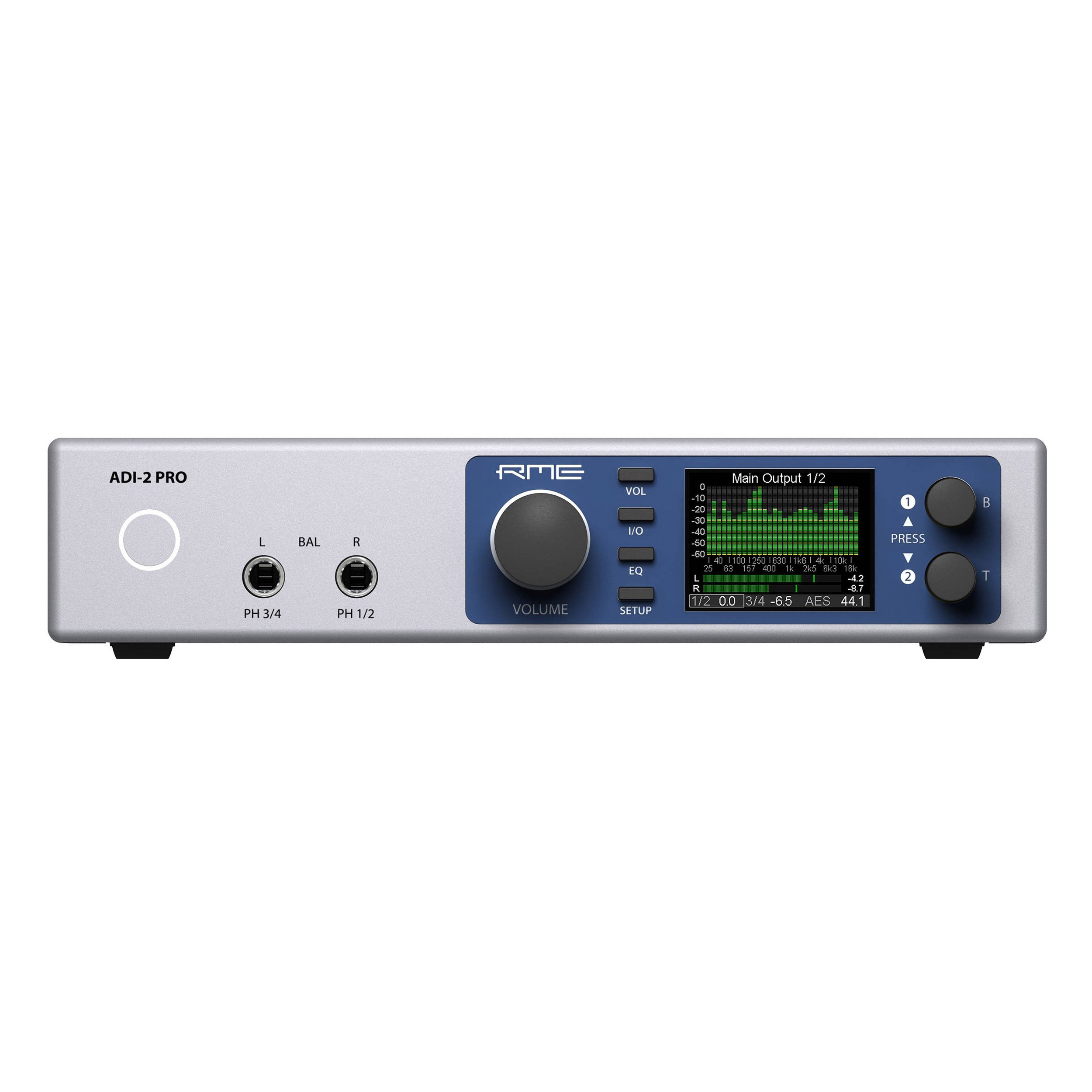
This manual provides essential information for the proper setup, operation, and maintenance of your RME ADI-2 Pro 2-in/4-out AD/DA Converter. The ADI-2 Pro is a versatile audio device designed for professional studio environments, offering high-end analog-to-digital and digital-to-analog conversion, a powerful headphone amplifier, and various digital connectivity options. Please read this manual thoroughly before using the device to ensure optimal performance and longevity.
מידע בטיחות
Always observe the following safety precautions to prevent damage to the device or injury to yourself:
- אין לחשוף את היחידה לגשם, לחות או טמפרטורות קיצוניות.
- ודא אוורור נאות סביב היחידה כדי למנוע התחממות יתר.
- Use only the specified power supply (9-15V DC, 10 Watt, center pin positive).
- הימנע מהנחת חפצים כבדים על היחידה.
- אל תנסה לפתוח או לטפל ביחידה בעצמך. יש לפנות לכל טיפול וטיפול באנשי מקצוע מוסמכים.
- הרחק את היחידה משדות מגנטיים חזקים.
תוכן החבילה
ודא שכל הפריטים נמצאים בחבילה:
- RME ADI-2 Pro Unit
- יחידת אספקת חשמל חיצונית
- כבל USB
- מדריך למשתמש (מסמך זה)
- שלט רחוק (אם כלול בגרסת דגם ספציפית)
המוצר נגמרview: פאנל אחורי
The rear panel of the ADI-2 Pro provides all necessary connections for power, digital, and analog audio signals.
תְמוּנָה: Rear panel of the RME ADI-2 Pro. From left to right, it features the power input, USB 2.0 port, digital I/O section with optical SPDIF/AES-3 and a D-sub connector, analog outputs (Right and Left XLR, plus L/R 1/4" TRS), and analog inputs (Right and Left XLR).
חיבורי לוח אחורי:
- קלט כוח: DC input for the external power supply. Requires 9-15V DC, 10 Watt, with a center pin positive configuration.
- USB 2.0: Connects the ADI-2 Pro to a computer for audio interface functionality.
- Digital I/O (SPDIF / AES-3):
- הַחוּצָה: Optical output for SPDIF or AES-3 digital audio.
- ב: Optical input for SPDIF or AES-3 digital audio.
- D-sub Connector: Provides additional digital I/O options, typically for AES-3 via breakout cable.
- יציאות אנלוגיות:
- Right / Left XLR: Balanced analog audio outputs for connecting to studio monitors or other audio equipment.
- L / R (1/4" TRS): Additional balanced analog outputs, often used for alternative monitoring or routing.
- תשומות אנלוגיות:
- Right / Left XLR: Balanced analog audio inputs for connecting microphones (with external pre-amp) or line-level sources.
הגדרה
- חיבור חשמל: Connect the external power supply to the DC input on the rear panel and then to a power outlet.
- חיבור USB: Connect the ADI-2 Pro to your computer using the provided USB cable.
- התקנת דרייבר: For Windows and macOS, download and install the latest drivers from the official RME webאתר. פעל לפי ההוראות שעל המסך.
- חיבורי שמע:
- חברו את צגי האולפן שלכם ל Analog Outputs (XLR or TRS).
- חברו את מקורות השמע שלכם (למשל, קדם-amplifiers, instruments) to the Analog Inputs (XLR).
- For digital audio, connect optical cables to the SPDIF/AES-3 In/Out יציאות לפי הצורך.
- הפעלה ראשונית: Power on the ADI-2 Pro. The device should be recognized by your computer's operating system and audio software.
הוראות הפעלה
The RME ADI-2 Pro offers extensive functionality through its front panel controls and display. Refer to the detailed software manual for in-depth configuration options.
- פקדי לוח קדמי: Use the rotary encoders and buttons on the front panel to navigate menus, adjust parameters, and select inputs/outputs.
- לְהַצִיג: The high-resolution display provides real-time metering, settings, and status information.
- יציאות אוזניות: The ADI-2 Pro features two high-quality headphone outputs. Adjust their volume independently via the front panel.
- דרכי פעולה: The device can function as a standalone AD/DA converter, a USB audio interface, a headphone amplifier, and a digital format converter. Specific modes and routing are configured through the internal menu system.
- בקרת תוכנה: Advanced settings and routing can be managed via the RME driver control panel on your computer.
תַחזוּקָה
- ניקוי: השתמשו במטלית רכה ויבשה לניקוי החלק החיצוני של היחידה. אין להשתמש בחומרי ניקוי נוזליים או ממסים.
- אוורור: ודאו שחריצי האוורור אינם חסומים כדי למנוע התחממות יתר.
- עדכוני קושחה: Periodically check the RME website for firmware updates to ensure optimal performance and access to new features. Follow the provided instructions carefully when updating firmware.
- אִחסוּן: כאשר המכשיר אינו בשימוש למשך תקופות ממושכות, יש לאחסן אותו בסביבה יבשה וללא אבק.
פתרון בעיות
- אין כוח:
- Check the power cable connection to the unit and the wall outlet.
- Verify the power adapter is functioning correctly and matches the required specifications (9-15V DC, 10 Watt, center pin positive).
- אין פלט שמע:
- Ensure the correct output is selected on the ADI-2 Pro and in your computer's audio settings.
- Check all cable connections to your monitors or headphones.
- Verify volume levels on the unit and in your software.
- אין כניסת שמע:
- Confirm the input source is correctly connected to the ADI-2 Pro's analog or digital inputs.
- Select the correct input source on the ADI-2 Pro and in your recording software.
- Ensure any external pre-ampהמאיצים מופעלים ופועלים.
- המכשיר לא מזוהה על ידי המחשב:
- Re-install the latest drivers from the RME webאֲתַר.
- נסה יציאת USB או כבל USB אחרים.
- Restart your computer and the ADI-2 Pro.
For further assistance, consult the comprehensive RME ADI-2 Pro manual available on the RME webאתר או צור קשר עם התמיכה הטכנית של RME.
מפרטים
| משקל פריט | 4.49 פאונד |
| מידות המוצר | 13.75 x 8.5 x 3.35 אינץ' |
| מספר דגם | ADI2PRO |
| ASIN | B01MTWM896 |
| תאריך ראשון זמין | 24 במרץ, 2017 |
| דרישת חשמל | 9-15V DC, 10 Watt (Center Pin +) |
| קישוריות | USB 2.0, Optical SPDIF/AES-3 I/O, D-sub Digital I/O, Analog XLR I/O, Analog 1/4" TRS Outputs |
אחריות ותמיכה
RME products are covered by a manufacturer's warranty. For specific warranty terms and conditions, please refer to the documentation included with your product or visit the official RME website. For technical support, driver downloads, and additional resources, please visit the RME support page:


