1. הקדמה
Thank you for choosing the Marathon CL030025WH Commercial Grade Jumbo Atomic Wall Clock. This clock is designed for clear visibility and precise timekeeping, automatically synchronizing with the NIST atomic clock signal. It features a large LCD display, indoor temperature, and date, making it suitable for various indoor environments.

תמונה 1.1: חזית view of the Marathon CL030025WH Jumbo Atomic Wall Clock.
2. מידע בטיחות
- מכשיר זה מיועד לשימוש פנימי בלבד.
- אין לחשוף את השעון לטמפרטורות קיצוניות, לאור שמש ישיר או לחות גבוהה.
- Use only the specified battery type (3 C batteries). Ensure correct polarity when inserting batteries.
- הוציאו סוללות ריקות באופן מיידי כדי למנוע דליפה ונזק.
- הרחק סוללות מהישג ידם של ילדים.
3. תכולת החבילה
ודא שכל הפריטים נמצאים בחבילה:
- Marathon CL030025WH Jumbo Atomic Wall Clock
- 3 x C סוללות
- מדריך למשתמש (מסמך זה)
4. המוצר נגמרview
The Marathon CL030025WH clock features a large, easy-to-read LCD display and intuitive controls. Below are key components and their functions.
4.1 תצוגה קדמית
Image 4.1: Front display showing time, date, and temperature.
- תצוגת זמן: Large digits for hours, minutes, and seconds. Includes AM/PM indicator.
- תצוגת תאריך: Month, day, and day of the week.
- טמפרטורה פנימית: Displays current indoor temperature in Celsius or Fahrenheit.
- מחוון אות אטומי: Shows status of atomic time synchronization.
- Time Zone Indicator: Displays the currently selected time zone.
- Daylight Saving Time (DST) Indicator: Shows if DST is active.
4.2 פקדים בפאנל האחורי

Image 4.2: Rear panel with control buttons and mounting options.
- Time Zone Switch: Selects one of the 6 available time zones (AST, CST, EST, MST, NST, PST).
- DST ON/OFF Switch: Enables or disables Daylight Saving Time adjustment.
- מתג יחידת טמפרטורה: עובר בין צלזיוס לפרנהייט.
- Manual Set Buttons: For manual adjustment of time and date if atomic signal is unavailable.
- חור מנעול: להרכבה על הקיר.
- Built-in Table Stand: For desktop placement.
5. התקנה
5.1 התקנת סוללה
- פתחו את מכסה תא הסוללות בגב השעון.
- Insert 3 C batteries, ensuring correct polarity (+ and -).
- סגור את מכסה תא הסוללות.
5.2 Initial Synchronization and Settings
Upon battery installation, the clock will automatically attempt to synchronize with the NIST atomic clock signal. This process may take several minutes to several hours, depending on your location and signal strength. The atomic feature only functions in North America.
- בחירת אזור זמן: Use the Time Zone switch on the back of the clock to select your local time zone (AST, CST, EST, MST, NST, PST).
- שעון קיץ (DST): Set the DST switch to ON or OFF according to your region's DST observance.
- יחידת טמפרטורה: Select Celsius or Fahrenheit using the dedicated switch.
- מיקום: For optimal signal reception, place the clock near a window and away from electronic devices that may cause interference.
5.3 אפשרויות הרכבה
The clock can be wall-mounted or placed on a flat surface using its built-in stand.
- קיר קיר: Use the keyhole slot on the back of the clock to hang it securely on a screw or nail.
- מעמד שולחן: Extend the built-in stand from the back of the clock for desktop or shelf placement.

Image 5.1: Clock mounted on an office wall.
5.4 מדריך וידאו להתקנה
For a visual guide on setting up your Marathon Atomic Wall Clock, please watch the video below:
Video 5.1: MARATHON CL030025 Commercial Grade Jumbo Atomic Wall Clock with 6 Time Zones, Indoor Temp. & Date. This video demonstrates the automatic synchronization feature and general setup of the clock.
6. הפעלת השעון
6.1 Automatic Time Synchronization
The clock automatically receives the atomic time signal from NIST's Colorado Atomic Clock. This ensures accurate timekeeping without manual adjustment. The signal icon on the display indicates reception status.
- A solid signal icon indicates successful synchronization.
- A flashing icon indicates the clock is attempting to receive the signal.
6.2 כוונון ידני של זמן ותאריך
In areas where the atomic signal is weak or unavailable, you can manually set the time and date.
- Locate the manual set buttons on the rear panel.
- Press the 'SET' button to enter setting mode.
- השתמשו בלחצנים '+' או '-' כדי לכוונן את הערך המהבהב (למשל, שעה, דקה, שנה, חודש, יום).
- Press 'SET' again to confirm and move to the next setting.
- Exit setting mode by not pressing any button for a few seconds, or by cycling through all settings.
6.3 מצבי תצוגה
- פורמט 12/24 שעות: The clock supports both 12-hour (with AM/PM) and 24-hour time displays. This setting can typically be toggled via a button on the rear panel or during manual setup.
- תצוגת טמפרטורה: Switch between Celsius (°C) and Fahrenheit (°F) using the dedicated switch on the back.
7. תחזוקה
7.1 ניקוי
To clean the clock, use a soft, dry cloth. Do not use abrasive cleaners or solvents, as these may damage the display or casing.
7.2 החלפת סוללה
The clock features a low battery indicator. When this indicator appears, replace all 3 C batteries with new ones to ensure continued accurate operation.
8. פתרון תקלות
| בְּעָיָה | סיבה אפשרית | פִּתָרוֹן |
|---|---|---|
| Clock not synchronizing with atomic signal. | Weak signal due to location, interference, or distance from transmitter. | Relocate the clock near a window or in a different room. Ensure it is away from electronic devices (TVs, computers, microwaves). Allow up to 24 hours for synchronization. |
| מוצג זמן או תאריך שגויים. | Incorrect time zone setting, DST setting, or failed atomic synchronization. | Verify time zone and DST settings. If atomic sync fails, manually set the time and date. |
| התצוגה עמומה או ריקה. | סוללות חלשות או מדולדלות. | Replace all 3 C batteries with new ones. |
| נראה שקריאת הטמפרטורה אינה מדויקת. | Clock exposed to direct sunlight or heat source. | Move the clock to a location with stable ambient temperature. |
9. מפרטים
| תכונה | פְּרָט |
|---|---|
| מספר דגם | CL030025WH |
| מותג | מרתון |
| סוג תצוגה | LCD דיגיטלי |
| מידות | רוחב 16 אינץ' x גובה 11 אינץ' (רוחב 40.64 ס"מ x גובה 27.94 ס"מ) |
| מקור כוח | 3 x C Batteries (Included) |
| מצב פעולה | Atomic (North America only) |
| אזורי זמן | 6 (AST, CST, EST, MST, NST, PST) |
| תצוגת טמפרטורה | Indoor, Celsius/Fahrenheit |
| סוג הרכבה | מעמד קיר, מעמד שולחן |
| חוֹמֶר | פּלָסטִי |
| משקל פריט | 2.54 פאונד (1152 גרם) |
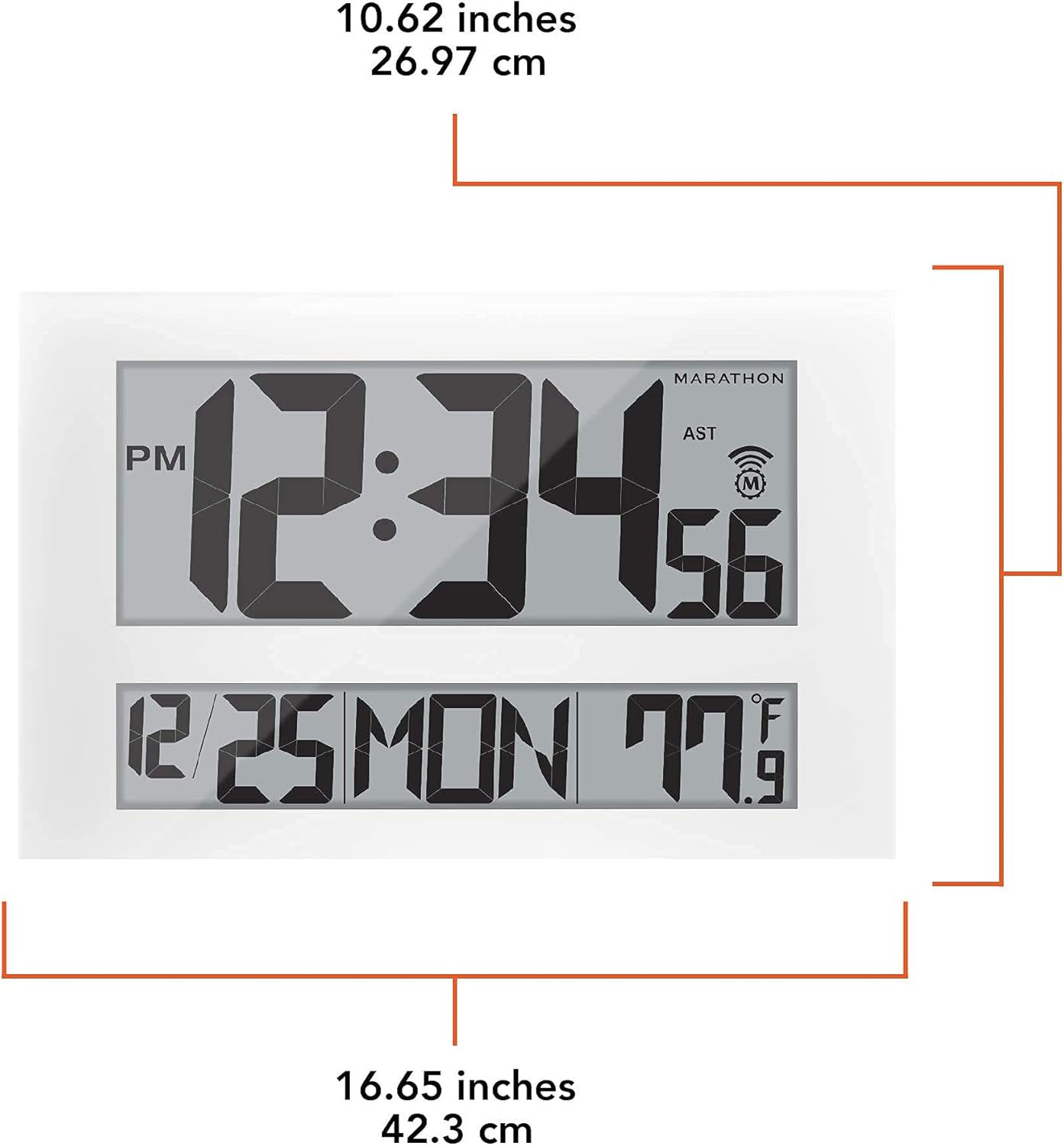
Image 9.1: Detailed dimensions of the clock.
10. מידע על אחריות
The Marathon CL030025WH Jumbo Atomic Wall Clock comes with a 2-year warranty from the date of purchase. This warranty covers manufacturing defects and workmanship. It does not cover damage caused by misuse, accidents, unauthorized repairs, or normal wear and tear. Please retain your proof of purchase for warranty claims.
11. תמיכת לקוחות
If you encounter any issues not covered in this manual or require further assistance, please contact Marathon customer support. Refer to the product packaging or the official Marathon webאתר לקבלת פרטי הקשר העדכניים ביותר.


