מָבוֹא
The Steinberg UR22MKII is a versatile 2-channel USB audio interface designed for recording and composing music with high fidelity. It offers robust build quality and advanced connectivity, making it suitable for both studio and mobile production environments. This manual provides essential information for setting up, operating, maintaining, and troubleshooting your UR22MKII interface.
מוצר רשמי נגמרview video for the Steinberg UR22MKII 2-Channel USB Interface.
מה יש בקופסה
ודא שכל הפריטים נמצאים באריזה:
- UR22MKII USB Interface

The retail packaging for the Steinberg UR22MKII interface.
תכונות מפתח
- 2 x 2 USB 2.0 audio interface
- 24-Bit/192 kHz & Two Class-A D-PRE mic preamps
- Compatible with all major audio editing, mastering, and music production software
- MIDI input/output & iPad connectivity. System requirements: mac OS X 10.7/10.8/10.9/10.10/10.11 and windows 7 SP1/8/8.1/10
- Cubase AI and Cubasis LE included.
הגדרה
דרישות מערכת
Ensure your computer meets the following minimum requirements for optimal performance:
- Operating System: macOS X 10.7/10.8/10.9/10.10/10.11 or Windows 7 SP1/8/8.1/10
- Compatible Devices: Laptop
- Hardware Interface: USB 2.0
התקנת דרייבר ותוכנה
Before connecting the UR22MKII, download and install the latest drivers and included software (Cubase AI, Cubasis LE) from the official Steinberg website. This ensures proper recognition and functionality of the interface with your computer.
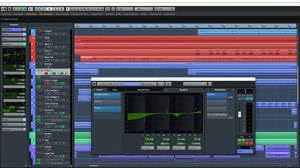
Screenshot of the Cubase AI software interface, included with the UR22MKII.

Screenshot of the Cubasis LE software interface running on an iPad.
חיבור הממשק
Connect the UR22MKII to your computer using the provided USB 2.0 cable. The interface is bus-powered via USB. For iPad connectivity, use an Apple iPad Camera Connection Kit or a Lightning to USB Camera Adapter. An additional USB power source or portable battery pack can be used to power the unit when connected to an iPad, especially when using phantom-powered microphones.

Front panel of the UR22MKII, showing input and output controls.

Rear panel of the UR22MKII, showing USB, MIDI, and line outputs.

Diagram illustrating microphone, guitar, and laptop connections to the UR22MKII.

The UR22MKII being used with an iPad for mobile recording.
פועל
בקרות קלט
The front panel features two combo sockets for connecting 1/4-inch jacks or XLR plugs. Each input has a D-PRE Class-A mic preamp, a gain knob, and a peak LED indicator. Both inputs support +48V phantom power for condenser microphones. Input 2 also includes a Hi-Z switch for direct connection of electric guitars and basses.

A musician using the UR22MKII to record a guitar.
Output and Monitoring
The rear panel provides two balanced line-level outputs for connecting active studio monitors or an amplifier with passive speakers. Headphone levels are controlled independently from the main mix, offering flexible routing for all input and output sources. The interface supports latency-free hardware-based monitoring.
קישוריות MIDI
The MIDI In/Out ports allow you to connect various MIDI devices such as drum machines, drum pads, synthesizers, sound modules, and controllers, expanding your production capabilities.
תַחזוּקָה
To ensure the longevity and optimal performance of your Steinberg UR22MKII, follow these maintenance guidelines:
- שמרו על ניקיון היחידה על ידי ניגובה במטלית רכה ויבשה. הימנעו משימוש בחומרי ניקוי שוחקים או ממסים.
- Protect the interface from dust, moisture, and extreme temperatures.
- הימנע מהנחת חפצים כבדים על גבי היחידה.
- הקפידו על אוורור נאות כדי למנוע התחממות יתר.
- Handle all cables and connectors with care to prevent damage to the ports.
פתרון בעיות
If you encounter issues with your UR22MKII, consider the following common troubleshooting steps:
- No Sound/Recognition: Ensure all cables are securely connected. Verify that the correct drivers are installed and updated. Check your computer's sound settings to ensure the UR22MKII is selected as the input/output device.
- בעיות כוח פנטום: Confirm the +48V switch on the rear panel is in the 'ON' position if using condenser microphones. Ensure adequate power supply, especially when connected to an iPad.
- Low Headphone Volume: Adjust the dedicated 'PHONES' output knob on the front panel. Ensure your headphones have appropriate impedance for the interface.
- Software/Latency Problems: Close unnecessary applications to free up system resources. Adjust buffer size settings in your DAW to optimize latency. Refer to your DAW's documentation for specific audio settings.
- Stiff Knobs: The gain and output knobs are designed to be firm for precise control. This is normal operation.
For persistent issues, consult the detailed User Manual PDF or contact Steinberg support.
מפרטים
| תכונה | פְּרָט |
|---|---|
| מספר דגם | UR22 MKII |
| משקל פריט | 3.4 פאונד |
| מידות המוצר | 8 x 9.2 x 4 אינץ' |
| מספר ערוצים | 2 |
| ממשק חומרה | USB 2.0 |
| כרך ידtage | 240 וולט |
| מכשירים תואמים | מחשב נייד |
| מַעֲרֶכֶת הַפעָלָה | Windows 7 (and later versions as per feature list) |
אחריות ותמיכה
The Steinberg UR22MKII comes with a 1-year warranty from Yamaha. For detailed warranty information, technical support, or further assistance, please refer to the official User Guide PDF or visit the Steinberg support webאֲתַר.
מדריך למשתמש (PDF): הורד כאן


