1. הקדמה
The FlashForge Finder is a user-friendly, home-friendly, and wallet-friendly 3D printer designed for novices and educators. It features easy-to-use functionalities such as a slide-in build plate, assisted bed-leveling, and an intuitive color touchscreen. The printer operates quietly and safely, using only non-toxic PLA filament with safely encased heated components. This manual provides essential information for setting up, operating, and maintaining your FlashForge Finder 3D printer.
2. מה בקופסה
Upon unboxing your FlashForge Finder 3D Printer, please verify that all the following components are included:
- FlashForge Finder 3D Printer
- מדריך להתחלה מהירה
- כרטיס שירות לאחר מכירה
- כבל חשמל
- צינור מדריך נימה
- תיק כלי עבודה
- Start-up PLA Filament
- מתאם מתח
- כבל USB
- Solid Glue
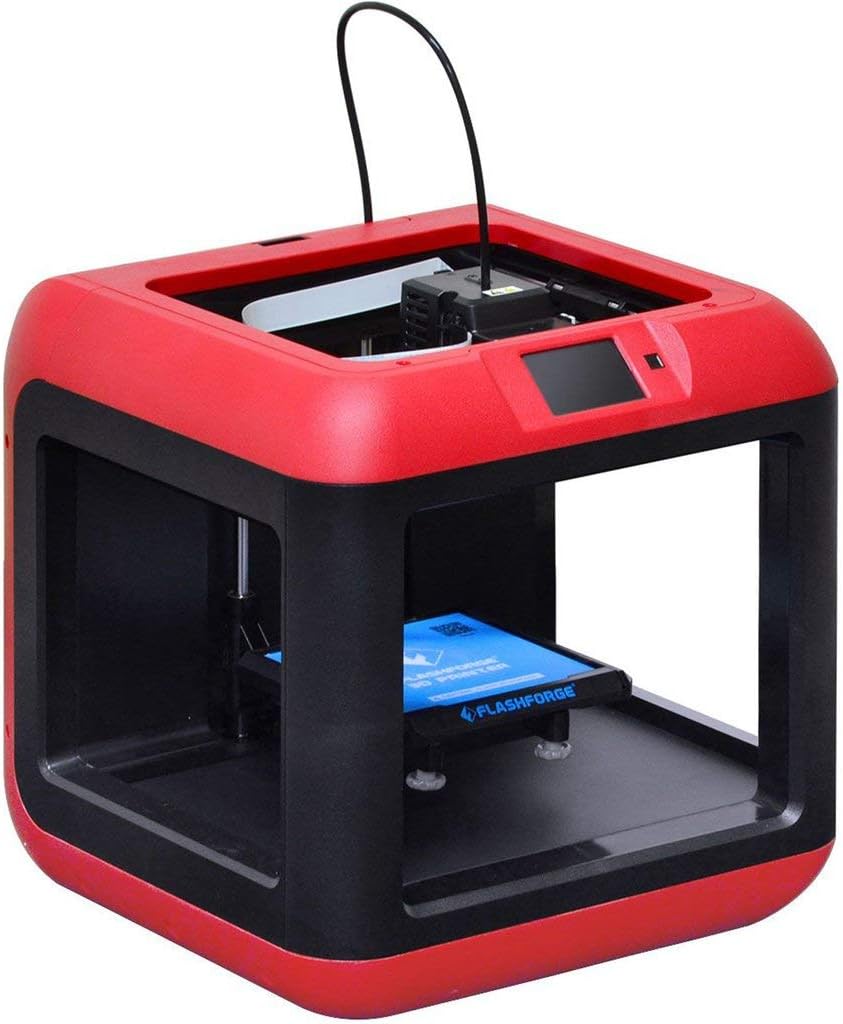
איור 2.1: חזית view of the FlashForge Finder 3D Printer.
3. תכונות עיקריות
The FlashForge Finder 3D Printer is equipped with several features designed for ease of use and reliable performance:
- Slide-in Build Plate: Allows for easy removal of printed objects.
- 3.5-Inch Full Color Touchscreen: Provides intuitive icons for straightforward operation.
- Sturdy, Plastic Alloy Construction: Ensures stable and consistent prints.
- Safe, Non-Heated Build Plate: Enhances safety, especially in educational or home environments.
- אפשרויות קישוריות מרובות: Supports printing via Wi-Fi, USB cable, USB stick, and Cloud.
- High Positioning Precision: Achieves 0.0001 inch on the Z-axis and 0.0004 inch on the XY plane, with a resolution of 0.004 inch.
- PLA Filament Compatibility: Designed to use PLA material.

Figure 3.1: Close-up of the intuitive color touchscreen display.
4. התקנה
Follow these steps to set up your FlashForge Finder 3D Printer for first use:
- פריקת אריזה: Carefully remove the printer and all accessories from the packaging. Retain the packaging for future transport or storage.
- מיקום: הנח את המדפסת על משטח יציב ומאוזן באזור מאוורר היטב, הרחק מאור שמש ישיר וממקורות חום.
- חיבור חשמל: Connect the power adapter to the printer and then plug it into a suitable power outlet. Turn on the printer using the power switch.
- טעינת נימה:
- Insert the filament guide tube into the designated port on the extruder.
- הנח את סליל החוט על מחזיק החוט.
- Feed the filament through the guide tube and into the extruder until it is properly seated.

Figure 4.1: Close-up of the extruder and filament path.
- יישור מיטה: The FlashForge Finder features assisted bed-leveling.
- Navigate to the leveling option on the touchscreen.
- Follow the on-screen prompts to adjust the build plate at the indicated points until the correct gap is achieved between the nozzle and the build plate.
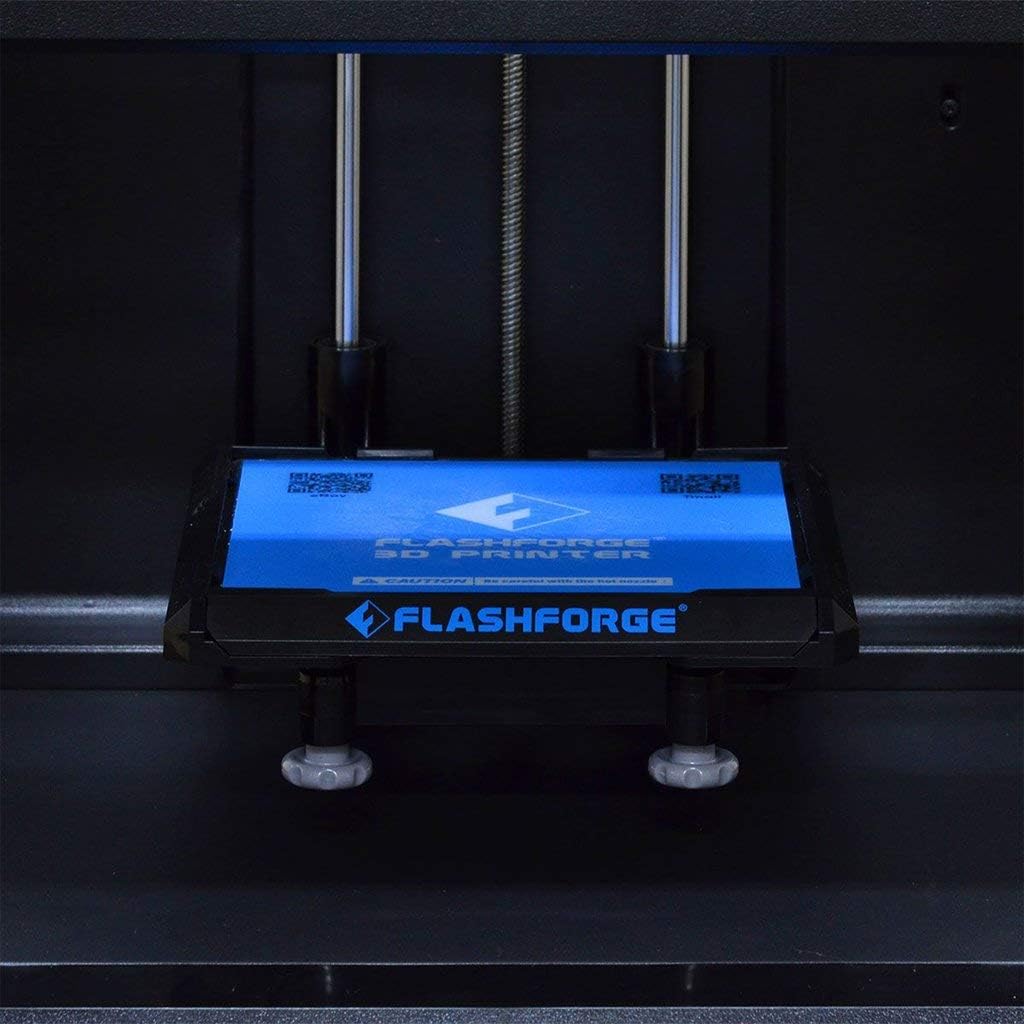
Figure 4.2: The removable build plate for easy print removal.
5. תפעול
Operating your FlashForge Finder is designed to be straightforward. Here are the basic steps:
- התקנת תוכנה: Install the FlashPrint software from the included USB stick or download the latest version from the official FlashForge webאֲתַר.
- הכנת דגם:
- פתח את המודל התלת-ממדי שלך file (e.g., .STL, .OBJ) in FlashPrint.
- Adjust print settings such as layer height, infill density, and support structures as needed.
- פרוס את המודל כדי ליצור את קוד ה-G file להדפסה.
- מעביר Files: Transfer the generated G-code file to the printer using one of the following methods:
- דיסק און קי: Save the G-code to a USB stick and insert it into the printer's USB port.
- כבל יו אס בי: Connect the printer to your computer via USB cable and transfer the file יָשִׁירוֹת.
- Wi-Fi/Cloud: Use the FlashPrint software to send the file wirelessly to the printer or via Cloud connectivity.
- Starting a Print:
- On the printer's touchscreen, select the desired G-code file.
- Confirm the print settings and initiate the print job. The printer will begin heating the extruder and then start printing.
- Monitoring the Print: Observe the initial layers to ensure proper adhesion to the build plate. Monitor the print progress via the touchscreen.
6. תחזוקה
Regular maintenance ensures the longevity and optimal performance of your FlashForge Finder 3D Printer:
- ניקוי משטח הבנייה: After each print, clean the build plate to remove any residue. Use a soft cloth and isopropyl alcohol if necessary.
- ניקוי חרירים: Periodically check the nozzle for clogs. Use the provided tools to clear any blockages.
- Lubricate Guide Rods: Apply a small amount of lubricant to the guide rods every few months to ensure smooth movement of the print head.
- עדכוני קושחה: Check the FlashForge webבאתר לקבלת עדכוני קושחה זמינים כדי להבטיח שהמדפסת שלך כוללת את התכונות ותיקוני הבאגים העדכניים ביותר.
7. פתרון תקלות
This section addresses common issues you might encounter with your FlashForge Finder 3D Printer:
| בְּעָיָה | סיבה אפשרית | פִּתָרוֹן |
|---|---|---|
| ההדפסה לא נדבקת ללוח הבנייה | Improper bed leveling, dirty build plate, insufficient adhesion. | Re-level the build plate using the assisted leveling function. Clean the build plate thoroughly. Apply a thin layer of solid glue (included) or painter's tape to the build plate for better adhesion. |
| פילמנט לא בולט | פיה סתומה, חוט סבוך, טמפרטורה לא נכונה. | Clear the nozzle using the provided cleaning needle. Ensure filament is not tangled and feeds smoothly. Verify extruder temperature settings in FlashPrint match PLA requirements (typically 190-220°C). |
| Poor print quality (e.g., layer shifting, rough surfaces) | Loose belts, incorrect print speed, filament quality, model issues. | Check and tighten any loose belts. Reduce print speed. Try a different brand of PLA filament. Ensure the 3D model is not corrupted. |
| Printer not connecting via Wi-Fi | Incorrect Wi-Fi settings, network interference. | Double-check Wi-Fi password and network name on the printer's touchscreen. Ensure the printer is within range of your Wi-Fi router. Restart both the printer and your router. |
8. מפרטים
Detailed technical specifications for the FlashForge Finder 3D Printer:
| מִפרָט | עֵרֶך |
|---|---|
| טכנולוגיית הדפסה | FFF (Fused Filament Fabrication) |
| Build Volume (L x W x H) | 140 x 140 x 140 מ"מ (5.5 x 5.5 x 5.5 אינץ') |
| רזולוציית שכבה | 100-400 microns, adjustable |
| Positioning Precision (X and Y) | 11 microns (0.0004 inch) |
| Positioning Precision (Z) | 2.5 microns (0.0001 inch) |
| קוטר נימה | 1.75 מ"מ |
| קוטר זרבובית | 0.4 מ"מ |
| Frame and Body Material | Plastic and Alloy |
| כמות אקסטרודר | אֶחָד |
| מידות המוצר | 420 x 420 x 420 מ"מ (16.54 x 16.54 x 16.54 אינץ') |
| משקל המוצר | 13.5 ק"ג (24.2 פאונד) |
| תוֹכנָה | FlashPrint |
| קישוריות | Wi-Fi, USB cable, USB stick, Cloud |
| חומר הדפסה | PLA |
| צֶבַע | שָׁחוֹר |
| יַצרָן | ZHEJIANG FLASHFORGE 3D TECHNOLOGY CO.,LTD |
| תאריך ראשון זמין | 6 בנובמבר 2015 |

Figure 8.1: Dimensions of the FlashForge Finder 3D Printer.
9. אחריות ותמיכה
For warranty information and additional support, please refer to the following resources:
- אחריות יצרן: The product comes with a 90-day manufacturer warranty from a US authorized distributor.
- מדריכי משתמש:
- תמיכה מקוונת: Visit the official FLASHFORGE Store on Amazon for more information and support: FLASHFORGE Store


