מָבוֹא
This manual provides instructions for the HAVIT HV-KB366L RGB Backlit Mechanical Gaming Keyboard. This keyboard features blue mechanical switches, full anti-ghosting, and customizable RGB backlighting, designed for reliable performance.
הוראות התקנה
חיבור המקלדת
- אתר יציאת USB זמינה במחשב שלך.
- Connect the USB cable from the HAVIT HV-KB366L keyboard to the USB port on your computer.
- המקלדת היא מסוג "Plug and Play" והיא אמורה להיות מזוהה אוטומטית על ידי מערכת ההפעלה שלך.
תאימות מערכת
- Compatible with Windows 10 and other Windows operating systems.
- Mac OS supports 6-key rollover only.
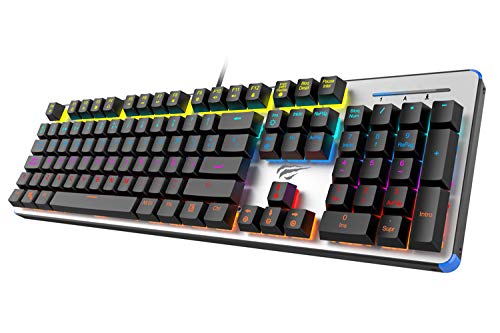
Figure 1: HAVIT HV-KB366L RGB Backlit Mechanical Gaming Keyboard. An overhead view של המקלדת, הצגasing its full layout with RGB lighting on the keys and a white frame.
הוראות הפעלה
מתגי מפתח מכניים
The keyboard is equipped with blue mechanical switches, providing tactile feedback and an audible click with each keystroke. This design is intended for precise input during typing and gaming.
Anti-Ghosting Feature
The full key anti-ghosting mechanism ensures that all key presses are registered accurately, even when multiple keys are pressed simultaneously. This feature is beneficial for fast-paced gaming.
התאמת תאורה אחורית
- To change the backlight color or mode, press the Fn מפתח בו זמנית עם תאורה אחורית key. Repeated presses will cycle through available modes and colors.
- Marquee Mode: In 7-color backlit mode (non-breathing), press the תאורה אחורית key once to activate marquee mode. Press the תאורה אחורית key again to deactivate marquee mode and return to 7-color backlit mode.
- רמות בהירות: The backlight offers 4 levels of brightness adjustment.
- קצב נשימה: The breathing effect has 10 adjustable levels.
תַחזוּקָה
ניקוי המקלדת
- נתק את המקלדת מהמחשב לפני ניקוי.
- השתמש במטלית רכה ויבשה כדי לנגב את פני השטח של המקלדת.
- עבור אבק ופסולת בין המקשים, השתמש באוויר דחוס.
- Avoid using harsh chemicals or abrasive materials, as these can damage the finish or keycaps.
עֲמִידוּת
The keyboard features an aluminum top housing with a sanded finish and a metal base, contributing to its overall durability and stable performance.
פתרון בעיות
המקלדת לא מגיבה
- ודא שכבל ה-USB מחובר היטב הן למקלדת והן למחשב.
- נסה לחבר את המקלדת ליציאת USB אחרת במחשב שלך.
- בדוק את המקלדת במחשב אחר כדי לקבוע אם הבעיה היא במקלדת או ביציאת ה-USB של המחשב.
תאורה אחורית לא עובדת או שגויה
- ודא שהמקלדת מחוברת כראוי ומקבלת חשמל.
- לִלְחוֹץ Fn + Backlit key to cycle through backlight modes and ensure it is not turned off or set to a very low brightness.
- Refer to the "Backlight Adjustment" section for detailed instructions on changing modes and brightness.
מפרטים
| מותג | HAVIT |
| מספר דגם | HV-KB366L |
| יַצרָן | HAVIT |
| מידות המוצר | 50.5 x 17.6 x 6 סנטימטרים |
| משקל פריט | 1.33 ק"ג |
| טכנולוגיית קישוריות | קווי (USB) |
| תיאור מקלדת | מקלדת מכנית למשחקים |
| תכונה מיוחדת | RGB Backlit, Anti-Ghosting |
| פלטפורמת חומרה | מחשב נייד, מחשב |
| מַעֲרֶכֶת הַפעָלָה | Windows 10 (and compatible), Mac OS (6-key rollover) |
| כרך ידtage | 5 וולט |
| רכיבים כלולים | כבל USB |
אחריות ותמיכה
מידע על אחריות
Specific warranty details for the HAVIT HV-KB366L keyboard are not provided in the product data. Please refer to the product packaging or contact HAVIT directly for warranty terms and conditions.
תמיכת לקוחות
For technical assistance, troubleshooting, or further inquiries, please contact HAVIT customer support through their official webהאתר או פרטי הקשר שסופקו עם הרכישה.


