1. הקדמה
The LAUNCH CNC602A Injector Cleaner and Tester is a professional automotive tool designed for comprehensive maintenance of fuel injectors. It performs simultaneous cleaning and testing of multiple injectors, ensuring optimal engine performance and fuel efficiency. This manual provides detailed instructions for safe and effective operation of the device.
2. מידע בטיחות
- Always operate the unit in a well-ventilated area.
- Do not smoke or use open flames near the cleaning or testing fluids.
- יש ללבוש ציוד מגן אישי מתאים, כולל משקפי מגן וכפפות.
- Ensure the unit is properly grounded before operation.
- Use only recommended cleaning and testing fluids.
- Do not place anything on the control panel that could interfere with operation or cause damage.
- In case of a damaged power supply or short circuit, discontinue use immediately.
3. רכיבי המוצר ותכולת האריזה
The LAUNCH CNC602A comes with a comprehensive set of accessories to facilitate various cleaning and testing procedures.

תְמוּנָה: Various accessories and cables included with the LAUNCH CNC602A Injector Cleaner and Tester.
רשימת חבילות:
- 105020217 CNC pulse signal connection cable 1, T=0.5
- 105020218 CNC pulse signal connection cable 2, T=0.8
- 103260037 Ultrasonic cleaner assembly 100W
- 106030038 On-vehicle adaptor package (tool kits)
- 107010428 CNC-602A user manual (En&Ch)
- 103250013 Top-supply connector 1
- 103250015 Swiss thread adaptor for fuel top-supply injector
- 103250016 Coarse thread adaptor for fuel top-supply injector
- 103250018 CNC-601/801 Hexangular stopper
- 104990012 CNC-801 BUICK injector adaptor
- 199010019 Injector testing liquid (pick out)
- 307030024 Injector detergent (pick out)
4. התקנה
Before operating the unit, ensure it is placed on a stable, level surface and connected to a suitable power supply (AC110V±10%, 50/60Hz).
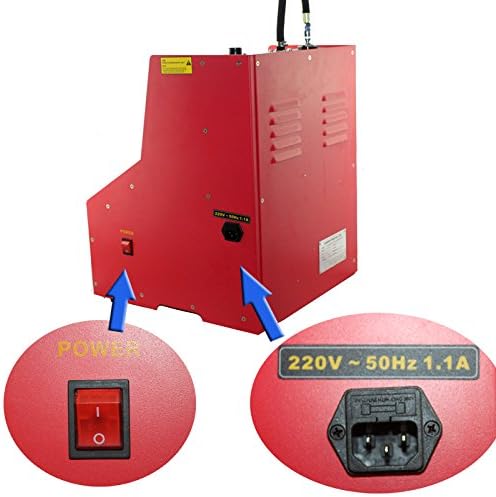
תְמוּנָה: Power switch and socket for connecting the unit to a 110V AC power supply.
שלבים ראשוניים:
- חבר חשמל: Plug the unit into a grounded AC110V power outlet.
- התקנת שסתום ניקוז: Attach the cleaning/testing agent discharge valve to the designated port.
- Prepare Ultrasonic Bath: Place the ultrasonic cleaning assembly into its designated slot.
- Install Signal Wires: Connect the pulse signal connection cables to the unit.
5. הוראות הפעלה
The CNC602A offers both ultrasonic cleaning and various testing functions for fuel injectors.

תְמוּנָה: The control panel with function selection, pulse width adjustment, and pressure controls.
5.1. Ultrasonic Cleaning Procedure
- Pre-clean Injectors: Clean the injector's exterior with gasoline or a suitable cleaning liquid before placing them in the unit.
- Place Injectors: Position the injectors in the ultrasonic bathtub.
- הוספת נוזל ניקוי: Pour cleaning fluid into the ultrasonic bathtub, ensuring injectors are submerged.
- Connect Pulse Signals: Attach the pulse signal cables to the injectors.
- Activate Ultrasonic System: Turn on the ultrasonic system. The pulsed energy, combined with the cleaning fluid, will dislodge carbon and impurities from inside the injectors.
- Heat Mode (Optional): If desired, activate the heating mode for enhanced cleaning.

תְמוּנָה: Injectors undergoing ultrasonic cleaning in the dedicated bath.
5.2. Fuel Injector Testing Procedure
- מזרקים להרכבה: Secure the cleaned injectors onto the main machine's test bench.
- הוסף נוזל בדיקה: Pour the dedicated testing fluid into the fuel tank (4700ml capacity). Ensure the fluid level is within the specified range.
- Connect Power and Signal: Ensure all injectors are correctly connected for power and pulse signals.
- Select Test Function: Use the control panel to select the desired test function (e.g., Idle Speed Test, Leakage Test, Sprayability Test).
- התאמת פרמטרים: Set simulated RPM, time, and pulse width as required for the selected test.
- התחל מבחן: Initiate the test and observe injector performance in the graduated cylinders.
- התאם לחץ: Use the pressure adjustment knob to modify system pressure during testing as needed.
וִידֵאוֹ: Demonstration of cleaning and testing 6 injectors simultaneously using a similar machine. This video illustrates the general process of injector cleaning and testing.
Available Testing Functions:
- ניקוי קולי: Removes carbon deposits and impurities using ultrasonic vibration.
- Idle Speed Test (0-20ms): מדמה את מהירות סרק המנוע כדי לבדוק את מצב המזרק.
- Medium Speed Test (0-7.5ms): Simulates medium engine speed to test injector state.
- High-Speed Test (0-4ms): Simulates high engine speed to test injector state.
- Acceleration Test: Simulates vehicle acceleration to test injector performance.
- Shift Speed Test: Simulates vehicle shifting state to test injector working performance.
- מבחן דליפה: Checks the sealing condition of the fuel injector.
- Idle Speed Sprayability Test: Tests spray performance at engine idling state.
- Medium Speed Sprayability Test: Tests spray performance at medium engine speed.
- High-Speed Sprayability Test: Tests spray performance at high engine speed.
- Reverse Flush: Cleans injectors by flowing test liquid from outlet to inlet, removing internal dirt or strainers (for top fuel supply injectors).
- ניקוי ללא פירוק: Direct cleaning without disassembling injectors (requires special adapters).
6. תחזוקה
Regular maintenance ensures the longevity and accuracy of your LAUNCH CNC602A unit.
- ניהול נוזלים: After each use, drain all cleaning and testing fluids from the unit. Store fluids properly according to their safety data sheets.
- יחידה נקייה: נגבו את החלק החיצוני של המכונה בעזרת מטלית רכהamp cloth. Avoid using harsh chemicals that may damage the surface or internal components.
- בדוק רכיבים: Regularly check all hoses, connections, and adapters for wear, damage, or leaks. Replace any damaged parts immediately.
- אִחסוּן: Store the unit in a clean, dry environment away from direct sunlight and extreme temperatures.

תְמוּנָה: Fuel intake port and warning label, emphasizing proper fluid handling.
7. פתרון תקלות
סעיף זה עוסק בבעיות נפוצות בהן ייתכן שתיתקלו במהלך הפעולה.
- היחידה לא נדלקת: Check power cable connection and ensure the power switch is in the 'ON' position. Verify the power outlet is functional.
- No ultrasonic cleaning action: Ensure the ultrasonic cleaning function is selected and the cleaning fluid level is adequate. Check connections to injectors.
- Inconsistent spray pattern/flow: Verify that injectors are clean and free of blockages. Check for proper seating of injectors and adapters. Ensure correct pressure settings.
- דליפת נוזלים: Inspect all connections, hoses, and O-rings for proper sealing. Tighten any loose fittings.
- Pressure gauge not responding: Check the oil supply hose connection and ensure the pressure adjustment knob is functioning correctly.
8. מפרטים
| תכונה | מִפרָט |
|---|---|
| ספק כוח | AC220V±10%, 50/60Hz; AC110V±10%, 50/60Hz |
| כוח קלט | 250W |
| כוח מנקה אולטרסאונד | 100W |
| טווח סל"ד מדומה | 10-9990rpm; step: 10rpm |
| טווח זמן | 1-9999 שניות |
| רוחב דופק | 0.5-25ms; step 0.1ms |
| קיבולת מיכל דלק | 4700 מ"ל |
| מידות | 385 מ"מ × 410 מ"מ × 500 מ"מ |
| מִשׁקָל | בערך 35 ק"ג |
9. אחריות ותמיכה
The LAUNCH CNC602A Injector Cleaner and Tester comes with a אחריות ל-1 שנים for damages caused by non-human factors. For any needs or support, please contact customer service. We aim to respond within 24 hours.


