מָבוֹא
The DigiTech TRIO is an innovative electric guitar multi-effect pedal designed to be your personal band. It listens to your guitar playing and automatically generates accompanying bass and drum parts. This manual provides comprehensive instructions for setting up, operating, and maintaining your TRIO pedal, ensuring you get the most out of its unique features.
תכונות מפתח
- Seven Music Genres and Twelve Song Styles Per Genre to Choose From
- The TRIO can learn up to three different song parts that can be recalled on-the-fly
- Adjustable Tempo & Alternate Half Time/Double Time Variants Bass & Drum Level Controls
- Hands-Free Control Using a DigiTech FS3X Footswitch (optional)
- Amp & Mixer Outputs Headphone Output w/Level Control Power Supply Included
מדריך התקנה
Follow these steps to set up your DigiTech TRIO pedal:
- Connect the included 9V DC power supply to the כּוֹחַ input on the pedal and plug it into a power outlet.
- חבר את הגיטרה החשמלית שלך ל GUITAR IN שקע באמצעות כבל מכשיר סטנדרטי בגודל 1/4 אינץ'.
- חבר את AMP הַחוּצָה שקע לגיטרה שלך ampקלט של המפיץ באמצעות כבל מכשיר נוסף בגודל 1/4 אינץ'.
- For connecting to a mixer or PA system, use the מיקסר אאוט ג'ֵק.
- לתרגול פרטי, חברו אוזניות ל אוזניות ג'ֵק.
- Optionally, connect a DigiTech FS3X Footswitch to the CONTROL IN jack for extended hands-free control.
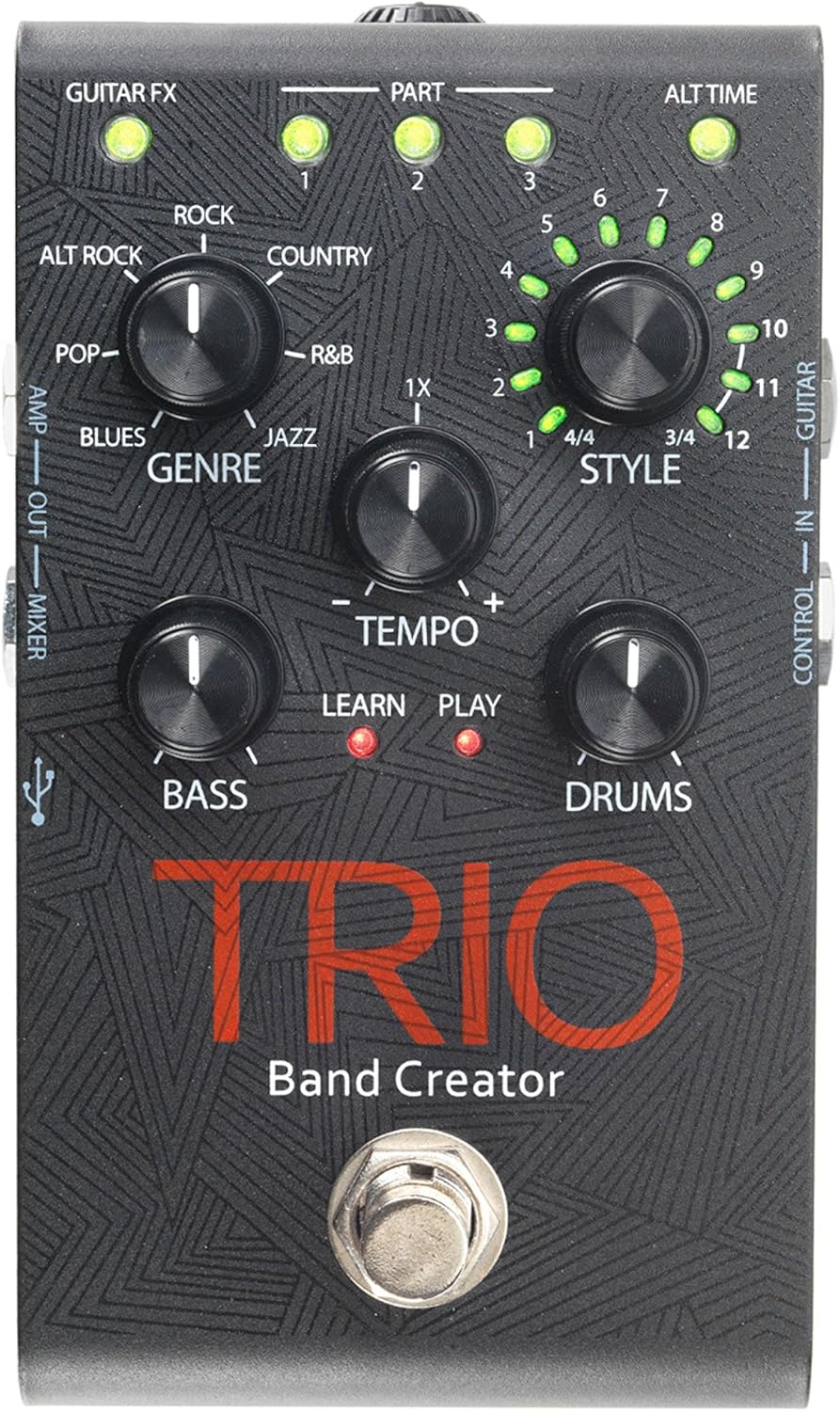
איור 1: למעלה view of the DigiTech TRIO pedal, showing the main controls and footswitch.
הוראות הפעלה
Basic Operation: Teaching the TRIO a Song
- הקש על לְהִתְאַגֵד footswitch once to enter 'Listen' mode. The לִלמוֹד LED תידלק.
- Play your desired chord progression and rhythm clearly. The TRIO will analyze your playing.
- הקש על לְהִתְאַגֵד footswitch again to stop 'Listen' mode. The לְשַׂחֵק LED will illuminate, and the TRIO will immediately begin playing generated bass and drum parts.
- You can now play along with your virtual band.
Genre and Style Selection
- השתמש ב- ז'ָאנר knob to select from Blues, Pop, Alternative Rock, Rock, Country, R&B, and Jazz. The genre affects the overall feel of the generated bass and drum parts.
- השתמש ב- סִגְנוֹן knob to choose from twelve different song styles available for each genre. This allows for further customization of the rhythm and feel.
- ה ALT TIME button allows you to switch between 3/4 and 4/4 time signatures.
Looping and Song Parts
- The TRIO can learn up to 3 different song parts. To record a new part, select an empty חֵלֶק slot (1, 2, or 3) using the corresponding buttons.
- Follow the 'Basic Operation' steps to teach the TRIO the new song part.
- During playback, you can switch between learned song parts on-the-fly by pressing the corresponding חֵלֶק לַחְצָן.
- ה לופר footswitch allows you to record and playback your own guitar loops. Press once to start recording, press again to stop recording and start playback, and press and hold to clear the loop.
Adjusting Levels and Tempo
- ה טֶמפּוֹ knob adjusts the playback speed of the band and loops.
- ה בס knob controls the volume level of the generated bass line.
- ה תופים knob controls the volume level of the generated drum track.
- ה לוּלָאָה knob controls the volume level of your recorded guitar loop.

איור 2: זוויתי view of the DigiTech TRIO pedal, highlighting the control knobs and input/output jacks.
בקרות וחיבורים
The DigiTech TRIO pedal features a user-friendly layout with clearly labeled controls and versatile connection options:
פקדי לוח קדמי:
- GUITAR FX: Activates built-in guitar effects tailored to the selected genre.
- PART 1, 2, 3: Buttons to select and recall different learned song parts.
- ALT TIME: Toggles between 3/4 and 4/4 time signatures.
- TEMPO Knob: Adjusts the overall playback speed.
- GENRE Knob: Selects the musical genre (Blues, Pop, Alt Rock, Rock, Country, R&B, Jazz).
- STYLE Knob: Selects one of twelve styles within the chosen genre.
- LOOP Knob: Controls the volume of your recorded guitar loop.
- כפתור BASS: Controls the volume of the generated bass line.
- DRUMS Knob: Controls the volume of the generated drum track.
- מתג רגליים לופר: Records/plays/clears guitar loops.
- BAND Footswitch: Enters 'Listen' mode to learn chords/rhythm, or starts/stops band playback.
Side and Rear Panel Connections:
- גיטרה ב: 1/4-inch input for your electric guitar.
- AMP הַחוּצָה: 1/4-inch output to your guitar ampחיים יותר.
- MIXER OUT: 1/4-inch output for connecting to a mixer or PA system.
- אוזניות: יציאת סטריאו 1/8 אינץ' לאוזניות.
- CONTROL IN: 1/4-inch input for optional DigiTech FS3X Footswitch.
- כּוֹחַ: 9V DC input for the included power supply.
- USB: Mini-USB port for firmware updates.

איור 3: אחורי view of the DigiTech TRIO pedal, showing the power input and headphone jack.
מפרטים
| תכונה | פְּרָט |
|---|---|
| משקל פריט | 10.6 גרם (0.3 ק"ג) |
| מידות המוצר | 4.63 x 3.19 x 2.13 אינץ' (11.76 x 8.10 x 5.41 ס"מ) |
| מספר דגם של פריט | TRIO |
| סוללות | 1 9V battery required (for internal use, not primary power) |
| ממשק חומרה | אודיו בגודל 1/4 אינץ' |
| פורמט אותות | אנלוגי |
| מקור כוח | Corded Electric (9V DC adapter included) |
| כרך ידtage | 9 וולט |
| Ampלמחוק | 300 מיליamps |
תַחזוּקָה
- שמרו על ניקיון הדוושה על ידי ניגובה במטלית רכה ויבשה. הימנעו משימוש בחומרי ניקוי שוחקים או ממסים.
- יש לאחסן את הדוושה במקום קריר ויבש, הרחק מאור שמש ישיר וטמפרטורות קיצוניות.
- ודא שכל הכבלים מחוברים היטב כדי למנוע אובדן או נזק לאות.
- הימנע מהפלת הדוושה או מחשיפתה למכות חזקות.
פתרון בעיות
- אין צליל: בדוק את כל חיבורי הכבלים (גיטרה, amp, power). Ensure the pedal is powered on and the volume knobs are not set to zero.
- איכות סאונד ירודה: ודא שהכלי שלך ו amplifier are functioning correctly. Check for damaged cables.
- Band Not Generating Correctly: Ensure you are playing clear, distinct chords during the 'Listen' phase. Try different genres and styles to see if a different setting better interprets your playing.
- מתג הרגליים לא מגיב: Disconnect and reconnect the power supply. If using an optional FS3X footswitch, ensure it is properly connected.
אחריות ותמיכה
למידע על אחריות ותמיכה טכנית, אנא עיינו באתר הרשמי של DigiTech webאתר או צרו קשר עם שירות הלקוחות שלהם. שמרו את הוכחת הרכישה שלכם לצורך תביעות אחריות.


