1. הקדמה
This manual provides detailed instructions for the VIZIO SB2920-C6 29-inch 2.0 Channel Sound Bar. This sound bar is designed to enhance your audio experience for television, music, and home theater content. It features two full-range stereo speakers and DTS audio technologies for improved sound quality. The compact and streamlined design allows for versatile placement options.
2. מה בקופסה
ודא שכל הרכיבים קיימים לפני שתמשיך בהתקנה.
- VIZIO SB2920-C6 29 אינץ' 2.0 ערוץ סאונד בר
- שְׁלַט רָחוֹק
- 2 סוללות AAA (לשלט רחוק)
- כבל שמע אופטי
- Digital Coaxial Cable
- כבלי RCA סטריאו
- כבל חשמל
3. המוצר נגמרview
3.1 חזית View

איור 1: חזית view of the VIZIO SB2920-C6 Sound Bar, showcasinהעיצוב השחור והאלגנטי שלו.
3.2 פקדי הפאנל העליון

Figure 2: Close-up of the top panel, showing buttons for Power, Input, Bluetooth Pairing, Volume Down, and Volume Up.
3.3 חיבורי לוח אחורי

Figure 3: Full rear view of the sound bar, illustrating all available input and output ports.

Figure 4: Close-up of the rear panel showing AUX (1) and AUX (2) input ports.
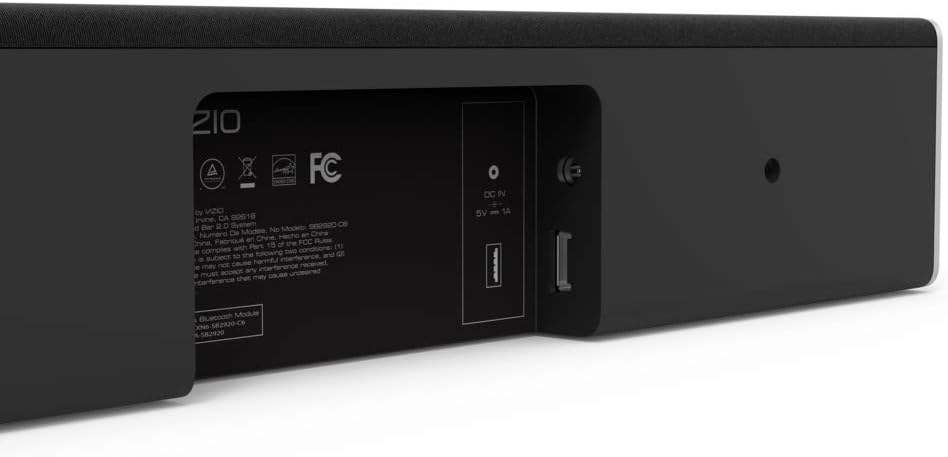
Figure 5: Close-up of the rear panel showing DIGITAL (Coaxial), OPTICAL, and SUB OUT ports.
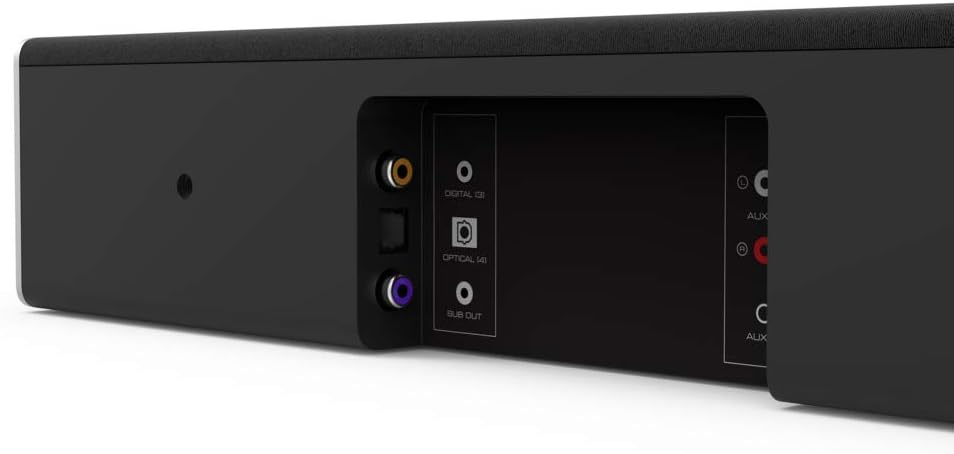
Figure 6: Close-up of the rear panel showing DC IN (power) and USB (Service Only) ports.
3.4 מידות

Figure 7: Diagram illustrating the dimensions of the VIZIO SB2920-C6 Sound Bar: 3 inches Depth x 29 inches Width x 3 inches Height.
4. התקנה
Follow these steps to set up your VIZIO SB2920-C6 Sound Bar.
4.1 מיקום
- Place the sound bar on a flat surface below your TV or mount it on a wall. Ensure it is centered with your TV for optimal sound distribution.
- Keep the sound bar clear of obstructions that could block the sound.
4.2 חיבור לטלוויזיה שלך
בחר אחת משיטות החיבור הבאות:
- Optical Cable (Recommended for best audio quality):
Connect one end of the optical cable to the OPTICAL port on the sound bar (Figure 5) and the other end to the Optical Digital Audio Out port on your TV. - Digital Coaxial Cable:
Connect one end of the digital coaxial cable to the DIGITAL port on the sound bar (Figure 5) and the other end to the Coaxial Digital Audio Out port on your TV. - RCA Stereo Cables:
Connect the red and white RCA cables to the AUX (1) ports on the sound bar (Figure 4) and the corresponding red and white Audio Out ports on your TV.
4.3 חיבור מתח
Connect the power cable to the DC IN port on the sound bar (Figure 6) and then plug the other end into a wall outlet.
4.4 מדריך וידאו להתקנה
Video 1: Official VIZIO guide on how to set up your VIZIO Sound Bar, demonstrating connection and initial configuration.
5. הוראות הפעלה
5.1 הפעלה/כיבוי
- הקש על כּוֹחַ button on the sound bar (Figure 2) or the remote control to turn the unit on or off.
5.2 כוונון עוצמת הקול
- השתמש ב- הגברת עוצמת הקול (+) ו להנמיך קול (-) buttons on the sound bar (Figure 2) or the remote control to adjust the sound level.
5.3 בחירת מקור קלט
- הקש על קֶלֶט button on the sound bar (Figure 2) or the remote control to cycle through available input sources (Optical, Digital, AUX 1, AUX 2, Bluetooth).
5.4 זיווג בלוטות '
- לחץ והחזק את בלוטות' button on the sound bar (Figure 2) or the remote control for 3 seconds to enter pairing mode. The LED indicators on the sound bar will flash.
- On your mobile device, search for the VIZIO sound bar in the Bluetooth settings and select it to pair.
5.5 שיפורי שמע
- The remote control includes buttons for בַּס, EQ, ו לְשַׁלֵשׁ to customize your audio experience.
- DTS technologies such as DTS Studio Sound, DTS TruVolume, and DTS TruSurround are integrated to optimize sound quality. Refer to the full user manual for detailed adjustments.
6. תחזוקה
To ensure the longevity and optimal performance of your VIZIO SB2920-C6 Sound Bar, follow these maintenance guidelines:
- ניקוי: Use a soft, dry cloth to clean the surface of the sound bar. Avoid using liquid cleaners or abrasive materials, as they may damage the finish.
- אוורור: Ensure that the sound bar's vents are not blocked to prevent overheating.
- אִחסוּן: אם מאחסנים את הסאונד בר למשך תקופה ממושכת, נתקו אותו מהחשמל ואחסנו אותו במקום קריר ויבש.
7. פתרון תקלות
אם אתם נתקלים בבעיות עם הרמקולים שלכם, עיינו בפתרונות הנפוצים הבאים:
| בְּעָיָה | פתרון אפשרי |
|---|---|
| אין צליל מהסאונד בר |
|
| הצליל נפסק לסירוגין |
|
| מכשיר בלוטות' לא יכול להתחבר |
|
| איכות שמע ירודה |
|
8. מפרטים
| תכונה | פְּרָט |
|---|---|
| שם הדגם | SB2920-C6 |
| סוג רמקול | סרגל סאונד |
| תצורת ערוץ סאונד סראונד | 2.0 |
| טכנולוגיית קישוריות | בלוטות' |
| טכנולוגיית תקשורת אלחוטית | בלוטות' |
| מצב פלט שמע | סטריאו, סראונד |
| תכונות מיוחדות | הגברת בס, אלחוטי |
| מכשירים תואמים | Personal Computer, Phones, Smartphone, Tablet, Television |
| שיטת בקרה | מְרוּחָק |
| צֶבַע | שָׁחוֹר |
| מידות המוצר (D x W x H) | 3 אינץ' x 29 אינץ' x 3 אינץ' |
| משקל פריט | 4.5 פאונד |
| סוג הרכבה | מתקן קיר |
| סוללות נדרשות | 2 AAA (כלול) |
9. אחריות ותמיכה
The VIZIO SB2920-C6 Sound Bar typically comes with a 12-month limited warranty. For specific warranty details, registration, and technical support, please refer to the official VIZIO website or contact VIZIO customer service directly. Keep your purchase receipt for warranty claims.
תמיכה מקוונת: לְבַקֵר www.vizio.com/support
שֵׁירוּת לָקוֹחוֹת: Refer to your product packaging or the VIZIO support webאתר לקבלת פרטי קשר עדכניים.


