1. הקדמה
This manual provides comprehensive instructions for the proper setup, operation, and maintenance of your Sony RM-DX300 remote control. This remote is specifically designed for use with Sony CD Changer models CDP-CX300, CDP-CX335, CDP-CX355, and CDP-X300. Please read this manual thoroughly before using the remote control to ensure optimal performance and longevity.
2. מידע בטיחות
- טיפול בסוללה: Always insert batteries with the correct polarity (+/-). Do not mix old and new batteries, or different types of batteries (e.g., alkaline and rechargeable). Remove batteries if the remote will not be used for an extended period to prevent leakage.
- רְשׁוּת: יש להשליך סוללות משומשות בהתאם לתקנות המקומיות. אין להשליך סוללות לאש.
- חשיפה לנוזלים: Avoid exposing the remote control to liquids or excessive moisture.
- טֶמפֶּרָטוּרָה: אל תחשוף את השלט רחוק לטמפרטורות קיצוניות או לאור שמש ישיר.
- ניקוי: השתמש במטלית רכה ויבשה לניקוי. אין להשתמש בחומרי ניקוי שוחקים או ממסים.
3. תכולת החבילה
אנא ודאו שהחבילה שלכם מכילה את הפריטים הבאים:
- Sony RM-DX300 Remote Control
- מדריך הוראות (מסמך זה)
הערה: סוללות בדרך כלל אינן כלולות ויש לרכוש אותן בנפרד.
4. התקנה
4.1 התקנת סוללה
To power your RM-DX300 remote control, you will need to install two (2) AA batteries (not included).
- אתר את מכסה תא הסוללות בגב השלט הרחוק.
- לחץ על הלשונית כלפי מטה והחלק את המכסה בכיוון המצוין על ידי החץ.
- הכנס שתי סוללות AA, וודא שהקוטבים החיוביים (+) והשליליים (-) מיושרים כהלכה עם הסימונים בתוך התא.
- החלק את מכסה תא הסוללה בחזרה למקומו עד שיישמע נקישה בטוחה.
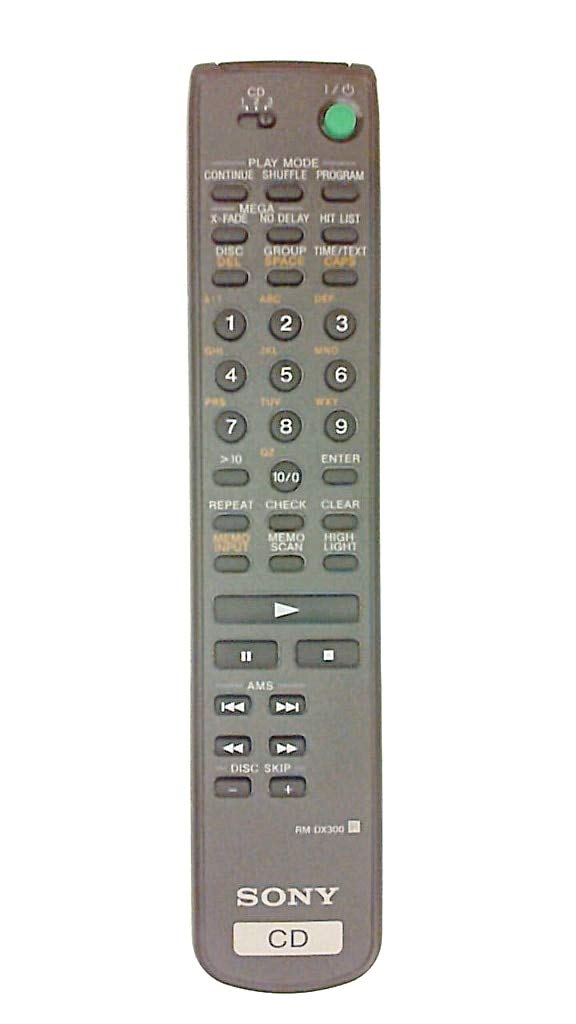
Image 4.1: The Sony RM-DX300 remote control. The battery compartment is located on the back.
5. הוראות הפעלה
The RM-DX300 remote control allows you to operate your compatible Sony CD Changer from a distance. Ensure there is a clear line of sight between the remote's infrared emitter and the CD changer's IR receiver.
5.1 פונקציות בסיסיות
- כּוֹחַ: Turns the CD changer on or off.
- נגן (►): מתחיל ניגון תקליטורים.
- PAUSE (−): משהה את השמעת התקליטור. לחץ שוב כדי לחדש את ההפעלה.
- עצור (■): מפסיק את השמעת התקליטורים.
- דלג (►►| / |◄◄): Skips to the next track or returns to the beginning of the current/previous track.
- SEARCH (►► / ◄◄): Fast forwards or fast reverses through a track.
- DISC SELECT (Numeric Keypad): Directly select a disc by entering its number.
- TRACK SELECT (Numeric Keypad): Directly select a track by entering its number.
- תָכְנִית: Allows programming of tracks for custom playback sequences. Refer to your CD changer's manual for detailed programming instructions.
- לַחֲזוֹר עַל: חוזר על הרצועה, הדיסק או הרצף המתוכנת הנוכחיים.
- SHUFFLE/RANDOM: Plays tracks or discs in a random order.
Note: Specific button labels and advanced functions may vary slightly depending on your CD changer model. Consult your CD changer's original instruction manual for detailed information on all features.
6. תחזוקה
6.1 ניקוי השלט
To clean the remote control, gently wipe its surface with a soft, dry cloth. Do not use liquid cleaners, sprays, or abrasive materials, as these can damage the remote's finish or internal components.
6.2 החלפת סוללה
Replace the batteries when the remote control's range decreases or if it stops responding. Follow the battery installation steps outlined in Section 4.1. Always replace both batteries at the same time with new ones of the same type.
7. פתרון תקלות
| בְּעָיָה | סיבה אפשרית | פִּתָרוֹן |
|---|---|---|
| Remote control does not operate the CD changer. |
|
|
| Remote control operates intermittently. |
|
|
8. מפרטים
| דֶגֶם: | RM-DX300 |
| מכשירים תואמים: | Sony CD Changer models CDP-CX300, CDP-CX335, CDP-CX355, CDP-X300 |
| טכנולוגיית קישוריות: | אינפרא אדום (IR) |
| מקור כוח: | 2 x סוללות AA (לא כלול) |
| מידות המוצר: | 8.1 x 1.5 x 1 אינץ' |
| משקל פריט: | 3.2 אונקיות |
| יַצרָן: | סוני |
9. אחריות ותמיכה
This remote control is manufactured by Sony. For information regarding warranty coverage, technical support, or service, please refer to the documentation provided with your original Sony CD Changer or visit the official Sony support webאתר. שמור את קבלת הרכישה כהוכחת קנייה לתביעות אחריות.
תמיכה של סוני Webאֲתַר: https://www.sony.com/electronics/support