1. הקדמה
The CyberPower BRG1500AVRLCD Intelligent LCD UPS System is designed to provide reliable battery backup and surge protection for desktop computers, workstations, networking devices, and home entertainment systems. This Uninterruptible Power Supply (UPS) system utilizes line interactive topology and simulated sine wave output to safeguard your valuable electronics from power interruptions and fluctuations.
Key features include Automatic Voltage Regulation (AVR) to correct minor power fluctuations without switching to battery power, thereby extending battery life. It also offers two USB charge ports (2.1 Amps shared) for portable devices.

Figure 1: CyberPower BRG1500AVRLCD UPS System in a typical office environment, providing power protection to connected devices.
2. אמצעי בטיחות
אנא קרא ופעל לפי כל הוראות הבטיחות בקפידה לפני התקנה או הפעלה של ה-UPS. אי ביצוע פעולה זו עלול לגרום נזק ליחידה, לציוד המחובר או לפציעה גופנית.
- Do not install the UPS in direct sunlight, near heat-emitting appliances, or in areas with excessive humidity.
- Ensure the UPS is connected to a grounded outlet.
- אל תפתחו את ה-UPSasinז. אין חלקים בפנים הניתנים לתיקון על ידי המשתמש. יש לפנות לטכנאי שירות מוסמכים כדי לטפל בהם.
- אל תשתמש ב-UPS עבור ציוד רפואי או תומך חיים.
- Ensure proper ventilation around the UPS. Do not block any ventilation openings.
- In case of fire, use a powder fire extinguisher. Do not use water.
3. תכולת החבילה
ודא שכל הפריטים נמצאים בחבילה:
- יחידת UPS
- מדריך למשתמש
4. המוצר נגמרview
4.1 לוח קדמי

איור 2: חזית view of the CyberPower BRG1500AVRLCD UPS, highlighting the Intelligent LCD panel and USB charging ports.
The front panel features the Intelligent LCD display, control buttons (Display, Mute, Enter, Setup), and two USB charge ports (USB-A and USB-C) for convenient charging of portable devices.
4.2 פאנל אחורי
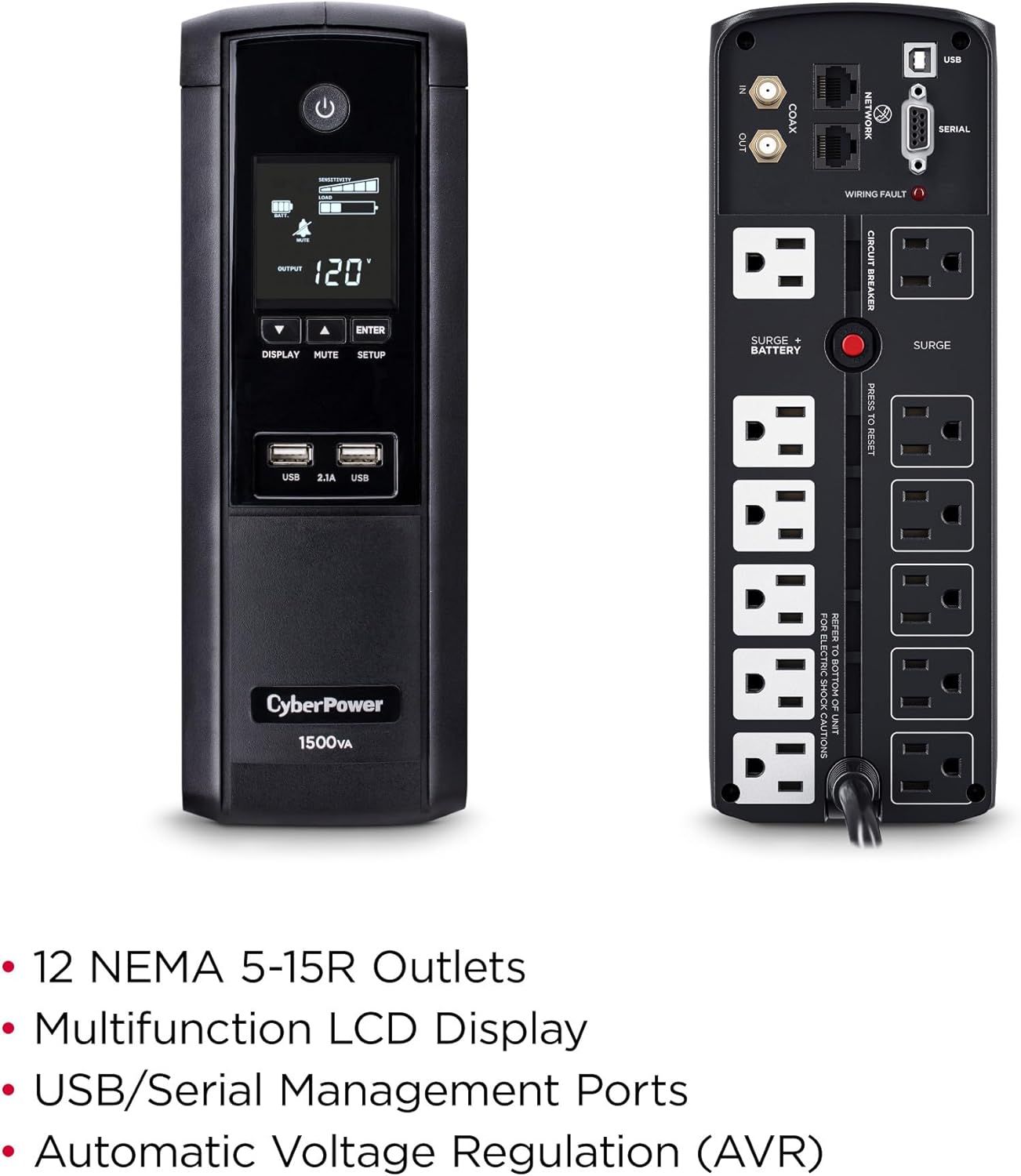
איור 3: אחורי view of the CyberPower BRG1500AVRLCD UPS, detailing the NEMA 5-15R outlets, network, cable, and serial ports.
The rear panel includes 12 NEMA 5-15R outlets: six battery backup & surge protected outlets and six surge protected outlets. It also features network (RJ45) and cable (Coax) surge protection ports, a serial port, and a USB port for management software connectivity. A circuit breaker reset button is also located on the rear panel.
5. התקנה
5.1 טעינה ראשונית
Before initial use, plug the UPS into a grounded wall outlet and allow it to charge for at least 8 hours to ensure maximum battery runtime. The unit will automatically turn on when connected to mains power.
5.2 ציוד חיבור
- שקעי גיבוי סוללה ומיגון מפני נחשולי מתח: Connect critical equipment such as your computer, monitor, and external hard drives to these outlets. These devices will receive power from the UPS battery during an outage.
- שקעים מוגנים מפני נחשולי מתח: Connect non-critical equipment that still requires surge protection, such as printers or scanners, to these outlets. These devices will not receive battery backup power.
- יציאות טעינת USB: Use the front USB-A and USB-C ports to charge mobile phones, MP3 players, and cameras.
- Data Line Protection: Connect your network cable (RJ45) and coaxial cable (Coax) through the designated IN/OUT ports on the rear panel to protect against surges.
6. הוראות הפעלה
6.1 הפעלה/כיבוי של ה-UPS
- להדליק: Press and hold the Power button on the front panel for approximately 2 seconds. The LCD display will light up.
- לכבות: Press and hold the Power button for approximately 2 seconds. The LCD display will turn off.
6.2 פונקציות תצוגת LCD
The multifunction LCD panel displays immediate, detailed information on battery and power conditions. Use the 'Display' button to cycle through various screens:

איור 4: דוגמהamples of information displayed on the Intelligent LCD panel, including input/output voltage, load, and battery status.
- קלט כרךtage: מציג את עוצמת הקול הנוכחיתtagה מרשת החשמל.
- פלט כרךtage: מראה את כרךtage supplied by the UPS to connected equipment.
- קיבולת סוללה: מציין את רמת הטעינה הנוכחית של הסוללות הפנימיות.
- כושר העמסה: מציג את האחוזיםtagמהקיבולת של מערכת ה-UPS המשמשת את הציוד המחובר.
- זמן ריצה משוער: Provides an estimate of how long the UPS can supply power during an outage based on the current load.
- יומן אירועים: Records power events such as outages, נחשולים וכרךtagתנודות.
6.3 כרך אוטומטיtagתקנה (AVR)
ל-UPS יש עוצמה אוטומטיתtage Regulation (AVR), which automatically corrects minor power fluctuations (sags and overvoltages) without switching to battery power. This extends the life of the battery by reducing the number of times it needs to discharge and recharge.
6.4 PowerPanel Personal Edition Management Software
The UPS comes with FREE PowerPanel Personal Edition Management Software (Download). This software allows for advanced power management features, including scheduled shutdowns, remote monitoring, and customizable alerts. Refer to the software's documentation for installation and usage instructions.
7. תחזוקה
7.1 החלפת סוללה
The CyberPower BRG1500AVRLCD uses two 12V batteries. The batteries are designed to last approximately 3-5 years under normal operating conditions. When the batteries reach the end of their service life, they should be replaced by qualified personnel. For battery replacement, contact CyberPower Systems customer support or a certified technician.
7.2 ניקוי
Regularly clean the exterior of the UPS with a dry cloth. Ensure ventilation openings are free from dust and debris to maintain proper airflow and prevent overheating.
8. פתרון תקלות
If the UPS is not functioning correctly, refer to the following common issues:
- UPS לא נדלק: Ensure the power cord is securely plugged into a grounded wall outlet and the UPS. Check the circuit breaker on the rear panel and reset if tripped.
- UPS מצפצף ברציפות: This usually indicates the UPS is operating on battery power during an outage or a low battery condition. Save your work and shut down connected equipment if the outage מוארך.
-
מסמכים קשורים - BRG1500AVRLCD

מדריך הגדרת פונקציות של CyberPower UPS
Detailed guide for setting up functions and configurations on CyberPower Intelligent LCD UPS Systems, including voltage settings, sensitivity, alarms, and display options.
מדריך למשתמש של CyberPower BRG1500AVRLCD2 UPS: תכונות, התקנה ותפעול
מדריך למשתמש מקיף עבור מערכת ה-UPS החכמה עם LCD CyberPower BRG1500AVRLCD2. למד על תכונותיה, התקנה, תפעול בסיסי, החלפת סוללה, פתרון בעיות ומפרטים טכניים.
מדריך למשתמש של סדרת UPS חכמה CyberPower PR750LCD3C
מדריך למשתמש עבור סדרת UPS חכמה CyberPower PR750LCD3C, המספק מידע מפורט על התקנה, הפעלה, אזהרות בטיחות, פתרון בעיות ומפרטים טכניים עבור ספק כוח רציף זה.
מדריך למשתמש של סדרת UPS חכמה של CyberPower OR1000LCDRM1U/OR1500LCDRM1U | מדריך להגנה על מתח
מדריך מקיף למשתמש עבור סדרת UPS חכמה של CyberPower (OR1000LCDRM1U, OR1500LCDRM1U). למד על התקנה, תכונות, תפעול, החלפת סוללה, פתרון בעיות, מפרטים טכניים ובטיחות להגנה אמינה על חשמל.
מדריך למשתמש של סדרת UPS חכמה של CyberPower - CP850/1000/1350/1500AVRLCD
מדריך למשתמש עבור דגמי סדרת UPS חכמה של CyberPower מדגם CP850AVRLCD, CP1000AVRLCD, CP1350AVRLCD ו-CP1500AVRLCD. מכסה תכונות, בטיחות, התקנה, הפעלה, החלפת סוללה, פתרון בעיות, מפרטים טכניים וטכנולוגיית UPS של GreenPower.
CyberPower PR5000RTXL2UC Smart App Sinewave UPS Series User Manual
Comprehensive user manual for the CyberPower PR5000RTXL2UC Smart App Sinewave UPS Series. Covers installation, basic and network operation, LCD settings, EPO/ROO configuration, dry contact monitoring, battery replacement, technical specifications, troubleshooting, and warranty information.