מָבוֹא
The Bose SoundTouch SA-4 amplifier is designed to pair with your choice of speakers for streaming music. It provides wireless access to Internet radio, music services, and your music library. The system features proprietary signal processing for rich lows and includes a SoundTouch controller for convenient operation.

Image: Bose SoundTouch SA-4 Amplifier with its wireless adapter and circular controller.
תוכן החבילה
ודא שכל הפריטים נמצאים בחבילה:
- SoundTouch SA-4 ampחיים יותר
- SoundTouch wireless adapter
- SoundTouch controller
- כבל USB
- כבל מתח AC

Image: All components included with the Bose SoundTouch SA-4 Amplifier, laid out for inspection.
הוראות התקנה
1. חיבור רמקולים
The SoundTouch SA-4 amplifier is designed for easy connection to your chosen speakers. Ensure speakers are compatible with the amplifier's impedance range (4-16 Ohms).
2. חיבור חשמל
חבר את כבל החשמל ל-AC amplifier and then to a power outlet. The amplifier is designed to enter sleep mode after 20 minutes of inactivity.
3. Wireless Adapter Setup
Connect the SoundTouch wireless adapter to the amplifier. This adapter enables wireless access to Internet radio, music services, and your music library.
4. SoundTouch Controller Pairing
The SoundTouch controller provides intuitive access to your music. Pair the controller with the system for immediate access to personalized presets and volume control. A wall-mounted cradle with an included bracket is available for convenient placement.
5. SoundTouch App Installation
Download and install the free SoundTouch app on your computer, smartphone, or tablet. Use the app to configure your system, drag and drop music sources to your six presets, and explore other music options from your library or online services. The app also allows you to play different music in different rooms if you have multiple SoundTouch systems.
6. Auxiliary and Ethernet Connections
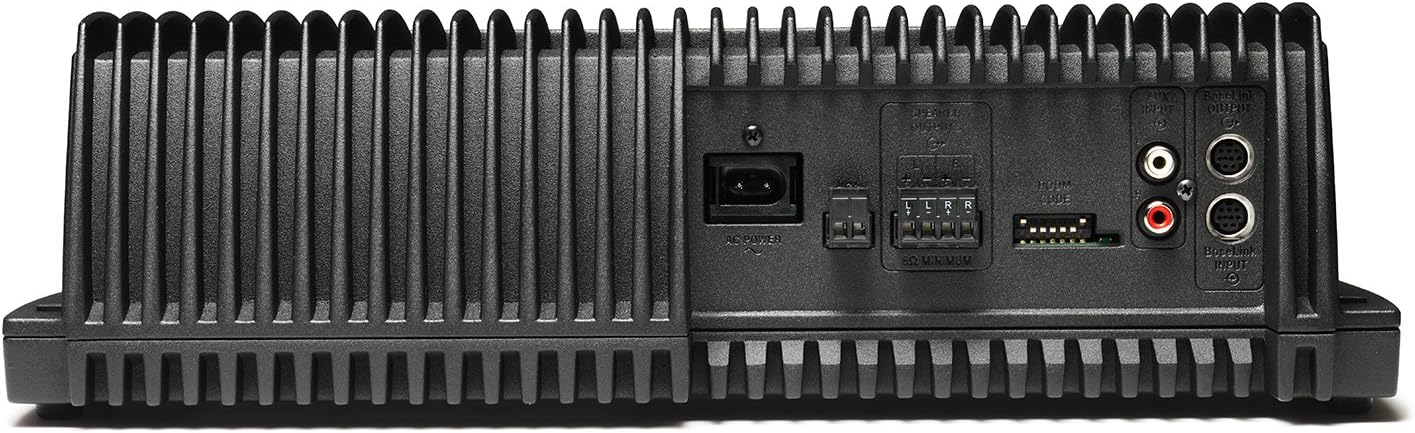
An auxiliary port is available for connecting other audio sources, such as an MP3 player. An Ethernet port allows for easy connection to a home network via an Ethernet cable. A USB input is also provided for system setup via a computer.

תמונה: אחורי view of the Bose SoundTouch SA-4 Amplifier, detailing connection ports.
וידאו: גמור כלליview of Bose Professional AudioPack installation. While not specific to the SA-4, it provides context for setting up Bose audio systems.
מִבצָע
SoundTouch Controller
The SoundTouch controller allows for direct control of your music. Use it to adjust volume, skip or pause songs, and power the system on or off. Personalized presets provide one-touch access to your favorite music.
תמונה: חזית view of the Bose SoundTouch SA-4 Amplifier and its controller.
SoundTouch App
The SoundTouch app offers comprehensive control over your system. Manage music sources, customize presets, and browse your music library or online services. For multi-room setups, the app enables playing the same music everywhere or different music in different rooms.
פונקציונליות AirPlay
ה amplifier supports AirPlay, allowing you to stream audio directly from compatible Apple devices.
תַחזוּקָה
To ensure optimal performance and longevity of your Bose SoundTouch SA-4 amplifier, keep the unit clean and free from dust. Use a soft, dry cloth for cleaning. Avoid exposing the amplifier to excessive moisture or extreme temperatures. Ensure proper ventilation to prevent overheating.
פתרון בעיות
If you encounter issues with your SoundTouch SA-4 amplifier, consider the following general troubleshooting steps:
- אין כוח: Ensure the AC power cord is securely connected to both the ampמכשיר חשמל ושקע חשמל תקין.
- אין צליל: Verify that speakers are correctly connected to the amplifier. Check volume levels on both the amplifier and the SoundTouch controller/app. Ensure the correct input source is selected.
- בעיות קישוריות אלחוטית: Confirm your Wi-Fi network is active and the SoundTouch wireless adapter is properly connected. Restart your router and the amplifier. For Bluetooth, ensure the device is in pairing mode and within range.
- הבקר לא מגיב: Check the batteries in the SoundTouch controller. Ensure it is within range of the ampחיים יותר.
- בעיות באפליקציה: Ensure the SoundTouch app is updated to the latest version. Restart the app or your device.
For more detailed troubleshooting or persistent issues, refer to the official Bose support resources or contact customer service.
מפרטים
| מותג | בוס |
| שם הדגם | SoundTouch SA 4 |
| מספר דגם של פריט | 361755-1100 |
| מידות המוצר | 5.5" D x 14.25" W x 4.25" H |
| משקל פריט | 11 פאונד |
| טכנולוגיית קישוריות | Wi-Fi |
| טכנולוגיית תקשורת אלחוטית | Wi-Fi |
| מצב פלט שמע | סטריאו |
| שיטת בקרה | אפליקציה |
| מקור כוח | חשמלי עם כבלים |
| סוג הרכבה | Floor Standing, Wall Mount |
| תכונה מיוחדת | גברת בס |
| שימושים מומלצים למוצר | מוּסִיקָה |
| מכשירים תואמים | נגן MP3 |
| צֶבַע | שָׁחוֹר |
| UPC | 017817598323 |
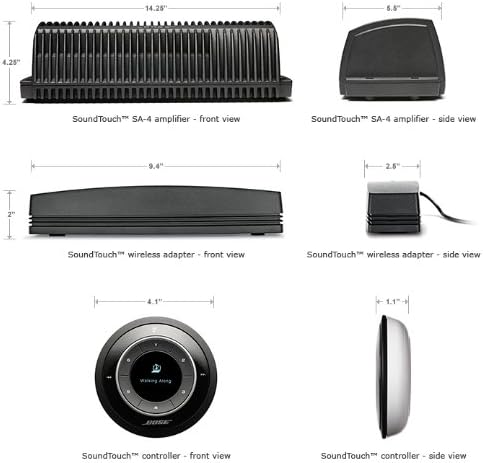
תמונה: מידות ה- amplifier and accessories.
אחריות ותמיכה
The Bose SoundTouch SA-4 amplifier comes with a limited warranty. For specific warranty details, please refer to the documentation included with your product or visit the official Bose website. For technical support, product registration, or service inquiries, please contact Bose customer support directly.
ניתן למצוא משאבים נוספים ופרטי יצירת קשר באתר חנות Bose.


