1. הקדמה
This manual provides instructions for the Dino-Lite Pro AM413ZTA Digital Microscope and the MS35B Pole Stand. The AM413ZTA is a 1.3-megapixel handheld digital microscope featuring a rotatable polarizer filter, designed for detailed observation and analysis. The MS35B is an economical, rigid vertical stand that provides stable support and adjustable positioning for the Dino-Lite microscope.
2. תכונות עיקריות
2.1 Dino-Lite Pro AM413ZTA Digital Microscope
- Polarizer Filter: A rotatable polarizer filter is integrated to significantly reduce reflection glare from surfaces, enabling clear viewing of transparent or highly reflective materials such as jewelry, skin, glass, plastic, metal, or soldering.
- H11 Housing: This second-generation housing design incorporates an improved magnification dial for smooth adjustment and focusing, a scroll lock feature to secure desired magnification/focus, and a cable strain relief (SR) for enhanced durability against pulls and twists.
- הַגדָלָה: Offers a magnification range of 10x to 50x and up to 220x.
- חיישן תמונה: 1.3 Megapixel resolution for clear image capture.
2.2 MS35B Pole Stand
- Vertical Stability: Provides rigid vertical support for the Dino-Lite microscope.
- Rotational Perspective: Allows up to 360 degrees of horizontal axis rotation.
- מרחק עבודה מתכוונן: Offers up to 8 inches of vertical working distance from the object.
- צְדָדִי Viewזוויות: The scope holster is mounted on a slider with a ball and socket joint, permitting up to 45 degrees of adjustable lateral viewזוויות.
- בנייה עמידה: Manufactured from resilient stainless steel and lightweight recycled aluminum for smooth adjustment and stability.
3. התקנה
3.1 Stand Assembly (MS35B)
- Place the base plate on a stable, flat surface.
- Insert the vertical pole into the designated slot on the base plate and secure it firmly.
- Attach the microscope holder assembly to the vertical pole at the desired height. Ensure all screws are tightened to prevent movement.
3.2 Microscope Installation (AM413ZTA)
- Gently insert the Dino-Lite AM413ZTA microscope into the holster of the MS35B stand. Ensure it is securely seated.
- Connect the microscope's USB cable to an available USB port on your computer.
- Install the Dino-Lite software (typically included with the product or available for download from the manufacturer's website). Follow the on-screen instructions for software installation.

Figure 1: Dino-Lite Pro AM413ZTA Digital Microscope mounted on the MS35B Pole Stand, ready for use.
4. הוראות הפעלה
4.1 Powering On and Software Launch
The microscope is powered via the USB connection. Once connected to your computer and the software is installed, launch the Dino-Lite application. The live image from the microscope should appear on your screen.
4.2 כוונון הגדלה ומיקוד
- הַגדָלָה: Rotate the magnification dial on the microscope body to adjust the desired magnification level. The H11 housing provides a smooth movement for this adjustment.
- Scroll Lock: To maintain a specific magnification, engage the scroll lock feature on the H11 housing.
- מוֹקֵד: Use the focus ring on the microscope to bring the image into sharp clarity. For fine adjustments, you may also adjust the height of the microscope on the MS35B stand.
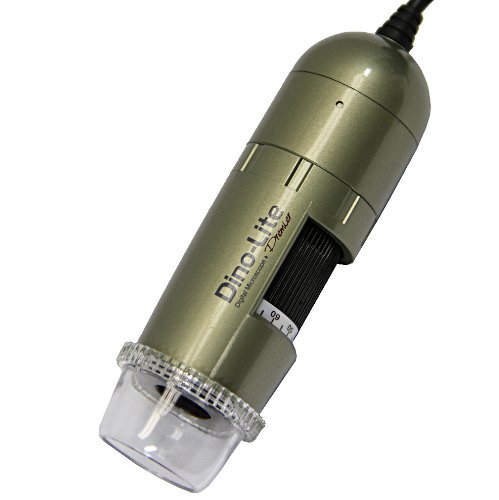
Figure 2: Handheld view of the Dino-Lite AM413ZTA, highlighting the magnification dial and clear housing.
4.3 Using the Polarizer Filter
The AM413ZTA features a rotatable polarizer filter to reduce glare. To use it:
- Observe the object through the microscope.
- Gently rotate the polarizer ring located near the objective lens.
- Continue rotating until the reflection glare is minimized or eliminated, allowing for a clearer view of the surface or subsurface features.

Figure 3: Microscopic view of a metal object with glare.

Figure 4: Microscopic view of the same object with glare reduced by the polarizer.
4.4 לכידת תמונה ווידאו
The Dino-Lite software provides functions for capturing still images and recording videos. Refer to the software's help documentation for detailed instructions on using these features, including measurement tools.

Figure 5: Microscopic image with measurement annotations.

Figure 6: Microscopic view של לוח מעגלים מודפס.
5. תחזוקה
- ניקוי העדשה: Use a soft, lint-free cloth specifically designed for optical lenses to clean the microscope's objective lens. Avoid abrasive materials or harsh chemicals.
- ניקוי הגוף: Wipe the microscope body and stand with a soft, damp cloth. Do not immerse any part of the device in liquid.
- אִחסוּן: Store the microscope and stand in a clean, dry environment, away from direct sunlight and extreme temperatures. Use the original packaging or a protective case if available.
6. פתרון תקלות
- אין תמונה על המסך:
- Ensure the USB cable is securely connected to both the microscope and the computer.
- Verify that the Dino-Lite software is running and the correct device is selected.
- Try connecting to a different USB port or another computer to rule out port or computer issues.
- תמונה מטושטשת:
- Adjust the focus ring on the microscope.
- Ensure the object is within the microscope's working distance. Adjust the height of the microscope on the stand if necessary.
- Clean the objective lens for any smudges or dust.
- Excessive Glare:
- Rotate the polarizer filter on the microscope to reduce reflections.
- Adjust the lighting conditions of your workspace.
- התוכנה לא מזהה מכשיר:
- Reinstall the Dino-Lite software and drivers.
- הפעל מחדש את המחשב.
- בדוק את זה של היצרן website for updated drivers or software.
7. מפרטים
| תכונה | מִפרָט |
|---|---|
| מספר דגם | AM413ZTA |
| חיישן תמונה | 1.3 מגה פיקסל |
| טווח הגדלה | 10x~50x, 220x |
| מַקטֵב | Yes, Rotatable |
| דִיוּר | H11 (Improved magnification dial, scroll lock, cable strain relief) |
| סוג מקור אור | הלוגן |
| Material (Microscope) | מַתַכתִי |
| חומר (מעמד) | Stainless steel, recycled aluminum |
| Item Weight (Microscope) | 0.35 פאונד |
| זווית אמיתית של View | 45 מעלות |
| מקור כוח | Battery Powered (Note: USB connection provides power for operation) |
| תיאור עדשת המטרה | אכרומטי |
8. מידע על אחריות
The Dino-Lite Pro AM413ZTA Digital Microscope and MS35B Pole Stand are covered by a manufacturer's warranty. Please refer to the warranty card included with your product or visit the official Dino-Lite webבאתר לקבלת מידע מפורט בנוגע לתנאי האחריות, תנאים והליכי הרישום.
9. תמיכה
For technical assistance, software updates, or further inquiries, please visit the official Dino-Lite website or contact their customer support. You can find more information and resources at the Dino-Lite Store on Amazon.


