מָבוֹא
The Plantronics M25 Bluetooth headset is designed for convenient wireless communication and audio playback. It features an extended battery life with DeepSleep mode, ensuring readiness when needed. The headset provides whispered alerts for battery status and connection information, and allows for listening to music, internet radio, or navigation directions while managing calls.
תוכן החבילה
ודא שכל הפריטים נמצאים בחבילה שלך:
- אוזניות בלוטות' של Plantronics M25
- AC Charger (100-240v)
- Clip-on Earloop
הגדרה
1. טעינת האוזניות
Before first use, fully charge the headset. Connect the AC charger to the headset's charging port. The indicator light will change to show charging status and turn off or change color when fully charged. A full charge can provide up to 5 months of readiness in DeepSleep mode.
2. התאמה עם מכשיר
To pair your Plantronics M25 headset with a Bluetooth-enabled device (e.g., smartphone, tablet):
- ודא שהאוזניות טעונות וכבויות.
- Press and hold the Call button on the headset until the indicator light flashes red and blue, indicating pairing mode.
- במכשיר שלך, הפעל את Bluetooth וחפש מכשירים חדשים.
- Select "Plantronics M25" from the list of available devices.
- אם תתבקש להזין קוד גישה, הזן "0000" (ארבעה אפסים).
- Once paired, the headset's indicator light will stop flashing and a voice prompt will confirm the connection.
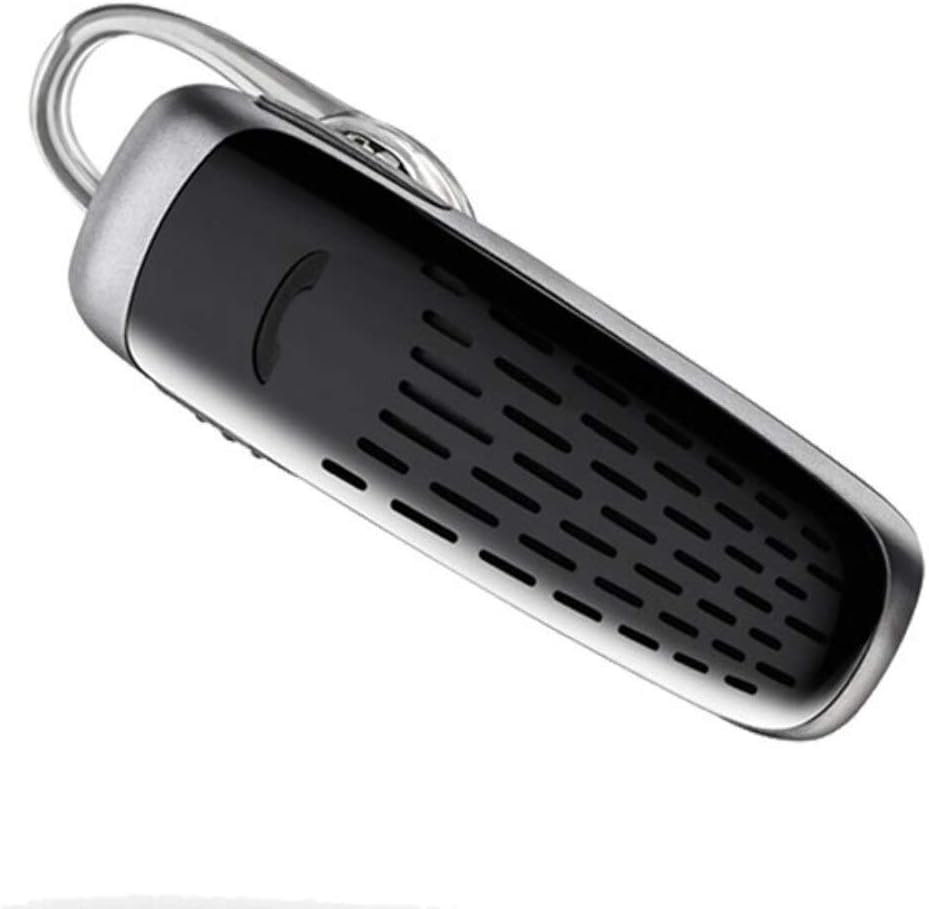
Image: The Plantronics M25 Bluetooth Headset, a compact black and silver device with an earloop, shown from an angled perspective. The call button is visible on the side.
הוראות הפעלה
הפעלה/כיבוי
- הפעלה: לחץ והחזק את לחצן ההפעלה עד שנורית החיווי תהבהב בכחול.
- כיבוי: Press and hold the Power button until the indicator light flashes red.
ביצוע וקבלת שיחות
- תשובה לשיחה: לחץ על כפתור התקשר.
- סיום שיחה: לחץ על כפתור התקשר.
- דחה שיחה: לחץ והחזק את לחצן השיחה למשך 2 שניות.
- חיוג חוזר למספר האחרון: לחצו פעמיים על כפתור השיחה.
השמעת אודיו
The headset supports streaming audio from your device, including music, podcasts, and GPS directions.
- הפעל/השהה: Press the Call button during audio playback.
מצב DeepSleep
The headset enters DeepSleep power-saving mode if it is disconnected from your phone for over 90 minutes. To wake it up when it's back in range (within 33 feet), simply tap the Call button.
תַחזוּקָה
- ניקוי: השתמשו במטלית רכה ויבשה לניקוי האוזניות. אין להשתמש בחומרי ניקוי נוזליים או בתרסיסים.
- אִחסוּן: יש לאחסן את האוזניות במקום קריר ויבש, הרחק מטמפרטורות קיצוניות.
- טיפול בסוללה: To preserve battery life, avoid fully discharging the battery frequently. Charge the headset regularly, even if not in use.
- עמידות במים: המכשיר הזה הוא לא עמיד במיםהימנעו מחשיפה למים או לחות מוגזמת.
פתרון בעיות
| בְּעָיָה | פִּתָרוֹן |
|---|---|
| האוזניות לא נדלקות. | Ensure the headset is charged. Connect it to the AC charger and allow it to charge for at least 30 minutes before attempting to power on. |
| Cannot pair the headset with my device. |
|
| No audio or low audio volume. |
|
| Headset frequently disconnects. |
|
מפרטים
| תכונה | פְּרָט |
|---|---|
| שם הדגם | פלנטרוניקס M25 |
| טכנולוגיית קישוריות | בלוטות' |
| טכנולוגיית תקשורת אלחוטית | בלוטות' |
| מכשירים תואמים | Smartphones, Laptops, Desktops, Tablets, Smart Speakers, Televisions |
| סוג בקרה | בקרת שיחות |
| משקל פריט | 0.3 אונקיות (כ-8.5 גרם) |
| רמת עמידות במים | לא עמיד במים |
| טווח תדרים | 20 הרץ עד 20,000 הרץ |
| Battery Life (DeepSleep) | עד 150 ימים |
| טווח בלוטות' | עד 10 מטרים (33 רגל) |
| מיקום אוזניים | אין אוזן |
| גורם צורה | One Ear |
| בקרת רעש | ביטול רעשים אקטיבי |
| מידות המוצר | 1.85 x 0.59 x 0.35 אינץ' |
| צֶבַע | שָׁחוֹר |
| יַצרָן | פלנטרוניקס |
אחריות ותמיכה
מידע על אחריות: שימו לב שמוצר זה נמכר עם No Warranty or Return as per the provided information. Users are advised to verify product condition upon receipt.
For further assistance or inquiries, please refer to the official POLY support channels or visit their website. Contact information may be available on the product packaging or the manufacturer's official webאֲתַר.
Disclaimer: Product specifications and features are subject to change without notice. Always refer to the latest information provided by the manufacturer.


