1. הקדמה
This manual provides comprehensive instructions for the safe and effective operation of the KORAD KA3005P Programmable DC Power Supply. The KA3005P is a high-precision, variable, and adjustable linear power supply designed for laboratory, educational, and industrial applications. It offers stable and reliable DC power output with advanced features such as programmable control, memory storage, and multiple safety protections.

איור 1.1: KORAD KA3005P Programmable DC Power Supply. This image shows the front and side view of the power supply unit, highlighting its compact design and the clear digital display.
2. הוראות בטיחות
To ensure safe operation and prolong the life of your KORAD KA3005P power supply, please observe the following safety precautions:
- Always connect the power supply to a properly grounded AC outlet.
- Do not operate the unit in a wet or damp סְבִיבָה.
- יש לוודא אוורור נאות סביב היחידה כדי למנוע התחממות יתר. אין לחסום את פתחי האוורור.
- אל תפתח את ה-casing של ספק הכוח. אין חלקים בפנים הניתנים לתיקון על ידי המשתמש. יש לפנות לכל טיפול בתיקונים ולטיפול באנשי מקצוע מוסמכים.
- ודא את כרך הקלטtage selector switch (110V/220V) on the rear panel is set correctly for your local power supply before connecting to AC mains.
- Disconnect the power cord before performing any maintenance or when the unit is not in use for extended periods.
- Avoid short-circuiting the output terminals. Although the unit has short-circuit protection, prolonged short circuits can cause damage.
- Use appropriate test leads and ensure they are rated for the voltage and current levels you intend to use.
3. מה בקופסה
Upon unpacking your KORAD KA3005P, please verify that all the following items are included:
- 1 x KORAD KA3005P Power Supply Unit
- 1 כבל מתח AC
- 1 x כבל USB
- 1 x Set of 5 Amp Test Leads (Banana plug to Crocodile clip)
- 1 x מדריך למשתמש
- 1 x CD containing Remote Control Software
4. תכונות מוצר
The KORAD KA3005P is equipped with a range of features designed for precision and ease of use:
- פלט מדויק: Provides stable and accurate 0-30V and 0-5A DC output.
- תצוגת LED בעלת 4 ספרות: Bright and clear display for precise voltage (0.001V resolution) and current (0.001A resolution) readings.
- בקרה ניתנת לתכנות: USB and RS232 ports for remote control via PC software.
- אחסון זיכרון: Four dedicated memory locations (M1-M4) to save and recall frequently used voltage וההגדרות הנוכחיות.
- כרך קבועtage (CV) & Constant Current (CC) Modes: Automatically switches between modes to maintain stable output.
- הגנות בטיחות מקיפות: Includes Over-Current Protection (OCP), Over-Voltage Protection (OVP), and Short-Circuit Protection.
- כפתור הפעלה/כיבוי של הפלט: Allows safe connection and disconnection of loads without powering down the unit.
- פונקצית נעילה: מונע שינויים מקריים בהגדרות במהלך הפעולה.
- עוצמת קלט ניתנת להחלפהtage: Supports 110V/220V AC input, making it suitable for international use.
- מאוורר קירור שקט: Built-in variable speed fan for efficient heat dissipation and reduced operational noise.

איור 4.1: Key features of the KORAD KA3005P. This image illustrates the power and protection mechanisms, memory settings, the bright 4-digit LED display, and the switchable power input on the rear panel.
5. Panel Overview
5.1 לוח קדמי

איור 5.1: Front Panel Layout of the KORAD KA3005P. This image provides a detailed view of the front panel with numbered labels indicating the function of each control and indicator.
- כרך ידtage Readout (V): מציג את נפח הפלטtagה בוולטים.
- Current Readout (A or mA): Displays the output current in Ampארס או מיליampארס.
- Power Readout (Watts): Displays the calculated output power in Watts.
- כרך קבועtage Mode Indicator (CV): מאיר כאשר היחידה פועלת בעוצמה קבועהtagמצב e.
- Constant Current Mode Indicator (CC): דולק כאשר היחידה פועלת במצב זרם קבוע.
- Memory Setting Indicator (M1-M4): Indicates which memory preset is currently active.
- Over-Current Protection Indicator (OCP): דולק כאשר הגנת זרם יתר פעילה.
- Over-Voltage Protection Indicator (OVP): מאיר כאשר עוצמת הקול גבוהה מדיtagההגנה e פעילה.
- Front Panel Lock Indicator (LOCK): דולק כאשר פקדי הלוח הקדמי נעולים.
- Output On/Off Indicator (ON): דולק כאשר היציאה פעילה.
- A/mA Button: עובר בין Amperage and milliAmperage display, and also serves as the Panel Lock button when held.
- כפתור OCP: מפעיל/מבטל את הגנת זרם יתר.
- OCP SET Button: Used to set the Over-Current Protection limit.
- כפתור OVP: Activates/deactivates Over-Voltage הגנה.
- OVP SET Button: Used to set the Over-Voltage Protection limit.
- לחצן הפעלה/כיבוי: Toggles the output power ON or OFF.
- Memory Save/Recall Buttons (M1-M4): Used to save and recall voltage וההגדרות הנוכחיות.
- BEEP Button: Toggles the audible feedback (beeper) ON or OFF.
- SENSE Button: (Functionality may vary, typically for remote sensing).
- Setting Adjustment Dial: מקודד סיבובי להתאמת עוצמת הקולtage והערכים הנוכחיים.
- Digit Selection Buttons (Left/Right Arrows): Used to select the digit to be adjusted by the Setting Adjustment Dial.
- כרך ידtage/Current Adjustment Selector: Toggles between adjusting voltage ושוטף.
- מסופי פלט: Red (+) and Black (-) terminals for connecting the load.
- מסוף קרקע (GND): Green terminal for chassis ground connection.
- לחצן הפעלה: מתג הפעלה ראשי ליחידה.
5.2 פאנל אחורי
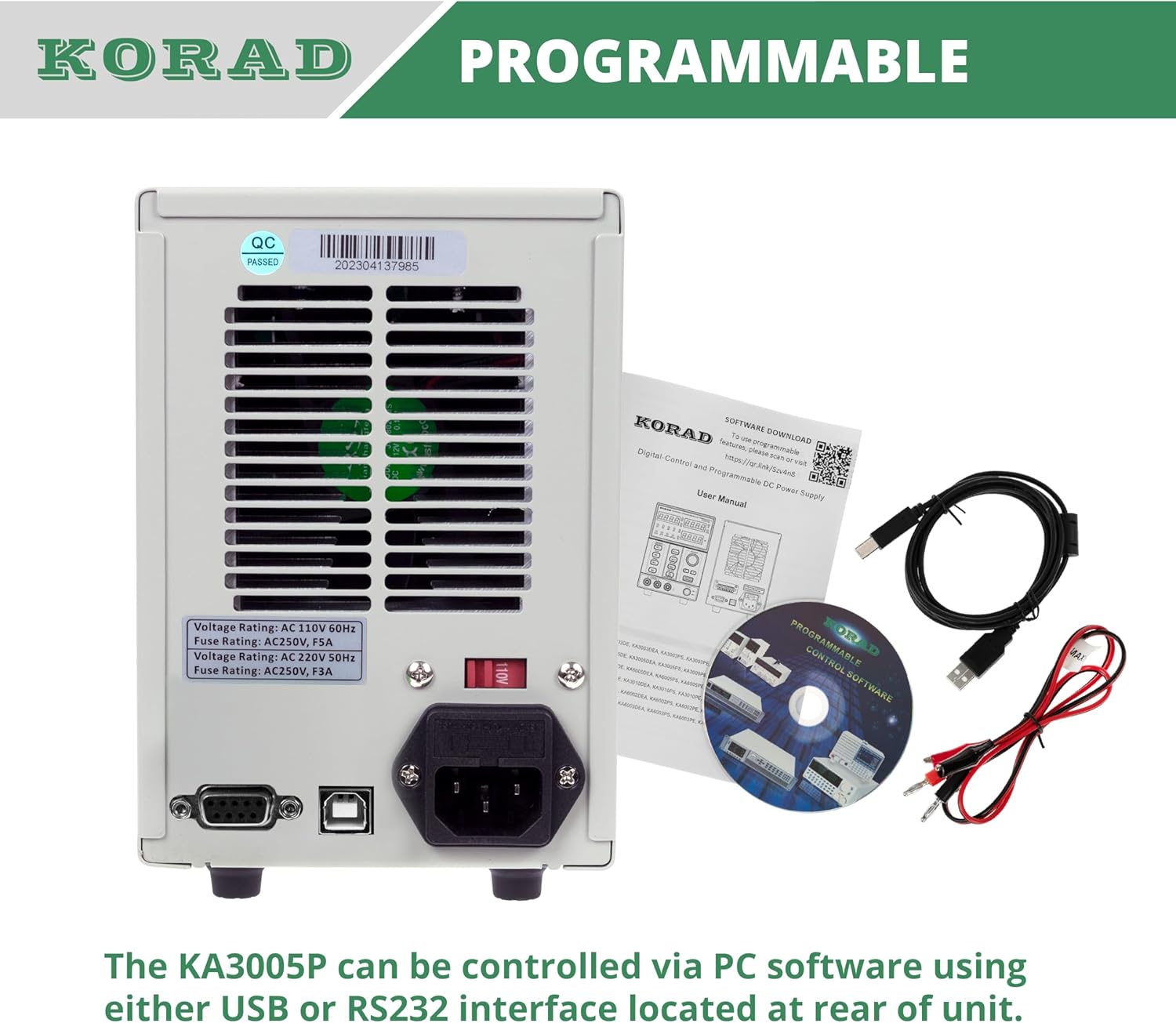
איור 5.2: Rear Panel Layout of the KORAD KA3005P. This image displays the rear panel, showing the AC input, voltage selector, cooling fan, and communication ports.
- שקע קלט AC: For connecting the supplied AC power cord.
- כרך ידtage Selector Switch (110V/220V): Allows selection of the appropriate input voltage עבור האזור שלך. Ensure this is set correctly before connecting to power.
- מאוורר קירור: Automatically adjusts speed based on internal temperature to maintain optimal operating conditions.
- יציאת USB: For connecting to a computer for programmable control.
- יציאת RS232: For connecting to a computer or other devices for programmable control.
- בעל נתיך: Contains the main AC input fuse.
6. התקנה
6.1 בדיקה ראשונית
Before connecting the power supply, inspect the unit for any signs of physical damage that may have occurred during shipping. If any damage is found, contact your supplier immediately.
6.2 Setting Input Voltage
אתר את הכרךtage selector switch on the rear panel of the unit. Ensure it is set to match your local AC mains voltagה. (110V או 220V). הגדרה שגויה עלולה לגרום נזק ליחידה.

איור 6.1: Rear panel showing the 110V/220V voltage selector switch. This switch must be correctly set to match the local AC power supply before operation.
6.3 חיבור מתח
Connect the supplied AC power cord to the AC input socket on the rear panel and then plug it into a grounded wall outlet.
6.4 חיבורי פלט
Connect your load to the output terminals on the front panel using the provided test leads or other suitable leads. Ensure correct polarity: Red for positive (+), Black for negative (-). The green terminal is for chassis ground.
7. הוראות הפעלה
7.1 הפעלה/כיבוי
- הקש על כּוֹחַ button on the front panel to turn the unit ON. The display will illuminate.
- הקש על כּוֹחַ שוב כדי לכבות את היחידה.
7.2 הגדרה כרךtage ו-Current
- הקש על כרךTAGE/CURRENT button to select whether you are adjusting voltage or current. The corresponding display will flash.
- השתמש ב- חץ שמאלה/ימינה buttons to select the digit you wish to adjust. The selected digit will flash.
- סובב את ה Setting Adjustment Dial to change the value of the selected digit.
- פעם הכרך הרצויtage ומגבלת הזרם מוגדרים, לחץ על הפעלה/כיבוי כפתור כדי להפעיל את הפלט. ה- ON מחוון נדלק.

איור 7.1: Close-up of the bright 4-digit LED display. This display provides precise and clear readouts of voltage and current, essential for accurate power delivery.
7.3 פונקציות זיכרון (M1-M4)
The unit allows you to save and recall up to four sets of voltage וההגדרות הנוכחיות.
- לשמור: הגדר את הכרך הרצויtage and current. Press and hold the desired memory button (M1, M2, M3 או M4) until you hear a beep or the display indicates saving.
- להיזכר: Briefly press the desired memory button (M1, M2, M3 או M4). The saved settings will be loaded.

איור 7.2: Close-up of the memory save/recall buttons (M1-M4). These buttons allow users to quickly store and retrieve frequently used voltage וההגדרות הנוכחיות.
7.4 בקרת הפעלה/כיבוי של היציאה
ה הפעלה/כיבוי button controls the output power to the terminals independently of the main power switch.
- לִלְחוֹץ הפעלה/כיבוי to enable output. The ON מחוון נדלק.
- לִלְחוֹץ הפעלה/כיבוי again to disable output. The ON המחוון יכבה.
- It is recommended to disable the output before connecting or disconnecting loads.
7.5 פונקציית נעילה
To prevent accidental changes to settings during operation, you can lock the front panel controls.
- לחץ והחזק את A/mA לחצן למשך מספר שניות עד ל- לִנְעוֹל indicator illuminates. All front panel controls will be disabled.
- כדי לבטל את הנעילה, לחץ והחזק את הלחצן A/mA כפתור שוב עד ל לִנְעוֹל המחוון נכבה.
7.6 Over-Current Protection (OCP) and Over-Voltage הגנה (OVP)
These features protect your connected load and the power supply from damage due to excessive current or voltage.
- Setting OCP/OVP: הקש על OCP SET or OVP SET לַחְצָן. השתמש ב- Setting Adjustment Dial ו חץ שמאלה/ימינה buttons to set the desired protection limit.
- Activating OCP/OVP: הקש על OCP or OVP button to enable the protection. The corresponding indicator will light up.
- When an OCP or OVP event occurs, the output will automatically shut off, and the respective indicator will flash. To reset, disable the protection or resolve the fault, then press the הפעלה/כיבוי button to re-enable output.

איור 7.3: Close-up of the protection and control buttons. This image highlights the OCP, OVP, and Lock buttons, which are crucial for safe operation and preventing accidental changes.
8. Programmable Control
The KORAD KA3005P can be controlled remotely via a computer using the USB or RS232 ports located on the rear panel.
- התקנת תוכנה: Insert the provided CD into your computer and follow the on-screen instructions to install the remote control software. Drivers for the USB/RS232 interface may also be included.
- קֶשֶׁר: Connect the power supply to your computer using the supplied USB cable or an RS232 cable (not included for RS232).
- תפעול תוכנה: Launch the installed software. Select the correct COM port corresponding to your connected power supply. The software allows you to set voltage, current, enable/disable output, and configure protection limits from your computer. Some software versions may support programmable sequences or data logging.
- פרוטוקול סדרתי: For advanced users, the user manual and CD typically contain documentation on the serial communication protocol, allowing for custom software development or integration with other programming environments (e.g., LabVIEW, Python).
איור 8.1: Rear panel showing USB and RS232 ports for programmable control. The image also displays the included user manual, USB cable, test leads, and software CD, which facilitate remote operation.
For software downloads or updates, please refer to the official KORAD website or the link provided in the manual (e.g., www.koradtechnology.com).
9. תחזוקה
The KORAD KA3005P is designed for reliable operation with minimal maintenance. Follow these guidelines:
- ניקוי: Disconnect the power supply from the AC mains before cleaning. Use a soft, dry cloth to wipe the exterior. Do not use abrasive cleaners or solvents.
- אוורור: Ensure the ventilation openings on the sides and rear of the unit are free from dust and obstructions. Periodically clean the fan vents with compressed air if necessary.
- החלפת נתיך: If the unit does not power on, check the fuse located in the fuse holder on the rear panel. Replace only with a fuse of the same type and rating (e.g., 5A/250V for 110V input, 3A/250V for 220V input). Always disconnect the power cord before replacing the fuse.
- אִחסוּן: כאשר המכשיר אינו בשימוש למשך תקופות ממושכות, יש לאחסן אותו במקום קריר ויבש, הרחק מאור שמש ישיר וטמפרטורות קיצוניות.
10. פתרון תקלות
If you encounter issues with your KORAD KA3005P, refer to the following common problems and solutions:
| בְּעָיָה | סיבה אפשרית | פִּתָרוֹן |
|---|---|---|
| היחידה לא נדלקת. | אין מתח AC; נתיך שרוף; עוצמת קול שגויהtagהגדרת בורר e. | בדוק את חיבור כבל החשמל ואת שקע הקיר. החלף את הנתיך אם הוא שרוף. ודא את עוצמת הקול.tage selector (110V/220V) on rear panel is correct. |
| אין פלט כרךtage/הנוכחי. | Output is OFF; OCP/OVP triggered; Short circuit at output. | הקש על הפעלה/כיבוי button to enable output. Check if OCP/OVP indicators are flashing; resolve fault and reset. Check for short circuits in the load or test leads. |
| תפוקה כרךtagהזרם/e אינו יציב. | חיבור עומס לקוי; התחממות יתר; חוטי בדיקה פגומים. | Ensure secure connections to the load. Check ventilation and allow unit to cool. Inspect and replace test leads if damaged. |
| Display shows incorrect readings. | Calibration issue; External interference. | If readings are consistently inaccurate, contact support for calibration. Minimize external electromagnetic interference. |
| Software communication issues. | Incorrect COM port; Driver issues; Software incompatibility. | Verify COM port selection in software. Reinstall USB/RS232 drivers. Ensure software version is compatible with your operating system. Refer to software documentation. |
If the problem persists after attempting these solutions, please contact KORAD customer support.
11. מפרטים
Technical specifications for the KORAD KA3005P Programmable DC Power Supply:

איור 11.1: KORAD KA3005P Unit Specifications. This image provides a visual summary of the key technical parameters of the power supply.
| פָּרָמֶטֶר | עֵרֶך |
|---|---|
| כרך ידtagטווח | 0-30V |
| טווח נוכחי | 0-5A |
| ויסות עומס (נפחtage) | ≤0.01%+2mV |
| ויסות עומס (זרם) | ≤0.1%+10mA |
| ויסות קו (כרךtage) | ≤0.01%+3mV |
| ויסות קו (נוכחי) | ≤0.1%+3mA |
| רזולוציית ההתקנה (נפחtage) | 10mV |
| רזולוציית התקנה (נוכחית) | 1mA |
| דיוק הגדרה (25°C ± 5°C) (נפחtage) | ≤0.5%+20mV |
| דיוק הגדרה (25°C ± 5°C) (זרם) | ≤0.5%+10mA |
| ריפל (20-20 מיליון) (כרךtage) | ≤2mVrms |
| ריפל (20-20 מיליון) (נוכחי) | ≤2mArms |
| מקדם טמפרטורה (כרךtage) | ≤150 עמודים לדקה |
| מקדם טמפרטורה (זרם) | ≤150 עמודים לדקה |
| רזולוציית קריאה לאחור (כרךtage) | 10mV |
| רזולוציית קריאה לאחור (נוכחית) | 1mA |
| זמן תגובה (נפח)tagעלייה) | ≤100mS (Voltage Drop) |
| מִמְשָׁק | Programmable (USB, RS232) |
| מִשׁקָל | 9.52 פאונד / 4.32 ק"ג |
| מידות (B x H x D) | 100 מ"מ (W) x 156 מ"מ (H) x 260 מ"מ (D) |
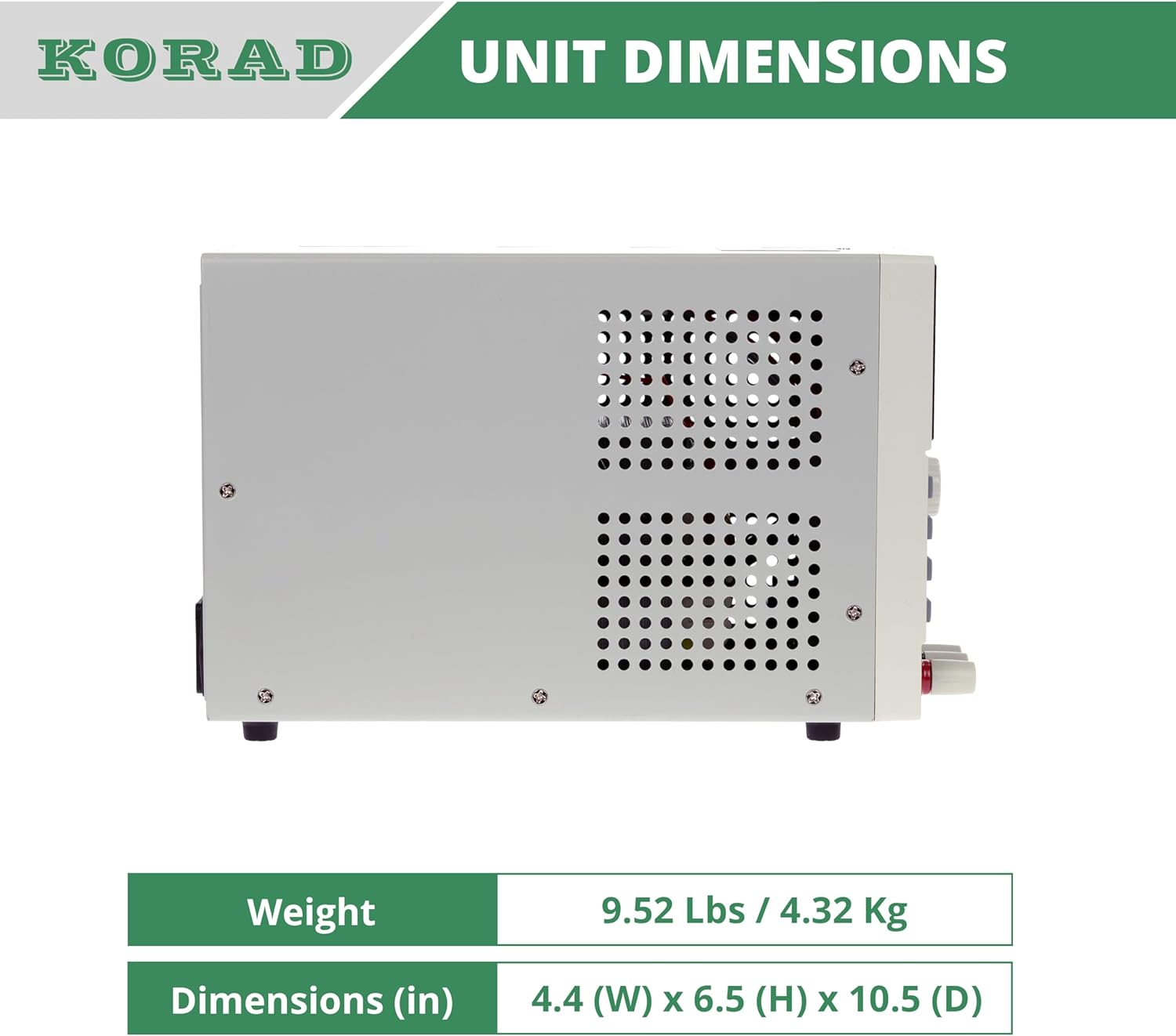
איור 11.2: צַד view of the KORAD KA3005P, illustrating its physical dimensions. The unit measures 4.4 inches (W) x 6.5 inches (H) x 10.5 inches (D).
12. אחריות ותמיכה
KORAD products are manufactured to high quality standards. For warranty information and technical support, please refer to the documentation included with your purchase or visit the official KORAD webאֲתַר.
- אַחֲרָיוּת: אנא שמור את הוכחת הרכישה שלך לצורך תביעות אחריות. תנאי האחריות עשויים להשתנות בהתאם לאזור.
- תמיכה טכנית: For technical assistance, troubleshooting beyond this manual, or service inquiries, please contact KORAD customer support through their official channels.
- משאבים מקוונים: Check the KORAD website for updated manuals, software, and FAQs.


