1. הקדמה
This manual provides comprehensive instructions for the setup, operation, and maintenance of your Geemarc CL100 Amplified Big Button Corded Phone. Please read this manual carefully to ensure proper use and to maximize the benefits of your new telephone.
The Geemarc CL100 is designed for ease of use, featuring large buttons, adjustable amplification, and visual indicators, making it suitable for individuals with hearing or visual impairments. This telephone is line-powered and does not require an external power source.
הערה חשובה: This telephone does not include a built-in answering machine, speakerphone, caller display, talking caller ID, talking keypad, or voice assist functionality.
2. המוצר נגמרview
2.1 תכולת החבילה
- Geemarc CL100 Corded Telephone Base
- שְׁפוֹפֶרֶת טֵלֵפוֹן
- כבל שפופרת מפותל
- כבל קו טלפון
- מדריך למשתמש (מסמך זה)
2.2 Telephone Layout
Familiarize yourself with the key components and controls of your Geemarc CL100 phone.

איור 1: מלמעלה למטה view of the Geemarc CL100 phone, illustrating the large numeric keypad, function buttons, and memory slots.
- מכשיר: For speaking and listening during calls.
- לוח מקשים נומרי: Large, easy-to-read buttons for dialing numbers.
- P1, P2, P3 Buttons: Priority memory buttons for frequently called numbers.
- M1-M9 Buttons: One-touch memory buttons for storing additional numbers.
- לחצן חיוג חוזר: מחייג את המספר האחרון שחויג.
- כפתור הבזק: Used for network services (e.g., call waiting).
- לחצן חנות: Used for programming memory numbers.
- כפתור השתק: משתיק זמנית את המיקרופון במהלך שיחה.
- Tone Control Switch: Adjusts the audio tone for clearer conversations.
- מתג בקרת עוצמת הקול: Adjusts the receiving volume during a call.
- Visual Ringer Indicator: Flashes when an incoming call is received.
- Memory Index Card: Pull-out card for noting stored memory numbers.

איור 2: צַד view of the phone, illustrating the ringer ON/OFF switch and the telephone line connection port.
3. התקנה
3.1 Connecting the Telephone
- חבר את השפופרת: Plug one end of the coiled handset cord into the handset and the other end into the handset jack on the side of the telephone base.
- חבר את קו הטלפון: Plug one end of the telephone line cord into the jack labeled with a telephone icon on the back or side of the phone base. Plug the other end into your wall telephone jack.
- מקור כוח: The Geemarc CL100 is powered by the telephone line and does not require an external power adapter.
- מתג צלצול: Ensure the ringer switch (located on the side) is set to "Low" or "High" for audible ringing.
3.2 בדיקות ראשוניות
- הרם את השפופרת והאזן לצליל חיוג. אם לא נשמע צליל חיוג, בדוק את כל החיבורים.
- Make a test call to ensure proper functionality.
4. הוראות הפעלה
4.1 ביצוע שיחה
- הרם את המכשיר.
- המתן לצליל החיוג.
- Dial the required number using the numeric keypad.
- Upon completion of the call, carefully replace the handset in the cradle to disconnect.
4.2 מענה לשיחה
When an incoming call is received, the phone will ring and the visual indicator will flash.
- הרם את השפופרת כדי לענות לשיחה.
- Upon completion of the call, carefully replace the handset in the cradle.
4.3 חיוג חוזר למספר האחרון
- הרם את המכשיר.
- המתן לצליל החיוג.
- הקש על חיוג חוזר button. The previously dialed number will be automatically redialed.
- Note: This function does not apply to numbers dialed from memory buttons.
4.4 פונקציית השתקה
The Mute button allows you to speak privately without your caller overhearing.
- לחץ על המקש במהלך שיחה לְהַשְׁתִיק button. You will still hear the caller, but they will not hear you.
- הקש על לְהַשְׁתִיק button again to resume normal conversation.
4.5 Storing Telephone Numbers (Memory Dialing)
Your telephone can store 12 direct memory numbers: 3 priority numbers (P1, P2, P3) and 9 standard memory numbers (M1-M9). Priority memories can store up to 24 digits, and M1-M9 can store up to 32 digits.
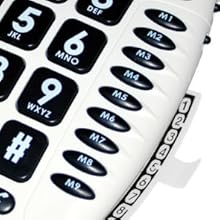
איור 3: Detail of the memory buttons (M1-M9) and the integrated memory index card.
- הרם את המכשיר.
- הקש על חנות לַחְצָן.
- חייג את מספר הטלפון שברצונך לשמור.
- הקש על חנות כפתור שוב.
- Press the desired memory button (P1, P2, P3, or M1-M9) where you want to save the number.
- החלף את השפופרת.
- Note: Use the index card located under the base to record your stored numbers for easy reference. Stored memories are protected even if the phone line is unplugged.
4.6 Dialing Stored Numbers
- הרם את המכשיר.
- המתן לצליל החיוג.
- Press the appropriate memory button (P1, P2, P3, or M1-M9). The stored number will be dialed automatically.
4.7 Recall (R), * & # Buttons
These buttons are used in conjunction with new services provided on digital exchanges. For specific details on their use, please contact your network operator.
4.8 תאימות למכשירי שמיעה
If you are using this telephone with a hearing aid, set your hearing aid to the "T" (Telecoil) setting for optimal audio quality.
5. תחזוקה
- ניקוי: נקו את הטלפון בעזרת מטלית רכהamp בַּד. אין להשתמש בחומרי ניקוי שוחקים או ממסים.
- אִחסוּן: יש לאחסן את הטלפון במקום קריר ויבש, הרחק מאור שמש ישיר וטמפרטורות קיצוניות.
- הימנע מנוזלים: Do not expose the telephone to water or other liquids.
- טיפול בחבל: Ensure the handset and line cords are not tangled or pinched to prevent damage.
6. פתרון תקלות
| בְּעָיָה | סיבה אפשרית | פִּתָרוֹן |
|---|---|---|
| אין צליל חיוג | כבל קו הטלפון אינו מחובר כראוי. | Check that both ends of the telephone line cord are securely plugged in. |
| לא שומע את המתקשר / המתקשר לא שומע אותי | Volume settings are too low or Mute is active. | Adjust the Volume control. Ensure the Mute button is not pressed. |
| הטלפון לא מצלצל | Ringer switch is set to "Off". | Set the ringer switch (on the side) to "Low" or "High". |
| Stored memory numbers are lost | This phone protects stored memories even if the phone line is unplugged. If numbers are lost, they may not have been stored correctly. | Re-store the numbers following the instructions in Section 4.5. |
| Difficulty dialing quickly | Some older phone systems may require a slower dialing pace. | Try dialing at a slightly slower pace. Consider using the memory dial function for frequently called numbers. |
7. מפרטים
- דֶגֶם: ג'ימרק CL100
- סוּג: טלפון מקושר
- Ampליפיקציה: Up to 30 dB receiving volume
- עוצמת הצלצול: Adjustable up to 85 dB
- זֵכֶר: 3 Priority (P1-P3), 9 One-touch (M1-M9)
- מקור כוח: Line-powered (no external adapter required)
- תואם מכשיר שמיעה: Yes (T-coil setting)
- מידות: בערך 7.5 x 8 x 3 אינץ' (19 x 20.3 x 7.6 ס"מ)
- מִשׁקָל: בערך 2.25 פאונד (1.02 ק"ג)
- צֶבַע: לָבָן
8. אחריות ותמיכה
8.1 מידע אחריות
For information regarding the warranty period and terms for your Geemarc CL100 telephone, please refer to the warranty card included with your purchase or visit the official Geemarc webאתר. שמור את הוכחת הרכישה שלך לצורך תביעות אחריות.
8.2 תמיכת לקוחות
If you encounter any issues not covered in the troubleshooting section or require further assistance, please contact Geemarc customer support. Contact details can typically be found on the Geemarc webבאתר או על אריזת המוצר.
למשאבים מקוונים, בקרו ב: www.geemarc.com


