1. הקדמה
The Altronix PD4 is a power distribution module designed to efficiently manage power delivery. It converts a single AC or DC input into four (4) individually fuse-protected outputs. This module is suitable for various low-voltage applications requiring reliable power distribution and circuit protection.
2. מידע בטיחות
Please read and understand all instructions before installing or operating the Altronix PD4. Failure to follow these instructions may result in injury or damage to the device.
- סכנה חשמלית: Disconnect all power sources before installation or servicing.
- איחוי נכון: Always use fuses of the specified type and rating. Never bypass a fuse.
- אוורור: ודא אוורור נאות סביב המודול כדי למנוע התחממות יתר.
- טכנאי מוסמך: ההתקנה והטיפול צריכים להתבצע על ידי צוות מוסמך בלבד.
- שימוש פנימי: This device is intended for indoor use in a controlled environment.
3. תכונות
- Four (4) individually fuse-protected outputs.
- Supports 12-24VDC input voltage.
- Total current output up to 10A.
- LED indicators for power status.
- עיצוב קומפקטי לשילוב קל.
4. מפרטים
| מִפרָט | עֵרֶך |
|---|---|
| קלט כרךtage | 12-24VDC |
| זרם פלט כולל | 10A (מקסימום) |
| מספר יציאות | 4 (individually fused) |
| מידות המוצר | 3.4 x 1.75 x 5.9 אינץ' |
| משקל פריט | 1 פאונד |
| מספר דגם | PD4 |
| יַצרָן | תאגיד אלטרוניקס |
5. התקנה והתקנה
Before proceeding, ensure all power is disconnected from the input source.
5.1. הַרכָּבָה
The PD4 module can be mounted using screws through the designated mounting holes on the board. Choose a secure, dry location with adequate ventilation.
5.2. חיבורי חיווט
- כוח קלט: Connect the 12-24VDC power source to the input terminals labeled 'MAIN FUSE' or similar input terminals. Observe correct polarity (positive to positive, negative to negative).
- התקני פלט: Connect your devices requiring power to the four (4) output terminal pairs (1P/1N, 2P/2N, 3P/3N, 4P/4N). Each output is individually protected by a fuse. Ensure the total current draw for all connected devices does not exceed 10A.
- התקנת נתיך: Insert the appropriate fuses into the designated fuse holders for each output. Refer to the markings on the board for recommended fuse ratings.
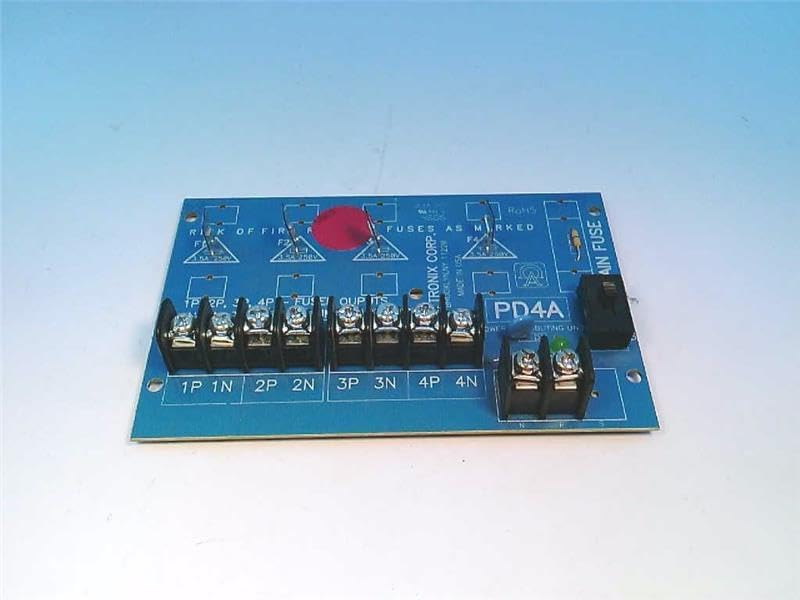
Figure 1: Altronix PD4 Power Distribution Module board, top view. Shows the main fuse holder, four sets of output terminals, and fuse locations for each output.

Figure 2: Altronix PD4 Power Distribution Module board, angled view. Highlights the terminal blocks for input and output connections, along with the fuse holders.
5.3. הפעל
Once all connections are secure and fuses are in place, apply power to the input terminals. The power indicator LED (if present) on the board should illuminate, indicating proper power input.
6. הוראות הפעלה
The Altronix PD4 operates automatically once power is supplied. It distributes the input power to the four connected output devices, with each output protected by its respective fuse. There are no user-adjustable settings or controls on the module itself beyond the initial wiring and fuse selection.
- ודא את נפח הקלטtage is within the specified 12-24VDC range.
- Monitor the power indicator LED to confirm the module is receiving power.
- If an output device is not receiving power, check its corresponding fuse.
7. תחזוקה
The Altronix PD4 requires minimal maintenance. Regular checks can help ensure continued reliable operation.
- בדיקת נתיכים: Periodically inspect fuses for any signs of damage or blowing. Replace blown fuses with the correct type and rating.
- חיבורי מסוף: Ensure all terminal connections remain tight and secure. Loose connections can lead to intermittent power or overheating.
- ניקוי: יש לשמור על המודול נקי מאבק ופסולת. יש להשתמש במטלית רכה ויבשה לניקוי. אין להשתמש בחומרי ניקוי נוזליים.
- בדיקה סביבתית: ודא שסביבת ההפעלה נשארת בטווחי הטמפרטורה והלחות שצוינו.
8. פתרון תקלות
| בְּעָיָה | סיבה אפשרית | פִּתָרוֹן |
|---|---|---|
| No power to any output, power LED off. | No input power, incorrect input voltage, main fuse blown. | Check input power source. Verify input voltage. Replace main fuse if blown (ensure correct rating). |
| No power to a specific output, other outputs working. | Blown fuse for that specific output, faulty wiring to the device. | Identify and replace the blown output fuse. Check wiring to the affected device. |
| נתיכים נשרףים לעתים קרובות. | Overcurrent draw from connected device, short circuit in wiring or device. | Reduce load on the output. Inspect wiring and connected device for short circuits. Ensure correct fuse rating. |
| המודול מרגיש חם מדי. | Overload, insufficient ventilation, loose connections. | Reduce total load. Ensure adequate airflow. Tighten all terminal connections. |
9. אחריות ותמיכה
For warranty information and technical support, please refer to the official Altronix website or contact Altronix customer service directly. Keep your purchase receipt for warranty claims.
תאגיד אלטרוניקס
Webאֲתַר: www.altronix.com
Contact information can typically be found on their webאֲתַר.


