1. הקדמה
This manual provides comprehensive instructions for the setup, operation, and maintenance of your Master Lock MLK5400D Locking Combination 5 Key Steel Box. Please read these instructions carefully before using the product to ensure proper function and security.

איור 1: חזית view of the Master Lock MLK5400D Key Box, showing the combination dials and shackle.
2. מידע בטיחות
הקפידו תמיד על אמצעי הזהירות הבאים:
- Do not attempt to force the lock mechanism. This can cause damage and void the warranty.
- Keep the key box away from extreme temperatures and harsh chemicals, which may affect its material integrity and functionality.
- Ensure the combination is set to a memorable sequence that is not easily guessed.
- Regularly check the shackle and body for any signs of wear or damage. Discontinue use if significant damage is observed.
3. תכולת החבילה
Your Master Lock MLK5400D package should contain the following item:
- One (1) Master Lock MLK5400D Locking Combination 5 Key Steel Box
4. הגדרת השילוב שלך
The Master Lock MLK5400D comes with a preset combination (usually 0-0-0-0). Follow these steps to set your personal combination:
- Open the Key Box: Enter the current combination (factory set to 0-0-0-0) and pull down the shackle to open the key box.
- אתר את ידית האיפוס: Inside the key compartment, locate the reset lever. It is typically on the back wall or side.
- Move the Reset Lever: Using a small, pointed object (like a pen tip), slide the reset lever from position A to position B (or from UP to DOWN, depending on the model).
- הגדר שילוב חדש: With the reset lever in the reset position, rotate the dials to your desired new combination. Choose a combination that is easy for you to remember but difficult for others to guess.
- ידית איפוס חזרה: Slide the reset lever back to its original position (position A or UP). This locks in your new combination.
- בדיקת שילוב חדש: Close the key box and scramble the dials. Then, enter your new combination and open the key box to verify it works correctly.
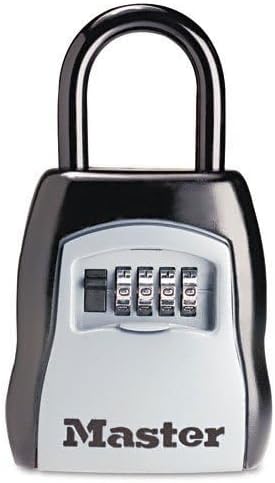
איור 2: צד view of the Master Lock MLK5400D Key Box, illustrating the shackle mechanism.
5. Operating the Key Box
To use your Master Lock MLK5400D Key Box:
- Open the Key Box: Rotate the combination dials to your set combination. Pull down the shackle to open the key box.
- Insert/Remove Keys: Place the keys you wish to store inside the compartment. Ensure they fit without obstructing the closing mechanism.
- סגור ומאובטח: Close the shackle firmly until it clicks into place.
- חוגות ערבוב: After closing, scramble the combination dials to secure the key box and prevent unauthorized access.

Figure 3: The Master Lock MLK5400D Key Box securely mounted on a door, demonstrating its typical application.
6. תחזוקה
Proper maintenance ensures the longevity and reliable operation of your key box:
- ניקוי: נגב את החלק החיצוני עם רך, דamp מטלית. הימנעו מחומרי ניקוי שוחקים או ממסים.
- סִיכָה: Periodically apply a small amount of silicone-based lubricant to the shackle and internal moving parts to ensure smooth operation, especially in outdoor environments.
- בְּדִיקָה: Regularly inspect the key box for any signs of wear, corrosion, or damage. Address any issues promptly.
7. פתרון תקלות
If you encounter issues with your Master Lock MLK5400D, consider the following:
- Key Box Will Not Open:
- Ensure you are entering the correct combination. Double-check each digit.
- Make sure the dials are aligned precisely with the indicator marks.
- Apply slight pressure to the shackle while entering the combination, then release.
- חוגות קשות:
- Clean the dials and apply a small amount of silicone lubricant.
- Ensure no debris is lodged between the dials.
- Forgot Combination:
- Unfortunately, if the combination is forgotten and the key box is locked, there is no master key or backdoor to open it. You may need to contact Master Lock support for options, which might involve professional assistance or replacement.
8. מפרטים
| תכונה | פְּרָט |
|---|---|
| מותג | מנעול מאסטר |
| מספר דגם | MLK5400D (Part Number: 1995234) |
| סוג מנעול | מנעול קומבינציה |
| חוֹמֶר | סגסוגת פלדה |
| צֶבַע | Black, Black/Silver |
| מידות פריט (L x W x H) | 8.81 x 5.31 x 2.06 אינץ' |
| משקל פריט | 2.34 פאונד |
| תכונה מיוחדת | Key Lock (for storing keys) |
9. אחריות ותמיכה
Master Lock products are manufactured to high-quality standards. For specific warranty information or technical support, please refer to the official Master Lock webאתר או צרו קשר ישירות עם שירות הלקוחות שלהם.
Master Lock Official Webאֲתַר: www.masterlock.com


