מָבוֹא
This manual provides instructions for the setup, operation, and maintenance of your Logitech Wingman Force Joystick, model 963155-0403. This device is designed to enhance your PC gaming experience with force feedback technology and programmable controls.
תוכן החבילה
ודא שהחבילה שלך מכילה את הפריטים הבאים:
- Logitech Wingman Force Joystick
- מתאם מתח
- USB Cable (integrated or separate)
- Software CD (if applicable, for WingMan Software)
- מדריך למשתמש (מסמך זה)
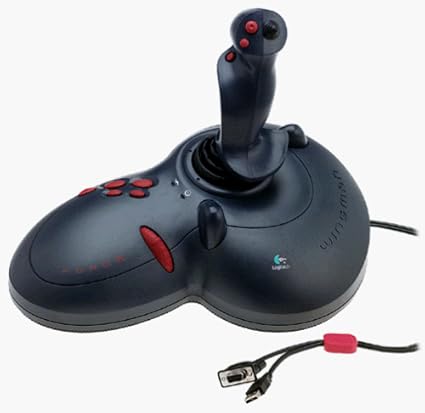
Figure 1: The Logitech Wingman Force Joystick packaging, showing the joystick and its features.
הגדרה
- חבר חשמל: Plug the power adapter into the joystick and then into a standard electrical outlet.
- התחבר למחשב: Connect the joystick's USB cable to an available USB port on your computer. The joystick also supports serial interfaces.
- להתקין תוכנה: Insert the WingMan Software CD (if provided) into your computer's CD-ROM drive and follow the on-screen instructions to install the drivers and WingMan Software. If no CD is provided, drivers may be automatically installed by your operating system or available for download from the Logitech support webאֲתַר.
- דרישות מערכת: Ensure your computer runs a compatible Windows operating system.
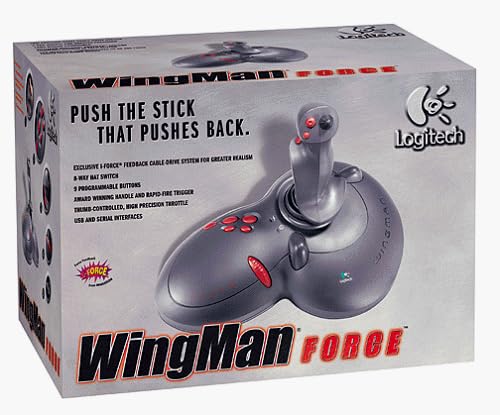
Figure 2: The Logitech Wingman Force Joystick, illustrating its ergonomic design and button layout.
הוראות הפעלה
השליטה נגמרהview
- Joystick Handle: Provides precise control for in-game movement.
- 9 לחצנים ניתנים לתכנות: Customize these buttons using the WingMan Software for various in-game actions.
- 8-Way Hat Switch: Located on top of the joystick, this switch allows for quick camera views or directional commands.
- Thumb-Controlled Throttle: Adjust speed or thrust with the integrated throttle control.
Force Feedback Technology
The Wingman Force Joystick utilizes Logitech's exclusive I-Force force feedback technology with a cable-drive system. This system provides realistic tactile feedback, such as vibrations from impacts, recoil from weapons, and resistance during maneuvers, enhancing immersion in compatible games.
Using WingMan Software
The WingMan Software allows you to:
- Program the 9 buttons for specific game functions.
- צור ושמור מספר רב של מקצועניםfiles עבור משחקים שונים.
- Adjust force feedback intensity settings.
- Calibrate the joystick for optimal performance.
Refer to the WingMan Software's help documentation for detailed instructions on customization and profile הַנהָלָה.
תַחזוּקָה
To ensure the longevity and optimal performance of your joystick:
- ניקוי: Use a soft, dry cloth to wipe the surface of the joystick. Avoid using abrasive cleaners or solvents.
- אִחסוּן: Store the joystick in a clean, dry environment away from extreme temperatures and direct sunlight.
- טיפול בכבלים: Avoid bending or crimping the cables excessively.
פתרון בעיות
- Problem: Joystick not recognized by computer.
- פִּתָרוֹן:
- ודא שכבל ה-USB מחובר היטב הן לג'ויסטיק והן למחשב.
- נסה לחבר ליציאת USB אחרת.
- Verify that the power adapter is properly connected and the joystick is receiving power.
- Reinstall the WingMan Software drivers.
- Problem: Inconsistent or absent force feedback.
- פִּתָרוֹן:
- Check the force feedback settings within the WingMan Software and ensure they are set to an appropriate level.
- Ensure the game you are playing supports force feedback and that it is enabled in the game's settings.
- Restart your computer and the game.
- ודא שכל החיבורים מאובטחים.
- Problem: Buttons or controls are unresponsive.
- פִּתָרוֹן:
- Calibrate the joystick using the WingMan Software.
- Ensure the joystick drivers are up to date.
- Test the joystick in a different game or application to determine if the issue is game-specific.
מפרטים
| תכונה | פְּרָט |
|---|---|
| מספר דגם | 963155-0403 |
| מותג | Logitech |
| סוג בקר | מַקֵל נוֹעַם |
| טכנולוגיית קישוריות | USB, טורי |
| מכשירים תואמים | מחשבי Windows |
| מידות המוצר | 13.5 x 9.63 x 9.25 אינץ' |
| משקל פריט | 4.14 פאונד |
| כוח משוב | I-Force feedback cable-drive system |
| כפתורים | 9 כפתורים הניתנים לתכנות |
| מתג כובע | מתג כובע 8 כיוונים |
| מַצעֶרֶת | Thumb-controlled, high precision throttle |
אחריות ותמיכה
For warranty information and technical support, please refer to the documentation included with your product or visit the official Logitech support webאתר. בדרך כלל ניתן למצוא שם מנהלי התקנים, שאלות נפוצות ופרטי קשר של שירות לקוחות.
תמיכה של Logitech Webאֲתַר: www.logitech.com/support


