
מדריך למשתמש של JOLIKE M4 Music Player
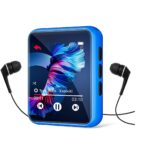
מדריך למשתמש בנגן המוזיקה JOLIKE M4 תודה על הרכישהasinנגן המוזיקה JOLIKE שלנו. אנא קרא את המדריך בעיון לפני השימוש במכשיר. אם יש לך שאלות, אנא צור קשר...


JOLIKE manufactures portable audio electronics, specializing in MP3 players, digital voice recorders, and Bluetooth music devices for active lifestyles.
JOLIKE is a consumer electronics brand dedicated to providing portable audio solutions. The company's primary product lineup includes high-fidelity MP3 and MP4 players, digital voice recorders, and related accessories. JOLIKE devices are known for their compact designs, long battery life, and support for lossless audio formats, making them popular among sports enthusiasts, students, and music lovers who prefer dedicated devices over smartphones for audio playback.
In addition to standard music playback, many JOLIKE players feature Bluetooth connectivity, FM radio tuners, e-book reading capabilities, and voice recording functions. The brand focuses on delivering user-friendly interfaces, often utilizing touch screens and physical buttons for intuitive navigation. JOLIKE continues to update its firmware and product designs to support modern audio needs, including audiobook organization and video playback support.
מדריכים אחרונים מ manuals+ נבחר עבור המותג הזה.




שאלות נפוצות בנוגע למדריכים, רישום ותמיכה עבור מותג זה.
This may be due to insufficient power supply or a bad cable connection. Try using the original USB cable provided, switch to a different USB port (especially a rear port on desktop computers), or update your USB drivers.
If the device freezes or does not respond, you can reset it by inserting a thin needle or paperclip into the reset hole for approximately 2 seconds.
No, JOLIKE MP3 players typically use Bluetooth to send audio signals, meaning they pair with Bluetooth headphones or speakers, but cannot pair with smartphones or computers for data transfer.
The most reliable method is to create folders on your computer, organize your music files into them, and then transfer the entire folders to the device. You can then access them via the 'Folder' view על השחקן.
Most JOLIKE players support AMV or AVI video formats. You may need to use a video converter tool to convert standard video files into the correct resolution and format before transferring them to the device.