
מָבוֹא
The Moondrop x Wuthering Waves U.C.T.S. is an Ultra HiFi Sound Open Wireless System (OWS) headset designed for gaming and high-fidelity audio. It features hybrid dual drivers, AI noise cancelling, LHDC-V transmission, and LE Audio support. This manual provides essential information for the proper use and care of your U.C.T.S. headset.
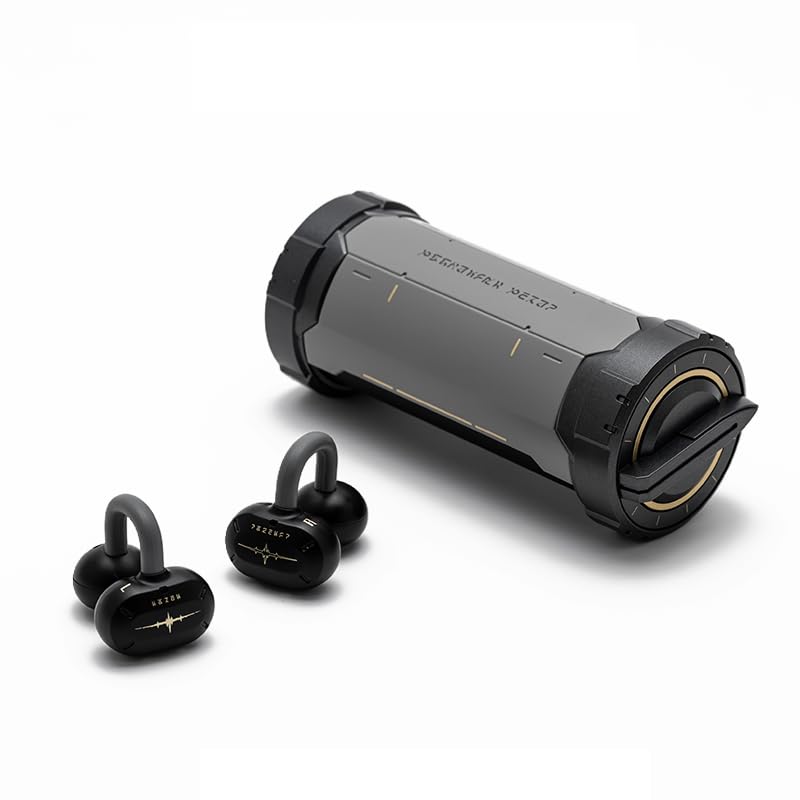
Image: The Moondrop x Wuthering Waves U.C.T.S. gaming headset with its cylindrical charging case.
מה יש בקופסה
ודא שכל הפריטים נמצאים בחבילה:
- אוזניות (ימין ושמאל)
- נרתיק טעינה
- כבל טעינה USB-C (לא רשום במפורש אך סטנדרטי)
- יָדָנִי
- הוראת לבישה
- Guidance Card
- כרטיס שירות
- Collaboration Badge x2
- Laser Ticket x2
- שרוך x1

Image: The complete package contents, including the headset, charging case, and various collaboration merchandise.
הגדרה
1. טעינה ראשונית
Before first use, fully charge the earbuds and charging case. Connect the USB-C cable to the charging port on the case and to a power source. The earbuds will charge automatically when placed inside the case.
- Earbud Charging Time: Approximately 1.7 Hours
- Charging Case Charging Time: Approximately 2 Hours

Image: The charging case opened, revealing the earbuds securely placed inside for charging.
2. זיווג Bluetooth
- ודאו שהאוזניות טעונות ומונחות במארז הטעינה.
- פתחו את מארז הטעינה. האוזניות ייכנסו למצב צימוד אוטומטי.
- במכשיר שלך (סמארטפון, טאבלט, מחשב), הפעל את Bluetooth וחפש מכשירים זמינים.
- Select "Moondrop U.C.T.S." from the list of found devices to connect.
- For LC3 codec, connect to "Moondrop U.C.T.S.-LEA" after activating it in the app.
3. Moondrop App Installation
For full customization and advanced features, download the Moondrop App. The app allows you to adjust sound settings, customize touch controls, and manage dual-device connectivity.
- Android users: Download from moondroplab.com or Google Play Store.
- iOS users: Download from the App Store.

Image: A smartphone displaying the Moondrop U.C.T.S. application interface, showing earbud status and settings.
הוראות הפעלה
לובש את האוזניות
The U.C.T.S. earbuds feature a C-shaped bridge design for comfortable and secure open-ear placement. Ensure the earbuds are positioned correctly over your ears for optimal sound and stability.

Image: A user wearing the Moondrop U.C.T.S. earbuds, demonstrating their open-ear fit.
מגע בפקדים
The earbuds feature touch-sensitive areas for control. Default controls include:
- הקשה כפולה: הפעל/השהה אודיו.
- Triple Tap (Left): שיר קודם.
- לחיצה משולשת (ימינה): שיר הבא.
- ארבע נקישות: Switch between Low Latency Game Mode and High-Fidelity Music Mode.
Customization of touch controls is available through the Moondrop App.
מצבי סאונד
- מצב משחק עם השהייה נמוכה: Provides a 55ms low-latency experience, suitable for gaming. Activate by four taps on the earbud.
- High-Fidelity Music Mode: Standard audio mode for music playback.
קישוריות למכשיר כפול
The U.C.T.S. supports simultaneous connection to two devices. Switch between connected devices using the Moondrop App for a seamless experience.
AI Noise Cancelling (ENC)
Equipped with a built-in NPU core and an AI ENC algorithm, the headset effectively reduces environmental noise during calls, enhancing vocal clarity.
Dipole Directional Sound Transmission
This technology minimizes sound leakage by directing sound towards the ear canal, reducing up to 97% of sound leakage at 15cm from the ear.
תַחזוּקָה
טְעִינָה
Recharge the earbuds by placing them in the charging case. Recharge the case using a USB-C cable. Regular charging ensures optimal battery performance.
- Earbud Battery Life: Approximately 9 hours (AAC)
- Charging Case Battery Life: Approximately 21.5 Hours (AAC)
- Total Playback Time: 9 + 21.5 hours
- Standby Time: 50 + 120 hours
ניקוי
Gently wipe the earbuds and charging case with a soft, dry, lint-free cloth. Avoid using abrasive materials, alcohol, or chemical cleaners. Do not immerse the device in water.
פתרון בעיות
בעיות קישוריות
- אוזניות לא מתחברות: Ensure earbuds are charged. Place them in the case, close, then open to re-enter pairing mode. Check your device's Bluetooth settings.
- האפליקציה לא מתחברת: If the Moondrop App struggles to connect, try restarting the app or your device. Ensure Bluetooth is active and the earbuds are connected to your phone.
- חיבור לא יציב: Ensure you are within the 10-meter working distance (or up to 40 meters in open environments). Avoid physical obstructions between the earbuds and your device.
בעיות סאונד
- אין קול: Check device volume and earbud battery level. Ensure earbuds are properly connected via Bluetooth.
- ווליום נמוך: Adjust volume on both your device and through the app.
- דליפת קול: Ensure earbuds are correctly positioned on your ears.
מפרטים
- סוג מוצר:
- Ultra HiFi Sound OWS
- דֶגֶם:
- MD-OWS-014 (WUTHERING WAVES xMOONDROP U.C.T.S.)
- גרסת בלוטות':
- בלוטות' 6.0
- Bluetooth Profiles:
- A2DP/AVRCP/HFP/HSP
- Codec אודיו:
- SBC/AAC/LC3/LHDC-V
- יציאת טעינה:
- USB-C
- מרחק עבודה:
- 10 Meters (Barrier-free Environment)
- קיבולת אוזניות:
- 3.7V/40mAh
- קיבולת סוללה לטעינה:
- 3.7V/300mAh
- מיקום אוזניים:
- אוזן פתוחה
- גורם צורה:
- אלחוטי אמיתי
- טכנולוגיית קישוריות:
- אַלחוּט
אַחֲרָיוּת
מוצר זה מגיע עם א 1 שנות אחריות מתאריך הרכישה. אנא שמור את הוכחת הרכישה שלך לצורך תביעות אחריות. האחריות מכסה פגמי ייצור אך אינה מכסה נזק שנגרם כתוצאה משימוש לרעה, תאונות או שינויים לא מורשים.
תְמִיכָה
For further assistance, technical support, or warranty inquiries, please refer to the service card included in your package or visit the official Moondrop store: