
1. הקדמה
The QCY MeloBuds A30 are advanced wireless earbuds designed to deliver a superior audio experience. They feature active noise cancellation, high-resolution audio support, and a robust wireless connection, making them suitable for various listening environments.
2. המוצר נגמרview
Familiarize yourself with the components of your QCY MeloBuds A30 earbuds.

Image: QCY MeloBuds A30 earbuds and charging case.
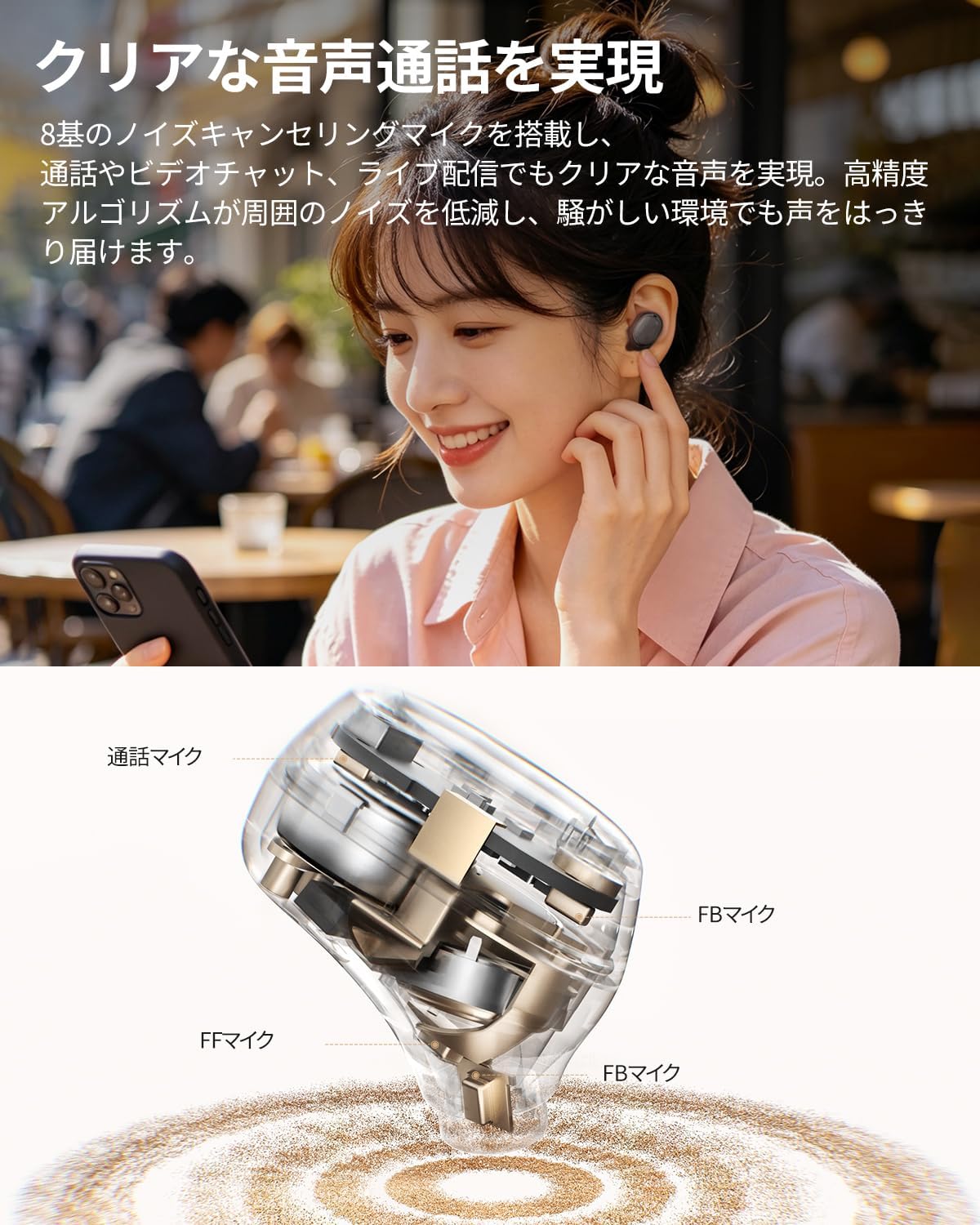
תמונה: מפורט פנימי view of a QCY MeloBuds A30 earbud, highlighting microphone components.
3. התקנה
3.1 צימוד ראשוני
- פתחו את מארז הטעינה. האוזניות ייכנסו אוטומטית למצב צימוד.
- במכשיר שלך (סמארטפון, טאבלט, מחשב), הפעל את Bluetooth.
- חפש "QCY MeloBuds A30" in the list of available Bluetooth devices and select it to connect.
- לאחר החיבור, יישמע הנחיה קולית שתאשר את ההתאמה המוצלחת.
3.2 חיבור רב-מכשירים
The MeloBuds A30 supports simultaneous connection with up to 3 devices. To switch between connected devices, simply play audio on the desired device. The earbuds will automatically switch to the active audio source.

Image: Man playing game with phone and QCY MeloBuds A30 earbuds, illustrating multi-device connection.
3.3 QCY App Installation
For full customization and advanced features, download the dedicated QCY app from your device's app store. The app allows for EQ adjustments, firmware updates, and personalized control settings.

Image: Smartphone displaying the QCY app interface for MeloBuds A30, showing various customization options and settings.
4. הוראות הפעלה
4.1 פקדי מגע
The MeloBuds A30 feature intuitive touch controls on each earbud. You can customize these controls via the QCY app.
- הפעל/השהה: הקש פעמיים על כל אחת מהאוזניות.
- הרצועה הבאה: הקש שלוש פעמים על האוזניה הימנית.
- רצועה קודמת: הקש שלוש פעמים על האוזניה השמאלית.
- מענה/סיום שיחה: הקש פעמיים על כל אחת מהאוזניות.
- דחה שיחה: לחץ והחזק את אחת האוזניות למשך 1.5 שניות.
- עוזר קולי: הקש שלוש פעמים על האוזניה השמאלית.
- ANC Mode Cycle: Press and hold the right earbud for 1.5 seconds to cycle through ANC ON → ANC OFF → Transparency Mode.

Image: Diagram illustrating touch controls for QCY MeloBuds A30 earbuds.
4.2 ביטול רעש פעיל (ANC)
The MeloBuds A30 feature up to 60dB hybrid ANC and 5.5kHz wideband noise cancellation. Adaptive ANC automatically adjusts to your environment and wearing conditions. AI scene-adaptive ANC and wind noise-adaptive ANC provide optimal noise cancellation, ensuring a clear listening experience even in windy conditions.

Image: Person wearing QCY MeloBuds A30 earbuds, demonstrating active noise cancellation.

Image: Diagram illustrating the effect of Active Noise Cancellation (ANC) on and off with sound waves around a person wearing QCY MeloBuds A30.
4.3 פונקציות שיחה
Equipped with 8 noise-cancelling microphones and a high-precision algorithm, the MeloBuds A30 effectively reduce ambient noise during calls, video chats, and live streaming. This ensures your voice is clearly transmitted even in noisy environments.

Image: Woman talking on phone while wearing QCY MeloBuds A30 earbuds in an outdoor setting.
5. טעינה
The earbuds provide approximately 11 hours of continuous playback on a single charge (ANC off), and up to 50 hours with the charging case. With ANC on, the earbuds offer about 6 hours of playback, extending to 27 hours with the charging case.

Image: QCY MeloBuds A30 earbuds and charging case, illustrating battery life with and without ANC.
כדי לטעון את האוזניות, החזירו אותן למארז הטעינה. כדי לטעון את המארז, חברו אותו למקור חשמל באמצעות כבל ה-USB-C המצורף.
6. תחזוקה
- נקו באופן קבוע את האוזניות ואת נרתיק הטעינה בעזרת מטלית רכה ויבשה.
- הימנע משימוש בחומרים שוחקים או כימיקלים קשים.
- Ensure the charging contacts on both the earbuds and case are clean and dry to prevent charging issues.
- אחסנו את האוזניות בנרתיק הטעינה שלהן כאשר אינן בשימוש כדי להגן עליהן מפני אבק ונזק.
6.1 עמידות במים
The MeloBuds A30 are IPX5 water resistant, protecting them from sweat and water splashes. This makes them suitable for workouts and commuting. However, they are not designed for submersion in water.

Image: QCY MeloBuds A30 earbuds with water droplets, demonstrating IPX5 water resistance.
7. פתרון תקלות
- אוזניות לא מתחברות: ודאו ששתי האוזניות נמצאות במארז הטעינה, לאחר מכן פתחו את המכסה כדי להפעיל את מצב הצימוד. בדקו את הגדרות ה-Bluetooth של המכשיר ונסו להתחבר מחדש.
- אין צליל מאוזניה אחת: החזירו את שתי האוזניות למארז הטעינה, סגרו את המכסה, המתינו מספר שניות, ולאחר מכן פתחו אותו שוב. פעולה זו לעיתים קרובות מסנכרנת מחדש את האוזניות.
- בעיות טעינה: Clean the charging contacts on both earbuds and the case. Ensure the charging cable is securely connected and the power source is working.
- איכות שיחה ירודה: Ensure the microphones are not obstructed. Try adjusting the earbuds' position in your ears.
- בעיות חיבור לאפליקציה: Ensure Bluetooth is enabled and the earbuds are connected to your device. Restart the QCY app or reinstall it if problems persist.
8. מפרטים
| מותג | QCY |
| שם הדגם | MeloBuds A30 |
| מספר דגם | BH26HT22A |
| צֶבַע | שָׁחוֹר |
| טכנולוגיית קישוריות | אַלחוּט |
| גרסת בלוטות' | 6.0 |
| טווח בלוטות' | 10 מטר |
| בקרת רעש | Active Noise Cancellation, Adaptive Noise Cancellation, Environmental Noise Cancellation |
| Codec אודיו | LDAC, Hi-Res Audio Wireless |
| מִיקרוֹפוֹן | 8-mic system with AI Call Noise Cancelling |
| זמן נגינה (אוזניות) | Approx. 11 hours (ANC off), Approx. 6 hours (ANC on) |
| זמן נגינה כולל (עם כיסוי) | עד 50 שעות (ANC כבוי), עד 27 שעות (ANC דולק) |
| עמידות במים | IPX5 |
| שיטת בקרה | בקרת מגע |
| מכשירים תואמים | Windows/Macbook Air/Pro PCs, iPads, iPhones, Android devices (Galaxy, Huawei, Xiaomi, OPPO, Xperia, Nexus, ASUS, Fujitsu, etc.) |
9. אחריות ותמיכה
QCY products come with a standard manufacturer's warranty. For detailed warranty information, please refer to the warranty card included in your product packaging or visit the official QCY webאֲתַר.
For technical support, troubleshooting assistance, or any product-related inquiries, please contact QCY customer service through their official webאתר או פרטי הקשר המופיעים בתיעוד המוצר שלך.