
1. הקדמה
This manual provides instructions for the proper use, setup, and maintenance of your bonoch AirSentry 16-in-1 Air Quality Monitor. This device is designed to measure various indoor air quality parameters to help you maintain a healthy living environment. Please read this manual thoroughly before operating the device.
2. מידע בטיחות
- אין לחשוף את המכשיר לטמפרטורות קיצוניות, ללחות או לאור שמש ישיר.
- Avoid touching the external sensors or air intake holes to ensure accurate readings.
- Do not expose the device to perfumes, strong odors, or chemical sprays, as this may affect sensor accuracy.
- Use only the provided USB-C cable and charging adapter for optimal performance and to prevent damage.
- הרחק את המכשיר מהישג ידם של ילדים.
- אל תנסה לפרק או לתקן את המכשיר בעצמך. צור קשר עם תמיכת הלקוחות לקבלת סיוע.
3. תכולת החבילה
ודא שכל הפריטים נמצאים בחבילה:
- 1 x bonoch Air Quality Monitor
- 1 x מתאם טעינה
- 1 x כבל USB-C
- מדריך למשתמש אחד (מסמך זה)
4. המוצר נגמרview
The bonoch AirSentry is a comprehensive indoor air quality monitor featuring a 7-inch LED display. It tracks 9 essential air quality parameters and provides 7 customizable AQI alert alarms.
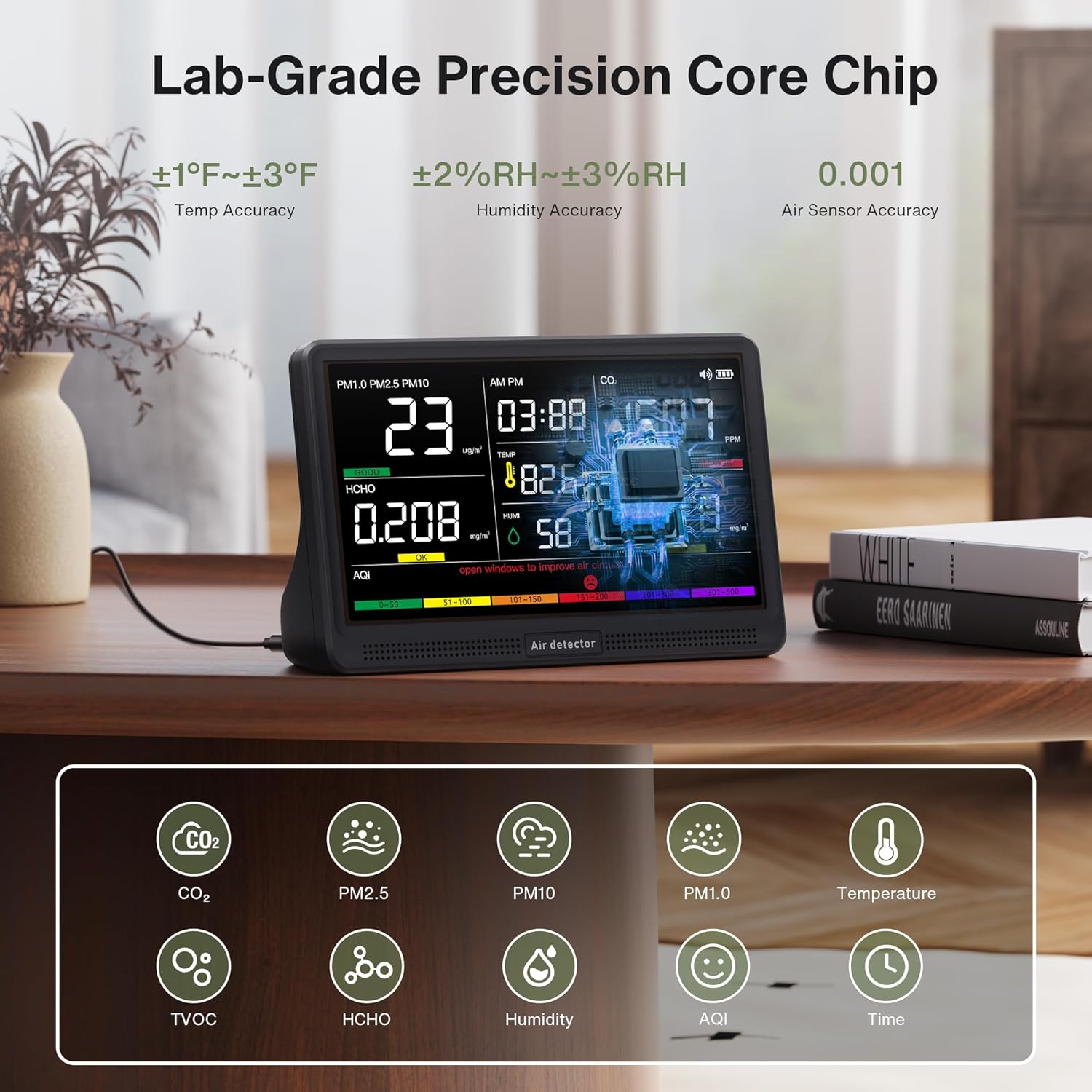
Image: The bonoch AirSentry monitor showing readings for PM1.0, PM2.5, PM10, HCHO, CO2, TVOC, Temperature, Humidity, and AQI on its 7-inch display. The image highlights the device's lab-grade precision core chip and various sensor accuracies.
תכונות עיקריות:
- ניטור 16 ב-1: Real-time tracking of CO2, PM2.5, PM1.0, PM10, HCHO (Formaldehyde), TVOC, Temperature, Humidity, and AQI.
- חיישנים בעלי דיוק גבוה: External sensors provide 0.001-level accuracy for precise measurements.
- 7-Inch LED Display: Large, clear display for instant air quality insights with 3-level adjustable brightness.
- AQI Alerts: 7 distinct alarm modes for various pollutants with a mute function.
- עיצוב נייד: Built-in 2500mAh battery offers up to 8 hours of cordless monitoring.

תמונה: פיצוץ view diagram illustrating the AirSentry's external air sensors, core chip, display, and multi-sensor array, emphasizing its lab-grade accuracy and enhanced airflow design.
5. התקנה
5.1 טעינה ראשונית
- Connect the provided USB-C cable to the monitor's charging port.
- Plug the other end of the USB-C cable into the provided charging adapter.
- חבר את המתאם לשקע קיר רגיל.
- A red indicator light will confirm that the device is charging. Charge the device fully before first use for optimal battery life.
5.2 מיקום
Place the monitor in a central location within the area you wish to monitor. Ensure it is not obstructed and has adequate airflow. Avoid placing it near windows, vents, or direct heat sources that could affect readings.
6. הוראות הפעלה
6.1 הפעלה/כיבוי
- להפעלה, לחץ והחזק את כּוֹחַ כפתור עד שהתצוגה תיאר.
- כדי לכבות, לחץ והחזק את המקש כּוֹחַ לחצן עד שהתצוגה תכבה.
6.2 תצוגה נגמרתview
The 7-inch LED display shows real-time readings for all monitored parameters, including CO2, PM2.5, PM1.0, PM10, HCHO, TVOC, Temperature, Humidity, AQI, and the current Time. Color-coded indicators on the AQI bar provide a quick visual assessment of air quality levels.
6.3 התאמת זמן
- Switch Time Format: לחץ על זְמַן כפתור כדי לעבור בין פורמטים של 12 שעות ל-24 שעות.
- הגדר שעות: לחץ לחיצה ארוכה על זְמַן button to enter setting mode. Use the אַזעָקָה כפתור או בְּהִירוּת button to adjust the hour value.
- קבע דקות: לחץ על זְמַן כפתור שוב. השתמש ב אַזעָקָה כפתור או בְּהִירוּת button to adjust the minute value.
- לְאַשֵׁר: לחץ על זְמַן button once more to save the settings and exit.
6.4 החלפת יחידת טמפרטורה
To switch between Fahrenheit (°F) and Celsius (°C), simply click the כּוֹחַ button once while the device is on.
6.5 AQI Alerts and Muting
The monitor provides real-time alerts for elevated levels of CO2, PM2.5, PM1.0, PM10, HCHO, TVOC, and AQI. There are 7 distinct alarm modes. When an alert is active, a buzzer will sound.

Image: The bonoch AirSentry display showing high CO2 (1507 PPM) and TVOC (0.618 mg/m³) readings, indicating 'POOR' air quality with a red bell icon for an active alert. The image also shows the color-coded AQI scale (Good, OK, Poor).
- To silence an active alert, press the אַזעָקָה לַחְצָן.
6.6 התאמת בהירות
The display has 3 adjustable brightness levels. Press the בְּהִירוּת button to cycle through the available levels.
6.7 Auto Recalibration / One-Click Reset
The device features auto-recalibration to maintain precision. For a quick reset and recalibration, long-press the כּוֹחַ button. This can be useful if you suspect readings are inaccurate or after moving the device to a new environment.

Image: The back of the bonoch AirSentry monitor, showing ventilation grilles and a warning to avoid touching external sensors or air intake holes to ensure accuracy. It also illustrates the one-click reset function via the power button.
7. תחזוקה
7.1 ניקוי
Wipe the device with a soft, dry cloth. Do not use abrasive cleaners, solvents, or spray directly onto the device. Ensure no liquid enters the sensor openings or charging port.
7.2 טיפול בחיישנים
To maintain the accuracy of the external high-precision sensors, avoid touching them or exposing them to perfumes, strong odors, or chemical fumes. Keep the air intake and exhaust vents clear of dust and obstructions.
8. פתרון תקלות
- המכשיר לא נדלק: Ensure the device is fully charged. Connect it to the charger and try again.
- קריאות לא מדויקות:
- Perform a one-click reset by long-pressing the Power button.
- Ensure the device is not near strong odors, chemicals, or in an area with poor airflow.
- Avoid touching the sensors.
- התצוגה עמומה/בהירה מדי: כוונן את הבהירות באמצעות בְּהִירוּת לַחְצָן.
- אזעקה נשמעת לעתים קרובות: Check the displayed air quality parameters. If levels are high, ventilate the area. You can mute the alarm by pressing the אַזעָקָה לַחְצָן.
9. מפרטים
| מותג | בונך |
| דֶגֶם | AirSentry B0GYF3WCLF |
| לְהַצִיג | LED בגודל 7 אינץ' |
| פרמטרים מנוטרים | CO2, PM2.5, PM1.0, PM10, HCHO, TVOC, Temperature, Humidity, AQI, Time |
| דיוק טמפרטורה | ±1-3°F |
| דיוק לחות | ±2-3% RH |
| Air Sensor Accuracy | רמה 0.001 |
| קיבולת סוללה | 2500mAh |
| חיי סוללה | עד 8 שעות (אלחוטי) |
| מקור כוח | מופעל על ידי סוללה (טעינה באמצעות USB-C) |
| מידות המוצר | 2.95 x 5.59 x 7.91 אינץ' |
| משקל המוצר | 1.48 פאונד |
10. אחריות ותמיכת לקוחות
bonoch provides customer support for its products. If you encounter any issues or have questions regarding your AirSentry monitor, please contact the bonoch support team. Refer to the product packaging or the official bonoch website for contact information. Our support team aims to respond within 24 hours.