
1. הודעה חשובה
Please carefully check the store name and ensure you are purchasing products sold by "LUZHAN." We have received customer feedback stating that products received did not match the description and were of poor quality. Upon investigation, we found that these customers did not purchase the products from us. To prevent such incidents from happening again in the future and to avoid unnecessary misunderstandings, please carefully verify the store name LUZHAN.

Image: Important notice to verify seller name LUZHAN for authentic products.
2. נגמרview
The XIAOMI POCO X8 Pro Max 5G is a high-performance smartphone designed for advanced users. It features a powerful Mediatek Dimensity 9500s processor, a vibrant 1.5K 120Hz AMOLED display, a large 8500mAh battery with 100W HyperCharge, and a 50 MP Light Fusion 600 camera system with OIS. This manual provides essential information for setting up and operating your device.
תמונה: חזית ואחורה view of the POCO X8 Pro Max 5G smartphone.
וידאו: אוברview of the POCO X8 Pro Series, highlighting key features and design.
3. התקנה
3.1 מה בקופסה
- XIAOMI POCO X8 Pro Max 5G Smartphone
- מַטעֵן
- מגן מסך (מוכן לשימוש או כלול)
3.2 הגדרת המכשיר הראשונית
- הפעלה: Press and hold the power button located on the side of the device until the XIAOMI logo appears.
- שפה ואזור: פעל לפי ההנחיות שעל המסך כדי לבחור את השפה והאזור המועדפים עליך.
- התחבר ל-Wi-Fi: Select your Wi-Fi network and enter the password to connect to the internet. This is necessary for initial setup and software updates.
- חשבון גוגל: היכנס באמצעות חשבון גוגל שלך או צור חשבון חדש. זה חיוני לגישה לחנות גוגל פליי ולשירותי גוגל אחרים.
- העברת נתונים: If you are upgrading from another device, you may have the option to transfer your data (apps, photos, contacts) during this stage.
- הגדרת אבטחה: Set up your preferred security method, such as a PIN, pattern, password, or fingerprint. The device supports an ultrasonic fingerprint sensor.
- התקנה מלאה: פעל לפי כל ההנחיות הנותרות כדי לסיים את תהליך ההתקנה.
3.3 הגדרת כרטיס SIM ו-eSIM
The POCO X8 Pro Max 5G supports physical SIM cards and eSIM functionality.
- Physical SIM: Use the provided SIM ejector tool to open the SIM tray. Insert your Nano-SIM card(s) into the tray, ensuring proper orientation. Close the tray securely.
- eSIM: להפעלת eSIM, נווט אל הגדרות > רשת ואינטרנט > כרטיסי SIM ופעל לפי ההוראות כדי להוסיף eSIM profile provided by your carrier.
4. הוראות הפעלה
4.1 תכונות תצוגה
Your device features a 6.83-inch 1.5K ultra-bright AMOLED display with a 120Hz refresh rate for smooth visuals and a 24x super resolution touch for enhanced responsiveness. It also includes eye protection features and Corning Gorilla Glass 7i for durability.
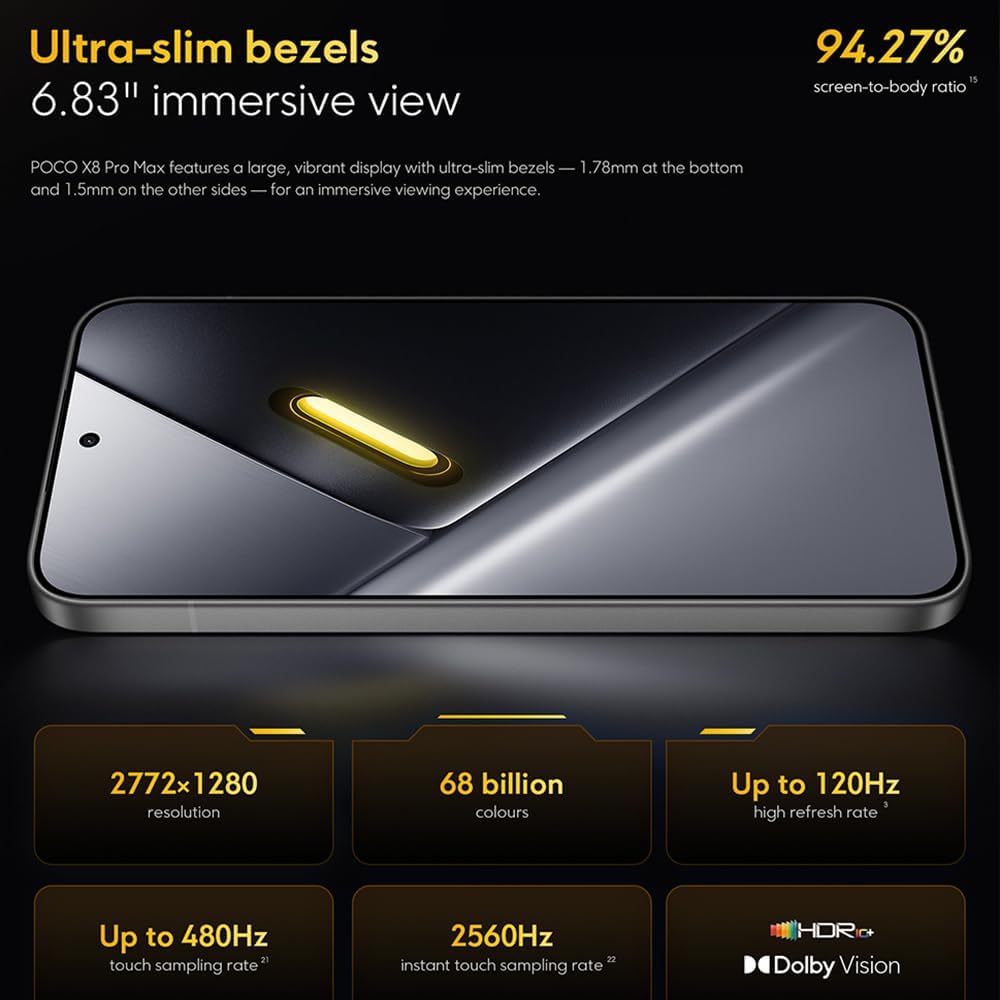
Image: The 6.83-inch 1.5K ultra-bright AMOLED display with minimal bezels.
4.2 ביצועים
Powered by the Mediatek Dimensity 9500s chipset (3nm, 4+4 All Big Core architecture, NPU890 AI processor), the POCO X8 Pro Max 5G delivers high performance. The POCO 3D IceLoop cooling system ensures efficient heat dissipation, maintaining optimal performance during intensive tasks like gaming.

Image: Diagram illustrating the Mediatek Dimensity 9500s flagship platform.

Image: Illustration of the 5800mm² ultra-large LHP area for cooling.
4.3 מערכת מצלמות
The device features a 50 MP Light Fusion 600 main camera with OIS (Optical Image Stabilization) and an 8 MP ultra-wide camera. It supports portrait mode with bokeh + HDR and dynamic video-to-still conversion.

Image: Close-up of the 50 MP main camera and 8 MP ultra-wide camera system.
4.4 סוללה וטעינה
Equipped with a massive 8500 mAh (typical) battery, the POCO X8 Pro Max 5G offers extended usage. It supports 100W HyperCharge, allowing for rapid recharging. A 16% ultra-high carbon-silicon content contributes to its high energy density.

Image: Illustration highlighting the massive 8500mAh battery capacity.

Image: Visual representation of the 100W HyperCharge technology.
4.5 אודיו
The device features symmetrical dual stereo speakers (1115F) for a balanced and immersive audio experience.
4.6 תוכנה
The POCO X8 Pro Max 5G comes with Xiaomi HyperOS 3 installed, offering an optimized and user-friendly interface based on Android 16.
5. תחזוקה
5.1 ניקוי המכשיר שלך
- השתמש במטלית רכה ונטולת סיבים כדי לנגב את המסך ואת הפאנל האחורי.
- הימנעו משימוש בכימיקלים חזקים, חומרים שוחקים או תרסיסים.
- עבור כתמים עקשניים, מעט דמוי עורampנקו את המטלית במים או בחומר ניקוי מסכים המיועד לאלקטרוניקה.
5.2 עמידות בפני אבק ומים
The device is certified for IP68 dust and water resistance. This means it can withstand immersion in up to 2 meters of water for 30 minutes under specific laboratory conditions. However, water and dust resistance may deteriorate over time with normal wear and tear. The warranty does not cover liquid damage. Avoid exposing the device to hot water, saltwater, or other liquids.

Image: Visual representation of the IP68 dust and water resistance.
5.3 עדכוני תוכנה
בדוק באופן קבוע אם קיימים עדכוני תוכנה והתקן אותם כדי לוודא שהמכשיר שלך כולל את התכונות, תיקוני האבטחה ושיפורי הביצועים העדכניים ביותר. בדרך כלל תוכל למצוא אפשרות זו ב הגדרות > אודות הטלפון > עדכון מערכת.
6. פתרון תקלות
6.1 בעיות ופתרונות נפוצים
- המכשיר לא נדלק: ודא שהסוללה טעונה. חבר את המכשיר למטען והמתן מספר דקות לפני שתנסה להפעיל אותו שוב.
- המסך לא מגיב: נסה להפעיל מחדש את המכשיר על ידי לחיצה ממושכת על כפתור ההפעלה (למשל, 10-15 שניות) עד שהוא יופעל מחדש.
- אפליקציות קורסות: נקה את המטמון של האפליקציה הבעייתית (הגדרות > אפליקציות > [שם האפליקציה] > אחסון > נקה מטמון) or reinstall the app. Ensure your device software is up to date.
- חיי סוללה גרועים: Check background app usage, reduce screen brightness, disable unnecessary features like GPS or Bluetooth when not in use, and ensure your software is updated.
- בעיות קישוריות לרשת: Restart your device. Check if your SIM card is properly inserted. Toggle Airplane Mode on and off. Reset network settings (הגדרות > מערכת > אפשרויות איפוס > איפוס Wi-Fi, נייד ו-Bluetooth).
6.2 איפוס להגדרות היצרן
If you encounter persistent issues, a factory reset may be necessary. אַזהָרָה: פעולה זו תמחק את כל הנתונים במכשיר שלך. גבה נתונים חשובים לפני שתמשיך. עבור אל הגדרות > מערכת > אפשרויות איפוס > מחק את כל הנתונים (איפוס להגדרות היצרן) ופעל לפי ההוראות שעל המסך.
7. מפרטים
| תכונה | מִפרָט |
|---|---|
| מותג | שיאומי |
| שם הדגם | POCO X8 Pro Max 5G |
| מַעֲרֶכֶת הַפעָלָה | Android 16 (with Xiaomi HyperOS 3) |
| קיבולת אחסון זיכרון | 512 ג'יגה-בייט |
| גודל מסך | 6.83 אינץ' |
| סוג תצוגה | AMOLED, 1.5K, 120Hz refresh rate |
| טכנולוגיה סלולרית | 5G |
| צֶבַע | נואר (שחור) |
| סוג מחבר | USB סוג C |
| אבטחה ביומטרית | Fingerprint Recognition (Ultrasonic) |
| קיבולת סוללה | 8500 מיליאמפר/שעה (ליתיום-פולימר) |
| טְעִינָה | 100W היפר-טעינה |
| מצלמה ראשית | 50 MP Light Fusion 600 with OIS |
| מצלמה רחבה במיוחד | 8 מגה פיקסל |
| מעבד | Mediatek Dimensity 9500s |
| עמידות בפני אבק ומים | IP68 |
| שנת דגם | 2025 |
| ארץ מוצא | סִין |
8. אחריות ותמיכה
For detailed warranty information and customer support, please refer to the warranty card included with your product or visit the official XIAOMI webאתר. שמור את הוכחת הרכישה שלך לצורך תביעות אחריות.
Online resources and FAQs may also be available on the XIAOMI support portal.