
SmallRig RF20C
SmallRig RF20C RGB Portable LED Photo Torch User Manual
Model: RF20C (5335)
מותג: SmallRig
1. הקדמה
The SmallRig RF20C RGB Portable LED Photo Torch is a versatile and powerful lighting tool designed for photographers, videographers, and content creators. It features 5-color LED beads, adjustable beam angle, and supports creative lighting effects with included gobos. This manual provides essential information for the safe and effective use of your device.
2. מידע בטיחות
- אין לחשוף את המכשיר למים או ללחות מוגזמת.
- הימנעו מחשיפה ישירה של העיניים לאור LED.
- אין לפרק או לשנות את המכשיר. תיקונים יבוצעו אך ורק על ידי אנשי צוות מורשים.
- הרחק מהישג ידם של ילדים.
- Ensure proper ventilation during extended use, as the device may become warm.
- השתמשו רק בכבל הטעינה ובמתאם החשמל שצוינו.
3. תכולת החבילה
ודא שכל הפריטים נמצאים בחבילה שלך:
- RF20C Portable Focusable LED Video Light x 1
- Gobos x 20
- Silicone Gobo Holder x 1
- שקית אחסון x 1
- מדריך למשתמש x 1 (מסמך זה)
- כבל טעינה x 1
4. התקנה
4.1 טעינה ראשונית
Before first use, fully charge the RF20C. Connect the provided USB-C charging cable to the device's charging port and to a compatible USB power adapter (PD 36W recommended). The device can be used while charging.

Figure 4.1: Internal battery illustration and runtime information.

Figure 4.2: Portable design, mounting options, cooling fan, and charging capability.
4.2 Attaching Gobos
To use the creative pattern gobos, first remove the plano-convex lens from the front of the light. Then, attach the silicone gobo holder and insert the desired gobo. This ensures optimal projection effects.

Figure 4.3: Gobo projection examples and installation tip.
5. הוראות הפעלה
5.1 הפעלה/כיבוי ובקרות בסיסיות
The RF20C features a single multi-function button for control. To prevent accidental activation during transport, the device requires a specific action to turn on.
- הפעלה: Rotate the control button to turn on the device.
- כיבוי: לחץ והחזק את לחצן הבקרה למשך 3 שניות.
- שנה צבע: Short press the control button to cycle through the available colors (Red, 5600K White, Purple, Orange, Cyan).
- התאם את הבהירות: Rotate the control button to increase or decrease the light brightness.
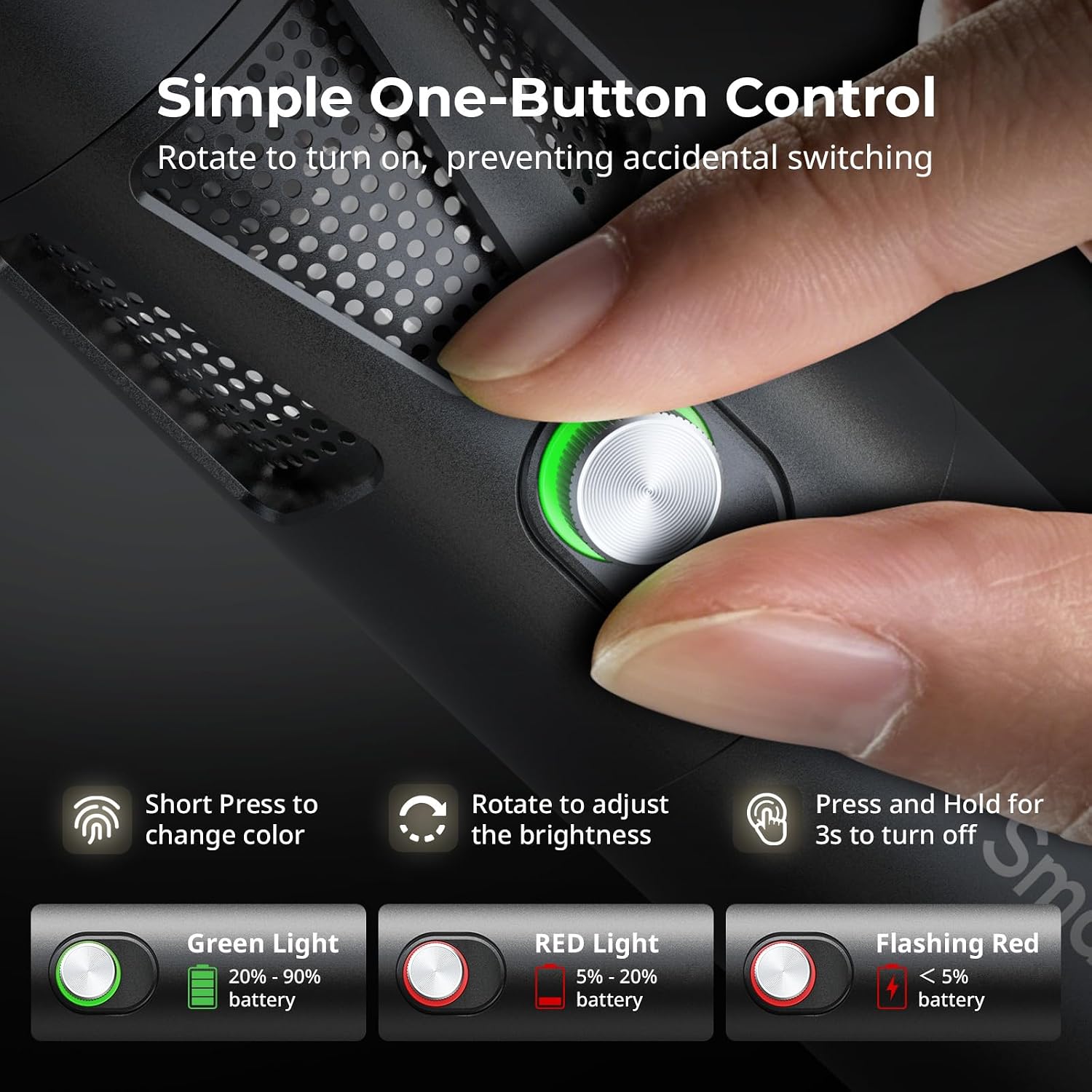
Figure 5.1: One-button control and battery indicator.

Figure 5.2: Available LED colors.
5.2 Adjusting Beam Angle
The front plano-convex lens allows for adjustment of the beam angle. Push or pull the lens to change the focus of the light from a narrow 24° beam to a wider 60° diffusion.
- Extend the lens: Narrows the beam (e.g., 24°).
- Retract the lens: Diffuses the beam (e.g., 60°).

Figure 5.3: Beam angle adjustment mechanism.
5.3 מחוון סוללה
The control button's LED indicates the battery status:
- אור ירוק: 20% - 90% סוללה נותרה.
- אור אדום: 5% - 20% סוללה נותרה.
- אור אדום מהבהב: נותרו פחות מ-5% מהסוללה.

Figure 5.4: Brightness comparison of RF20C.
6. תחזוקה
- Clean the device regularly with a soft, dry cloth. Do not use harsh chemicals or abrasive materials.
- יש לאחסן את המכשיר במקום קריר ויבש, הרחק מאור שמש ישיר וטמפרטורות קיצוניות.
- When not in use for extended periods, charge the battery to approximately 50% every three months to prolong battery life.
- Keep the lens and LED surface free from dust and fingerprints for optimal light output.
7. פתרון תקלות
| בְּעָיָה | סיבה אפשרית | פִּתָרוֹן |
|---|---|---|
| המכשיר לא מופעל. | סוללה חלשה; הליך הפעלה שגוי. | Charge the device. Ensure you rotate the control button to power on. |
| פלט האור עמום. | Low battery; brightness set too low; dirty lens. | Charge the device. Rotate the control button to increase brightness. Clean the lens. |
| Gobo projection is blurry. | Plano-convex lens not removed; gobo not seated correctly. | Remove the plano-convex lens before attaching the silicone gobo holder. Ensure gobo is properly inserted. |
| המכשיר מתחמם במהלך השימוש. | Normal operation, especially at high power; fan obstruction. | This is normal. Ensure the fan vents are not obstructed for proper heat dissipation. If excessively hot, reduce brightness or allow to cool. |
| Fan noise is noticeable. | Normal operation for cooling. | The device uses a high-speed fan for efficient heat dissipation. This noise is part of normal operation. Consider distance from audio recording equipment. |
8. מפרטים
| תכונה | פְּרָט |
|---|---|
| דֶגֶם | RF20C (5335) |
| כּוֹחַ | 20 W |
| קֶלֶט | 20 V / 1.8 A (max. 36 W) |
| צבעי LED | Red, 5600K White, Purple, Orange, Cyan |
| אינדקס עיבוד צבע (CRI) | ≥ 97 |
| אינדקס עקביות תאורת טלוויזיה (TLCI) | ≥ 99 (at 5600 K) |
| בְּהִיקוּת | 5400 Lux @ 1m / 5600K |
| קיבולת סוללה | 10000mAh (2 x 5000mAh / 7.4V / 37Wh) |
| Runtime (Full Power) | עד 1.5 שעות |
| טְעִינָה | USB-C PD 36W Fast Charging, supports charging while operating |
| התאמת זווית הקורה | 24° עד 60° |
| חוֹמֶר | סגסוגת אלומיניום, ABS |
| מידות המוצר | φ49.0 x 200.0 mm / φ1.9 x 7.9 inches |
| משקל המוצר | 520.0 ± 20.0 גרם / 18.3 ± 0.7 עוז |
| טכנולוגיית קישוריות | USB |
| ארץ מוצא | סִין |
9. אחריות ותמיכה
SmallRig products are designed and manufactured to the highest quality standards. This product is covered by a limited warranty from the date of purchase. For detailed warranty terms, technical support, or service inquiries, please refer to the official SmallRig webאתר או צור קשר עם המפיץ המקומי שלך.
אנא שמור את הוכחת הרכישה שלך עבור תביעות אחריות.
10. תרחישי שימוש
The SmallRig RF20C is suitable for various applications, including:
- צילום
- הקלטת וידאו
- סטרימינג בשידור חי
- Creative Accent Lighting
- Macro Work and Close-ups

איור 10.1: דוגמהamples of RF20C usage scenarios.
Ask a question about this manual
Ask about setup, troubleshooting, compatibility, parts, safety, or missing instructions. Manuals+ will review the question and use this page’s manual context to help answer it.