
1. הקדמה
The Shutao 2 Channel 18650 Battery Capacity Tester is designed for comprehensive analysis of 18650 lithium-ion batteries. This device facilitates independent charging, discharging, and capacity testing, along with internal resistance measurement. It is suitable for tasks such as sorting used cells, testing household batteries, and maintaining battery collections.
2. מידע בטיחות
- The device features overheating protection and automatic power-off to prevent damage.
- The discharge current is fixed at approximately 1A and is not adjustable or constant current.
- כרך הטעינהtage is fixed at 4.2V.
- This tester is לא תואם with LiFePO4 batteries.
- After installing a battery, allow a few seconds for voltage and internal resistance readings to stabilize before proceeding.
- Internal resistance readings may appear elevated at low battery voltages. For more accurate measurements, reinstall the battery or test when the battery is fully charged.
- The device may reach temperatures of 60-80°C during operation. Exercise caution and ensure adequate ventilation.
3. המוצר נגמרview
3.1 רכיבים
The following diagram illustrates the key components of the battery capacity tester:

תְמוּנָה: Labeled diagram showing the various parts of the battery tester, including battery compartments, buttons, and ports.
- Power supply battery compartment: Used to power the device itself.
- Blue and red indicator light: Indicates charging status of the power supply battery. This does not relate to the test channels.
- Type-C 5V power supply interface: Primary power input for the device.
- ON/OFF/Menu button: Powers the device on/off and accesses menu options.
- כפתור התאמה: עובר בין מצבי בדיקה שונים.
- לחצן התחלה/עצירה: Initiates or terminates a test cycle.
- Test ② Type-C external discharge interface: An alternative interface for testing batteries that do not fit the 18650 holder.
- Test ① charging and discharging 18650 battery compartment: The primary slot for testing 18650 batteries.
- 1.77 inch display screen: Shows real-time test data and settings.
- 10W8ΩJ discharge cement resistance ×2: Resistors used for discharging batteries during tests.
הערה חשובה: Despite some product descriptions, user feedback indicates this device functions as a single-channel tester. The left battery slot (1) is primarily for powering the device, and the right slot (8) is the main test channel. The Type-C external discharge interface (7) can also be used for testing, but not simultaneously with slot (8).
3.2 ממשק תצוגה
The 1.77-inch display provides comprehensive real-time information during testing:

תְמוּנָה: Labeled diagram detailing the information displayed on the tester's screen.
- Real Time Voltage: כרך נוכחיtage of the battery under test.
- Real Time Current: Current flowing during charge or discharge.
- Real Time Power: Instantaneous power (Voltage × Current).
- Cumulative Capacity: Total capacity measured in mAh.
- Accumulated Energy: Total energy measured in mWh.
- מחוון מצב: Shows the current state (e.g., STA:STOP, STA:CHG, STA:DIS).
- Work Pattern: Indicates the selected mode (e.g., MODE:AUTO, MODE:CHG, MODE:DIS).
- הפסקת פריקה נפחtage: הסט כרךtage at which discharge will cease.
- מחזורים: Number of charge/discharge cycles completed in Auto mode.
- Battery Internal Resistance: Measured internal resistance in mR.
- Cumulative Time: Total duration of the current test cycle.
4. התקנה
4.1 הפעלת המכשיר
The tester can be powered in two ways:
- Via Type-C: Connect a 5V Type-C power adapter and cable (included) to the Type-C 5V power supply interface (3).
- Via Power Supply Battery: Insert an 18650 battery into the Power supply battery compartment (1) on the left side of the device. This battery will power the tester's internal circuitry.
4.2 Battery Installation for Testing
To test an 18650 battery:
- Insert the flat-top 18650 battery into the Test ① charging and discharging 18650 battery compartment (8) on the right side of the device, ensuring correct polarity.
- Alternatively, for batteries that do not fit the 18650 holder, connect them to the Test ② Type-C external discharge interface (7) using appropriate cables.
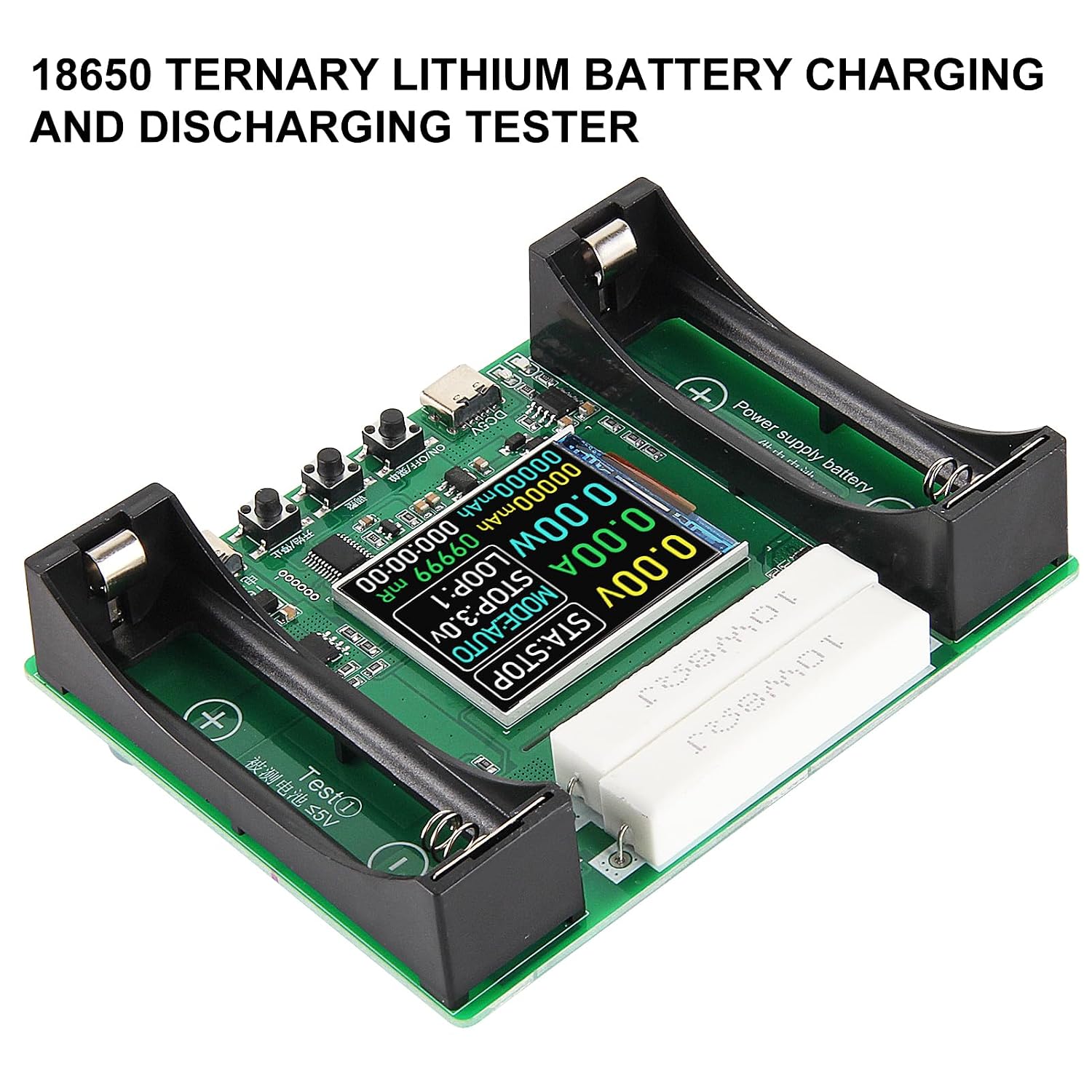
תְמוּנָה: תקורה view of the battery tester, showing the two 18650 battery slots and the discharge resistors.
5. הוראות הפעלה
5.1 הפעלה/כיבוי
- הקש על ON/OFF/Menu button (4) to power on the device.
- לחץ והחזק את ON/OFF/Menu button (4) to power off the device.
5.2 Selecting Test Mode
הקש על לְהַתְאִים button (5) to cycle through the available test modes:
- מצב אוטומטי: Performs a full charge, then discharges to measure capacity, and finally recharges the battery. This cycle can be adjusted from 1 to 9 loops.
- CHARGE Mode: Charges the battery to 4.2V.
- DISCHARGE Mode: Discharges the battery to the selected stop-discharge voltage.
5.3 Setting Stop-Discharge Voltage
In DISCHARGE or AUTO mode, you can select from 11 stop-discharge voltage levels ranging from 2.5V to 3.5V. Use the לְהַתְאִים button (5) to change this setting before starting the test.
5.4 Starting and Stopping a Test
- הקש על התחל/עצור button (6) to begin the selected test mode.
- הקש על התחל/עצור button (6) again to pause or stop an ongoing test.
- When a test is stopped, a long press of the התחל/עצור button (6) will reset the onscreen data.
5.5 Internal Resistance Measurement
The device utilizes the DC two-wire method to provide a reference internal resistance value. For the most accurate reading, measure the internal resistance when the battery is fully charged.

תְמוּנָה: א מפורט view of the tester's screen, displaying voltage, current, power, capacity, energy, and internal resistance readings.
6. תחזוקה
- שמרו על ניקיון המכשיר, ללא אבק ולכלוך. השתמשו במטלית רכה ויבשה לניקוי.
- Ensure proper ventilation during operation, especially during discharge cycles, as the device can generate heat. Do not obstruct the discharge resistors.
- Store the tester in a dry environment, away from direct sunlight and extreme temperatures.
7. פתרון תקלות
- המכשיר לא נדלק: Verify that the Type-C power adapter is correctly connected and supplying 5V, or ensure the power supply battery in slot (1) is charged and properly inserted.
- Test does not start: Check that the battery is correctly inserted into the test compartment (8) with the correct polarity. Ensure a test mode (AUTO, CHARGE, DISCHARGE) has been selected.
- Inaccurate internal resistance readings: Reinstall the battery and ensure it is fully charged for the most accurate internal resistance measurement. Readings can be higher at low battery voltages.
- המכשיר מרגיש חם: This is normal during discharge cycles due to the resistive load. The device has built-in overheating protection. Ensure good airflow around the device.
8. מפרטים
| מותג | Shutao |
| מספר דגם | 13973ST-1 |
| כוח קלט | DC 5V (via Type-C) |
| תאימות סוללה | Flat-top 18650 Lithium-ion batteries (Not compatible with LiFePO4) |
| טעינה כרךtage | 4.2V קבוע |
| זרם פריקה | Fixed ~1A (non-adjustable, non-constant current) |
| Stop-Discharge Voltage | 11 levels (2.5V to 3.5V) |
| Test Channels | 1 (with an additional Type-C external discharge interface) |
| לְהַצִיג | 1.77 אינץ' |
| רכיבים כלולים | Battery capacity tester module |
| מידות | 108 מ"מ (4.25 אינץ') x 85 מ"מ (3.34 אינץ') |

תְמוּנָה: Diagram showing the physical dimensions of the battery tester.
9. אחריות ותמיכה
Specific warranty information and direct support contact details are not provided in the product description. Please refer to your retailer or point of purchase for warranty claims and customer support inquiries.