
מָבוֹא
This manual provides essential information for the safe and efficient use of your Xiaomi 55-inch 4K UHD Smart Quantum MagiQ S Mini LED Google TV. Please read these instructions thoroughly before operating the device and retain them for future reference.
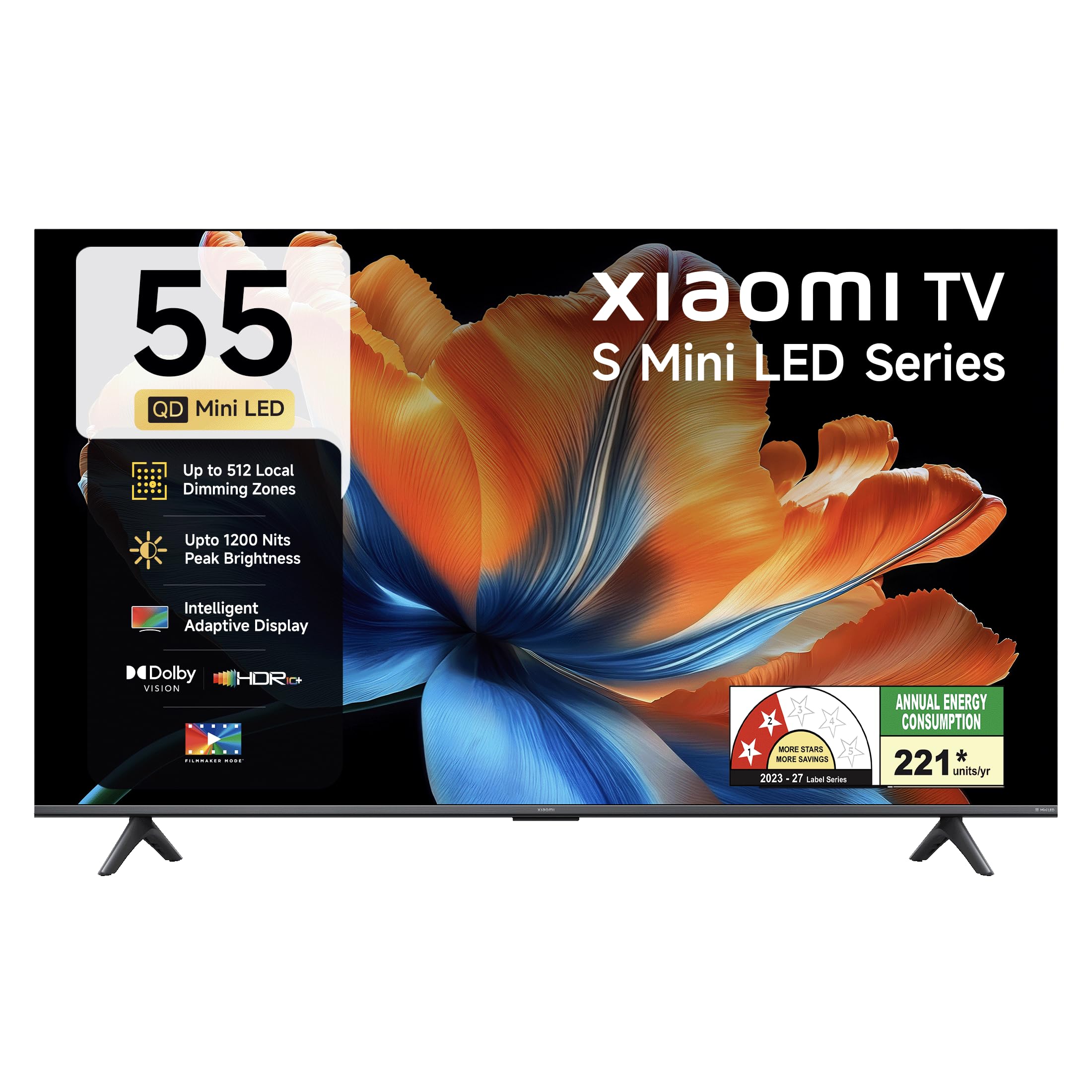
תמונה: חזית view of the Xiaomi 55-inch 4K UHD Smart Quantum MagiQ S Mini LED Google TV, showcasinעיצוב המסגרת הדק שלו.
מדריך התקנה
1. פירוק האריזה והרכיבים הכלולים
Carefully remove all items from the packaging. Ensure all components listed below are present and undamaged.

Image: Contents of the product box, including the TV unit, remote control, user manual, two stand units, four screws, two AAA batteries, and a power cord.
- יחידת טלוויזיה LED אחת
- שלט רחוק 1
- 1 מדריך למשתמש (מסמך זה)
- 2 Stand Units
- 4 ברגים להתקנת המעמד
- 2 סוללות AAA (לשלט רחוק)
- 1 כבל חשמל
2. Stand Installation or Wall Mounting
Your television supports both table-top stand installation and wall mounting. Choose the method suitable for your environment.
- להתקנת מעמד: Attach the two provided stand units to the bottom of the TV using the four screws. Ensure they are securely fastened.
- עבור הרכבה על הקיר: Use a compatible VESA wall mount (sold separately). Follow the instructions provided with your wall mount kit. Ensure the wall can support the TV's weight.
3. חיבור התקנים חיצוניים
Connect your external devices such as set-top boxes, gaming consoles, or audio systems to the TV's ports.

תמונה: אחורי view of the TV highlighting connectivity ports: Optical, Earphone, AV In, 3 HDMI ports (one with eARC), 2 USB 2.0 ports, Antenna, and Ethernet.
- יציאות HDMI (x3): Connect gaming consoles, Blu-ray players, or set-top boxes. One port supports eARC for enhanced audio return channel functionality.
- יציאות USB (x2): חבר התקני אחסון USB להפעלת מדיה.
- יציאת אתרנט: עבור חיבור אינטרנט קווי.
- פלט אופטי: לחיבור למערכות שמע חיצוניות.
- כניסת AV: לחיבור מכשירים ישנים יותר באמצעות וידאו מרוכב ואודיו סטריאו.
- אַנטֶנָה: לחיבור אנטנה יבשתית או כבלית.
4. הפעלה והתקנה ראשוניים
After connecting all necessary cables, plug the power cord into an electrical outlet. Press the power button on the remote control or the TV to turn it on. Follow the on-screen instructions for initial setup, which typically includes:
- בחירת שפה
- חיבור רשת (Wi-Fi או Ethernet)
- כניסה לחשבון גוגל
- סריקת ערוצים
הפעלת הטלוויזיה החכמה של שיאומי
1. פונקציות שלט רחוק
השלט המצורף מספק גישה לכל פונקציות הטלוויזיה. הכניסו את שתי סוללות ה-AAA לשלט הרחוק, תוך הקפדה על קוטביות נכונה.

Image: Xiaomi remote control, featuring dedicated quick access buttons for popular streaming services and Google Assistant voice control.
- לחצן הפעלה: מפעיל או מכבה את הטלוויזיה.
- כפתור העוזר של גוגל: מפעיל שליטה קולית לחיפוש תוכן, שליטה במכשירי בית חכם ועוד.
- משטח ניווט: משמש לניווט בתפריטים ובחירת פריטים.
- עוצמת הקול מעלה/הנמכת: מכוונן את עוצמת השמע.
- ערוץ למעלה/למטה: משנה ערוצי טלוויזיה.
- כפתורי גישה מהירה: Dedicated buttons for Netflix, Prime Video, YouTube, Disney+ Hotstar, SonyLIV, and Live TV.
- כפתור השתק: משתיק את שמע הטלוויזיה.
2. Google TV Interface and Applications
Your TV runs on the Android 14 OS with Google TV, offering a personalized content experience. Access a wide range of applications from the Google Play Store.

Image: The PatchWall interface, providing customized content recommendations and curation from various streaming platforms.
- ממשק משתמש קודם כל של תוכן: Organizes content from all your streaming services in one place.
- מקצוען אישיfiles: צור מקצוען אישיfileלהמלצות מותאמות אישית.
- אפליקציות נתמכות: Pre-installed and downloadable apps include Netflix, Prime Video, YouTube, Zee5, JioCinema, SonyLiv, and more.
- Google Assistant: Use voice commands for navigation, search, and smart home control.
3. הגדרות תמונה וקול
בצע אופטימיזציה שלך viewחוויית האזנה באמצעות מצבי תמונה וקול שונים.
הגדרות תמונה:
- מצב יוצר סרטים: Disables post-processing effects to display content as intended by the director.
- Dolby Vision: Enhances HDR content with dynamic metadata for optimized image quality frame by frame.
- HDR10+: Uses dynamic data to enhance every frame, providing an immersive viewניסיון.
- מצב נוחות עיניים: מפחית אור כחול והבהוב לנוחות רבה יותר viewניסיון.
- MEMC Engine: הערכת תנועה, טכנולוגיית פיצוי תנועה לתנועה חלקה יותר בסצנות מהירות.
- AI Picture Optimization Engine: Advanced AI algorithms analyze content in real-time to enhance clarity, contrast, and color reproduction.

Image: Filmmaker Mode, designed to preserve original colors, contrast, and motion for an authentic cinematic experience.

Image: Dolby Vision technology, optimizing image quality with deeper blacks and brighter highlights.

Image: HDR10+ dynamic frame-by-frame tuning, ensuring consistent detail across dark and bright scenes.

Image: Eye Care Mode, providing flicker-free visuals with DC Dimming and reduced blue light for comfortable viewing.
הגדרות שמע:
- תפוקה של 34 וואט: Powerful built-in box speakers.
- Dolby Audio: מספק צליל עשיר, צלול ועוצמתי.
- DTS-X ו-DTS Virtual:X: מספק אודיו סוחף ורב-ממדי.
- סאונד של שיאומי: Preset audio configurations developed for optimal sound quality.

Image: Xiaomi Sound, offering tailored audio experiences through expert-developed configurations.
4. קישוריות וסטרימינג
Your TV offers versatile connectivity options for seamless streaming and device integration.
- Wi-Fi כפול-פס: Connects to 2.4GHz and 5GHz wireless networks.
- בלוטות': Connect wireless headphones, speakers, or other Bluetooth accessories.
- גוגל קאסט מובנה: Stream content directly from compatible apps on your smartphone or tablet.
- אפל איירפליי 2: הזרמת תוכן ממכשירי אפל.
- Miracast: שיקוף אלחוטי של מסך מכשיר האנדרואיד שלך.

Image: Stream content from your phone using Google Cast or Apple AirPlay 2.
טיפול ותחזוקה
טיפול נכון מבטיח אורך חיים וביצועים אופטימליים של הטלוויזיה שלכם.
- ניקוי מסך: נגבו בעדינות את המסך בעזרת מטלית רכה ונטולת סיבים. עבור סימנים עקשניים, השתמשו בתמיסת ניקוי ייעודית למסך המרוחה על המטלית, ולא ישירות על המסך.
- ניקוי גוף: Wipe the TV's frame and back panel with a soft, dry cloth. Avoid abrasive cleaners or solvents.
- אוורור: ודאו זרימת אוויר מספקת סביב הטלוויזיה. אין לחסום פתחי אוורור.
- כיבוי: תמיד כבו את הטלוויזיה ונתק אותה משקע החשמל לפני ניקויה או אם לא נעשה בה שימוש למשך תקופה ממושכת.
- עדכוני תוכנה: בדוק מעת לעת אם קיימים עדכוני תוכנה והתקן אותם כדי להבטיח ביצועים ואבטחה מיטביים.
פתרון בעיות נפוצות
Refer to this section for solutions to common operational problems.
| בְּעָיָה | פִּתָרוֹן |
|---|---|
| הטלוויזיה לא נדלקת | Ensure the power cord is securely plugged into both the TV and a working electrical outlet. Check if the power outlet is active. Try pressing the power button on the TV itself. |
| אין תמונה, אבל יש קול | Check the input source. Ensure the connected device (e.g., set-top box) is turned on and functioning. Try a different HDMI cable or port. |
| אין קול, אבל יש תמונה | Check the volume level and ensure the TV is not muted. Verify audio output settings (e.g., internal speakers, external sound system). Check audio cables for external devices. |
| השלט רחוק לא מגיב | Replace the AAA batteries in the remote control. Ensure there are no obstructions between the remote and the TV. Re-pair the Bluetooth remote if necessary (refer to TV settings). |
| לא ניתן להתחבר ל-Wi-Fi | Ensure your Wi-Fi router is on and working. Re-enter the Wi-Fi password. Try restarting both the TV and the router. Check if other devices can connect to the Wi-Fi network. |
מפרט טכני
Detailed specifications for the Xiaomi 55-inch 4K UHD Smart Quantum MagiQ S Mini LED Google TV (Model L55MC-IN).

Image: Physical dimensions and weight of the Xiaomi 55-inch TV, both with and without the stand.
| תכונה | מִפרָט |
|---|---|
| מספר דגם | L55MC-IN |
| גודל מסך | 55 אינץ '(138 ס"מ) |
| טכנולוגיית תצוגה | מיני לד |
| הַחְלָטָה | 4K Ultra HD (3840 x 2160) |
| קצב רענון | 60 Hz (DLG 120 Hz) |
| בהירות שיא | עד 1200 ניטים |
| מַעֲרֶכֶת הַפעָלָה | Android 14 OS with Google TV |
| אַיִל | 2GB |
| ROM (אחסון פנימי) | 32 ג'יגה-בייט |
| פלט סאונד | 34 וואט |
| טכנולוגיות אודיו | דולבי אודיו, DTS-X, DTS וירטואלי:X |
| קישוריות | Dual Band Wi-Fi, Bluetooth, 3 HDMI (1 eARC), 2 USB, Optical, Ethernet, AV In |
| שיקוף מסך | Google Cast, Apple AirPlay 2, Miracast |
| תכונות מיוחדות | Filmmaker Mode, MEMC, Eye Comfort Mode, AI Picture Optimization Engine |
| מידות המוצר (D x W x H) | 31.2D x 31.2W x 76.9H Centimeters (with stand) |
| Item Weight Without Stand | 11.6 קילוגרם |
| צריכת חשמל | 230 וואט |
| ארץ מוצא | הוֹדוּ |
מידע על אחריות
Your Xiaomi TV comes with a comprehensive warranty provided by the brand from the date of purchase.
- אחריות סטנדרטית: 3-year comprehensive warranty for non-prebook customers (purchases between April 22nd - May 31st).
- Pre-book Customer Warranty: 4-year comprehensive warranty for pre-book customers (purchases between April 22nd - April 30th).
Warranty claims can be made using your Amazon invoice as proof of purchase. For detailed terms and conditions, please refer to the official Xiaomi warranty policy or contact customer support.
תמיכת לקוחות
For any assistance, service requests, or queries regarding your Xiaomi TV, please contact Xiaomi customer support.

תמונה: מעלview of Xiaomi's customer support commitments, including quick installation, prompt call-backs, and swift doorstep solutions.
- שירותי התקנה: New TV installations are typically completed within 3 hours of your appointment.
- Service Requests: צפו לשיחה חוזרת מצוות התמיכה תוך 60 דקות עבור כל בקשת שירות.
- תמיכה באתר: Experts aim to arrive at your home within 24 hours of your service request.
Please visit the official Xiaomi India webאתר או עיינו בפרטי הקשר המופיעים באריזת המוצר לקבלת פרטי התמיכה העדכניים ביותר.