
1. הקדמה
Welcome to the user manual for your new Nothing Phone (4a) Pro. This guide provides essential information on setting up, operating, maintaining, and troubleshooting your device. Please read this manual thoroughly to ensure optimal performance and longevity of your smartphone.
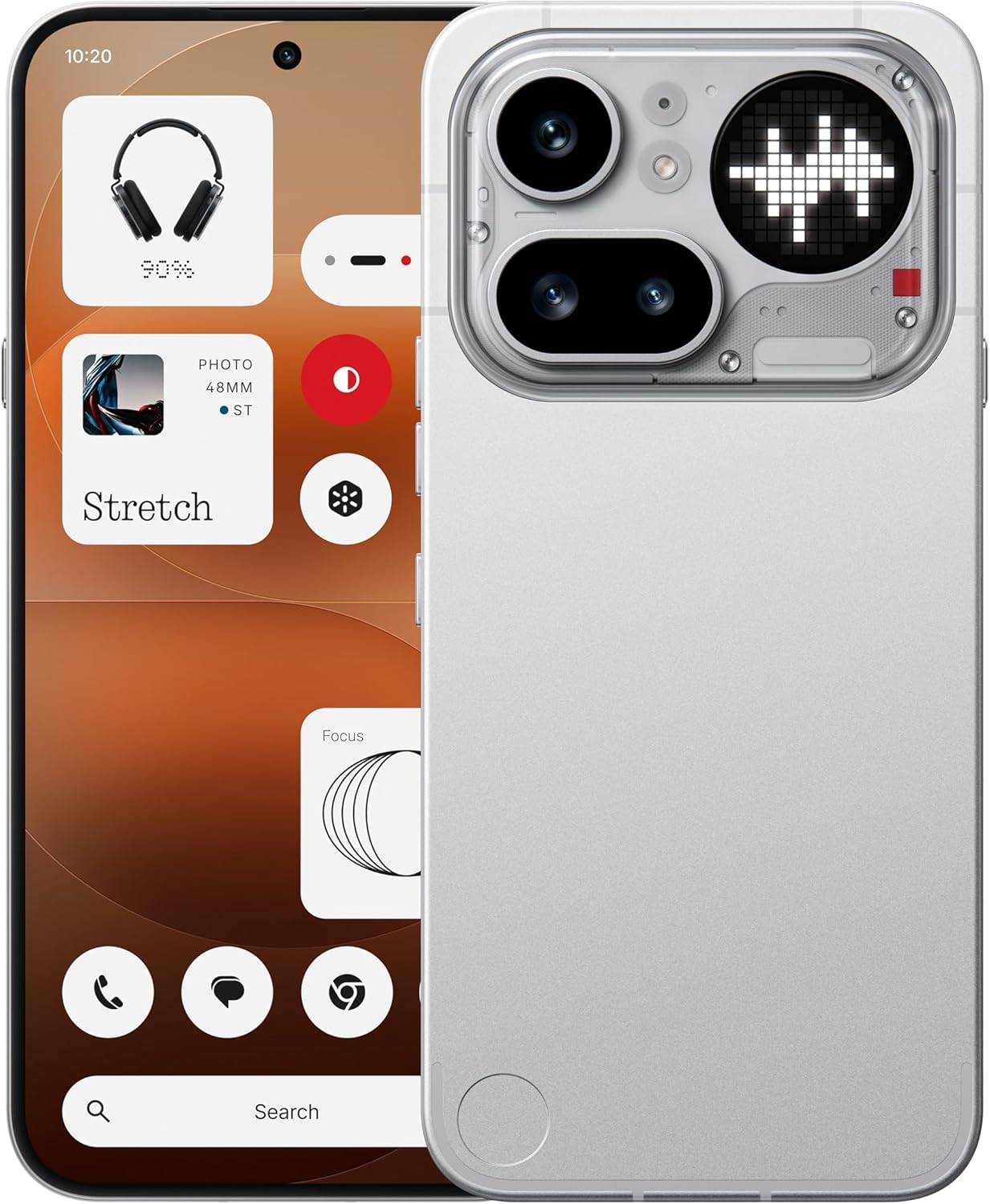
איור 1.1: חֲזִית view of the Nothing Phone (4a) Pro. This image displays the sleek design and full-screen display of the device.
2. תוכן התיבה
ודא שהחבילה שלך מכילה את הפריטים הבאים:
- Nothing Phone (4a) Pro Handset
- Nothing USB-C Cable
- כיסוי לטלפון
- מגן מסך מודבק מראש
- כלי מפלט סים
- מידע בטיחות
- תעודת אחריות
3. הגדרה ראשונית
3.1. הכנסת כרטיס ה-SIM
- אתר את מגש כרטיס ה-SIM בצד הטלפון שלך.
- הכנס את כלי חילוץ ה-SIM המצורף לחור הקטן במגש ולחץ בעדינות עד שהמגש ייצא החוצה.
- Place your Nano SIM card(s) into the tray with the gold contacts facing down. The Phone (4a) Pro supports Dual Nano SIM.
- דחף בזהירות את המגש בחזרה לתוך הטלפון עד שייכנס למקומו בנקישה.
3.2. הפעלת המכשיר
לחץ והחזק את כפתור הפעלה located on the side of the phone until the Nothing logo appears on the screen. Follow the on-screen instructions to complete the initial setup, including language selection, Wi-Fi connection, and Google account setup.
3.3. טעינת הסוללה
Before first use, it is recommended to fully charge your device. Connect the Nothing USB-C cable to the phone's USB Type-C port and the other end to a compatible power adapter (sold separately). The phone supports quick charging.
4. הפעלת המכשיר שלך
4.1. ניווט בסיסי
The Nothing Phone (4a) Pro features a responsive touchscreen. Use gestures such as tapping, swiping, pinching, and spreading to navigate the interface, open apps, and interact with content.
4.2. In-Display Fingerprint Sensor
Your device is equipped with an in-display fingerprint sensor for secure unlocking and authentication. To set up, navigate to הגדרות > אבטחה > טביעת אצבע ופעל לפי ההוראות לרישום טביעת האצבע/ות שלך.
4.3. מערכת הפעלה
The Nothing Phone (4a) Pro runs on Nothing OS based on Android 16, offering a clean and intuitive user experience with access to a wide range of applications via the Google Play Store.

איור 4.1: מֵעַלview of Nothing Phone (4a) Pro key features, including the triple camera system, 140x ultra zoom, 5080 mAh battery with 50W fast charge, Snapdragon 7 Gen 4 processor, essential AI tools, Nothing OS on Android 16, 6.83" 1.5K flexible AMOLED display, and Google Gemini + ChatGPT integration.
5. תכונות המצלמה
The Nothing Phone (4a) Pro is equipped with an advanced camera system to capture high-quality photos and videos.
5.1. מערכת מצלמות אחוריות
The rear camera setup includes a 50MP main sensor, a 50MP ultra-wide sensor, and an 8MP telephoto sensorהתכונות העיקריות כוללות:
- OIS + EIS: Optical Image Stabilization and Electronic Image Stabilization for steady shots.
- מיקוד אוטומטי: Fast and accurate focusing.
- Ultra XDR: Enhanced dynamic range for vibrant images.
- 7X In-sensor Zoom: High-quality zoom without loss of detail.
- 70X Ultra Zoom: Extended zoom capabilities for distant subjects.
- הקלטת וידאו 4K: Capture high-resolution videos.
5.2. מצלמה קדמית
The front camera features a 32MP sensor, תומך 1080p video recording at 30fps/60fps with Ultra XDR, ideal for selfies and video calls.

איור 5.1: Diagram illustrating the Pro 3-Camera System of the Nothing Phone (4a) Pro, highlighting the 50 MP OIS Periscope Camera, 50 MP OIS Sony Main Camera, 120° Sony Ultra-Wide Camera, and 32 MP Front Camera.
6. תצוגה וביצועים
6.1. תצוגה
המכשיר כולל א 6.83-inch 144Hz flexible LTPS AMOLED display עם רזולוציה של 1260 x 2800 פיקסלים and a pixel density of 450 ppi. This provides sharp visuals, smooth scrolling, and an immersive viewניסיון.
6.2. ביצועים
מופעל על ידי Qualcomm Snapdragon 7 Gen 4 octa-core processor with a clock speed of up to 2.8GHz, the Phone (4a) Pro delivers robust performance for multitasking, demanding applications, and gaming. It is complemented by זיכרון RAM של 12GB LPDDR5X ו 256 ג'יגה-בייט של אחסון פנימי.
7. סוללה וטעינה
The Nothing Phone (4a) Pro is equipped with a סוללת ליתיום-יון 5400mAh, providing extended usage time. It supports טעינה מהירה via the USB Type-C port, allowing for rapid power replenishment.
8. קישוריות
Your device offers comprehensive connectivity options:
- רֶשֶׁת: Dual Nano SIM, 5G, 4G VoLTE
- אַלחוּט: Wi-Fi 6, בלוטות' גרסה 5.4
- יציאות: USB Type-C (OTG compatible)
- ניווט: GPS
9. תחזוקה וטיפול
9.1. עמידות במים
The Nothing Phone (4a) Pro is rated as עמיד במים. While it can withstand splashes and light rain, it is not fully waterproof. Avoid submerging the device in water or exposing it to high-pressure water jets.
9.2. ניקיון
To clean your phone, use a soft, lint-free cloth. Avoid using abrasive materials, solvents, or aerosol sprays, as these can damage the screen or finish.
9.3. תנאים סביבתיים
Operate and store your device within recommended temperature ranges. Extreme heat or cold can affect battery life and overall performance.
10. פתרון תקלות
If you encounter issues with your Nothing Phone (4a) Pro, try the following basic troubleshooting steps:
- המכשיר לא מופעל: ודא שהסוללה טעונה. חבר את המטען והמתן מספר דקות לפני שתנסה להפעיל שוב.
- המסך לא מגיב: Restart the device by pressing and holding the Power button for approximately 10-15 seconds.
- בעיות רשת: Check if your SIM card is properly inserted. Try toggling Airplane Mode on and off. Ensure you have network coverage.
- קריסת אפליקציה: Close and reopen the app. If the issue persists, clear the app's cache and data in הגדרות > אפליקציות.
- ביצועים איטיים: Close unnecessary background apps. Restart your device. Consider performing a factory reset as a last resort (note: this will erase all data on your phone).
11. מפרטים
| תכונה | פְּרָט |
|---|---|
| מותג | שׁוּם דָבָר |
| דֶגֶם | Phone (4a) Pro |
| מַעֲרֶכֶת הַפעָלָה | אנדרואיד 16 |
| מעבד | Qualcomm Snapdragon 7 Gen 4 Octa-core (up to 2.8 GHz) |
| אַיִל | 12 GB LPDDR5X |
| אחסון פנימי | 256 ג'יגה-בייט |
| גודל תצוגה | 6.83 אינץ' |
| סוג תצוגה | Flexible LTPS AMOLED |
| רזולוציית תצוגה | 1260 x 2800 פיקסלים |
| קצב רענון | 144 הרץ |
| מצלמה אחורית | 50MP + 50MP + 8MP (OIS + EIS, Ultra XDR, 7X in-sensor zoom, 70X ultra zoom, 4K video) |
| מצלמה קדמית | 32MP (1080p video at 30fps/60fps, Ultra XDR) |
| קיבולת סוללה | 5400 מיליאמפר / שעה ליתיום-יון |
| טְעִינָה | Quick Charging, USB Type-C |
| קישוריות | 5G, Dual SIM, Wi-Fi 6, Bluetooth v5.4, OTG, GPS |
| בִּטָחוֹן | חיישן טביעת אצבע בתצוגה |
| עמידות במים | עמיד במים |
| מידות | 16.4 x 7.8 x 0.8 סנטימטרים |
| מִשׁקָל | 190 גרם |
12. מידע על אחריות
The Nothing Phone (4a) Pro comes with a אחריות יצרן לשנה from the date of purchase. This warranty covers manufacturing defects under normal use. Please refer to the included Warranty Card for detailed terms and conditions, exclusions, and how to claim warranty services.
13. תמיכה
לסיוע נוסף, תמיכה טכנית או פניות שירות, אנא בקרו באתר התמיכה הרשמי של Nothing webאתר או צרו קשר עם שירות הלקוחות שלהם. שמרו את קבלת הרכישה וכרטיס האחריות בהישג יד בעת פנייה לתמיכה.