
1. הקדמה
This manual provides essential instructions for setting up, operating, and maintaining your Nothing Phone (4a) Pro. Please read this guide thoroughly to ensure proper use and to maximize the performance of your device.
2. הגדרה ראשונית
2.1. פתיחת האריזה ורכיבים
עם פתיחת האריזה, יש לוודא שכל הרכיבים נמצאים:
- Nothing Phone (4a) Pro device
- אוזניות
Note: A USB Type-C cable and SIM ejector tool may be sold separately or included depending on region. A power adapter is typically sold separately.
2.2. הכנסת כרטיס ה-SIM
- אתר את מגש כרטיס ה-SIM בצד הטלפון שלך.
- Insert a SIM ejector tool (not always included) into the small hole next to the tray and press gently until the tray pops out.
- הנח את כרטיס/י הננו-SIM שלך במגש כאשר המגעים הזהובים פונים כלפי מטה.
- הכנס בזהירות את המגש בחזרה לטלפון עד שייכנס למקומו בנקישה.
2.3. הפעלה ותצורה ראשונית
- Press and hold the Power button until the Nothing logo appears.
- פעל לפי ההנחיות שעל המסך כדי לבחור את השפה שלך, להתחבר לרשת Wi-Fi ולהיכנס באמצעות חשבון Google שלך.
- Complete the setup process, including data transfer (if applicable) and security settings.
3. הפעלת הטלפון
3.1. תצוגה וממשק משתמש
The Nothing Phone (4a) Pro features a 6.83-inch 1.5K Flexible AMOLED Display עם א קצב רענון של 144Hz, providing vibrant colors and smooth scrolling. Navigate the interface using touch gestures.
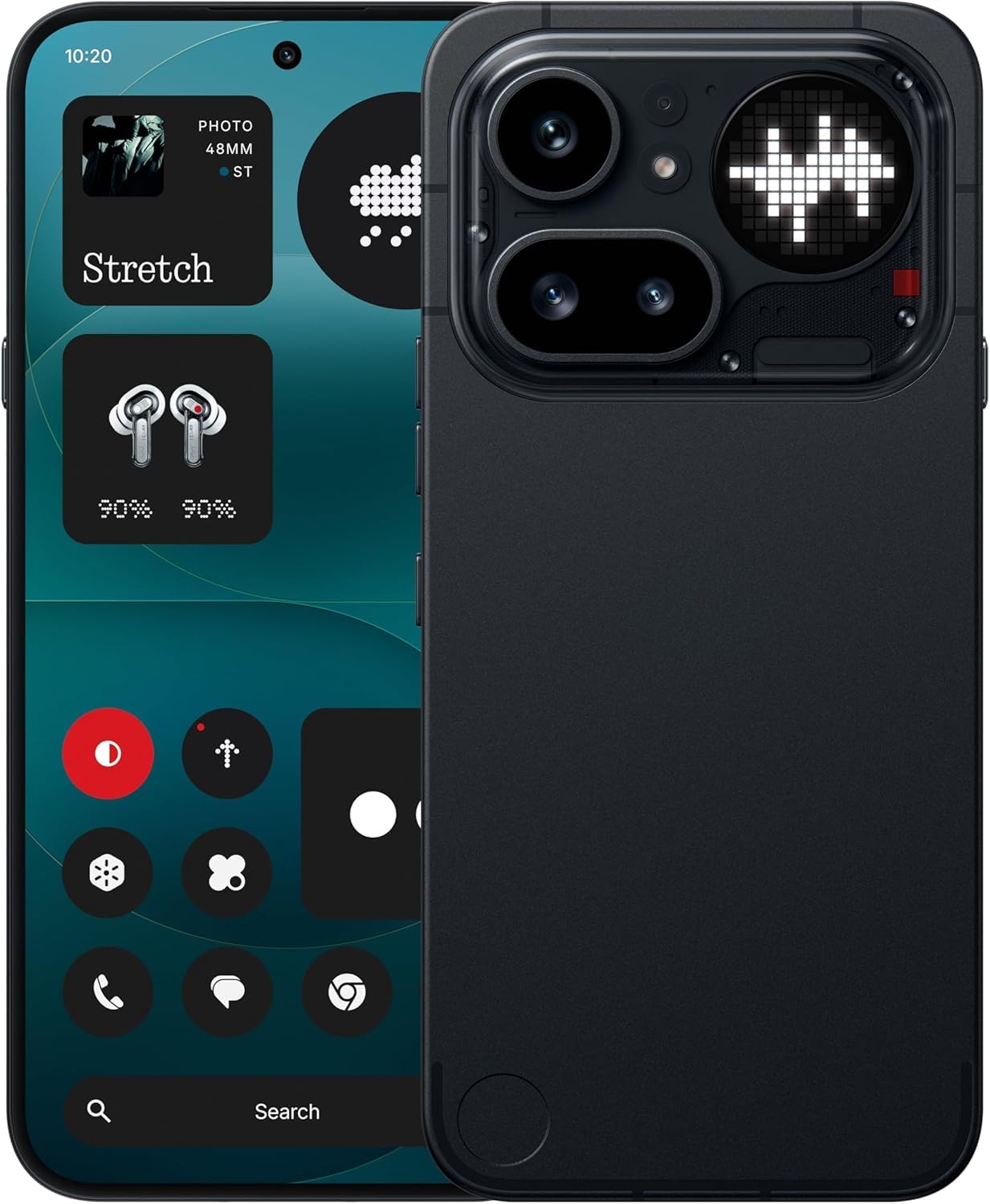
Image: The Nothing Phone (4a) Pro showcasing its flexible AMOLED display and sleek design.
3.2. מערכת מצלמה
Your device is equipped with a מערכת מצלמות משולשת, allowing for versatile photography. The camera supports up to 140x ultra zoom for capturing distant subjects.
Image: Detail of the triple camera module and a screen showing 140x zoom capability.
3.3. ביצועים
The Nothing Phone (4a) Pro is powered by the Snapdragon 7 Gen 4 processor, ensuring smooth multitasking and efficient performance for demanding applications and games. It comes with 12GB RAM for enhanced responsiveness.
Image: A visual representation of the Snapdragon 7 Gen 4 processor, highlighting the device's core performance component.
3.4. סוללה וטעינה
המכשיר כולל א סוללה של 5080 mAh, ומספק זמני שימוש ארוכים יותר. הוא תומך 50W תשלום מהיר technology, allowing for quick recharging.
תמונה: פנימי view of the phone, showing the battery component with its specifications.
3.5. תוכנה ותכונות בינה מלאכותית
Your Nothing Phone (4a) Pro runs on Nothing OS, בהתבסס על אנדרואיד 14, offering a clean and intuitive user experience. It integrates Essential AI tools ותכונות Google Gemini + ChatGPT Integration for advanced assistance and productivity.
Image: Screenshots depicting the Nothing OS home screen, an AI tools interface, and the Google Gemini + ChatGPT integration menu.
3.6. קישוריות
המכשיר תומך 5G cellular technology for high-speed internet access. It uses a USB Type-C (USB 2.0) connector for charging and data transfer.
4. תחזוקה
4.1. ניקוי המכשיר
לניקוי הטלפון, השתמשו במטלית רכה ונטולת סיבים. הימנעו מחומרים שוחקים או כימיקלים חזקים. עבור כתמים עקשניים, שטפו קלות.ampנקו את המטלית במים או בחומר ניקוי מסכים המיועד לאלקטרוניקה.
4.2. עדכוני תוכנה
בדוק באופן קבוע אם קיימים עדכוני תוכנה והתקן אותם כדי לוודא שהמכשיר שלך כולל את התכונות, תיקוני האבטחה ושיפורי הביצועים העדכניים ביותר. עבור אל הגדרות > מערכת > עדכון תוכנה כדי לבדוק אם קיימים עדכונים זמינים.
4.3. טיפול בסוללה
To prolong battery life, avoid exposing your phone to extreme temperatures. It is recommended to keep the battery charge between 20% and 80% for optimal long-term health.
5. פתרון תקלות
5.1. בעיות נפוצות ופתרונות
- המכשיר לא נדלק: ודא שהסוללה טעונה. חבר למטען למשך 15 דקות לפחות, ולאחר מכן נסה להפעיל שוב.
- אפליקציות קורסות: Clear the cache of the problematic app (Settings > Apps > [App Name] > Storage & cache > Clear cache). If the issue persists, reinstall the app.
- קליטת רשת חלשה: Check if your SIM card is properly inserted. Try restarting the phone or toggling Airplane Mode on and off.
- הסוללה מתרוקנת במהירות: הפחת את בהירות המסך, השבת אפליקציות רקע מיותרות והגבל את שירותי המיקום.
5.2. איפוס להגדרות היצרן
אם אתם נתקלים בבעיות תוכנה מתמשכות, איפוס להגדרות היצרן עשוי לפתור אותן. אזהרה: פעולה זו תמחק את כל הנתונים בטלפון שלך. גבה נתונים חשובים לפני שתמשיך. עבור אל הגדרות > מערכת > אפשרויות איפוס > מחק את כל הנתונים (איפוס להגדרות היצרן).
6. מפרטים
| תכונה | פְּרָט |
|---|---|
| דֶגֶם | Nothing Phone (4a) Pro |
| מַעֲרֶכֶת הַפעָלָה | Android 14 (Nothing OS) |
| מעבד | סנאפדרגון 7 דור 4, 2.5 גיגה-הרץ |
| אַיִל | 12 ג'יגה-בייט |
| אחסון פנימי | 256 ג'יגה-בייט |
| לְהַצִיג | 6.83" 1.5K Flexible AMOLED, 144Hz refresh rate |
| קיבולת סוללה | 5080 מיליאמפר / שעה ליתיום-יון |
| טְעִינָה | 50W Fast Charge, USB Type-C (USB 2.0) |
| מַצלֵמָה | Triple Camera System, up to 140x ultra zoom |
| קישוריות | 5G, GSM, LTE |
| מידות | 16.4 x 7.8 x 0.8 סנטימטרים |
| מִשׁקָל | 250 גרם |
| תוכן הקופסה | אוזניות |
7. אחריות ותמיכה
7.1. אחריות למוצר
The Nothing Phone (4a) Pro comes with a אחריות יצרן לשנה from the date of purchase. This warranty covers manufacturing defects and workmanship under normal use. It does not cover damage caused by accidents, misuse, unauthorized modifications, or normal wear and tear.
7.2. תמיכת לקוחות
For technical assistance, warranty claims, or service inquiries, please contact Nothing customer support. Refer to the official Nothing webאתר לקבלת פרטי הקשר העדכניים ביותר.
Manufacturer: Nothing
Packer/Importer Contact: Essentially Nothing