
1. המוצר נגמרview
The Edifier CC300 is a professional Bluetooth 6.0 communicator headset designed for reliable and high-quality audio communication in various professional environments. It features AI-enhanced dual-microphone noise filtering, a 30mm dynamic driver for clear sound, and multiple connectivity options for versatile use.
2. תכולת החבילה
- Edifier CC300 Headset
- דונגל USB-C
- כבל טעינה USB-A ל-USB-C
- מדריך למשתמש
3. תכונות מוצר
The Edifier CC300 headset is engineered for comfort and performance, featuring a lightweight design and a flexible microphone arm.

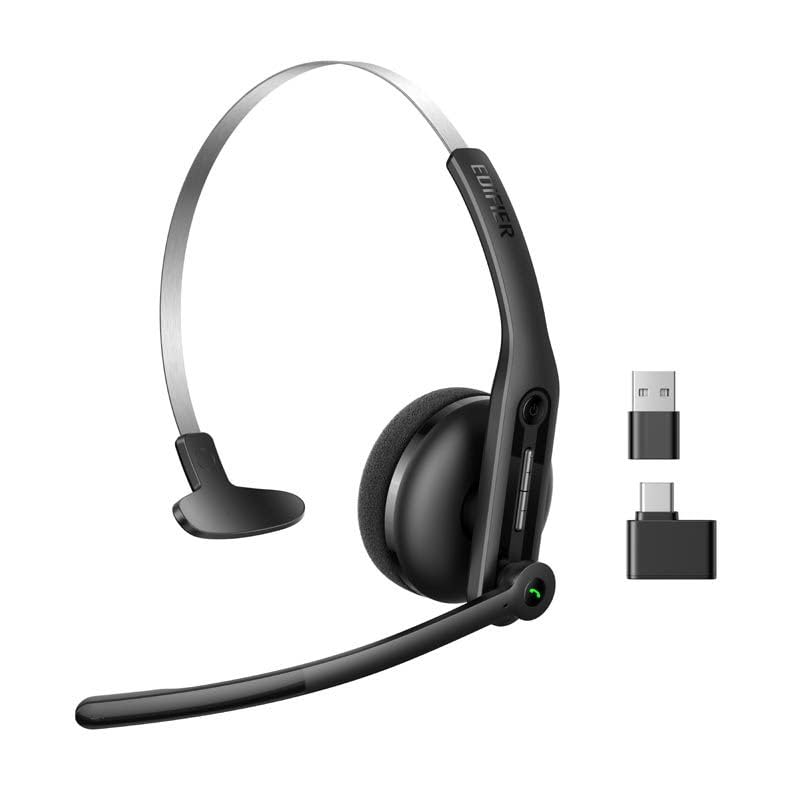
איור 3.1: Edifier CC300 Headset with included USB-C dongle and charging cable.

איור 3.2: צַד view of the Edifier CC300 Headset with the microphone arm extended.

איור 3.3: The microphone arm can rotate 240 degrees for flexible positioning on either the left or right side.
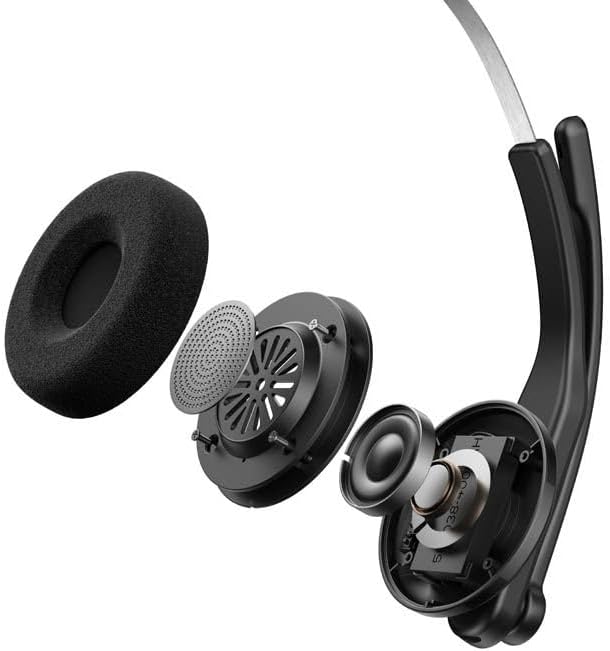
איור 3.4: התפוצץ view showing the internal components of the earcup, including the 30mm dynamic driver.
4. התקנה
4.1 טעינה ראשונית
Before first use, fully charge the headset using the provided USB-A to USB-C cable. Connect the USB-C end to the headset and the USB-A end to a power source (e.g., computer USB port or wall adapter). The charging indicator light will show the charging status.
4.2 הפעלה/כיבוי
- כדי להפעיל: לחץ והחזק את לחצן ההפעלה עד שנורית החיווי נדלקת.
- כדי לכבות: לחץ והחזק את לחצן ההפעלה עד שנורית החיווי תכבה.
4.3 ענידת האוזניות
Adjust the headband for a comfortable fit. The microphone arm can be rotated 240 degrees to be positioned on either the left or right side of your face. Position the microphone approximately 2-3 cm from your mouth for optimal voice pickup.
5. הוראות הפעלה
The Edifier CC300 features intuitive controls for managing calls and audio playback.

איור 5.1: Diagram illustrating the control buttons and their functions on the Edifier CC300 Headset.
5.1 פונקציות כפתורים
| פְּעוּלָה | פוּנקצִיָה |
|---|---|
| Press and hold (Power Button) | הפעלה/כיבוי |
| Press 1x (Mute Button) | Activate/Deactivate Mute (during calls) |
| Press 1x (Volume Up) | הגדל את עוצמת הקול |
| Press and hold (Volume Up) | המסלול הבא |
| Press and hold (Volume Down) | הורד את עוצמת הקול |
| Press 1x (Volume Down) | המסלול הקודם |
| Press 1x (Call Button) | Play/Pause Audio; Answer/End Call |
| Press and hold (Call Button) | דחה שיחה |
| Press 2x (Call Button) | חיוג חוזר למספר האחרון |
6. אפשרויות קישוריות
The Edifier CC300 offers three versatile connection methods:
איור 6.1: Visual representation of the three connectivity options: Bluetooth, USB-C dongle, and wired USB-A.
6.1 חיבור בלוטות'
- Ensure the headset is powered on and in pairing mode (indicator light flashing).
- On your device (smartphone, laptop), enable Bluetooth and search for "EDIFIER CC300".
- Select the headset to pair. Once connected, the indicator light will turn solid blue.
6.2 USB-C Dongle Connection
- Plug the provided USB-C dongle into an available USB-C port on your computer.
- Power on the headset. It will automatically connect to the dongle for a stable, low-latency connection.
6.3 Wired USB-A Connection
- Connect the headset to your computer using the provided USB-A to USB-C cable.
- The headset will function as a wired audio device, providing zero interference.
7. סוללה וטעינה
The CC300 headset is designed for extended use with a long-lasting battery.
- חיי סוללה: Up to 72 hours for audio playback, or 36 hours for talk time.
- זמן טעינה: כשעתיים לטעינה מלאה.
- מחוון טעינה: Refer to the LED indicator on the headset for charging status.
To charge, connect the headset to a power source using the USB-A to USB-C cable.
8. תחזוקה
- ניקוי: השתמשו במטלית רכה ויבשה לניקוי האוזניות. אין להשתמש בחומרי ניקוי נוזליים או בתרסיסים.
- אִחסוּן: יש לאחסן את האוזניות במקום קריר ויבש, הרחק מאור שמש ישיר וטמפרטורות קיצוניות.
- הימנע מלחות: Keep the headset away from water and high humidity to prevent damage.
- טפל בזהירות: הימנעו מהפלת האוזניות או מחשיפתן לפגיעות חזקות.
9. פתרון תקלות
9.1 אין צליל או איכות שמע ירודה
- Ensure the headset is powered on and properly connected (Bluetooth, dongle, or wired).
- בדוק את עוצמת הקול הן באוזניות והן במכשיר המחובר.
- If using Bluetooth, ensure the headset is within range of your device.
- Try restarting both the headset and your connected device.
9.2 המיקרופון לא עובד
- ודא שהמיקרופון אינו מושתק (בדוק את כפתור ההשתקה).
- ודא שהאוזניות נבחרו כהתקן הקלט בהגדרות הקול של המחשב או המכשיר שלך.
- Ensure the microphone arm is positioned correctly near your mouth.
9.3 Headset Not Pairing via Bluetooth
- ודא שהאוזניות נמצאות במצב צימוד (נורית החיווי מהבהבת).
- כבה את בלוטות' במכשירים אחרים בקרבת מקום כדי למנוע הפרעות.
- שכח את המכשיר מרשימת ה-Bluetooth של המכשיר ונסה לבצע התאמה שוב.
10. מפרטים
| תכונה | פְּרָט |
|---|---|
| מותג | עורך |
| שם הדגם | CC300 |
| צֶבַע | שָׁחוֹר |
| טכנולוגיית קישוריות | Wireless (Bluetooth), Wired (USB-A), USB-C Dongle |
| גרסת בלוטות' | 6.0 |
| פרוטוקולי Bluetooth | A2DP, AVRCP, HFP |
| Codec אודיו | SBC |
| סוג דרייבר | דרייבר דינמי 30 מ"מ |
| תגובת תדר | 20Hz - 20KHz |
| רמת לחץ קול | 94 ± 3dB(A) |
| קיבולת סוללה | 400mAh |
| זמן השמעת מוסיקה | כ. 72 שעות |
| זמן דיבור | כ. 36 שעות |
| זמן טעינה | כ. 1.5 שעות |
| קלט כוח | 5V/500mAh |
| מִשׁקָל | 70 גרם |
| תכונות מיוחדות | AI-enhanced Dual-Mic Noise Cancellation |
| מכשירים תואמים | Mobile Phones, Desktops, Laptops |
11. אחריות ותמיכה
11.1 מידע אחריות
The Edifier CC300 Headset comes with a אחריות לשנה from the date of purchase, covering manufacturing defects. Please retain your proof of purchase for warranty claims. The warranty does not cover damage caused by misuse, accidents, unauthorized modifications, or normal wear and tear.
11.2 תמיכת לקוחות
For technical assistance, troubleshooting, or warranty inquiries, please contact Edifier customer support through their official website or the contact information provided with your product packaging. You may also visit the חנות Edifier באמזון למידע נוסף.