
פונייט ניו יורק-01
FUNYET 2026 14.1-inch Laptop User Manual
דגם: NY-01
מָבוֹא
This manual provides essential information for setting up, operating, maintaining, and troubleshooting your FUNYET 2026 14.1-inch Laptop. Please read this manual thoroughly before using your device to ensure proper function and longevity.
מה יש בקופסה
ודא שכל הפריטים נמצאים בחבילה:
- FUNYET 2026 14.1-inch Laptop
- Power Adapter (12V2A DC)
- מדריך הוראות (מסמך זה)
- תעודת אחריות
המוצר נגמרview
The FUNYET 2026 laptop is designed for productivity and entertainment, featuring a powerful processor and versatile connectivity.
תכונות מפתח
- מַעֲרֶכֶת הַפעָלָה: Pre-installed Windows 11 Pro for enhanced multitasking and security.
- מעבד: Intel Celeron N5095 (4 cores, 4 threads, up to 2.9 GHz) for smooth performance.
- זיכרון ואחסון: 16GB LPDDR4 RAM and 512GB M.2 SSD, with support for up to 1TB TF Card expansion.
- לְהַצִיג: 14.1-inch IPS Full HD (1920x1080) screen, offering clear and vibrant visuals, with a 180° foldable hinge for flexible viewing.
- קישוריות: Dual-band 5G Wi-Fi and Bluetooth 5.0 for fast and stable wireless connections.
- יציאות: Includes 2x USB 3.0, 1x 3.5mm Headphone Jack, 1x 3.5mm DC Adapter port, 1x Mini-HDMI, and 1x TF Card slot.
- סוֹלְלָה: Integrated 5000mAh battery providing 4-5 hours of normal use and over 50 hours of standby time.
- מצלמה ואודיו: Built-in 0.3-megapixel front camera and dual microphones for video calls and online meetings.
זיהוי רכיבים
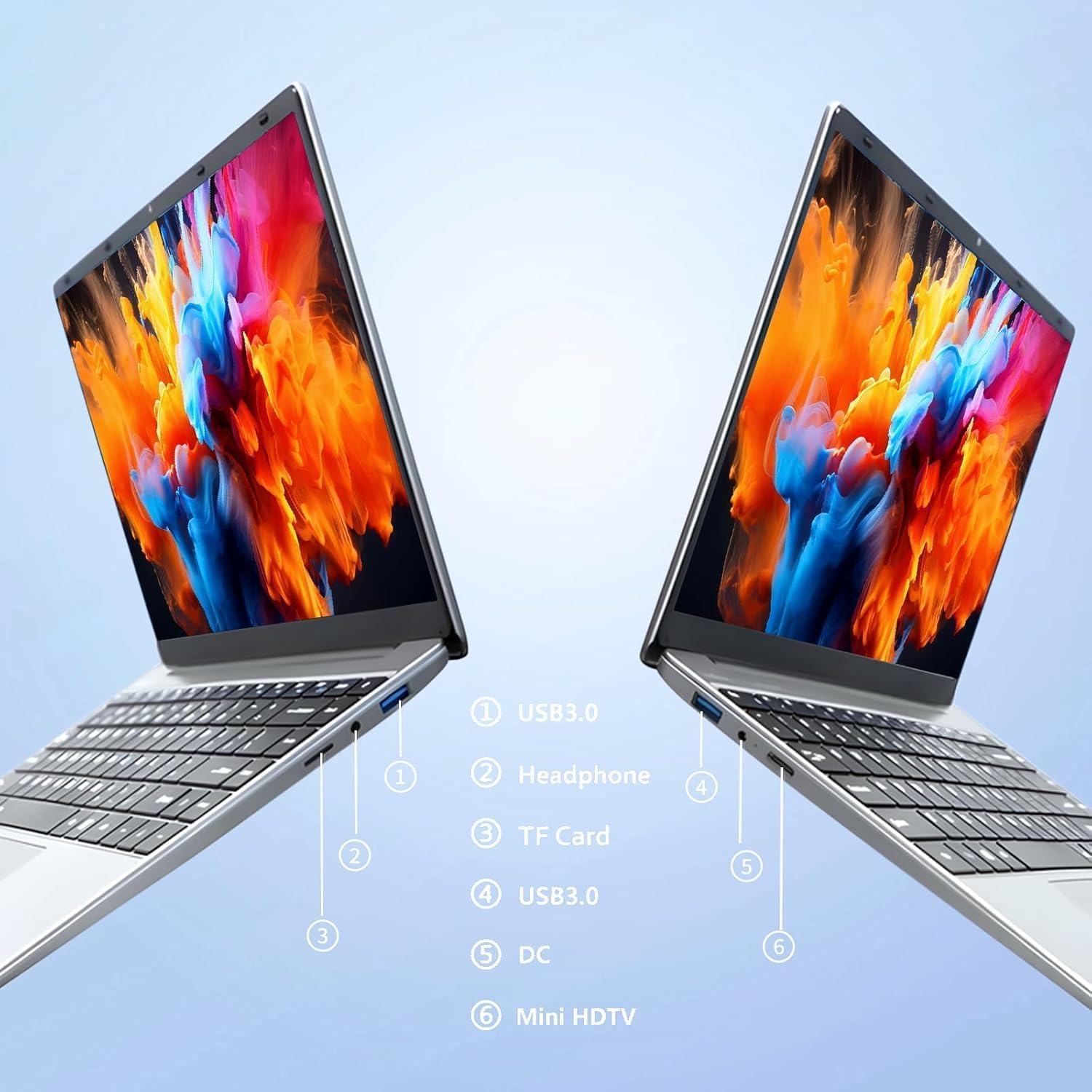
תְמוּנָה: צַד view of the laptop highlighting port locations.
This image illustrates the various ports available on the FUNYET 2026 laptop. On one side, you will find a USB 3.0 port, a 3.5mm headphone jack, and a TF Card slot. On the opposite side, there is another USB 3.0 port, the DC power input, and a Mini-HDMI port.

תְמוּנָה: Laptop screen displaying its 14-inch Full HD IPS features.
The laptop features a 14-inch Full HD (1920x1080) IPS display with a 16:9 aspect ratio and ultra-narrow bezels, providing a wide perspective and vivid images.

תְמוּנָה: Laptop demonstrating its 180-degree foldable hinge.
The laptop's hinge allows the screen to fold back 180 degrees, offering versatile viewing angles and usage modes.
מדריך התקנה
1. טעינה ראשונית
- הוצא את המחשב הנייד ואת ספק הכוח מהקופסה.
- Connect the power adapter to the DC input port on the side of the laptop.
- חבר את מתאם החשמל לשקע בקיר.
- יש לאפשר למחשב הנייד להיטען במשך 30 דקות לפחות לפני השימוש הראשון, או עד שמחוון הסוללה יראה טעינה מספקת.
2. הפעלה ראשונה
- פתח את מכסה המחשב הנייד.
- לחץ על כפתור ההפעלה, שבדרך כלל ממוקם על גבי משטח המקלדת או בצד.
- פעל לפי ההוראות שעל המסך כדי להשלים את תהליך ההגדרה של Windows 11 Pro, כולל בחירת שפה, חיבור רשת ויצירת חשבון משתמש.
3. התחברות ל-Wi-Fi
- During the initial Windows setup, you will be prompted to connect to a Wi-Fi network. Select your network from the list and enter the password.
- אם אתם מתכננים להגדיר מאוחר יותר, לחצו על סמל ה-Wi-Fi בשורת המשימות, בחרו את הרשת שלכם ולחצו על "התחבר".
הוראות הפעלה
ניהול חשמל
- הפעלה: לחץ על לחצן ההפעלה.
- מצב שינה: סגור את המכסה או לחץ לחיצה קצרה על כפתור ההפעלה.
- כיבוי: Click the Start button, then Power, then Shut down.
- הפעל מחדש: Click the Start button, then Power, then Restart.
Using the Touchpad and Touchscreen
- לוח מגע: Use gestures for navigation. Single tap for left-click, two-finger tap for right-click, two-finger scroll for scrolling.
- מסך מגע: Tap to select, pinch to zoom, swipe to scroll.
חיבור תצוגה חיצוני
To connect an external monitor or projector:
- Connect a Mini-HDMI cable from the laptop's Mini-HDMI port to the external display's HDMI input.
- If necessary, use a Mini-HDMI to HDMI adapter (not included).
- לִלְחוֹץ מקש Windows + P to open the Project menu and select your desired display mode (Duplicate, Extend, Second screen only).
Using TF Card Expansion
Insert a TF card into the designated slot for additional storage. The laptop supports up to 1TB TF card expansion.
טיפול ותחזוקה
- ניקוי: השתמשו במטלית רכה ונטולת סיבים לניקוי המסך והשלדה. במקרה של סימנים עקשניים, נקו קלותampשטפו את המטלית במים או בחומר לניקוי מסכים. הימנעו מכימיקלים חזקים.
- טיפול בסוללה: כדי להאריך את חיי הסוללה, הימנעו מפריקה מלאה של הסוללה לעתים קרובות. אחסנו את המחשב הנייד במקום קריר ויבש אם לא נעשה בו שימוש למשך תקופות ממושכות.
- טֶמפֶּרָטוּרָה: Operate the laptop within a temperature range of 5°C to 35°C (41°F to 95°F). Avoid direct sunlight or extreme heat/cold.
- אוורור: Ensure the ventilation openings are not blocked to prevent overheating. Do not place the laptop on soft surfaces like beds or sofas during operation.
- עדכוני תוכנה: עדכן את Windows ומנהלי ההתקנים באופן קבוע כדי להבטיח ביצועים ואבטחה מיטביים.
פתרון בעיות
בעיות נפוצות ופתרונות
| בְּעָיָה | פתרון אפשרי |
|---|---|
| המחשב הנייד לא נדלק. | Ensure the power adapter is securely connected and plugged into a working outlet. Check if the battery is charged. Try holding the power button for 10-15 seconds for a hard reset. |
| בעיות חיבור Wi-Fi. | Check if Wi-Fi is enabled in Windows settings. Restart your router and the laptop. Ensure you are within range of the Wi-Fi signal. Verify the Wi-Fi password. |
| ביצועים איטיים. | Close unnecessary applications. Check for background processes in Task Manager. Ensure Windows is updated. Consider running a disk cleanup. |
| לא זוהה צג חיצוני. | Ensure the Mini-HDMI cable is connected correctly. Check the input source on your external display. Press מקש Windows + P to cycle through display modes. |
| הסוללה מתרוקנת במהירות. | Adjust screen brightness. Close power-intensive applications. Check power settings in Windows and select a power-saving plan. Disconnect external peripherals when not in use. |
מפרט טכני
| מותג | FUNYET |
| שם הדגם | NY-01 |
| גודל מסך | 14.1 אינץ' |
| הַחְלָטָה | 1920 x 1080 (Full HD) |
| טכנולוגיית מסך | IPS LCD |
| מעבד | אינטל סלרון N5095 (עד 2.9 גיגה-הרץ) |
| אַיִל | 16 ג'יגה-בייט LPDDR4 (2400 מגה-הרץ) |
| אִחסוּן | 512 GB M.2 SSD (expandable via TF Card up to 1TB) |
| מַעֲרֶכֶת הַפעָלָה | Windows 11 Pro |
| גרָפִיקָה | המשולב Intel Graphics |
| קישוריות אלחוטית | 5G Wi-Fi (2.4 GHz, 5.8 GHz), Bluetooth 5.0 |
| נמלים | 2x USB 3.0, 1x 3.5mm Headphone, 1x 3.5mm DC Adapter, 1x Mini-HDMI, 1x TF Card Slot |
| Webפִּקָה | 0.3 Megapixel Front Camera |
| קיבולת סוללה | 5000 mAh / 38.5 WH |
| מידות (L x W x H) | 32.2 x 21 x 2.1 ס"מ (12.68 x 8.27 x 0.83 אינץ ') |
| מִשׁקָל | 1.4 ק"ג (3.09 פאונד) |
| תכונה מיוחדת | 180° Foldable Hinge |
אחריות ותמיכה
מידע על אחריות
Your FUNYET 2026 laptop comes with a אחריות לשנה from the date of purchase. Please retain your proof of purchase for warranty claims. The warranty covers manufacturing defects and malfunctions under normal use. It does not cover damage caused by misuse, accidents, unauthorized repairs, or normal wear and tear.
בנוסף, א 6-month free exchange/return policy may apply, subject to the terms and conditions of your purchase platform.
תמיכת לקוחות
For any issues, questions, or technical assistance, please contact FUNYET customer support:
- תמיכה מקוונת: Available 24/7. You can typically find support by logging into your Amazon account, navigating to "Your Account" -> "Your orders", and selecting "Ask Product Question" for your FUNYET laptop.
- אֶלֶקטרוֹנִי: funyestore@outlook.com
- טֵלֵפוֹן: +49 800-000-7147 (Please note operating hours may vary)

תְמוּנָה: Customer service contact details and warranty information.
This image provides a visual summary of the support options, including the 2-year warranty, 6-month exchange/return policy, and contact information for phone and email support.
Ask a question about this manual
Ask about setup, troubleshooting, compatibility, parts, safety, or missing instructions. Manuals+ will review the question and use this page’s manual context to help answer it.