1. הקדמה
This manual provides detailed instructions for assembling and operating your CUTEBEE 3D Wooden Music Box Model Kit, the 'Bread Factory' edition. This DIY kit allows you to construct a miniature bread factory diorama featuring LED lighting, a mist atomiser, a music playback function, and 360° rotating elements. It is designed for enthusiasts aged 14 and above, offering an engaging and rewarding crafting experience.
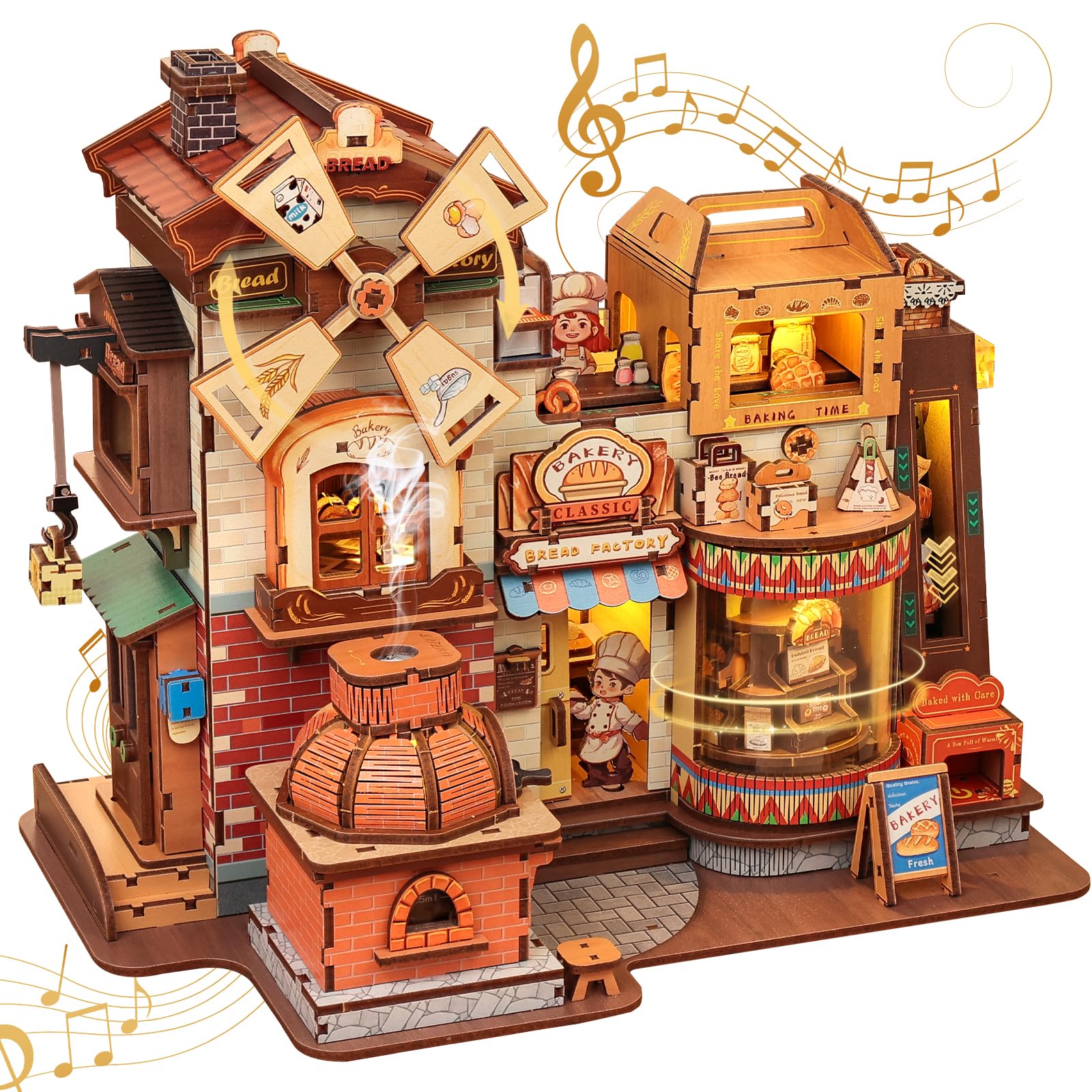
Figure 1: Assembled CUTEBEE Bread Factory Model Kit.
2. מידע בטיחות
- המלצת גיל: This kit is recommended for individuals aged 14 years and older. It contains small parts that may pose a choking hazard for younger children.
- השגחת מבוגרים: For users under 18, adult supervision is recommended during assembly.
- דֶבֶק: Liquid silicone glue is required for assembly and is NOT included in the kit. Please ensure proper ventilation when using adhesives and follow the glue manufacturer's safety instructions.
- רכיבים חשמליים: Handle LED lights and wiring with care. Ensure the Type-C power connection is dry before use.
3. תכולת החבילה
Before beginning assembly, verify that all components listed below are present in your kit. If any parts are missing or damaged, please contact customer support.

איור 2: מעלview של רכיבים כלולים.
- Pre-cut Wooden Sheets (Front Wood Board, Backing Wood Board)
- ערכת תאורת לד
- Music Box Mechanism
- Mist Atomiser
- יריעות אקריליק
- PVC Sheets
- מדריך הוראות
- Various miniature decorative elements (e.g., oven, bread display, windmill parts)
- USB Type-C Cable (for power, not included in some kits, please check your packaging)
4. הוראות הרכבה
Assembly typically takes 10-12 hours and involves approximately 572 pieces. Follow the step-by-step instructions provided in the included manual carefully. Use the images below as a general guide for the assembly process.
- הֲכָנָה: Unpack all components and organize them. Identify the wooden sheets and individual pieces. Refer to the manual for part identification.
- Initial Structure Assembly: Begin by assembling the main structural elements of the bread factory. Carefully detach pieces from the wooden sheets.
- Detailing and Wiring: As you build the structure, integrate the smaller decorative elements. This includes installing the LED lights and routing the wiring according to the manual's diagrams.
- רכיבים מכניים: Install the music box mechanism, mist atomiser, and any rotating parts (like the windmill and bread display). Ensure they are correctly aligned for proper function.
- נגיעות אחרונות: Complete the exterior and interior decorations. Apply any remaining stickers or small accessories.

Figure 3: Users engaged in the assembly process.

איור 4: דוגמהample of a detailed assembly step for a miniature toaster.
5. הוראות הפעלה
The CUTEBEE Bread Factory model features interactive elements controlled by a touch switch and powered via a Type-C port.

Figure 5: Location of the touch switch and Type-C power port.
- חיבור חשמל: Connect the model to a power source using a Type-C USB cable (not always included).
- קליק ראשון: Tap the designated touch switch once. The LED lights will illuminate, and the rotating elements (e.g., windmill, bread display) will begin to move.
- קליק שני: Tap the touch switch a second time. The mist atomiser will activate, producing a gentle mist, and the music playback function will start.
- קליק שלישי: Tap the touch switch a third time. All active functions (lights, rotation, mist, music) will turn off.

Figure 6: Visual guide to the touch switch operation.

Figure 7: The model displaying its illuminated features in different lighting conditions.
6. תחזוקה
- ניקוי: Gently dust the model with a soft, dry cloth or a soft brush to remove accumulated dust. Avoid using wet cloths or harsh cleaning agents.
- אִחסוּן: Store the model in a dry environment, away from direct sunlight, high humidity, and extreme temperature fluctuations to prevent warping or fading of the wooden components.
- טיפול: Handle the assembled model with care, especially delicate parts, to prevent accidental damage.
7. פתרון תקלות
- Lights/Rotation/Mist/Music Not Working:
- Ensure the Type-C USB cable is securely connected to both the model and a working power source.
- Verify that the touch switch is being pressed correctly according to the operating instructions.
- Check all wiring connections during assembly to ensure they are firm and correctly installed.
- חלקים לא מתאימים: If you encounter difficulty fitting parts, do not force them. Refer to the instruction manual's diagrams for correct orientation and ensure any excess material from the laser-cut sheets has been removed.
- חלקים חסרים או פגומים: If any parts are missing or damaged upon opening the kit, please contact customer support immediately for assistance.
8. מפרטים
| תכונה | פְּרָט |
|---|---|
| מספר דגם | CB-EAHB501-DE5 |
| מותג | חמוד |
| חוֹמֶר | עֵץ |
| מידות (L x W x H) | 27 ס"מ x 17 ס"מ x 22 ס"מ (10.6 אינץ' x 6.8 אינץ' x 9 אינץ') |
| מספר חתיכות | 572 יחידות |
| זמן הרכבה | 10-12 שעות (בערך) |
| המלצת גיל | 14+ שנים |
| מקור כוח | Type-C USB (cable not always included) |
| תכונות | LED Lights, Mist Atomiser, Music Playback, 360° Rotation |
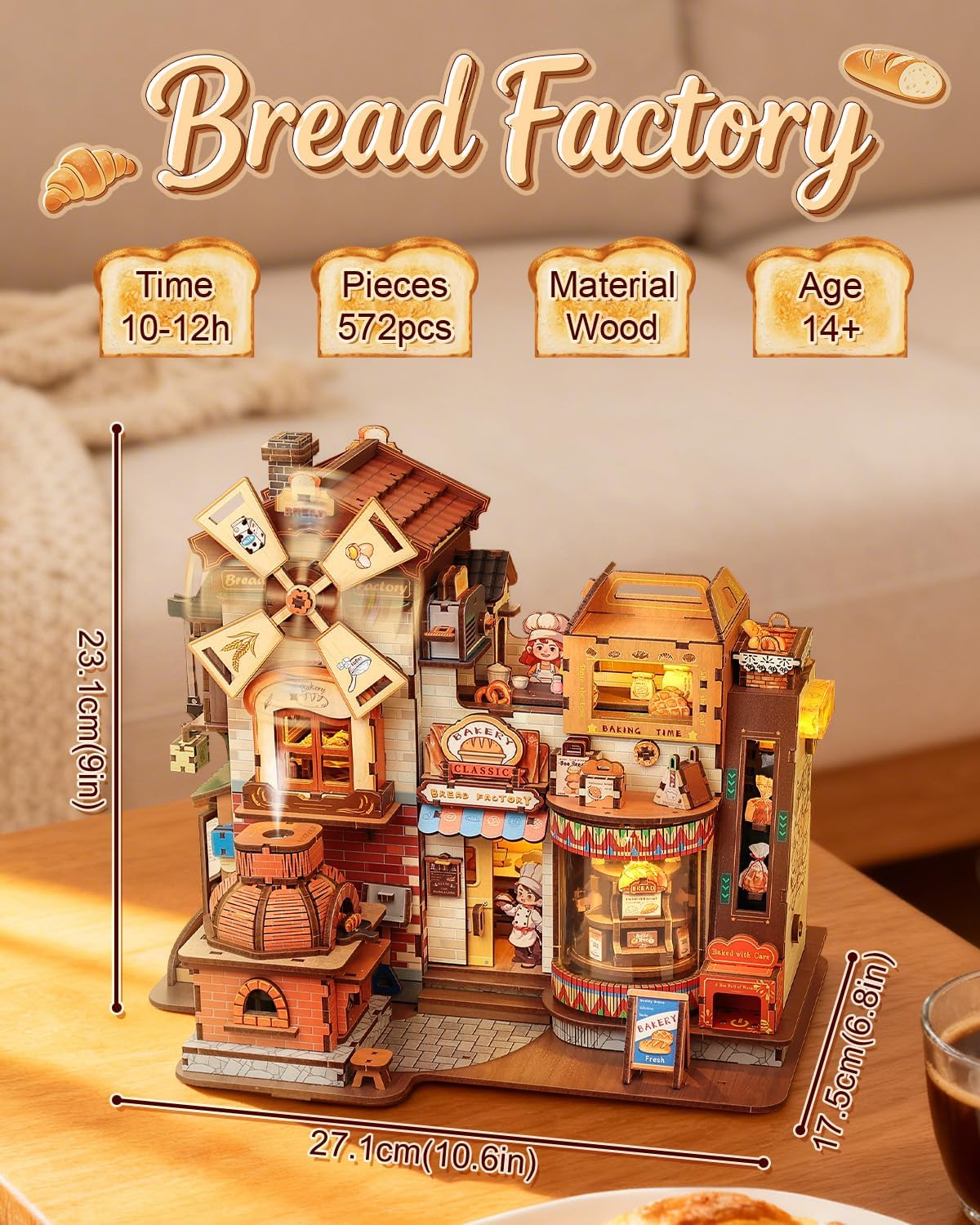
איור 8: מפרטים ומאפיינים עיקריים של המוצר.
9. אחריות ותמיכה
Each CUTEBEE miniature house kit undergoes a 100% inspection before shipment to ensure all parts are complete. If you encounter any problems during assembly or have questions about the product, please do not hesitate to contact our customer support team. We are committed to providing prompt assistance and resolving any issues you may experience.
לקבלת תמיכה, אנא עיינו בפרטי הקשר המופיעים על אריזת המוצר או בפרטי הקשר של הקמעונאי. webאֲתַר.