
1. המוצר נגמרview
The PUSOKEI 4K HD WiFi Action Camera is a versatile handheld video recorder designed for capturing high-quality footage in various environments, from sports activities to travel vlogs. It features a 180° rotating lens, a 1.31-inch display, and built-in WiFi for easy sharing and management of your recordings.
תכונות עיקריות:
- איכות וידאו 4K HD: Records clear and vibrant moments in 4K resolution.
- עיצוב קומפקטי ונייד: Easy to carry for various recording needs.
- 1.31 Inch Screen: ממשק אינטואיטיבי לניווט ובקרה קלים.
- עדשה מסתובבת 180°: Allows for unique angles and creative compositions.
- קישוריות WiFi: Enables quick sharing, storage, and editing of footage via a mobile app.
- הקלטת לולאה: מקליט ברציפות, דורס את הישן ביותר files כאשר כרטיס הזיכרון מלא.
- אור LED למילוי: Suitable for both day and night use, enhancing image quality in low light.
תכולת החבילה:
- 1 x PUSOKEI Handheld Camera
- 2 x כבלי USB
- 1 x מדריך הוראות
Note: A Small Memory Card (up to 256GB) is required for recording and is not included in the package.

Image: PUSOKEI 4K HD WiFi Action Camera showcasing its main features like 4K HD resolution, 180° rotating lens, one-click recording, loop recording, business back clamp, ultra-low power consumption, and small memory card support.
2. התקנה
2.1 טעינת הסוללה
The camera is equipped with a built-in high-capacity battery. Before first use, fully charge the camera using the provided USB Type-C cable.
- Connect one end of the USB Type-C cable to the camera's charging port.
- Connect the other end to a standard USB power adapter (not included) or a computer's USB port.
- נורית חיווי הטעינה תידלק. היא תכבה או תשנה צבע לאחר השלמת הטעינה.

Image: The PUSOKEI Action Camera highlighting its Type-C charging port and indicating extended battery life.
2.2 הכנסת כרטיס זיכרון
A small memory card (MicroSD card) is required to store recordings. The camera supports cards up to 256GB.
- אתר את חריץ כרטיס הזיכרון בצד המצלמה.
- הכנס בעדינות את כרטיס ה-MicroSD כאשר המגעים הזהובים פונים כלפי מטה עד שיינעל במקומו בנקישה.
- כדי להוציא, דחפו את הכרטיס מעט פנימה עד שייקפץ החוצה.

Image: The PUSOKEI Action Camera illustrating the insertion of a small memory card, emphasizing support for up to 256GB for secure data transmission and storage.
2.3 הפעלה/כיבוי
- כדי להפעיל: Press and hold the Power button (usually marked with a power symbol) for a few seconds until the screen illuminates.
- כדי לכבות: לחץ והחזק שוב את לחצן ההפעלה עד שהמסך יכבה.
3. הוראות הפעלה
3.1 Basic Controls and Screen Navigation
The camera features a 1.31-inch screen for live view and menu navigation. Use the physical buttons on the device to navigate through menus and select options.

Image: The PUSOKEI Action Camera displaying its 1.3-inch HD screen, illustrating its adjustable recording angle for wider viewקלות שימוש.
3.2 הקלטת וידאו
- Ensure a formatted memory card is inserted.
- Press the Record button (often marked with a red dot or camera icon) to start recording.
- לחץ שוב על כפתור ההקלטה להפסקת ההקלטה.
- The camera records in 4K HD resolution by default, providing high-quality footage.

Image: Comparison showing the difference between standard quality and 4K quality footage captured by the PUSOKEI Action Camera, highlighting its 4K Ultra HD display capabilities.
3.3 שימוש בעדשה המסתובבת ב-180°
The camera's lens can be manually rotated 180 degrees to capture footage from various angles, including forward-facing, backward-facing, or any angle in between.
- Gently rotate the lens module to your desired angle.
- The screen display will adjust automatically to the lens orientation.
- This feature is ideal for vlogging, self-recording, or capturing unique perspectives.
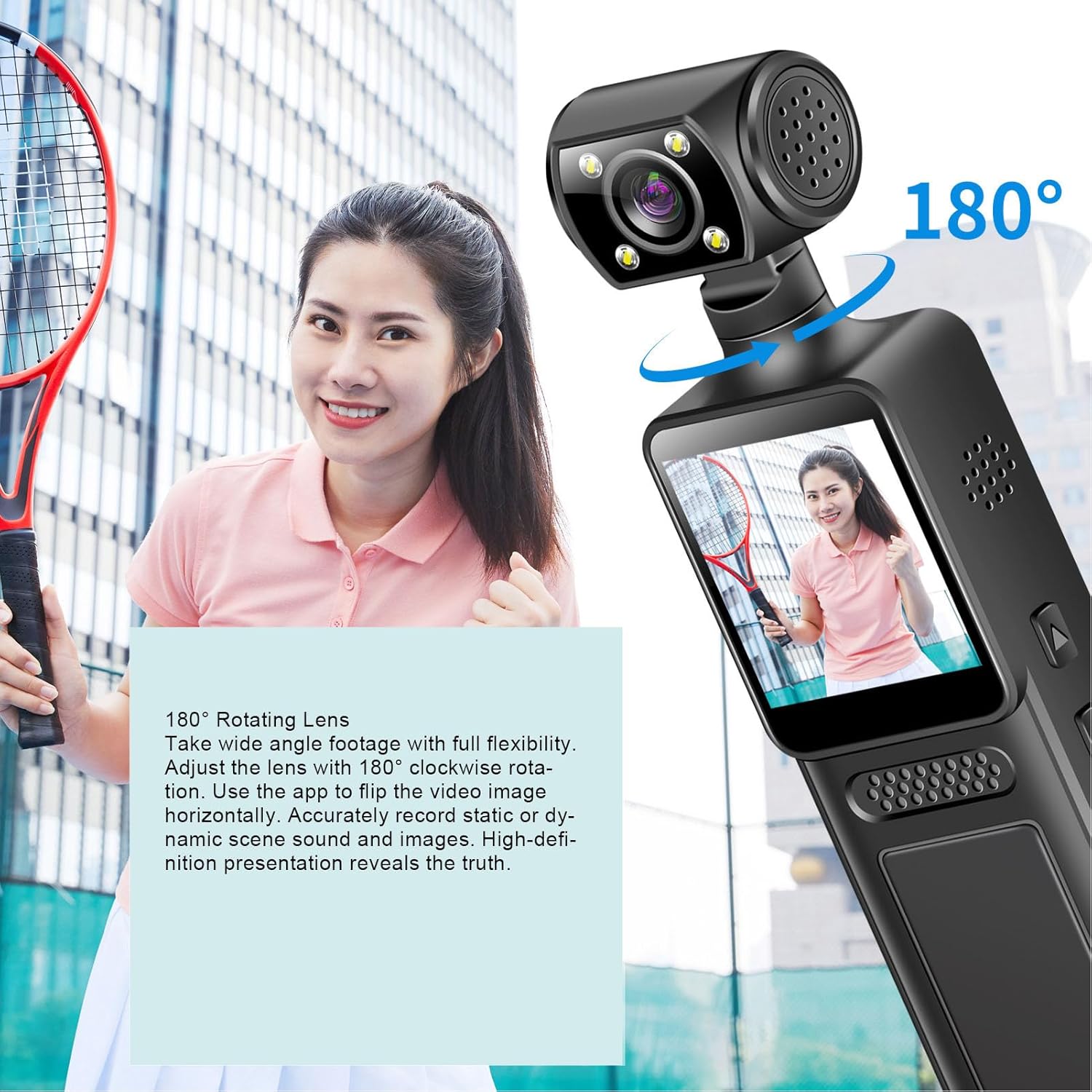
Image: The PUSOKEI Action Camera demonstrating its 180° rotating lens, allowing for wide-angle footage with full flexibility and the ability to flip video images horizontally via the app.
3.4 קישוריות WiFi ושימוש באפליקציות
The camera features built-in WiFi for wireless connection to your smartphone or tablet. This allows for real-time viewing, downloading, and sharing of your footage.
- Download the official PUSOKEI camera app from your device's app store (iOS/Android).
- Turn on WiFi on your camera via the settings menu.
- On your smartphone, connect to the camera's WiFi network (SSID and password usually displayed on the camera screen).
- Open the app to automatically connect and view foo בזמן אמתtage, or download recordings to your phone.

Image: The PUSOKEI Action Camera demonstrating mobile wireless connectivity, showing how to connect to a smartphone app to view foo בזמן אמתtage or download recordings.
3.5 הקלטת לולאה
The loop recording feature allows the camera to continuously record. When the memory card is full, the oldest files יוחלפו אוטומטית על ידי הקלטות חדשות.
- Access the camera's settings menu.
- Locate the "Loop Recording" option and enable or disable it as desired.
- Set the desired loop recording duration (e.g., 1, 3, 5 minutes) if available.
3.6 שימוש בתאורת מילוי LED
The integrated LED fill light provides additional illumination for recording in low-light conditions, ensuring clear image quality.
- Locate the button or menu option to activate the LED fill light.
- Toggle the light on or off as needed for your recording environment.

Image: The PUSOKEI Action Camera demonstrating its LED fill light, suitable for both day and night use, ensuring clear video in dark environments and vivid color during daylight.
3.7 Body-Worn Camera Usage
The compact design and included back clamp allow the camera to be worn on clothing, making it suitable for sports, travel, or security applications.
- Attach the camera securely to your clothing using the integrated back clamp.
- Ensure the lens is oriented correctly for the desired recording angle.
- Verify the camera is recording before engaging in activities.
4. תחזוקה
Proper maintenance ensures the longevity and optimal performance of your PUSOKEI Action Camera.
4.1 ניקוי המצלמה
- עֲדָשָׁה: השתמש במטלית רכה ונטולת סיבים המיועדת במיוחד לעדשות מצלמה. הימנע משימוש בכימיקלים חזקים.
- מָסָך: Wipe gently with a microfiber cloth. Do not press hard.
- גוּף: Use a soft, dry cloth to wipe the camera body. If necessary, slightly dampשטפו את המטלית במים, ולאחר מכן נגבו יבש מיד.
- ודא שכל היציאות נקיות מאבק ופסולת.
4.2 טיפול בסוללה
- הימנעו מפריקת הסוללה באופן מלא לעתים קרובות.
- אחסנו את המצלמה עם סוללה טעונה חלקית (כ-50%) אם לא נעשה בה שימוש למשך תקופות ממושכות.
- Do not expose the camera to extreme temperatures.
4.3 אחסון
- Store the camera in a cool, dry place away from direct sunlight and moisture.
- Use a protective case to prevent scratches and impacts.
5. פתרון תקלות
If you encounter issues with your camera, refer to the following common troubleshooting steps.
| בְּעָיָה | סיבה אפשרית | פִּתָרוֹן |
|---|---|---|
| המצלמה לא נדלקת. | סוללה חלשה; סוללה פגומה; בעיה בכפתור ההפעלה. | Charge the battery fully. Try a different charging cable/adapter. If problem persists, contact support. |
| לא ניתן להקליט וידאו. | No memory card; memory card full; memory card error; incorrect settings. | Insert a memory card. Format the memory card (this will erase all data). Check available storage. Verify recording settings. |
| איכות וידאו ירודה. | עדשה מלוכלכת; תנאי תאורה חלשים; הגדרות רזולוציה שגויות. | Clean the lens. Activate the LED fill light in low light. Ensure 4K resolution is selected in settings. |
| בעיות חיבור WiFi. | WiFi not enabled; incorrect password; app issues; interference. | Ensure camera WiFi is on. Re-enter WiFi password. Restart camera and phone. Try connecting in a different location. |
| המצלמה קופאת או מאבדת את התגובות. | תקלת תוכנה; בעיה בכרטיס זיכרון. | Perform a soft reset by holding the power button until it turns off. If unresponsive, use a pin to press the reset button (if available). Remove and reinsert the memory card. |
6. מפרטים
| תכונה | פְּרָט |
|---|---|
| מספר דגם | PUSOKEIpqi950c8n7 |
| רזולוציית וידאו | 4K HD |
| גודל מסך | 1.31 אינץ' |
| סיבוב עדשה | 180 מעלות |
| קישוריות | WiFi, USB Type-C |
| סוג סוללה | סוללת Li מובנית |
| קיבולת סוללה | 1000mAh |
| תמיכה בכרטיס זיכרון | Up to 256GB (MicroSD, not included) |
| משקל פריט | 6.1 אונקיות |
| מידות חבילה | 6.3 x 3.15 x 1.97 אינץ' |
| יַצרָן | PUSOKEI |
7. אחריות ותמיכה
For warranty information and customer support, please refer to the documentation provided with your purchase or contact the retailer/manufacturer directly.
- יַצרָן: PUSOKEI
- מַגָע: Please refer to the official PUSOKEI website or your purchase platform for specific support contact details.