
1. הקדמה
Thank you for choosing the xinwld Air3 Pro Wireless Earbuds. This manual provides detailed instructions on how to set up, operate, and maintain your new earbuds. Please read this manual carefully before use to ensure optimal performance and longevity of your device. Keep this manual for future reference.
2. תכולת החבילה
ודא שכל הפריטים נמצאים בחבילה:
- xinwld Air3 Pro Wireless Earbuds (Left and Right)
- נרתיק טעינה
- כבל טעינה מסוג USB מסוג C
- Multiple Ear Tip Sizes (S, M, L)
- מדריך למשתמש
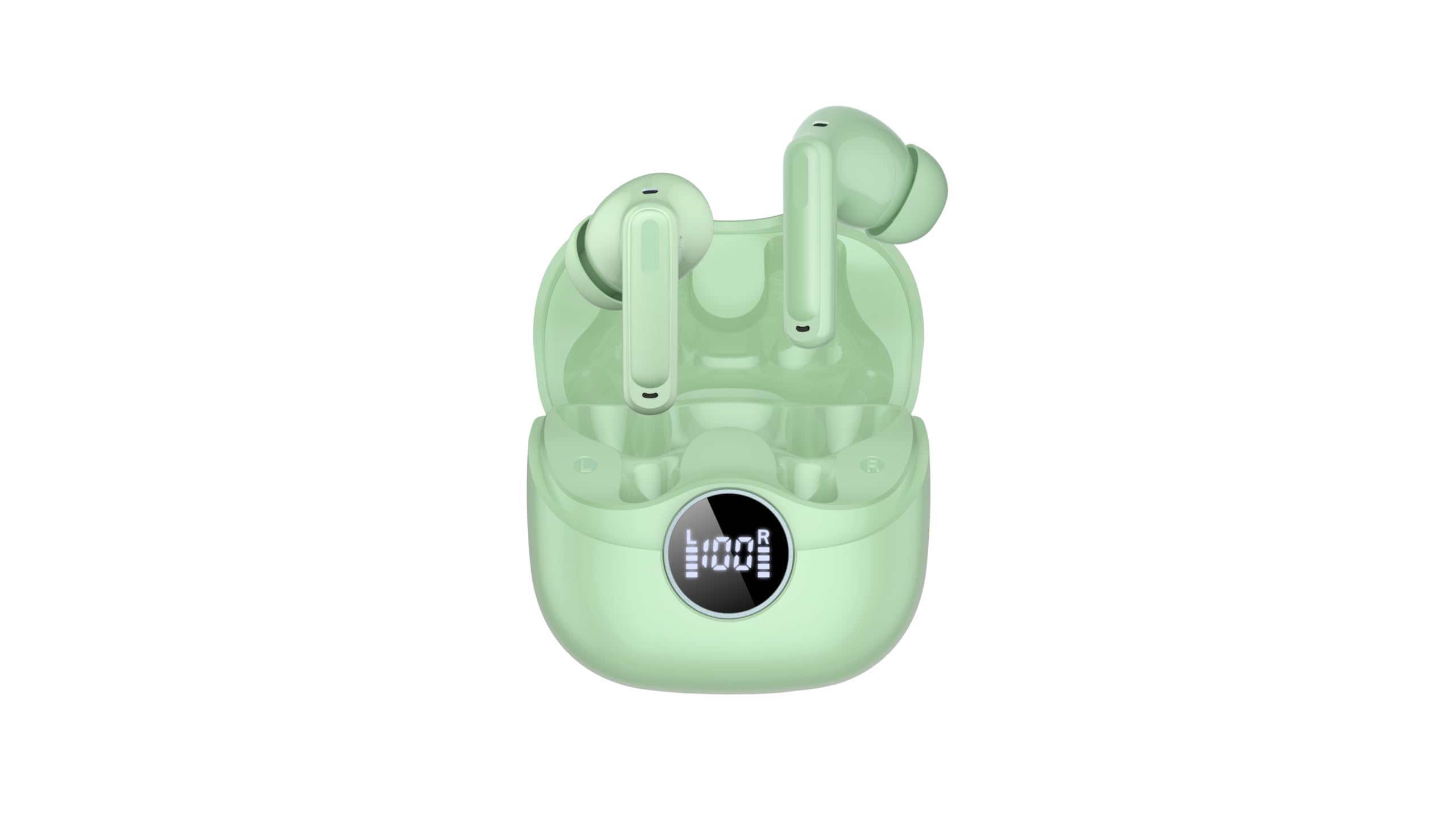
Image 2.1: xinwld Air3 Pro Wireless Earbuds and Charging Case with accessories.
3. המוצר נגמרview
The xinwld Air3 Pro Wireless Earbuds are designed for a superior audio experience with advanced features.
תכונות עיקריות:
- Bluetooth 5.4: מספק חיבור אלחוטי יציב ויעיל.
- 4 ENC Noise Cancelling Microphones: משפר את צלילות השיחה על ידי הפחתת רעשי הסביבה.
- HiFi Stereo Deep Bass: Delivers rich, immersive audio quality.
- 40 שעות משחק: חיי סוללה ארוכים יותר עם מארז טעינה.
- IP7 עמיד למים: Resistant to sweat and rain, suitable for workouts and outdoor activities.
- תצוגת לד: מציג את מצב הסוללה של מארז הטעינה ושל האוזניות בנפרד.
- בקרת מגע: Intuitive control for music, calls, and voice assistant.
תמונה 3.1: תקריב view of the xinwld Air3 Pro Wireless Earbuds.
4. טעינה
The earbuds and charging case come with a partial charge. It is recommended to fully charge them before first use.
טעינת מארז הטעינה:
- חבר את כבל ה-USB Type-C המצורף לשקע הטעינה במארז.
- חבר את הקצה השני של הכבל לספק כוח USB (לא כלול) או ליציאת USB של מחשב.
- The LED display on the case will show the charging progress. A full charge typically takes about 1 hour.
טעינת האוזניות:
- הניחו את האוזניות בחריצים המתאימים שלהן במארז הטעינה. ודאו שמגעי הטעינה מיושרים.
- Close the charging case lid. The earbuds will automatically begin charging.
- The LED display on the case will indicate the charging status of each earbud.
פֶּתֶק: The earbuds can be recharged 2-3 times by a fully charged case, providing up to 40 hours of total playtime.
5. Initial Setup and Bluetooth Pairing
Follow these steps to pair your xinwld Air3 Pro earbuds with your device:
- טעינת אוזניות: ודאו ששתי האוזניות וגם נרתיק הטעינה טעונים כראוי.
- הפעלה: Open the charging case lid. The earbuds will automatically power on and enter pairing mode. You may see indicator lights flashing on the earbuds.
- הפעל בלוטות': בטלפון החכם, בטאבלט או במכשיר אחר התומך ב-Bluetooth, עבור אל הגדרות ה-Bluetooth והפעל את ה-Bluetooth.
- חפש הֶתקֵן: In the list of available devices, select "Air3 Pro".
- לְחַבֵּר: Once selected, your device should connect to the earbuds. A voice prompt or indicator light change will confirm successful pairing.
- שימוש אחר כך: לאחר הצימוד הראשוני, האוזניות יתחברו אוטומטית למכשיר האחרון שקושם לאחר הוצאתן ממארז הטעינה, בתנאי ש-Bluetooth מופעל במכשיר שלכם.
פֶּתֶק: If pairing fails, place the earbuds back into the case, close the lid, and repeat the steps. Ensure the earbuds are close to your device during pairing.
6. הוראות הפעלה
בקרות מגע:
The xinwld Air3 Pro earbuds feature intuitive touch controls on each earbud. The specific functions may vary slightly depending on your device and application.
| פְּעוּלָה | אוזניה שמאלית | Earbud נכון |
|---|---|---|
| הפעל/השהה מוזיקה | הקשה אחת | הקשה אחת |
| המסלול הבא | הקש פעמיים | הקש פעמיים |
| המסלול הקודם | טריפל ברז | טריפל ברז |
| מענה/סיום שיחה | הקשה אחת | הקשה אחת |
| דחה שיחה | לחיצה ארוכה (2 שניות) | לחיצה ארוכה (2 שניות) |
| הפעל את עוזר הקולי | לחיצה ארוכה (2 שניות) | לחיצה ארוכה (2 שניות) |
לענוד את האוזניות:
לקבלת איכות צליל ונוחות אופטימליים, ודאו שהאוזניות עונדות נכון.
- בחר טיפים לאוזניות: בחרו את אטמי האוזניים המספקים את האטימה והנוחות הטובים ביותר לאוזניים שלכם.
- הכנסת אוזניות: הכניסו בעדינות כל אוזניה לתעלת האוזן.
- התאם מיקום: Rotate the earbud slightly until it fits snugly and securely. The microphone should be pointing towards your mouth for clear calls.
7. תחזוקה וטיפול
טיפול נכון מבטיח את אורך החיים והביצועים של האוזניות שלכם.
- ניקוי: יש לנקות באופן קבוע את האוזניות ואת מארז הטעינה בעזרת מטלית רכה, יבשה ונטולת סיבים. אין להשתמש בכימיקלים חזקים או בחומרים שוחקים.
- ניקוי אוזניים: הסירו את קצוות האוזניים ונקו אותם עם סבון עדין ומים במידת הצורך. ודאו שהם יבשים לחלוטין לפני חיבורם מחדש.
- אִחסוּן: כאשר אינן בשימוש, יש לאחסן את האוזניות תמיד בנרתיק הטעינה שלהן כדי להגן עליהן מפני אבק ונזק.
- טיפול בסוללה: Avoid fully discharging the battery frequently. Charge the earbuds and case regularly, even if not in use for extended periods, to maintain battery health.
- עמידות במים: While IP7 waterproof, avoid prolonged submersion in water. Dry the earbuds completely if they get wet before placing them back in the charging case.
- הימנע מטמפרטורות קיצוניות: Do not expose the earbuds or charging case to extreme temperatures (hot or cold) or high humidity.
8. פתרון תקלות
אם אתם נתקלים בבעיות עם האוזניות שלכם, עיינו בבעיות הנפוצות ובפתרונות הבאות:
- אוזניות לא מתחברות למכשיר:
- ודא שה-Bluetooth מופעל במכשיר שלך.
- ודאו שהאוזניות טעונות ומחוץ למארז הטעינה.
- Forget "Air3 Pro" from your device's Bluetooth list and try pairing again.
- הפעילו מחדש את המכשיר ואת האוזניות (על ידי החזרתם למארז והוצאתם).
- אין צליל מאחת האוזניות או משתיהן:
- בדקו את עוצמת הקול גם במכשיר וגם באוזניות.
- ודא שהאוזניות מחוברות כראוי למכשיר שלך.
- Try resetting the earbuds (refer to the manual for specific reset instructions if available, or try placing them in the case, closing, and reopening).
- נקו כל פסולת מרשת הרמקול של האוזניות.
- מארז טעינה לא נטען:
- ודא שכבל ה-USB Type-C מחובר היטב הן למארז והן למקור החשמל.
- נסה כבל USB או מתאם מתח אחר.
- בדוק אם יש פסולת ביציאת הטעינה של המארז.
- איכות שיחה ירודה:
- ודאו שהאוזניות ממוקמות כראוי באוזניים.
- Check for strong environmental noise; the ENC feature works best within its limits.
- Ensure your device has good network reception.
9. מפרט מוצר
Detailed technical specifications for the xinwld Air3 Pro Wireless Earbuds:
| תכונה | מִפרָט |
|---|---|
| שם הדגם | Air3 Pro |
| טכנולוגיית קישוריות | אלחוטי (Bluetooth) |
| גרסת בלוטות' | 5.4 |
| תכונות בקרת רעש | ביטול רעש סביבתי (ENC) |
| חיי סוללה | עד 40 שעות (עם מארז טעינה) |
| רמת עמידות במים | IP7 עמיד למים |
| שיטת בקרה | לָגַעַת |
| צורת אפרכסת | אין אוזן |
| סוג מנהל התקן שמע | נהג בס |
| מכשירים תואמים | סמארטפונים, מחשבים ניידים, טאבלטים, רמקולים חכמים |
| משקל פריט | 0.071 אונקיות (אוזניות) |
10. מידע בטיחות
אנא קראו ופעלו לפי הנחיות הבטיחות הבאות כדי למנוע פגיעה או נזק למכשיר שלכם:
- אין לפרק, לתקן או לשנות את המוצר. הדבר עלול לגרום לשריפה, התחשמלות או נזק מלא למוצר.
- Keep the earbuds and charging case away from extreme temperatures, direct sunlight, and high humidity.
- Avoid using the earbuds at excessively high volumes for prolonged periods to prevent hearing damage.
- יש להרחיק מהישג ידם של ילדים וחיות מחמד כדי למנוע בליעה מקרית של חלקים קטנים.
- Do not use the earbuds in situations where you need to hear your surroundings, such as driving, cycling, or walking in traffic.
- השתמש רק בכבלים ובמתאמים המסופקים או המאושרים.
11. אחריות ותמיכה
xinwld products are designed and manufactured to the highest quality standards. For warranty information, technical support, or customer service inquiries, please refer to the warranty card included in your package or contact xinwld customer support through the retailer where you purchased the product. Please have your product model number (Air3 Pro) and ASIN (B0GHC3X3BP) ready when contacting support.