
1. התקנה
1.1 פתיחת הקופסה ובדיקה ראשונית
עם פתיחת האריזה, יש לוודא שכל הרכיבים נמצאים במצב תקין. הקופסה צריכה להכיל:
- XIAOMI Redmi Note 15 Pro 5G AI Smartphone
- מוציא מגש SIM
- כבל USB
- כיסוי לטלפון
1.2 התקנת כרטיס SIM
The Redmi Note 15 Pro 5G AI supports Dual SIM functionality (nano SIM + nano SIM or nano SIM + eSIM). It does לֹא have a Micro SD slot.
- אתר את מגש ה-SIM בצד המכשיר.
- הכנס את כלי חילוץ מגש ה-SIM המצורף לחור הקטן שליד המגש ולחץ בעדינות עד שהמגש ייצא החוצה.
- Place your nano SIM card(s) into the designated slots on the tray. Ensure the gold contacts face downwards and the card is correctly oriented.
- הכנס בזהירות את מגש ה-SIM בחזרה לטלפון עד שייכנס למקומו בנקישה.
פֶּתֶק: For USA market, this phone is compatible with T-Mobile, Mint, Tello, or any network operating under the T-Mobile infrastructure. An already activated SIM card is required. Outside the USA, it works with any GSM carrier SIM.
1.3 טעינה ראשונית והפעלה
Before first use, it is recommended to fully charge your device. The phone supports 45W turbo charging.
- Connect the USB cable to the phone's USB Type-C port and to a compatible power adapter.
- חבר את ספק הכוח לשקע בקיר. מחוון הטעינה יופיע על המסך.
- Once sufficiently charged, press and hold the power button on the side of the device until the XIAOMI logo appears.
- פעל לפי ההנחיות שעל המסך כדי להשלים את ההגדרה הראשונית, כולל בחירת שפה, חיבור Wi-Fi והגדרת חשבון Google.
2. הוראות הפעלה
2.1 תכונות תצוגה
The device features a 6.83-inch AMOLED display with a 1.5K resolution (2772 x 1280) and a refresh rate of up to 120Hz. It offers a peak brightness of 3200 nits and is protected by Corning Gorilla Glass Victus 2.
טכנולוגיית מגע רטוב 2.0: This feature intelligently detects water, oil, foam, or sweat, providing a smoother and more responsive touch experience even in challenging conditions.
2.2 שימוש במצלמה
The Redmi Note 15 Pro 5G AI is equipped with an advanced camera system:
- מצלמה אחורית: 200MP main camera with Optical Image Stabilization (OIS) and an 8MP ultra-wide camera.
- מצלמה קדמית: 20 מגה פיקסל.
To access the camera, tap the camera icon on your home screen or lock screen. Select modes such as Photo, Video, Portrait, or Pro mode. The 200MP AI Engine supports features like AI Film Camera for cinematic effects and various AI image editing tools.
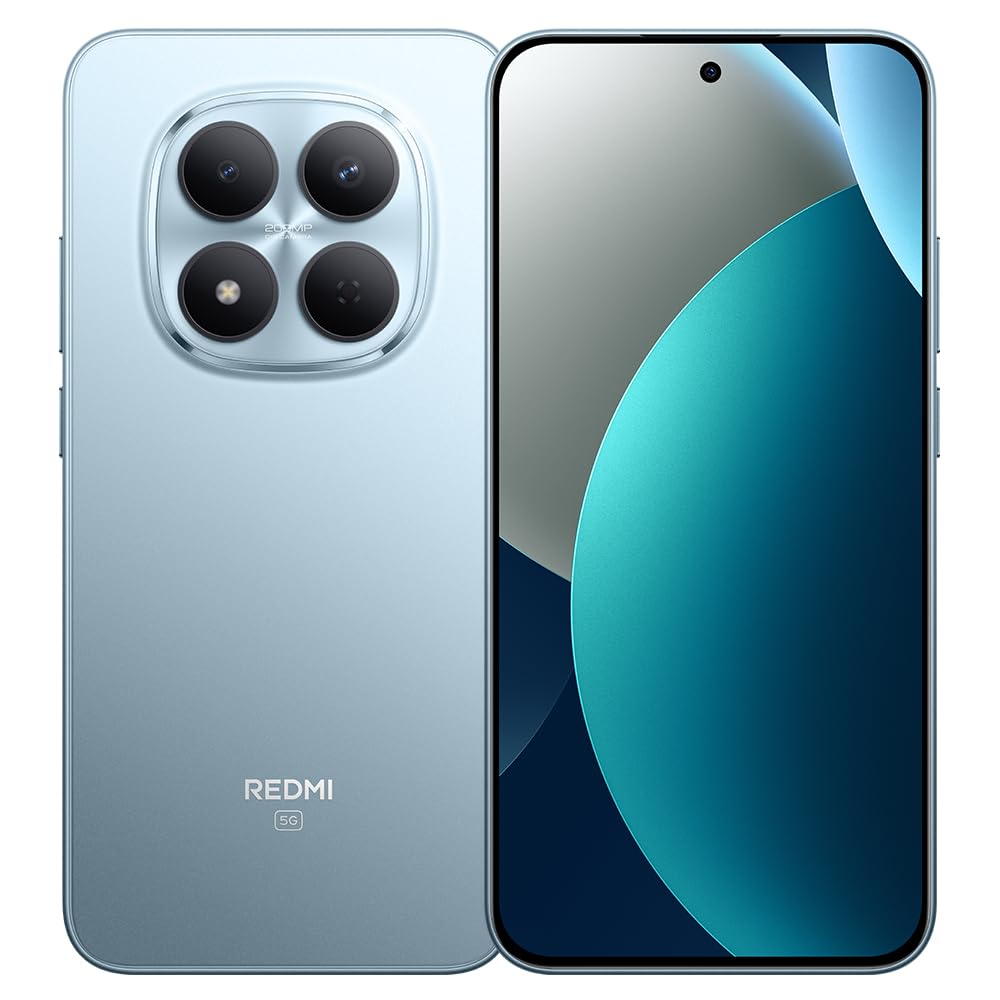
Image: XIAOMI Redmi Note 15 Pro 5G AI smartphone, black color, showing the front display and side profile.
2.3 Biometric Security
The device offers two primary biometric security methods:
- חיישן טביעות אצבע במסך: רשום את טביעת האצבע/ות שלך בהגדרות האבטחה לפתיחה מהירה ומאובטחת.
- ביטול נעילה באמצעות בינה מלאכותית עם פנים: Set up face recognition in the Security settings to unlock your device by looking at the front camera.
2.4 Navigation and AI Features
The phone supports multiple global navigation satellite systems including GPS, GLONASS, BDS, Galileo, and QZSS for accurate positioning.
Integrated AI features enhance user experience:
- הקף בעיגול כדי לחפש עם גוגל: חפש מידע במהירות על ידי הקפת תוכן על המסך.
- גוגל ג'מיני: AI assistant for various tasks.
- עריכת תמונות באמצעות בינה מלאכותית: Includes AI Erase Pro, AI Remove Reflection, AI Image Expansion, AI Sky, AI Bokeh, AI Cutouts, AI Image Enhancement, and AI Beautify.
3. תחזוקה
3.1 טיפול בסוללה
The device is equipped with a 6580mAh silicon-carbon battery designed for longevity, boasting a 6-year battery life guarantee. To maximize battery life:
- הימנע מטמפרטורות קיצוניות.
- Use the provided 45W turbo charger for optimal charging speed.
- The phone also supports up to 22.5W reverse charging to power other compatible devices.
3.2 עמידות והגנה
The Redmi Note 15 Pro 5G AI is built for durability:
- התנגדות לנפילה: Certified for 2.5-meter drop resistance.
- הגנת מסך: Features Corning Gorilla Glass Victus 2 for enhanced impact and scratch resistance.
- עמידות בפני מים ואבק: Rated P66/IP68/IP69/IP69K for dust and water resistance, ensuring protection against various environmental challenges.
3.3 ניקוי המכשיר שלך
כדי לנקות את הסמארטפון שלך:
- השתמש במטלית רכה ונטולת סיבים כדי לנגב את המסך והגוף.
- עבור כתמים עקשניים, מעט דמוי עורampשטפו את המטלית במים או בתמיסת ניקוי מסכים.
- הימנעו משימוש בכימיקלים חזקים, חומרים שוחקים או לחות מוגזמת.
4. פתרון תקלות
4.1 בעיות ופתרונות נפוצים
- המכשיר לא נדלק: Ensure the battery is charged. Connect the phone to its charger for at least 15 minutes, then try powering it on again. If it still doesn't turn on, perform a forced restart by holding the power button for 10-15 seconds.
- קליטת רשת חלשה או חוסר שירות: Check if your SIM card is properly inserted. Verify that airplane mode is off. Go to Settings > SIM cards & mobile networks and ensure your SIM is enabled. If issues persist, contact your mobile carrier.
- מסך מגע לא מגיב: Restart the device. If the issue continues, ensure the screen is clean and dry. If using a screen protector, ensure it is properly applied and not interfering with touch sensitivity.
- הסוללה מתרוקנת במהירות: Reduce screen brightness, close unused apps running in the background, disable unnecessary notifications, and limit location services. Check battery usage in Settings to identify power-hungry apps.
- אפליקציות קורסות או קופאות: Clear the cache and data for the problematic app in Settings > Apps. If the issue persists, uninstall and reinstall the app. Ensure your device's software is up to date.
4.2 איפוס להגדרות היצרן
אם אתם נתקלים בבעיות תוכנה מתמשכות שלא ניתן לפתור באמצעות שלבי פתרון בעיות אחרים, ייתכן שיהיה צורך באיפוס להגדרות היצרן. אַזהָרָה: איפוס להגדרות היצרן ימחק את כל הנתונים בטלפון שלך. גבה נתונים חשובים לפני שתמשיך.
- עבור אל הגדרות > אודות הטלפון > איפוס להגדרות היצרן.
- Tap 'Erase all data' and follow the on-screen instructions.
5. מפרטים
| מותג | שיאומי |
| שם הדגם | Note 15 Pro 5G |
| מספר דגם | 25080RABDG |
| מַעֲרֶכֶת הַפעָלָה | היפר-OS 2 |
| דגם מעבד | Mediatek Dimensity 7400-Ultra (Octa-core, up to 2.6GHz) |
| אַיִל | 8 ג'יגה-בייט |
| קיבולת אחסון | 256 ג'יגה-בייט |
| גודל מסך | מסך AMOLED בגודל 6.83 אינץ' |
| הַחְלָטָה | 1.5K (2772 x 1280) |
| קצב רענון | עד 120Hz |
| בהירות שיא | 3200 ניטים |
| מצלמה אחורית | 200 MP (Main, OIS) + 8 MP (Ultra-wide) |
| מצלמה קדמית | 20 מגה פיקסל |
| קיבולת סוללה | 6580 מיליאמפר/שעה |
| טְעִינָה | 45W Turbo Charging, 22.5W Reverse Charging |
| חריץ לכרטיס SIM | Dual SIM (Nano SIM + Nano SIM or Nano SIM + eSIM) |
| קישוריות | 5G, 4G LTE, Wi-Fi, Bluetooth, NFC, USB Type-C |
| עמידות במים | IP66/IP68/IP69/IP69K |
| אבטחה ביומטרית | In-screen Fingerprint, AI Face Unlock |
| מידות | Not specified in data |
6. אחריות ותמיכה
6.1 מידע אחריות
The XIAOMI Redmi Note 15 Pro 5G AI comes with a 30-day Xiaomi Europe Warrantyאנא שמור את הוכחת הרכישה שלך לצורך תביעות אחריות.
Additionally, spare parts for this device are available for a duration of 6 שנים within the EU.
6.2 תמיכת לקוחות
For technical assistance, warranty claims, or further inquiries, please contact XIAOMI customer support through their official website or authorized service centers. Refer to the official XIAOMI webאתר לקבלת פרטי הקשר ומשאבי התמיכה העדכניים ביותר.