
מבוא ומעברview
The Tribit StormBox Micro 3 is a compact and powerful portable Bluetooth speaker designed for versatile use. It features advanced audio technology, robust durability, and convenient mounting options, making it ideal for both indoor and outdoor environments.
- 13W XBass Technology: Equipped with a 48mm Neodymium driver and 2 coaxial passive radiators, delivering 13W rich audio with deep, punchy bass and clear highs/mids.
- 24H Non-Stop Music: Enjoy up to 24 hours of continuous music playback at medium volume. A 15-minute quick charge provides 4 hours of playtime.
- IP68 & 1.22m Drop-Proof: SGS-certified IP68 waterproof protection against rain, splashes, and brief submersion. Tested to withstand drops from up to 1.22 meters.
- Strap & Magnetic Mount: Features a 2-in-1 design allowing secure attachment via a non-slip strap to handlebars, backpacks, or tent poles, or magnetic attachment to metal surfaces.
- Bluetooth 6.0 & 45m Range: Utilizes the latest Bluetooth 6.0 chipset with AAC/SBC codec for stable audio up to 45 meters, ensuring faster pairing and stronger anti-interference.
- Versatile Smart Functions: Supports TWS pairing for immersive stereo sound, a dedicated app with 7 presets and 9 EQ bands for audio customization, auto shut-off, OTA updates, and a built-in mic for hands-free calls.
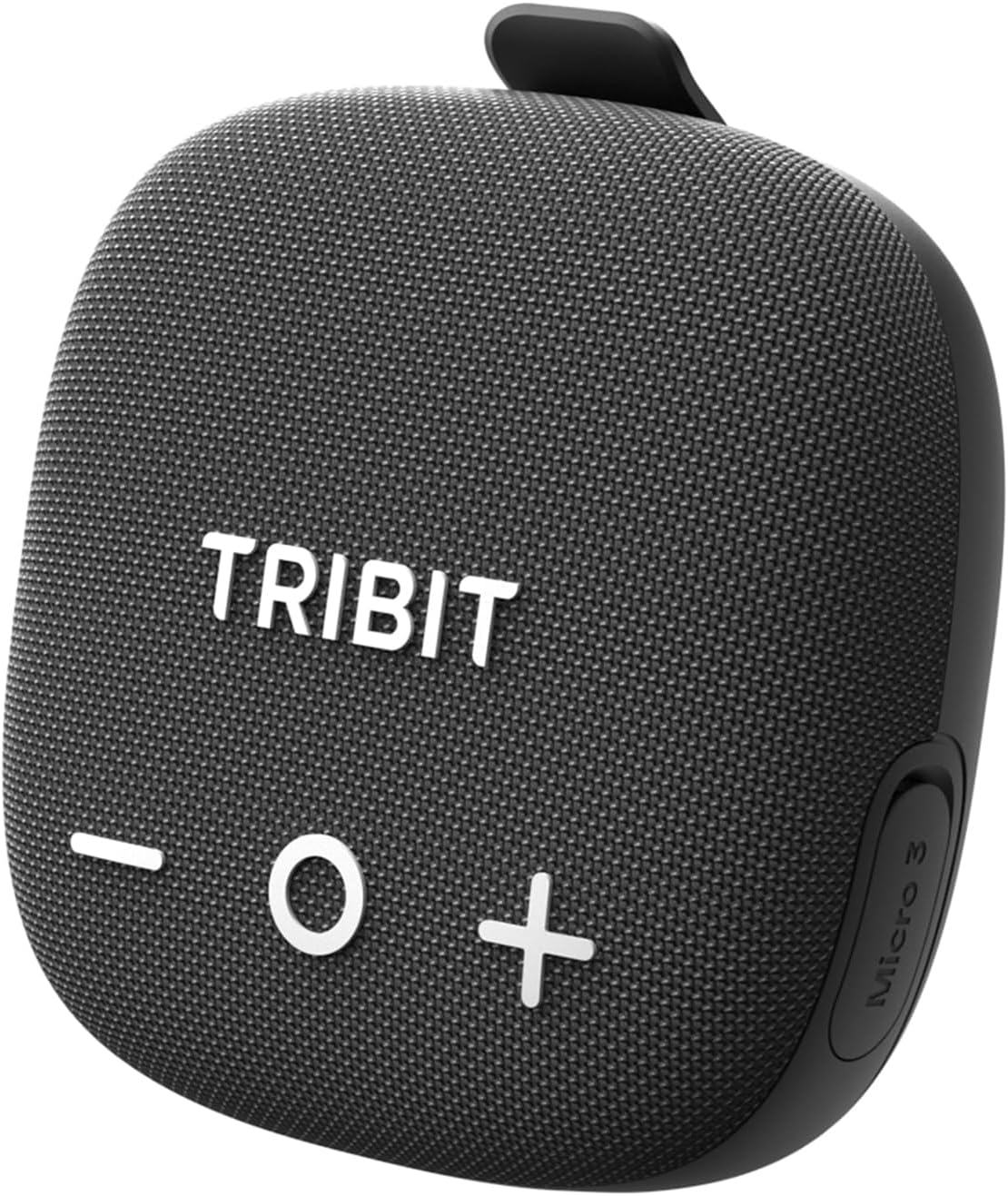
Image: The Tribit StormBox Micro 3 Portable Bluetooth Speaker in black, showcasinהעיצוב הקומפקטי והגריל הקדמי שלו.
הגדרה
1. טעינה ראשונית
Before first use, fully charge your speaker. Connect the provided USB-C charging cable to the speaker's charging port and a compatible power source. A full charge takes approximately 2 hours. A 15-minute quick charge provides 4 hours of playtime.
2. הפעלה/כיבוי
- הפעלה: לחץ והחזק את לחצן ההפעלה (
 ) למשך 2 שניות.
 - כיבוי: לחץ והחזק את לחצן ההפעלה למשך 2 שניות.
3. זיווג Bluetooth
- Ensure the speaker is powered on and the Bluetooth indicator is blinking, indicating it's in pairing mode.
- On your device (smartphone, tablet, etc.), enable Bluetooth and search for "Tribit StormBox Micro 3" in the list of available devices.
- בחר את הרמקול לחיבור. לאחר החיבור, מחוון ה-Bluetooth יידלק בכחול קבוע.

Image: The Tribit StormBox Micro 3 speaker held in hand next to a smartphone displaying its Bluetooth settings, showing the speaker as 'Connected'.
4. Tribit App Download
For enhanced control and customization, download the Tribit App from the App Store (iOS) or Google Play Store (Android). The app allows you to adjust EQ settings, manage auto shut-off, and receive firmware updates.
הפעלת הרמקול
1. בקרות בסיסיות
- עוצמת הקול מעלה/הנמכת: לחץ על הכפתורים '+' או '-'.
- הפעל/השהה: Press the 'O' button.
- הרצועה הבאה: Double-press the 'O' button.
- רצועה קודמת: Triple-press the 'O' button.

תמונה: למעלה view of the Tribit StormBox Micro 3 speaker, clearly showing the large '+' (volume up), 'O' (play/pause), and '-' (volume down) buttons.
2. טכנולוגיית XBass
The speaker features XBass technology for enhanced low-end frequencies. Press the 'XBass' button (often indicated by an 'X' icon) to activate or deactivate this feature, boosting bass impact.

תמונה: פיצוץ view diagram of the Tribit StormBox Micro 3, highlighting the 48mm NdFeB driver and two coaxial passive radiators, with 'XBass' logo.
3. צימוד סטריאו אלחוטי אמיתי (TWS)
Pair two StormBox Micro 3 speakers together for an immersive stereo sound experience. Activate TWS mode on both speakers (usually by pressing a dedicated TWS button or through the app) and follow the pairing instructions.

Image: Two Tribit StormBox Micro 3 speakers are shown attached to backpacks of hikers, illustrating TWS pairing for stereo sound in an outdoor setting.
4. שיחות ללא ידיים
The built-in microphone allows for hands-free calls. When a call comes in, press the 'O' button to answer or end the call. Press and hold the 'O' button to reject a call.

Image: A man cycling with the Tribit StormBox Micro 3 attached to his bike handlebars, making a hands-free call, indicated by a green phone icon.
5. App-Controlled Sound Evolution
Use the Tribit App to customize your audio experience. Choose from 7 preset EQ modes or create your own using the 9-band equalizer. The app also offers features like auto shut-off and firmware updates.

Image: A man in a golf cart using the Tribit App on his smartphone to control the Tribit StormBox Micro 3 speaker, showing the app's equalizer and preset options.
6. Reverse Charging (Power Bank)
The speaker can act as a power bank to charge your devices. Connect your device to the speaker's USB-C port using a compatible cable to initiate reverse charging.
אפשרויות הרכבה
The StormBox Micro 3 offers flexible mounting solutions to suit various activities:
- הר רצועה: Use the integrated non-slip silicone strap to securely attach the speaker to bicycle handlebars, backpack straps, or tent poles.
- הר מגנטי: The speaker features strong magnets on its base, allowing it to securely attach to metal surfaces like refrigerators, toolboxes, or metal poles when stationary.

Image: A composite image showing the Tribit StormBox Micro 3 being magnetically attached to a refrigerator and strapped to a bicycle handlebar, illustrating its 2-in-1 mount feature.
תַחזוּקָה
To ensure the longevity and optimal performance of your Tribit StormBox Micro 3, follow these maintenance guidelines:
- ניקוי: השתמש רך, דamp cloth to wipe the speaker's surface. Avoid using harsh chemicals or abrasive cleaners.
- אִחסוּן: יש לאחסן את הרמקול במקום קריר ויבש, הרחק מטמפרטורות קיצוניות ואור שמש ישיר, כאשר אינו בשימוש למשך תקופות ממושכות.
- חותם עמיד למים: Ensure the USB-C port cover is securely closed to maintain IP68 waterproof integrity, especially before exposure to water.
עמידות והגנה
The StormBox Micro 3 is built to withstand challenging environments:
- IP68 עמיד למים: The speaker is fully protected against dust and can be submerged in water up to 1.5 meters for 30 minutes.
- עמיד בפני נפילות מגובה 1.22 מטר: Engineered to survive drops from up to 1.22 meters, making it suitable for rugged outdoor activities.
Image: A Tribit StormBox Micro 3 speaker is shown covered in muddy water on a bike handlebar, with icons indicating IP68 waterproof/dustproof and 1.22m military drop resistance.
פתרון בעיות
If you encounter any issues with your Tribit StormBox Micro 3, please refer to the following general advice:
- אין כוח: ודא שהרמקול טעון במלואו. חבר אותו למקור חשמל ובדוק את מחוון הטעינה.
- לא ניתן לזווג: Make sure the speaker is in pairing mode (blinking Bluetooth indicator). Disable and re-enable Bluetooth on your device, then try pairing again.
- איכות סאונד ירודה: Check the volume levels on both the speaker and your connected device. Ensure there are no obstructions between the speaker and your device. Try adjusting the EQ settings via the Tribit App.
- ניתוקי חיבור: Ensure your device is within the 45-meter Bluetooth range. Avoid strong electromagnetic interference.
For more detailed troubleshooting or persistent issues, please contact Tribit customer support.
מפרטים
| מותג | טריביט |
| שם הדגם | StormBox Micro 3 |
| מספר דגם | BTS36 |
| רמקול כוח פלט מרבי | 13 וואט |
| טכנולוגיית קישוריות | בלוטות' |
| טווח בלוטות' | 45 מטר |
| מצב פלט שמע | מונו |
| סוג הרכבה | Magnetic & Strap |
| חומר המארז | ABS+PC/TPE |
| הוא עמיד למים | אמיתי (IP68) |
| חיי סוללה ממוצעים | 24 שעות |
| זמן טעינת הסוללה | 2 שעות |
| מידות פריט (D x W x H) | 3.93" D x 3.93" W x 1.77" H |
| משקל פריט | 0.34 קילוגרם |
מה יש בקופסה
- Portable Bluetooth Speaker (Tribit StormBox Micro 3)
- מדריך למשתמש
- כבל טעינה USB-C
אחריות ותמיכה
The Tribit StormBox Micro 3 comes with a אחריות לשנה. For any product-related inquiries, technical support, or warranty claims, please contact Tribit customer service.
Additionally, Tribit offers תמיכה למשך 12 חודשים כדי לסייע לכם בכל שאלה או בעיה שתיתקלו בה.
You can find more information and contact details on the official Tribit website or through the Tribit App.
סרטוני מוצר רשמיים
Bike Speaker, IP68, 24H Playtime, BT6.0, TWS Pairing
Video: This official seller video highlights the key features of the Tribit StormBox Micro 3, including its suitability as a bike speaker, IP68 rating, 24-hour playtime, Bluetooth 6.0 connectivity, and TWS pairing capabilities.