מָבוֹא
Thank you for choosing the Fastrack StreetStyle 5.0 Quartz Analog Watch. This manual provides detailed instructions for setting up, operating, and maintaining your watch to ensure optimal performance and longevity. This watch combines a classic analog display with a modern digital interface, offering precise timekeeping and a range of useful functions for your daily activities.
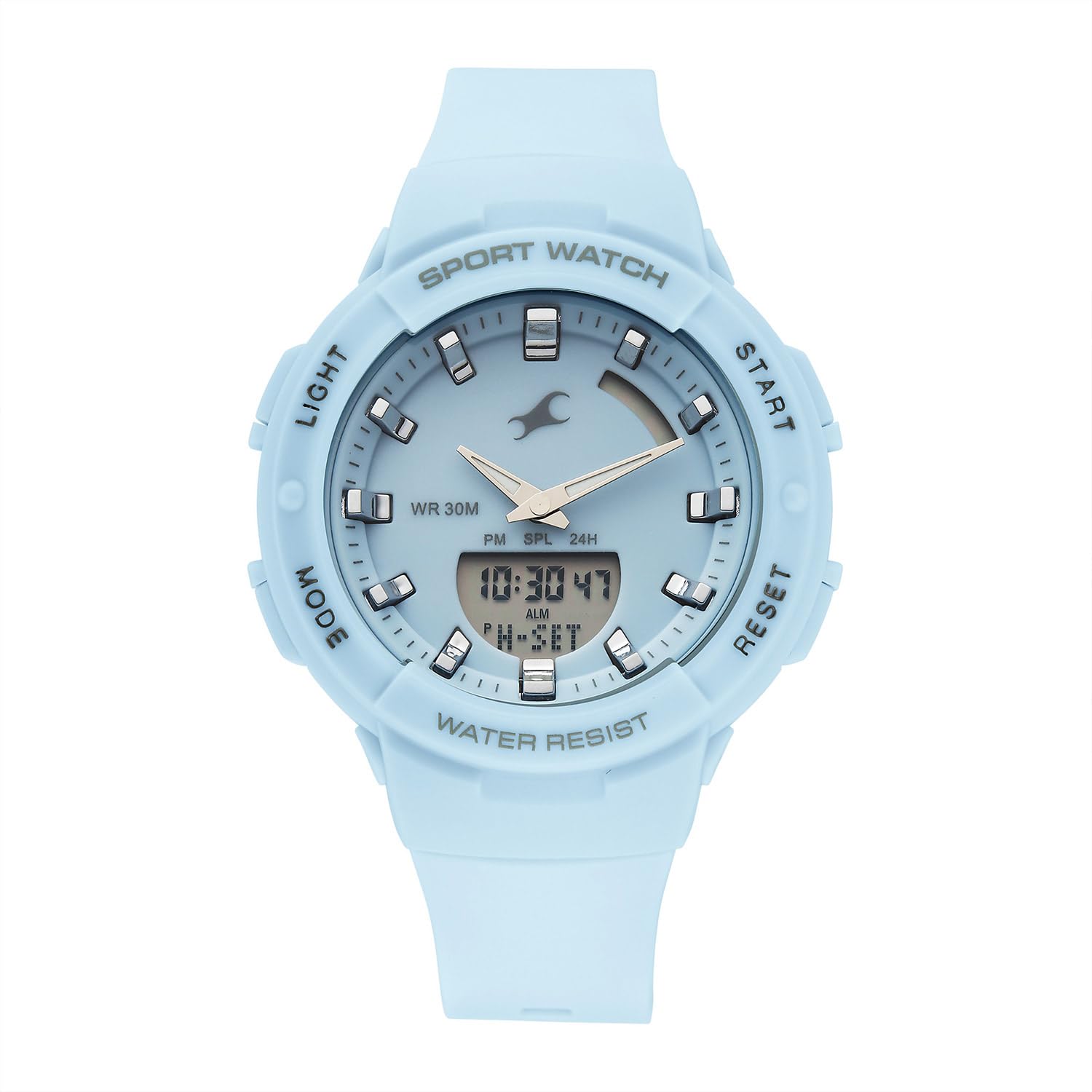
חֲזִית view of the Fastrack StreetStyle 5.0 watch, showcasing the blue dial, analog hands, and digital display. The four control buttons (LIGHT, MODE, START, RESET) are visible on the sides of the case.
הגדרה
Your Fastrack StreetStyle 5.0 watch comes with a pre-installed battery. Before first use, ensure any protective films are removed from the watch face and back case.
הגדרת זמן ראשונית
- זיהוי כפתורים: Your watch features four buttons: אוֹר (למעלה משמאל), MODE (למטה משמאל), הַתחָלָה (למעלה מימין), ו אִתחוּל (למטה מימין).
- היכנסו למצב הגדרת זמן: הקש על MODE button repeatedly until the digital time display starts flashing, indicating you are in setting mode.
- התאם זמן: השתמש ב- הַתחָלָה button to increase the flashing value (hours, minutes, seconds). Use the אִתחוּל button to cycle through the different values (hours, minutes, 12/24-hour format).
- קבע תאריך ויום: המשך ללחוץ על אִתחוּל button to move to date, month, and day settings. Adjust these values using the הַתחָלָה לַחְצָן.
- יציאה ממצב הגדרות: לאחר שכל ההגדרות נכונות, לחצו על הלחצן MODE button to exit the setting mode. The digital display will stop flashing, and the analog hands will automatically synchronize with the set digital time.
הוראות הפעלה
שימוש בתאורת EL אחורית
כדי להאיר את הצג הדיגיטלי בתנאי תאורה חלשים, לחצו על אוֹר button (top left). The backlight will remain active for a few seconds.
פונקציית אזעקה
- גישה למצב אזעקה: הקש על MODE button repeatedly until 'ALM' or the alarm time is displayed.
- הגדרת זמן אזעקה: While in Alarm Mode, press the אִתחוּל button to select the hour or minute digit you wish to adjust. Use the הַתחָלָה לחצן כדי לשנות את הערך.
- הפעלה/ביטול של אזעקה: הקש על הַתחָלָה button while in Alarm Mode to toggle the alarm ON/OFF. An alarm icon will appear when activated.
- Hourly Chime: Some models allow setting an hourly chime. Refer to the display for an 'SIG' or chime icon and use the הַתחָלָה button to toggle it.
- יציאה ממצב אזעקה: הקש על MODE button to return to the regular time display.
פונקציית שעון עצר
- Access Stopwatch Mode: הקש על MODE button repeatedly until 'STW' or '00:00:00' is displayed.
- התחלה/עצירה: הקש על הַתחָלָה לחצן כדי להתחיל את זמן הזמנים. לחץ הַתחָלָה שוב כדי להשהות.
- זמן הקפה/זמן פיצול: בזמן שהסטופר פועל, לחצו על הלחצן אִתחוּל button to record a lap or split time. The stopwatch will continue running in the background.
- איפוס: בזמן שהסטופר מושהה, לחצו על אִתחוּל כדי לאפס את שעון העצר ל-'00:00:00'.
- יציאה ממצב שעון עצר: הקש על MODE button to return to the regular time display.
פונקציית זמן עולמי
Your watch includes a World Time function for tracking time in different global cities.
- גישה למצב זמן עולמי: הקש על MODE button repeatedly until 'WT' or a different city code is displayed.
- Select City: השתמש ב- הַתחָלָה button to cycle through available city codes/time zones.
- Exit World Time Mode: הקש על MODE button to return to the regular time display.
תַחזוּקָה
ניקוי השעון שלך
כדי לשמור על מראה השעון, נגבו אותו באופן קבוע במטלית רכה ויבשה. במקרה של לכלוך עיקש, נגבו אותו מעט.amp cloth can be used, followed by a dry cloth. Avoid using chemical cleaners, solvents, or abrasive materials, as these can damage the watch's finish and seals.
עמידות במים
שעון זה מדורג עבור WR 30M (3 כספומט) water resistance. This means it is suitable for everyday use and can withstand splashes or brief immersion in water. It is לֹא suitable for swimming, showering, or diving. Avoid operating buttons when the watch is wet to prevent water ingress.

אֲחוֹרִי view of the Fastrack StreetStyle 5.0 watch, showing the stainless steel back case with engraved brand logo, model number (68054PP02), and water resistance rating (WR 30M).
החלפת סוללה
The watch is powered by a button-cell battery. When the display dims or the watch stops functioning, it's time for a battery replacement. It is recommended to have the battery replaced by an authorized service center to ensure proper sealing and maintain water resistance.
אִחסוּן
When not in use, store your watch in a cool, dry place away from direct sunlight, extreme temperatures, and strong magnetic fields. Keeping it in its original packaging or a watch box can help protect it from dust and scratches.
פתרון בעיות
- שעון לא מתפקד: בדוק אם יש צורך להחליף את הסוללה. ודא שאין כפתורים תקועים.
- תצוגת זמן שגויה: היכנסו שוב למצב הגדרת הזמן וכווננו את הזמן בהתאם להוראות 'הגדרת זמן ראשונית'.
- Analog Hands Not Synchronized: If analog hands do not match the digital time after setting, try resetting the watch (if a reset function is available, otherwise consult service).
- תצוגה דיגיטלית עמומה או ריקה: This usually indicates a low battery. Replace the battery.
- מים בתוך השעון: If you notice condensation or water droplets inside the watch, stop using it immediately and take it to an authorized service center.
For issues not covered here, please contact Fastrack customer support.
מפרטים

Diagram illustrating the case size of the Fastrack StreetStyle 5.0 watch, indicating a 41 mm case diameter for reference.
| תכונה | פְּרָט |
|---|---|
| מותג | פאסטרק |
| שם הדגם | StreetStyle 5.0 |
| מספר דגם | 68054PP02W |
| סוג תצוגה | אנלוגי-דיגיטלי |
| תְנוּעָה | קְוָרץ |
| עמידות במים | 30 מטרים (3 כספומט) |
| מידות המארז (LxWxH) | 50 x 41 x 17 מילימטרים |
| משקל פריט | 200 גרם |
| סוללות כלולות | כֵּן |
| ארץ מוצא | הוֹדוּ |
אחריות ותמיכה
Your Fastrack StreetStyle 5.0 watch is covered by a manufacturer's warranty against manufacturing defects. Please refer to the warranty card included with your purchase for specific terms, conditions, and duration. Keep your purchase receipt as proof of purchase for warranty claims.
For technical assistance, service, or warranty claims, please contact Fastrack customer support or visit an authorized Fastrack service center. You can find contact information and service center locations on the official Fastrack webאֲתַר: www.fatrack.in