
1. הקדמה
The MoKo Wireless CarPlay Adapter seamlessly converts your car's existing wired CarPlay system into a wireless experience. This adapter is designed for quick auto-connection and stable performance, allowing you to enjoy navigation, music, calls, and Siri assistant without the need for cables. Its compact design and durable construction ensure a reliable and convenient driving experience.

Figure 1: Comparison of wired vs. wireless CarPlay setup, demonstrating reduced cable clutter.
2. המוצר נגמרview
The MoKo Wireless CarPlay Adapter features a compact form factor with a flexible nylon braided cable for enhanced durability. It includes an upgraded 2025 core chip for ultra-fast startup and low-latency connection. An LED indicator provides status feedback.
2.1 תכולת החבילה
- MoKo Wireless CarPlay Adapter
- מתאם USB-C ל-USB-A (לתאימות רחבה יותר)
- מדריך להתחלה מהירה

Figure 2: The MoKo Wireless CarPlay Adapter with its flexible nylon braided cable and LED indicator.

Figure 3: The adapter shown with both USB-A and USB-C connection options.
3. הוראות התקנה
Setting up your MoKo Wireless CarPlay Adapter is a simple plug-and-play process. No complex installations or tools are required.
- לִתְקוֹעַ תֶקַע: Connect the MoKo Wireless CarPlay Adapter into your car's USB port that supports wired Apple CarPlay. Use the appropriate USB-A or USB-C connector.
- התאם Bluetooth: On your iPhone, go to Bluetooth settings and pair with the adapter (usually named 'Wireless-Adapter-XXXX'). Ensure your iPhone's Wi-Fi is also turned on.
- Connect to CarPlay: Once paired, your car's display will prompt you to connect to CarPlay. Confirm the connection.
The adapter is designed to auto-connect to your iPhone when you start your car, significantly reducing connection time compared to traditional wired setups.
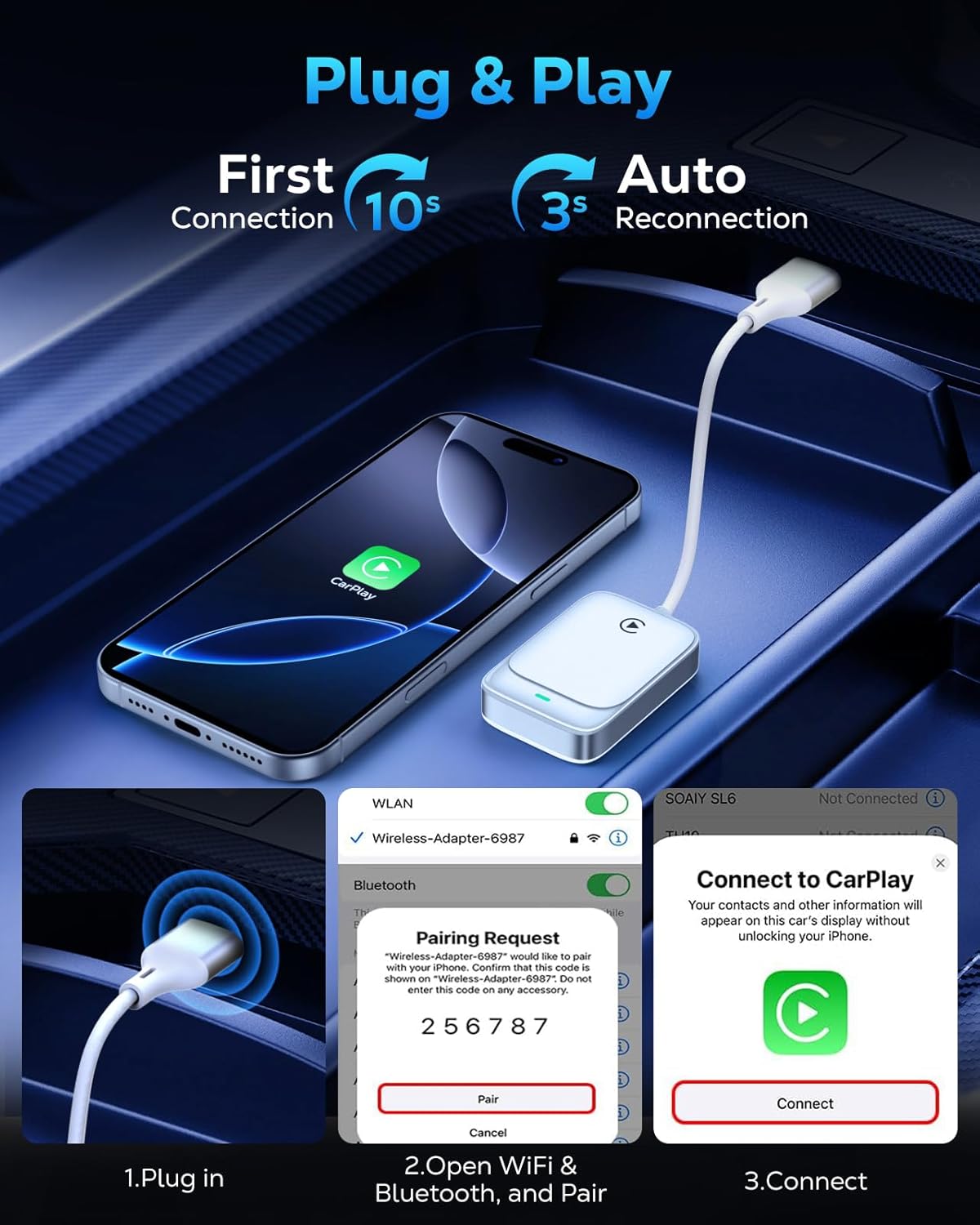
Figure 4: Visual guide for the three-step plug and play connection process.
3.1 מדריך וידאו להתקנה
Video 1: This video demonstrates the seamless wireless CarPlay experience, including the unboxing and quick setup process of the MoKo Wireless CarPlay Adapter in a vehicle.
4. הוראות הפעלה
Once connected, the MoKo Wireless CarPlay Adapter allows you to utilize all standard CarPlay functions wirelessly, maintaining your car's original control methods.
4.1 פונקציות ליבה
- ניווט: Use Apple Maps or other compatible navigation apps directly on your car's display.
- השמעת מוזיקה: Stream music from your iPhone's library or favorite apps.
- Siri Assistant: Activate Siri for voice commands, hands-free messaging, and more.
- שיחות טלפון: Make and receive calls safely using your car's infotainment system.

Figure 5: Display of various CarPlay functions available through the adapter.
שיטות בקרה של 4.2
The adapter supports your car's original control mechanisms for a familiar user experience:
- עוזר קולי: השתמשו בסירי לתפעול ללא ידיים.
- בקרות הגה: Manage audio, calls, and navigation directly from your steering wheel.
- בקרת מסך מגע: Interact with CarPlay apps via your car's touch screen.
- בקרת כפתור OEM: Utilize your car's original equipment manufacturer (OEM) control knobs.

Figure 6: Illustration of different control methods supported by the adapter.
4.3 Operation Video Guide
סרטון 2: סרטון זה מספק סקירה מקיפהview of the MoKo Wireless CarPlay Adapter, demonstrating its features and how it enhances the in-car experience.
5. תאימות
The MoKo Wireless CarPlay Adapter offers broad compatibility with specific requirements:
- תאימות לרכב: Compatible with any car equipped with a factory-installed wired Apple CarPlay system.
- תאימות לאייפון: Supports iPhone 6 and later models.
- גרסת iOS: דורש iOS 10 ומעלה.
Note: This adapter is NOT compatible with vehicles that lack Apple CarPlay or with Android Auto systems. Please verify your car's specifications before purchase.
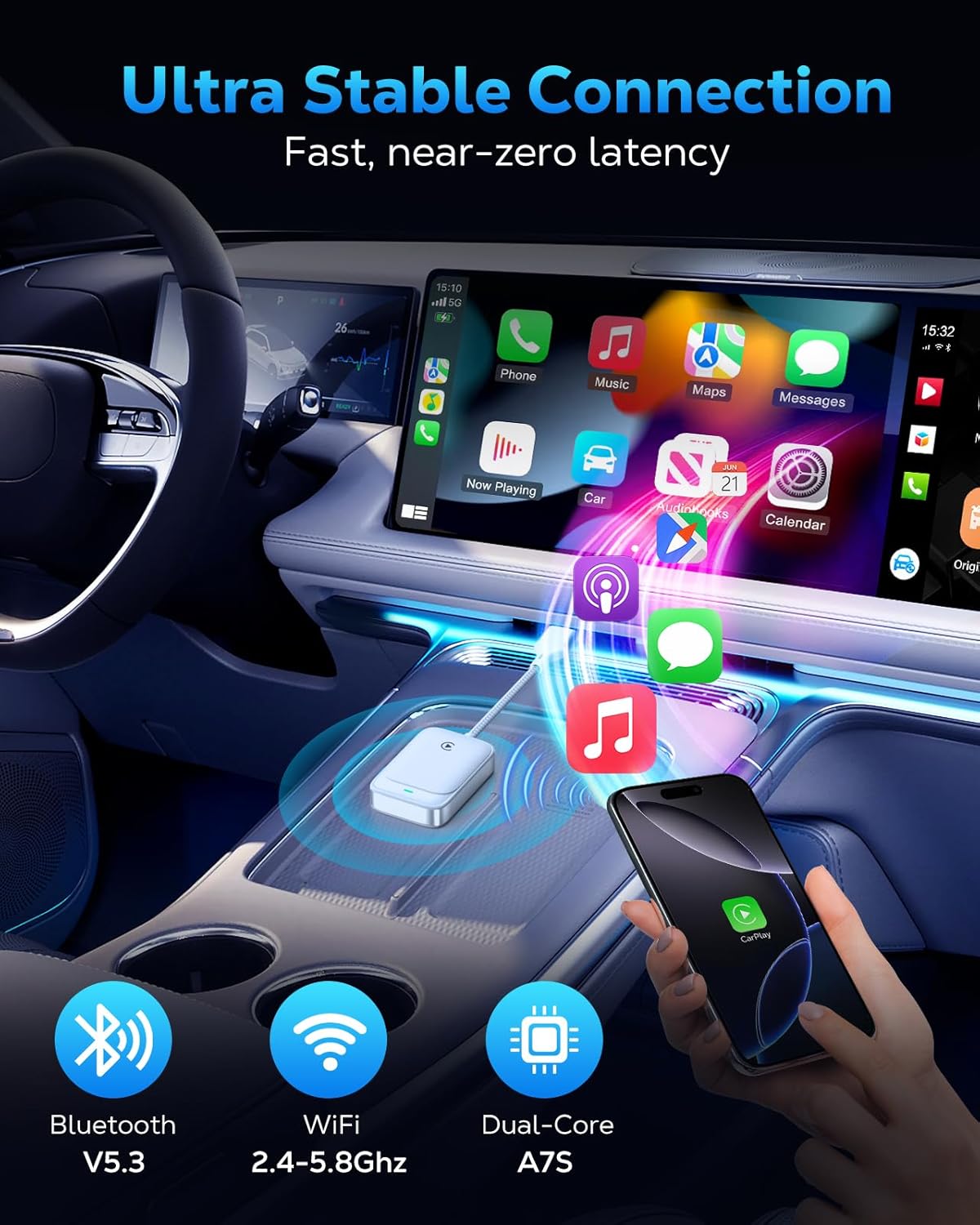
Figure 7: The adapter's advanced chip for stable and fast connection.
6. פתרון תקלות
If you encounter issues with your MoKo Wireless CarPlay Adapter, consider the following common solutions:
- בעיות חיבור: If the adapter fails to connect or disconnects frequently, ensure your iPhone's Bluetooth and Wi-Fi are both enabled. Try restarting both your iPhone and your car's infotainment system.
- עדכוני קושחה: The adapter supports firmware updates for optimal functionality and to resolve potential issues. Refer to the official MoKo support website for instructions on how to check for and apply updates.
- בדיקת תאימות: Double-check that your vehicle has factory-installed wired Apple CarPlay and that your iPhone meets the iOS 10+ requirement.
For persistent issues, please refer to the detailed solutions in the included manual or contact our professional technical support team.
7. מפרטים
| תכונה | פְּרָט |
|---|---|
| מידות המוצר | 7.6 x 1.34 x 0.47 אינץ' |
| משקל פריט | 0.74 אונקיות |
| קישוריות | 5.8GHz WiFi, Bluetooth V5.3 |
| ערכת שבבים | 2025 Upgraded Core Chip (e.g., Cortex A7S) |
| תְאִימוּת | Cars with factory wired Apple CarPlay, iPhone 6+ with iOS 10+ |
8. תחזוקה
To ensure the longevity and optimal performance of your MoKo Wireless CarPlay Adapter, follow these simple maintenance guidelines:
- שמור על ניקיון: Regularly wipe the adapter with a soft, dry cloth to remove dust and debris. Avoid using liquid cleaners.
- הימנע מטמפרטורות קיצוניות: Do not expose the adapter to extreme heat or cold, as this can affect its internal components.
- טפל בזהירות: While the braided cable is durable, avoid excessive bending or pulling on the cable and connectors to prevent damage.
- מיקום מאובטח: Ensure the adapter is placed in a secure location within your vehicle to prevent it from being dislodged or damaged during driving.
9. תמיכה
MoKo is committed to providing excellent customer support. If you have any questions, encounter issues, or require technical assistance with your Wireless CarPlay Adapter, please do not hesitate to contact our professional technicians. We are always ready to help you.
For the latest firmware updates and support resources, please visit the official MoKo webאתר או עיינו בפרטי הקשר המופיעים במדריך ההתחלה המהירה שלכם.