
מָבוֹא
This manual provides essential information for the safe and efficient operation, installation, and maintenance of your Carrier 1.5 Ton 3 Star Inverter Window Air Conditioner, Model CIW19SC3R36F1. Please read this manual thoroughly before using the appliance and keep it for future reference.
תכונות עיקריות:
- טכנולוגיית אינוורטר: Ensures stable cooling with optimized energy consumption.
- מצב טורבו: Delivers faster cooling for quick temperature reduction.
- מצב חיסכון באנרגיה: Helps reduce power usage during prolonged operation.
- פונקציה יבשה: Effectively reduces excess humidity, ideal for monsoon seasons.
- טיימר אוטומטי: Allows for scheduled operation, enhancing convenience.
- מסנן אבק: Traps dust particles for cleaner indoor air and improved airflow.
- סליל קונדנסר 100% נחושת: With anti-corrosion blue coating for durability and low maintenance.
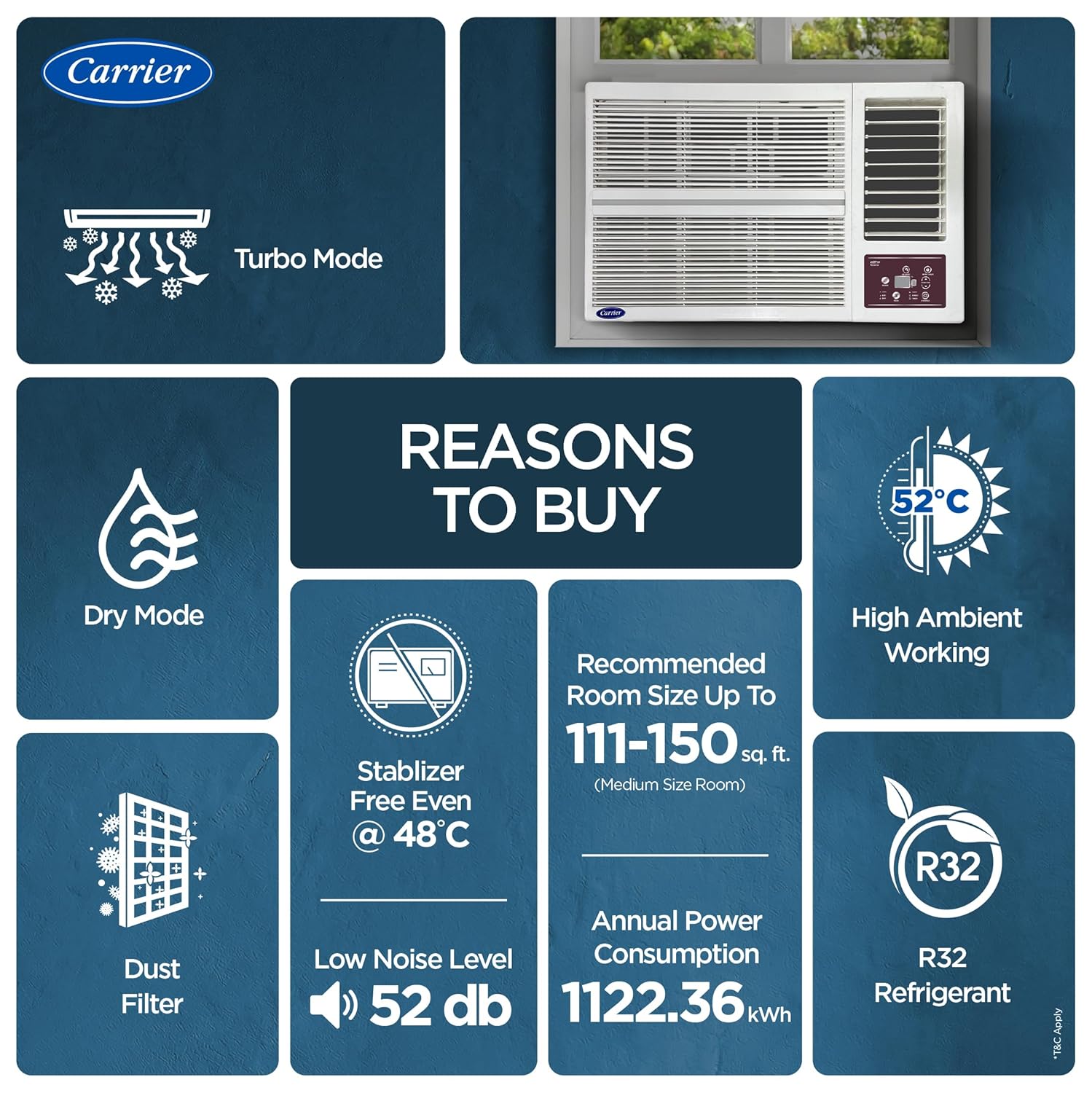
- Cools Even at 52°C: Designed for effective cooling in high ambient temperatures.
- פעולת רעש נמוך: לנוחות מירבית.
- חומר קירור R32: Environmentally friendly with no ozone depletion potential.

תְמוּנָה: מֵעַלview of key features including Turbo Mode, Dry Mode, Dust Filter, Low Noise, R32 Refrigerant, High Ambient Working, Recommended Room Size (111-150 sq. ft.), and Annual Power Consumption (1122.36 kWh).
התקנה והתקנה
Your Carrier Window AC is designed for economical and easy installation. However, for optimal performance and safety, professional installation is highly recommended.
בדיקות לפני התקנה:
- Ensure the window opening meets the required dimensions.
- Verify the electrical supply matches the unit's requirements (230 Volts).
- Confirm the installation area can support the unit's weight (42 kg).
מידות:
The unit dimensions are approximately 66 cm (Depth) x 66 cm (Width) x 43 cm (Height). The recommended window opening width is 66 cm.

תְמוּנָה: Diagram showing the dimensions of the Carrier Window AC unit: 660 mm width, 430 mm height, and 660 mm depth.
מה יש בקופסה:
לאחר הפריקה, ודא שכל הרכיבים קיימים:
- One AC Unit
- שְׁלַט רָחוֹק
- מדריך למשתמש (מסמך זה)
- תעודת אחריות
תְמוּנָה: Contents of the product packaging, including the Air Conditioner Unit, Remote Control, User Manual, and Warranty Card.
הוראות הפעלה
Your Carrier AC is controlled via the included remote control. Familiarize yourself with the remote's functions for optimal use.
פעולה בסיסית:
- הפעלה/כיבוי: לחץ על כפתור ההפעלה בשלט הרחוק כדי להפעיל או לכבות את היחידה.
- התאמת טמפרטורה: Use the temperature up/down buttons to set your desired room temperature.
- מהירות מאוורר: בחר מבין 3 מהירויות מאוורר (נמוכה, בינונית, גבוהה) כדי להתאים את זרימת האוויר.
- בחירת מצב: Choose between Cooling and Dehumidifying (Dry) modes.
מצבים מיוחדים:
- מצב טורבו: Activates maximum cooling power for rapid room temperature reduction. Ideal for quickly cooling a hot room.
- מצב חיסכון באנרגיה: Optimizes compressor operation to reduce energy consumption while maintaining comfort.
- Dry Function (Dehumidifier): Reduces humidity in the air without significant cooling, perfect for humid conditions.
- טיימר אוטומטי: Set specific times for the AC to turn on or off automatically. Refer to the remote control section of the full user manual for detailed programming instructions.
- מצב שינה: Adjusts temperature and fan speed automatically during sleep hours for enhanced comfort and energy efficiency.
- הפעלה אוטומטית: במקרה של כוח outagה, היחידה תופעל מחדש אוטומטית עם ההגדרות הקודמות לאחר חידוש החשמל.
- 2 Way Air Directional Control: Adjust the horizontal and vertical louvers to direct airflow as desired.

תְמוּנָה: Illustration of maximum cooling and comfort features, including Turbo Mode for faster cooling, 2-Way Air Directional Control, and effective operation even at 52°C high ambient temperatures.
תַחזוּקָה
Regular maintenance ensures the longevity and efficient operation of your AC unit.
ניקוי מסנן אבק:
- The built-in dust filter should be cleaned regularly (e.g., every two weeks, depending on usage and air quality).
- To clean, carefully remove the front panel and slide out the filter.
- Wash the filter with mild detergent and water, rinse thoroughly, and allow it to dry completely before reinserting.
- A clean filter improves air quality and maintains cooling efficiency.
סליל קונדנסר:
- The 100% copper condenser coil with anti-corrosion blue coating is designed for durability and low maintenance.
- Periodic professional inspection and cleaning of the condenser coil are recommended to ensure optimal performance and prevent rust and corrosion.
ניקיון כללי:
- נגב את החלק החיצוני של היחידה בעזרת חומר רך, דamp בַּד. אין להשתמש בכימיקלים קשים או בחומרי ניקוי שוחקים.
- Ensure the unit is unplugged before any cleaning or maintenance.
פתרון בעיות
לפני יצירת קשר עם שירות הלקוחות, אנא מחדשview הבעיות הנפוצות והפתרונות הבאים:
| בְּעָיָה | סיבה אפשרית | פִּתָרוֹן |
|---|---|---|
| המזגן לא נדלק. | אין אספקת חשמל; מפסק חשמלי מופעל; סוללות שלט רחוק מתות. | בדוק את חיבור החשמל; אפס את מפסק החשמל; החלף את סוללות השלט. |
| קירור לא מספיק. | Dirty air filter; blocked air intake/outlet; room too large; doors/windows open. | Clean air filter; ensure clear airflow; close doors/windows; verify room size is within recommended limits (111-150 sq. ft.). |
| רעש חריג מהיחידה. | חלקים רופפים; חפץ זר; בעיה במדחס. | Ensure unit is securely installed; check for obstructions. If noise persists, contact customer support. |
| דליפת מים. | Blocked drain pipe; improper installation angle. | Check and clear drain pipe; ensure proper tilt for drainage. Contact professional for installation check. |
If the problem persists after attempting these solutions, please contact Carrier customer support for assistance.
מפרט מוצר
| תכונה | פְּרָט |
|---|---|
| מותג | מוֹבִיל |
| מספר דגם | CIW19SC3R36F1 |
| יְכוֹלֶת | 1.5 טון |
| כוח קירור | 5000 קילוואט |
| דירוג אנרגיה | 3 כוכבים (דירוג כוכבים BEE) |
| צריכת אנרגיה שנתית | 1122.36 יחידות |
| ISEER Value | 3.45 |
| חומר קירור | R-32 (Environmental friendly) |
| סוג מדחס | Rotary Scroll (Inverter Compressor) |
| רמת רעש | 52 דציבלים |
| מידות המוצר (D x W x H) | 66D x 66W x 43H סנטימטרים |
| משקל פריט | 42 קילוגרם |
| סוג התקנה | חַלוֹן |
| מקור כוח | חשמלי עם כבלים |
| כרך ידtage | 230 וולט |
| סוג מסנן | לפני סינון |
| גודל חדר מומלץ | 111 sq ft to 150 sq ft |
| טמפרטורת סביבה מקסימלית | 52 מעלות צלזיוס |

תְמוּנָה: Energy Savings Guide label indicating 3 Star rating, ISEER value of 3.45, and annual energy consumption of 1122.36 units per year.
מידע על אחריות
Your Carrier AC unit comes with a comprehensive warranty to ensure peace of mind.
- אחריות מוצר: שנה אחת על המוצר כולו.
- אחריות על מדחס: 10 שנים על המדחס.
- תנאים והגבלות: Standard warranty terms and conditions apply. Please refer to the warranty card included in the box or the official Carrier webהאתר לפרטים מלאים.
- שירות אחריות: To avail warranty services, provide the product's model name and seller's details mentioned on your invoice. Carrier's service center will schedule a convenient slot for service.
- הערת התקנה: For units installed by entities outside of Carrier's service network, warranty repairs for defects attributed to installation may be charged by Carrier.
תְמוּנָה: Visual representation of the warranty coverage: 1 Year Product Warranty and 10 Years Compressor Warranty.
תמיכת לקוחות
For any queries, service requests, or technical assistance, please contact Carrier customer support:
- מספר שירות לקוחות: 18001033333
- כתובת היצרן: Carrier Midea India Pvt. Ltd., 1st Floor, Pearl Tower, Plot no. 51, Sector-32, Gurgaon-122001
- משאבים מקוונים: The user manual can also be accessed from the official Carrier webאֲתַר.