
FE05
Generic FE05 Digital Biometric Electronic Mortise Lock User Manual
דגם: FE05
מָבוֹא
This manual provides comprehensive instructions for the installation, operation, and maintenance of your Generic FE05 Digital Biometric Electronic Mortise Lock. The FE05 lock offers advanced security and convenience with multiple access methods, including biometric fingerprint recognition, numerical password, RFID card, and a traditional mechanical key. Please read this manual carefully before installation and use to ensure proper function and longevity of your lock.
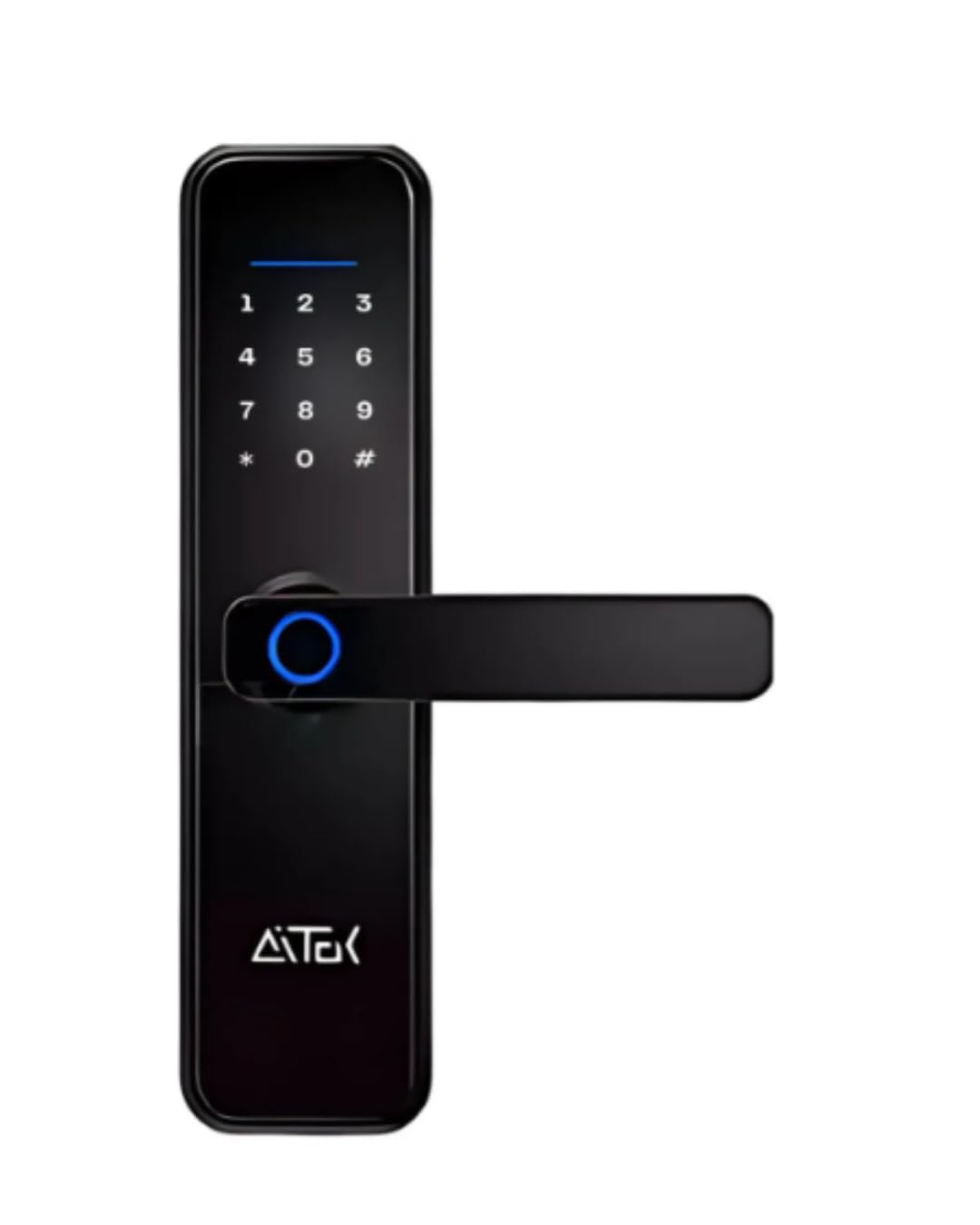
איור 1: חזית view of the Generic FE05 Digital Biometric Electronic Mortise Lock.
מידע בטיחות חשוב
- Do not attempt to disassemble or repair the lock yourself. Contact qualified personnel for service.
- Keep mechanical keys in a safe place outside the property to be used as a backup.
- Use only high-quality alkaline AA batteries for optimal performance and to prevent leakage.
- Avoid exposing the lock to direct water or extreme temperatures.
- Ensure the door dimensions are compatible with the lock before installation.
תוכן החבילה
ודא שכל הפריטים נמצאים בחבילה:
- 1 x Generic FE05 Digital Lock Unit
- 2 x Mechanical Backup Keys
- 2 כרטיסי RFID
- 1 x Kit of Screws and Hardware for Installation
- מדריך למשתמש אחד (מסמך זה)
מפרטים
| תכונה | תֵאוּר |
|---|---|
| דֶגֶם | FE05 (also known as 6822) |
| שיטות גישה | Biometric Fingerprint, Numerical Password, RFID Card, Mechanical Key |
| ספק כוח | 4 x סוללות AA |
| אזהרת סוללה חלשה | כֵּן |
| סוג התקנה | Mortise (Embedded) |
| עובי דלת תואם | 35 מ"מ עד 55 מ"מ |
| צֶבַע | שָׁחוֹר |
| חוֹמֶר | מתכת, פלסטיק |
| מידות (L x W x H) | 30 x 7.5 x 2.2 ס"מ |
| תכונות מיוחדות | Automatic Locking, Anti-Intrusion Alarm, Privacy Mode, Touch Display |
| שימוש מומלץ | Residential, Offices, Commercial Spaces, Apartments, Condominiums |
התקנה והתקנה
1. בדיקת תאימות דלתות
Before beginning installation, ensure your door's thickness is between 35 mm and 55 mm. The lock is designed for mortise installation in both wood and metal doors.
2. Mortise Lock Installation
Install the mortise lock body into the door according to standard mortise lock procedures. Ensure the latch bolt and deadbolt operate smoothly.

Figure 2: The internal mortise lock mechanism, showing the latch and deadbolt components.
3. התקנת סוללה
The lock requires 4 AA alkaline batteries. Open the battery compartment cover on the interior unit. Insert the batteries, ensuring correct polarity (+/-). Close the cover securely.

איור 3: View of the battery compartment, showing slots for four AA batteries.
4. Initial Setup and Admin Registration
Upon first power-up, the lock will be in factory default mode. You must register an administrator fingerprint or password first. Refer to the on-screen prompts on the touch display for guided setup.
- Touch the display to activate.
- Follow the instructions to register the first administrator user (fingerprint or password). This user will have privileges to add or remove other users.
- It is recommended to register at least two administrator access methods for redundancy.

Figure 4: Front (keypad and fingerprint sensor) and back (battery cover) views of the FE05 lock.
הוראות הפעלה
פתיחת הדלת
- טביעת אצבע ביומטרית: הנח את האצבע הרשומה שלך על חיישן טביעות האצבע. המנעול ייפתח אם טביעת האצבע תזוהה.
- Numerical Password: Touch the display to activate the keypad. Enter your registered password followed by '#'. The lock will unlock.
- כרטיס RFID: Present a registered RFID card to the card reader area on the lock. The lock will unlock.
- מפתח מכני: Insert the mechanical key into the keyhole at the bottom of the exterior unit and turn to unlock. This is for emergency backup.
נעילת הדלת
The FE05 lock features automatic locking. After the door closes, the lock will automatically engage the deadbolt after a short delay (configurable in settings).
מצב פרטיות
Activate privacy mode from the interior unit to prevent external access, even with valid credentials. Refer to the lock's on-screen menu for specific steps to enable/disable this feature.
תַחזוּקָה
החלפת סוללה
When the low battery warning is displayed or heard, replace all four AA batteries promptly. Use only new, high-quality alkaline batteries. Refer to the "Battery Installation" section for instructions.
ניקוי
Clean the lock's exterior with a soft, dry cloth. Do not use abrasive cleaners, solvents, or harsh chemicals, as these can damage the finish and electronic components.
פתרון בעיות
| בְּעָיָה | סיבה אפשרית | פִּתָרוֹן |
|---|---|---|
| מנעול לא מגיב. | סוללות מתות. | Replace all four AA batteries. Use the mechanical key for emergency access. |
| טביעת האצבע לא זוהתה. | Finger is wet, dirty, or improperly placed. Fingerprint not registered. | Ensure finger is clean and dry. Place finger firmly and completely on the sensor. Re-register fingerprint if necessary. |
| הסיסמה לא התקבלה. | Incorrect password entered. Keypad not activated. | Ensure correct password is entered. Touch the display to activate the keypad before entering. |
| RFID card not working. | Card not registered. Card damaged. | Ensure the RFID card is registered. Try another registered card. |
| Lock does not automatically lock. | Automatic locking feature disabled. Door not fully closed. | Check lock settings to ensure automatic locking is enabled. Ensure the door is properly aligned and closed. |
אחריות ותמיכה
This Generic FE05 Digital Biometric Electronic Mortise Lock comes with a אחריות ל-6 חודשים from the date of purchase. The warranty covers manufacturing defects under normal use. It does not cover damage caused by misuse, unauthorized repairs, or improper installation.
For technical support, warranty claims, or further assistance, please contact your retailer or the manufacturer's customer service. Keep your proof of purchase for warranty validation.