
1. הקדמה
This user manual provides comprehensive instructions for the installation, operation, and maintenance of your Polarlander B5350 Car Stereo. Please read this manual thoroughly before using the product to ensure proper functionality and to prevent damage. Keep this manual for future reference.
2. מידע בטיחות
- בטיחות נהיגה: Always prioritize safe driving. Do not operate the system in a way that distracts you from the road.
- הַתקָנָה: Professional installation is recommended. Ensure all wiring is correctly connected to prevent short circuits or damage.
- ספק כוח: Connect the unit to a 9-30V DC power supply. Incorrect voltagה יכול לגרום נזק.
- טֶמפֶּרָטוּרָה: Operate the unit within the specified temperature range of -20℃ to 60℃.
- לַחוּת: הרחק את היחידה ממים ולחות מוגזמת.
3. תכולת החבילה
ודא שכל הפריטים נמצאים בחבילה:
- יחידה ראשית (סטריאו לרכב)
- Waterproof Power Cord
- Fixed Mounting Bracket Set (Hardware bracket + Sunshade)
- MINI-USB to USB2.0 Cable
- מדריך למשתמש (מסמך זה)

Image 3.1: Contents of the Polarlander B5350 package, including the main unit, power cord, mounting bracket, and USB cable.
4. המוצר נגמרview
The Polarlander B5350 is a double DIN car stereo featuring a 5.0-inch touchscreen display with 800x480 resolution. It supports wireless CarPlay and Android Auto, Bluetooth 5.0, and various media playback options.
4.1 הפאנל הקדמי והתצוגה
The front panel features the 5.0-inch touchscreen, which is the primary interface for controlling the unit. The display provides access to various functions including navigation, media playback, and phone calls.

תמונה 4.1: דוגמהamples of the user interface display, showing various application icons and menu layouts.
4.2 Side and Rear Connections
The unit includes several ports for connectivity and expansion:
- שקע אוזניות: להאזנה פרטית לאודיו.
- חריץ כרטיס TF: For media playback from a TransFlash (MicroSD) card.
- MINI to USB Interface: For connecting USB devices or the provided MINI-USB to USB2.0 cable.
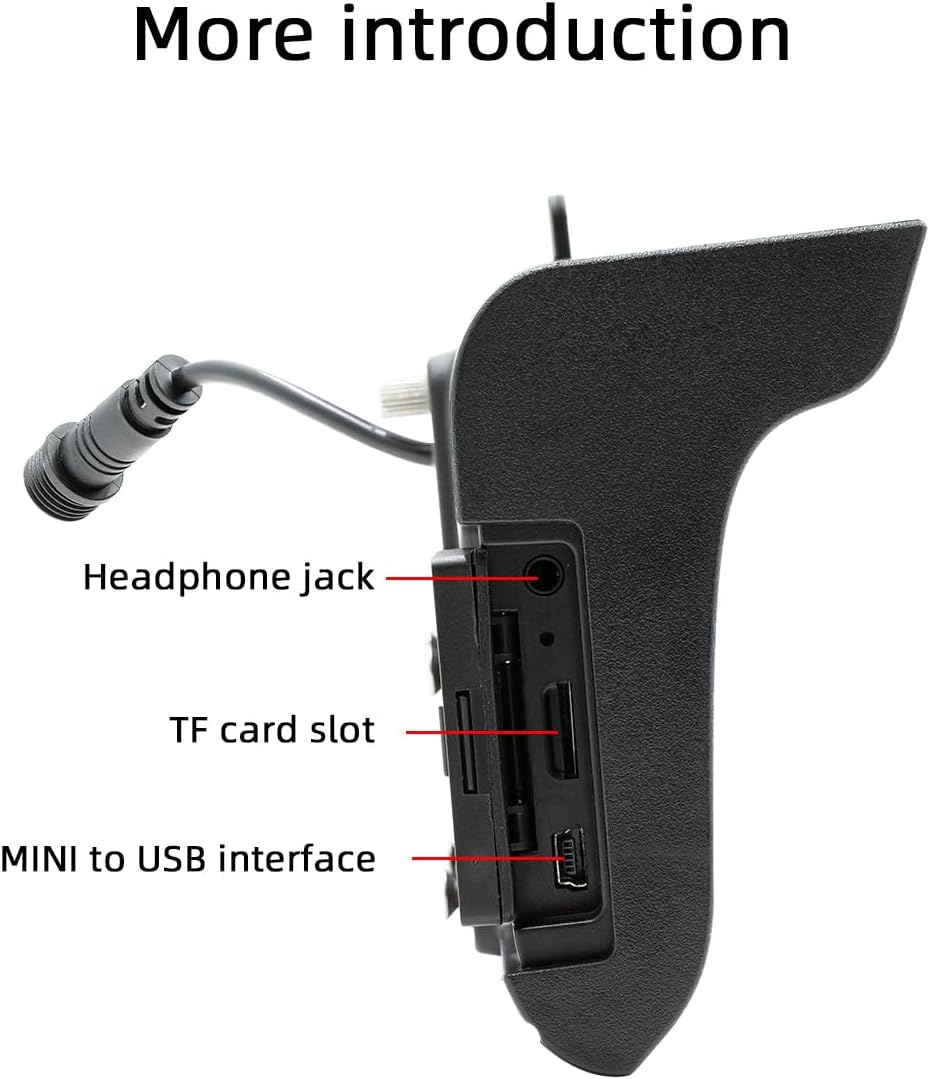
תמונה 4.2: צד view illustrating the headphone jack, TF card slot, and MINI to USB interface.
The rear of the unit houses a built-in 1W speaker and mounting points for the bracket.

תמונה 4.3: אחורי view of the unit, highlighting the built-in 1W speaker.
5. התקנה
This unit is designed for double DIN installation. Due to the complexity of vehicle wiring and dashboard configurations, professional installation is highly recommended. Incorrect installation can lead to vehicle damage or malfunction of the stereo unit.
5.1 שלבי התקנה כלליים (התייעצו עם איש מקצוע)
- נתק את מצבר הרכב כדי למנוע קצר חשמלי.
- Remove the existing car stereo or dashboard trim to access the double DIN slot.
- Connect the wiring harness from the vehicle to the stereo's power and speaker connections. Ensure correct polarity.
- Connect any additional inputs/outputs such as the reversing camera, AUX-in, or RCA audio outputs.
- Mount the stereo securely into the double DIN slot using the provided mounting bracket set.
- חבר מחדש את מצבר הרכב ובדוק את תפקוד היחידה.
- Reassemble the dashboard trim.
Note: The waterproof power cord should be routed carefully to avoid damage and ensure proper sealing.
6. הגדרה ראשונית
6.1 הפעלה/כיבוי
The unit will power on automatically when the vehicle's ignition is turned on. To power off, turn off the vehicle's ignition.
6.2 הגדרות שפה
Upon first use, you may be prompted to select your preferred language. Navigate through the on-screen menu to select from English, Chinese, Spanish, Portuguese, Russian, German, French, Polish, Turkish, Arabic, Hebrew, Italian, Czech, Japanese, or Korean.
7. הוראות הפעלה
7.1 ניווט מסך מגע
The 5-inch touchscreen is the primary control interface. Tap icons to open applications, swipe to navigate menus, and use pinch-to-zoom gestures where applicable (e.g., in navigation apps).
7.2 בקרת הגה
If your vehicle supports steering wheel controls, connect the appropriate wires during installation. The unit supports programmable steering wheel controls, allowing you to map functions like volume, track skip, and mode selection to your vehicle's buttons.
7.3 Seven-Color Key Backlights
The unit features adjustable seven-color key backlights. Access the settings menu to customize the backlight color to match your vehicle's interior lighting or your personal preference.
8. קישוריות
8.1 בלוטות '5.0
The unit features Bluetooth 5.0 for wireless audio streaming and hands-free calling. The default Bluetooth name is "SWL-BT".
- הפעל Bluetooth בטלפון הנייד שלך.
- במערכת הסטריאו של הרכב, נווטו לתפריט Bluetooth.
- חפש available devices on your phone and select "SWL-BT".
- אשר את קוד הצימוד אם תתבקש.
The unit supports connecting to two Bluetooth devices simultaneously, such as a mobile phone and a Bluetooth earphone.

Image 8.1: Illustration of the dual Bluetooth connection capability, powered by a Bluetooth 5.0 chip.
8.2 Wireless & Wired CarPlay / Android Auto
Connect your smartphone to access functions like navigation, phone calls, messages, and music directly on the car stereo display. Both wired and wireless connections are supported.

Image 8.2: Display showing the CarPlay and Android Auto interfaces, demonstrating mobile phone function integration.
8.2.1 חיבור אלחוטי
For wireless CarPlay or Android Auto, ensure your phone's Wi-Fi and Bluetooth are enabled. Follow the on-screen prompts on the car stereo to pair your device wirelessly.
8.2.2 חיבור קווי
Connect your smartphone to the unit's USB port using a compatible USB cable. The system will automatically detect and launch CarPlay or Android Auto.
9. השמעת מדיה
The Polarlander B5350 supports multiple methods for media playback:
- Bluetooth (BT) Playback: Stream audio wirelessly from your paired smartphone.
- השמעת כרטיסי TF: Insert a TF (MicroSD) card into the designated slot to play audio and video files.
- השמעת USB: Connect a USB flash drive to the USB port for audio and video file השמעה.
- כניסת AUX: חבר התקני שמע חיצוניים דרך כניסת העזר.
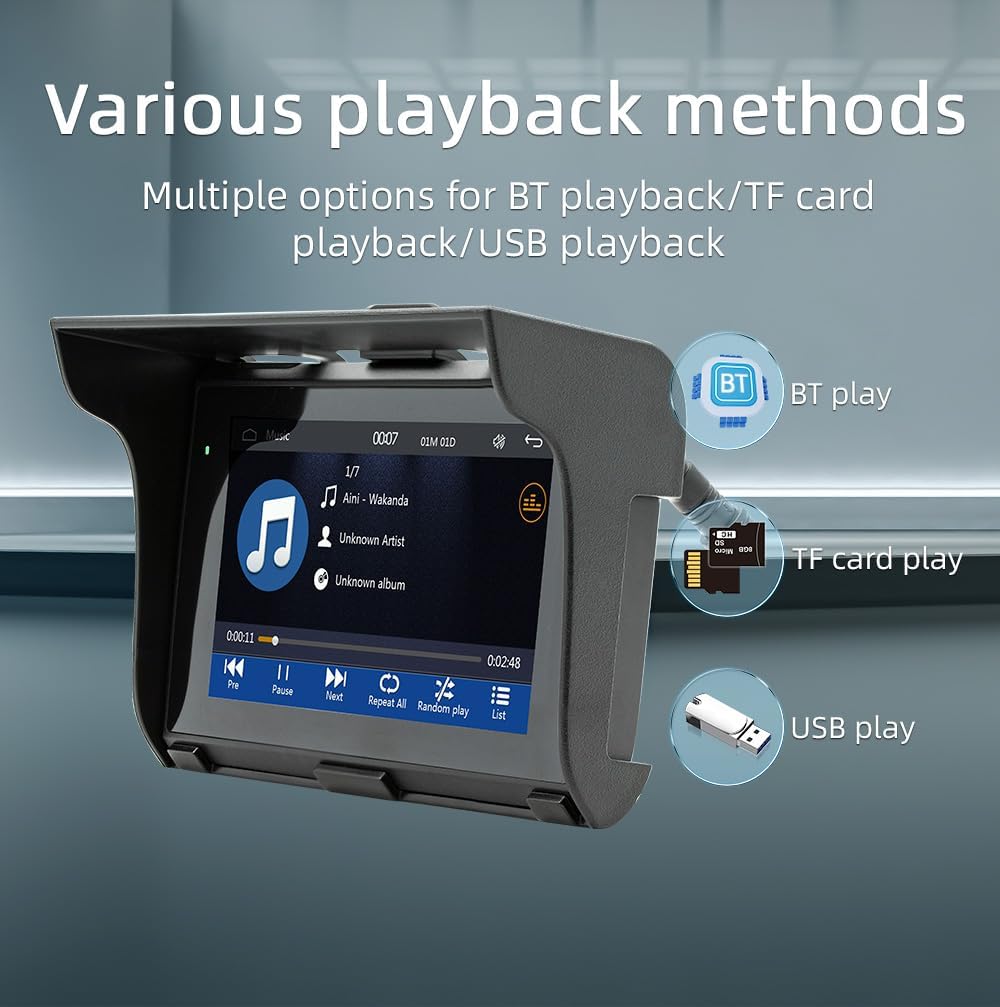
Image 9.1: Visual representation of the various media playback methods available: Bluetooth, TF card, and USB.
9.1 פורמטי מדיה נתמכים
- פורמטי שמע: MP3, AAC, APE, OGG, M4A, RA, WAV
- פורמטים של וידאו: H263, H264, H265, DIVX HD, AVI, FLV, MKV, MPEG, MP4, WMV9, VC, ASF, TS, QT
- פורמטים של תמונה: JPEG, PNG, BMP, GIF, TIFF
10. פעולת רדיו AM/FM
The unit includes an AM/FM radio receiver. To access the radio function, select the "Radio" icon from the main menu.
- סריקה: Use the scan function to automatically search for and save available radio stations.
- כוונון ידני: Manually tune to specific frequencies using the on-screen controls.
- הגדרות קבועות מראש: שמרו את התחנות המועדפות עליכם בכפתורי הגדרות קבועות מראש לגישה מהירה.
The radio allows you to stay updated with real-time traffic, news broadcasts, and weather forecasts.
11. Driving Recorder Function (Optional)
The Polarlander B5350 supports an optional car driving recorder. When connected, the unit can display and record your driving dynamics, providing additional security and peace of mind.

Image 11.1: The car stereo displaying footage from an optional driving recorder camera.
Note: The driving recorder camera is an optional accessory and is not included in the standard package.
12. פתרון תקלות
| בְּעָיָה | סיבה אפשרית | פִּתָרוֹן |
|---|---|---|
| היחידה לא נדלקת. | אין חיבור חשמל או חיווט שגוי. | Check power cables and fuse. Ensure correct 9-30V DC supply. |
| אין קול. | Volume too low, mute activated, or speaker wiring issue. | Increase volume, check mute status, verify speaker connections. |
| חיבור Bluetooth נכשל. | Bluetooth not enabled on phone/unit, or device out of range. | Ensure Bluetooth is active on both devices. Move phone closer to unit. Re-pair device. |
| CarPlay/אנדרואיד אוטו לא מתחברים. | Incorrect cable, phone settings, or app issues. | Use a certified USB cable. Check phone settings for CarPlay/Android Auto. Restart phone and unit. |
| מסך מגע לא מגיב. | System freeze or temporary software issue. | Restart the unit (turn off/on ignition). If issue persists, consult support. |
13. מפרטים
| תכונה | פְּרָט |
|---|---|
| סוג מוצר | Car Stereo (Double Din) |
| גודל תצוגה | 5.0 אינץ' |
| רזולוציית תצוגה | 800x480 |
| כוח פלט | רמקול 1W מובנה |
| כרך עבודהtage | 9~30V DC |
| טמפרטורת הפעלה | -20℃ עד 60℃ |
| גרסת בלוטות' | 5.0 (שם ברירת מחדל: SWL-BT) |
| זיכרון ריצה | זיכרון DRAM של 1 ג'יגה-ביט |
| פורמטי שמע נתמכים | MP3, AAC, APE, OGG, M4A, RA, WAV |
| פורמטי וידאו נתמכים | H263, H264, H265, DIVX HD, AVI, FLV, MKV, MPEG, MP4, WMV9, VC, ASF, TS, QT |
| תבניות תמונה נתמכות | JPEG, PNG, BMP, GIF, TIFF |
| קלט/פלט | SD Card, USB, AUX-in, RCA Audio output, Reversing camera input |
| מספר חלק של היצרן | B5350 |
14. תחזוקה
- ניקוי התצוגה: השתמש במטלית רכה ונטולת סיבים כדי לנגב בעדינות את מסך המגע. אין להשתמש בחומרי ניקוי שוחקים או ממסים.
- ניקיון כללי: יש לשמור על המכשיר נקי מאבק ופסולת. יש להשתמש במברשת רכה או באוויר דחוס לאזורים שקשה להגיע אליהם.
- חיבורי כבלים: בדוק מעת לעת את כל חיבורי הכבלים כדי לוודא שהם מאובטחים.
15. אחריות ותמיכה
למידע על אחריות ותמיכה טכנית, אנא עיין בתיעוד שסופק בעת הרכישה או פנה לספק. שמור את הוכחת הרכישה שלך עבור כל תביעת אחריות.
For further assistance, visit the official Polarlander webלאתר או לפנות למחלקת שירות הלקוחות שלהם.