
1. המוצר נגמרview
The NEEWER GP48 Neck Phone Holder is a versatile accessory designed for capturing Point-of-View (POV) video footage with action cameras and smartphones. It features a flexible, adjustable design for comfortable wear and quick switching between horizontal and vertical recording.
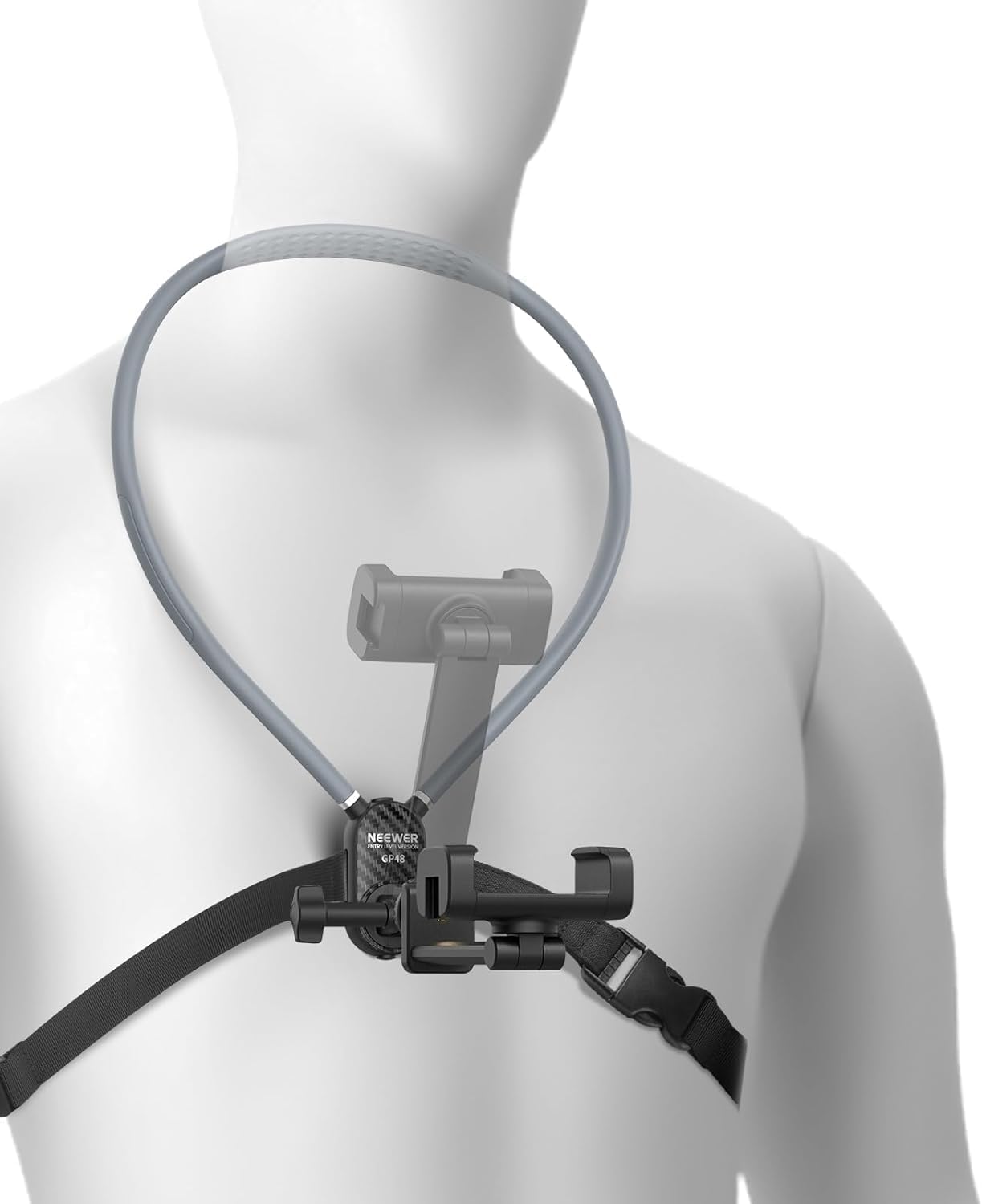
Image: NEEWER GP48 Neck Phone Holder, showcasing its design and intended use.
תכונות עיקריות:
- Quick Horizontal/Vertical Switching: Easily switch between recording orientations with a 180° tilt and 90° rotation mechanism.
- תאימות רחבה: Supports a broad range of smartphones (e.g., iPhone, Samsung, Google Pixel) and action cameras (e.g., GoPro, DJI, Insta360, AKASO).
- Quick Release and Robust Structure: Features a 65cm (25.6") neck strap with a one-button quick release. Constructed from durable, flexible aluminum alloy.
- Adjustable and Stable: Includes a chest strap (70-108cm / 27.6"-42.5") for a secure fit and enhanced buckles for stable recording.
- Skin-Friendly Comfort: Designed with a silicone outer layer and padded base to minimize discomfort during prolonged use.
2. התקנה והתקנה
Follow these steps to correctly set up and install your NEEWER GP48 Neck Phone Holder.

Image: Visual guide for quick and simple installation of the neck phone holder.
- שלב א': Place the neck strap around your neck and fasten it.
- שלב ב': Attach the chest strap and secure the safety buckle.
- שלב ג': Lock the buckle and adjust the strap to a comfortable and secure fit.
- שלב ד': Attach your smartphone or action camera to the holder. Ensure it is firmly secured.
- שלב ה ': Attach the holder assembly to the neck strap.
- שלב ו ': Installation is complete. Adjust the camera angle as needed.
3. הוראות הפעלה
3.1 Adjusting Recording Orientation
The neck holder allows for flexible adjustment of your camera's orientation.

Image: Demonstrates the quick horizontal/vertical switching feature.
- To switch between horizontal and vertical views, press the release button on the base.
- Rotate the base 90° clockwise to lock into the desired orientation.
- To unlock, press the button and rotate 90° counter-clockwise.
- The mount also allows for a 180° tilt to adjust the vertical recording angle.
3.2 הבטחת יציבות
For optimal stability during recording, especially during movement, ensure all buckles and straps are securely fastened.

Image: Illustrates the adjustable and stable features, including various rotation points.
- Adjust the chest strap to fit snugly but comfortably around your body.
- Verify that the camera or phone is tightly secured in its mount to prevent wobbling.
- The flexible aluminum alloy structure allows for minor adjustments to camera position without compromising stability.
4. תחזוקה
Proper maintenance ensures the longevity and optimal performance of your neck phone holder.
- ניקוי: Wipe the silicone and aluminum surfaces with a soft, damp מטלית. הימנעו מכימיקלים חזקים או חומרי ניקוי שוחקים.
- אִחסוּן: Store the holder in a cool, dry place away from direct sunlight when not in use. The foldable design (as shown in the image below) allows for compact storage.
- בְּדִיקָה: Periodically check all moving parts, buckles, and screws for any signs of wear or damage. Ensure all connections are secure before each use.

Image: The foldable and lightweight design of the NEEWER GP48 for convenient portability and storage.
5. פתרון תקלות
If you encounter any issues with your NEEWER GP48 Neck Phone Holder, consider the following:
- Device Not Secure: Ensure your phone or action camera is properly seated in its mount and all locking mechanisms are engaged. Check for compatibility with your device.
- המחזיק מרגיש רופף: Re-adjust the neck strap and chest strap to ensure a snug fit. Verify that the quick-release button is fully engaged and locked.
- קושי בהתאמת זווית: Ensure the release button for rotation is pressed before attempting to rotate the base. Do not force adjustments.
- אי נוחות במהלך השימוש: Adjust the chest strap and neck strap position. The padded base and silicone layer are designed for comfort; ensure they are correctly positioned on your body.
6. מפרטים
Detailed technical specifications for the NEEWER GP48 Neck Phone Holder.
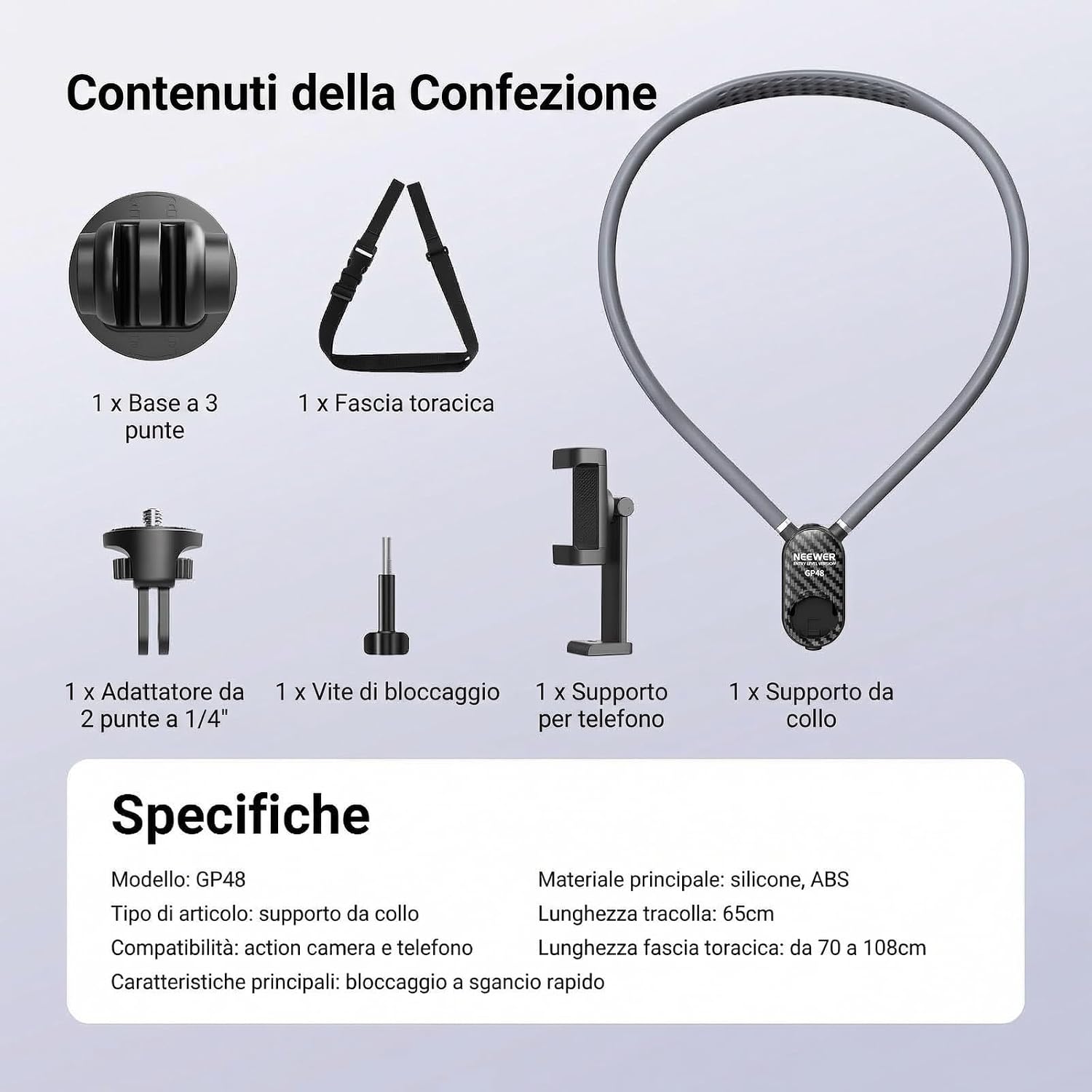
Image: Visual representation of package contents and key specifications.
| שם הדגם | GP48 |
| מותג | חדש |
| מכשירים תואמים | מצלמות, סמארטפונים |
| דגמי טלפונים תואמים | אוּנִיבֶרְסָלִי |
| סוג הרכבה | בגדי גוף |
| תכונה מיוחדת | מתכוונן |
| מידות פריט | 19.3 x 17.4 x 4.4 ס"מ (7.6 x 6.85 x 1.73 אינץ ') |
| משקל פריט | 273 גרם (0.6 פאונד) |
| חוֹמֶר | Silicone, Aluminum |
| Neck Strap Length | 65 ס"מ (25.6 אינץ') |
| אורך רצועת החזה | 70 - 108 ס"מ (27.6 - 42.5 אינץ') |
| UPC | 191073129078 |
| ASIN | B0G4CLF4PP |
7. מה בקופסה
The NEEWER GP48 Neck Phone Holder package includes the following components:

Image: All components included in the NEEWER GP48 package.
- 1 x Neck Holder
- 1 x 3-Prong Base
- 1 x Chest Strap
- 1 x 1/4" 2-Prong Adapter
- 1 x בורג נעילה
- 1 x מחזיק טלפון
8. אחריות ותמיכה
8.1 מידע אחריות
This NEEWER GP48 Neck Phone Holder comes with a אחריות יצרן לשנה from the date of purchase. The warranty covers defects in materials and workmanship under normal use. Please retain your proof of purchase for warranty claims.
8.2 תמיכת לקוחות
For technical assistance, troubleshooting, or warranty inquiries, please contact NEEWER customer support through their official website or the retailer where the product was purchased. You can find more information and contact details on the חנות המותגים NEEWER.