
מָבוֹא
This manual provides detailed instructions for the installation, operation, and maintenance of your PolarLander AV252B Universal 1-DIN In-Dash Car Audio Player. Please read this manual thoroughly before using the product to ensure proper function and safety. Keep this manual for future reference.
מידע בטיחות
- Ensure all wiring is correctly connected to prevent damage to the unit or vehicle. Incorrect wiring can cause fire or electrical shock.
- Always connect the unit to a 12V DC power supply with a negative ground.
- אל תפעילו את היחידה באופן שמסיח את דעתכם מהנהיגה. תנו תמיד עדיפות לבטיחות בדרכים.
- הימנעו מחשיפת היחידה לטמפרטורות קיצוניות, לאור שמש ישיר או לחות גבוהה.
- אין לנסות לפרק או לשנות את היחידה. יש לפנות לכל תיקון וטיפול באנשי מקצוע מוסמכים.
תוכן החבילה
ודא שכל הפריטים נמצאים בחבילה:
- 1 x PolarLander AV252B 12V Bluetooth Vehicle MP3 Audio Player
- מדריך למשתמש באנגלית אחת (מסמך זה)
- רתמת חיווט
- חומרת הרכבה (אם רלוונטי)
המוצר נגמרview
The PolarLander AV252B is a versatile 1-DIN in-dash car audio player featuring Bluetooth connectivity, FM radio, USB, SD card, and AUX-in support. It is designed for easy integration into most vehicles with a standard 1-DIN slot.

תמונה: חזית view of the PolarLander AV252B car audio player, showing the display, control knob, and various buttons.
בקרות וחיבורים בלוח הקדמי
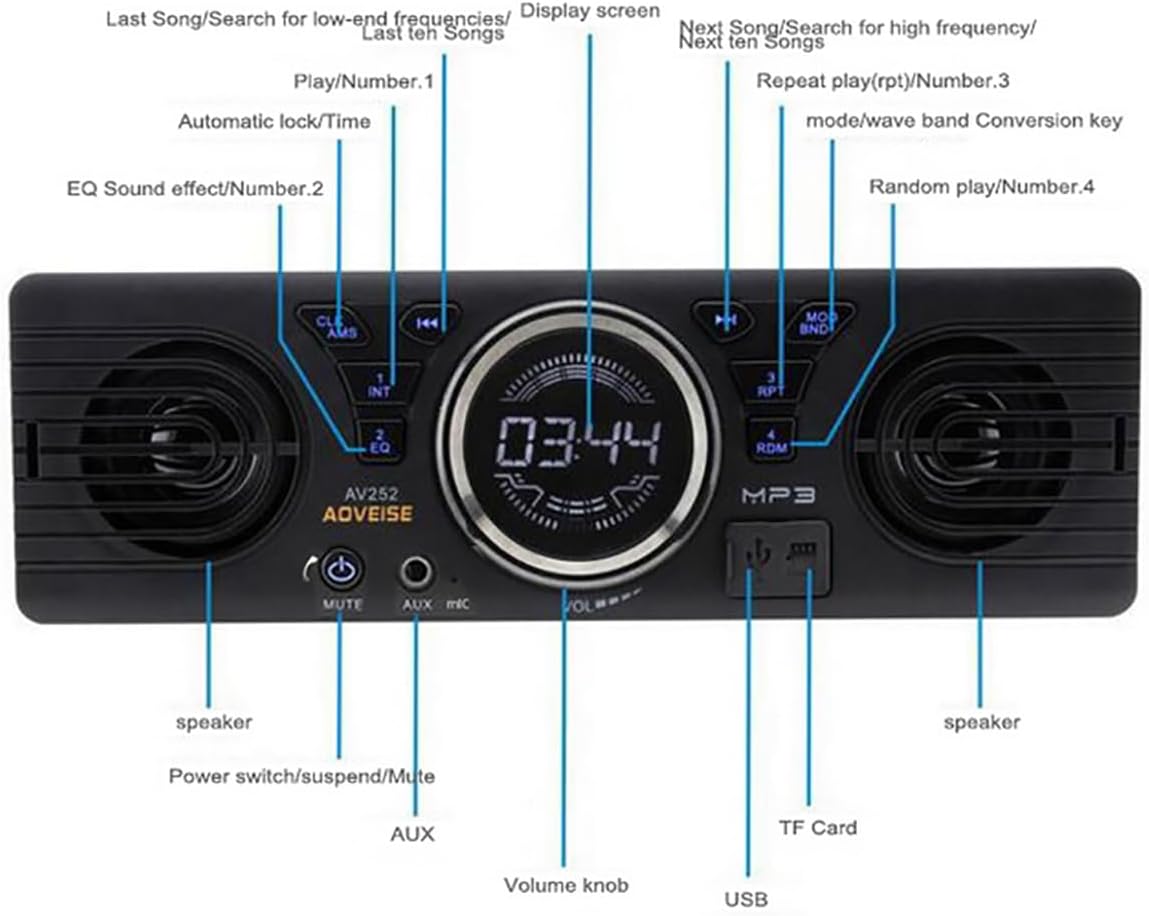
Image: Diagram illustrating the front panel controls of the AV252B unit, with labels for each button and port.
- CLK/AMS Button: Short press for clock display, long press to set time. In radio mode, short press for automatic station search.
- INT/EQ Button: Short press for intro play (first 10 seconds of each track). Long press to cycle through EQ sound effects (Jazz, Rock, Pop, Classical, etc.).
- MUTE/Power Button: Short press to mute/unmute audio. Long press to power the unit on/off.
- יציאת AUX-IN: שקע 3.5 מ"מ לחיבור התקני שמע חיצוניים.
- מיקרופון: Built-in microphone for Bluetooth hands-free calls.
- ידית עוצמת הקול: Rotate to adjust volume. Press to select functions in menu.
- יציאת USB: For connecting USB flash drives for media playback and charging.
- חריץ כרטיס TF: For inserting TF (MicroSD) cards for media playback.
- MOD/BND Button: Short press to switch between modes (FM, Bluetooth, USB, SD, AUX). In radio mode, long press to switch between FM bands.
- RPT/Number 3 Button: Short press for repeat play.
- RDM/Number 4 Button: Short press for random play.
- Next Song/Search Button: Short press for next track/station. Long press for fast forward.
- Previous Song/Search Button: Short press for previous track/station. Long press for fast rewind.
- מסך תצוגה: Shows current time, radio frequency, track information, etc.
- רמקולים: רמקולים משולבים לפלט שמע.
הַתקָנָה
מידות

תמונה: מלמעלה למטה view of the AV252B unit showing its length (178mm / 7 inches) and height (58mm / 2.3 inches).

תמונה: צד view of the AV252B unit showing its depth (54mm).
The installation size is 187mm x 49mm, suitable for standard 1-DIN center consoles. The unit's dimensions are approximately 178mm (length) x 58mm (height) x 54mm (depth).
תרשים חיווט
Refer to the following diagram for correct wiring connections. Incorrect wiring can cause damage to the unit or vehicle.

Image: A detailed wiring diagram for the car radio, showing connections for antenna, ignition switch, battery, and RCA audio outputs.
- חוט צהוב: Connect to the car's battery positive (+) (constant 12V).
- חוט אדום: Connect to the car's ACC ignition switch (switched 12V).
- חוט שחור: Connect to the car's battery negative (-) / ground.
- חוט כחול: התחבר ל automatic antenna (אם רלוונטי).
- White RCA: Left RCA audio output.
- Red RCA: Right RCA audio output.
- שקע אנטנה: Connect to the vehicle's radio antenna.
Important: The car radio cannot be turned on if the red and yellow wires are not connected to the 12V power positive at the same time. Ensure the black wire is securely connected to ground.
Physical Installation Steps
Follow these general steps for installing the unit into your vehicle's dashboard. Specific vehicle models may vary.

Image: A series of six images demonstrating the step-by-step process of removing an old car radio and installing a new one, including dashboard disassembly, wiring, and reassembly.
- שלב 1: Carefully remove the trim panels and screws securing the existing car radio or blank panel in your dashboard.
- שלב 2: Use removal tools to extract the old radio or the factory blanking plate from the dashboard slot.
- שלב 3: If applicable, install the mounting sleeve or cage into the dashboard opening.
- שלב 4: Disconnect any existing wiring from the old unit.
- שלב 5: Connect the wiring harness of the AV252B unit to your vehicle's wiring, following the wiring diagram provided above. Ensure all connections are secure.
- שלב 6: Carefully slide the AV252B unit into the dashboard opening until it clicks into place or is secured with screws. Reassemble any removed trim panels.
הוראות הפעלה
הפעלה/כיבוי
לחץ והחזק את MUTE/Power לחצן כדי להפעיל או לכבות את היחידה.
בקרת עוצמת הקול
סובב את ה כפתור עוצמת הקול עם כיוון השעון כדי להגביר את עוצמת הקול ונגד כיוון השעון כדי להנמיך את עוצמת הקול.
בחירת מצב
הקש על MOD/BND button repeatedly to cycle through available modes: FM Radio, Bluetooth, USB, SD Card, and AUX-in.
תפעול רדיו FM
- חיפוש אוטומטי: במצב FM, לחצו לחיצה ארוכה על CLK/AMS button to automatically search for and store strong stations.
- כוונון ידני: השתמש ב- Previous/Next Song/Search כפתורים לכוונון ידני של תדרים.
- בחירת להקה: לחץ לחיצה ארוכה על MOD/BND button to switch between FM bands (FM1, FM2, FM3).
Bluetooth Pairing and Audio Playback
The unit features built-in Bluetooth 2.1 + EDR for hands-free calls and audio streaming.
- Ensure the unit is powered on and in Bluetooth mode (select using MOD/BND לַחְצָן).
- במכשיר הנייד שלך, הפעל את Bluetooth וחפש מכשירים זמינים.
- Select "AV252B" (or similar name) from the list of devices to pair. No password is typically required.
- Once paired, you can play audio from your device, and it will stream through the car audio player.
- For hands-free calls, the built-in microphone will capture your voice.
הפעלת כרטיס USB/SD
הכנס כונן הבזק מסוג USB לתוך יציאת USB או כרטיס TF (MicroSD) לתוך חריץ כרטיס TF. The unit will automatically switch to USB/SD mode and begin playing compatible audio files (MP3/WMA).
- השתמש ב- Previous/Next Song/Search לחצנים לנווט בין רצועות.
- לִלְחוֹץ RPT for repeat play (e.g., repeat current track).
- לִלְחוֹץ RDM for random play.
AUX-in Operation
חברו מכשיר שמע חיצוני (למשל, סמארטפון, נגן MP3) ל יציאת AUX-IN using a 3.5mm audio cable. Select AUX mode using the MOD/BND button. Audio will play through the car speakers.
אפקטים קוליים של EQ
לחץ לחיצה ארוכה על INT/EQ button to cycle through preset equalizer settings such as Jazz, Rock, Pop, and Classical.
הגדרת השעון
לחץ קצר על CLK/AMS button to display the time. Long press it to enter time setting mode. Use the כפתור עוצמת הקול to adjust hours and minutes, and press the knob to confirm.
תַחזוּקָה
- ניקוי: השתמשו במטלית רכה ויבשה לניקוי פני השטח של היחידה. אין להשתמש בחומרי ניקוי שוחקים או ממסים.
- אָבָק: שמרו על חריצי כרטיסי ה-USB וה-SD נקיים מאבק ולכלוך.
- טֶמפֶּרָטוּרָה: Avoid prolonged exposure to direct sunlight or extreme temperatures, which can affect the unit's lifespan.
פתרון בעיות
| בְּעָיָה | סיבה אפשרית | פִּתָרוֹן |
|---|---|---|
| היחידה לא נדלקת. | Incorrect wiring (Red/Yellow wires not connected to 12V, Black wire not grounded). Blown fuse. | Check all power connections (Red to ACC, Yellow to constant 12V, Black to ground). Check vehicle's fuse box and the unit's fuse. |
| אין קול. | Volume too low. Mute function active. Speaker wires disconnected. Incorrect source selected. | Increase volume. Press MUTE button. Check speaker wiring. Select correct input mode (FM, BT, USB, AUX). |
| קליטת רדיו FM גרועה. | Antenna not connected or damaged. Weak signal area. | Ensure antenna is securely connected. Try tuning to a stronger station or move to an area with better reception. |
| בלוטות' לא מתחבר. | Unit not in Bluetooth mode. Device not discoverable. Already paired with another device. | Switch unit to Bluetooth mode. Ensure your mobile device's Bluetooth is on and discoverable. Disconnect from other devices. |
| כרטיס USB/SD לא מזוהה. | לא נתמך file format. Card/drive corrupted. Incorrectly inserted. | לְהַבטִיחַ files are MP3/WMA format. Try a different USB/SD card. Reinsert the card/drive correctly. |
מפרטים
| תכונה | מִפרָט |
|---|---|
| מספר דגם | AV252B |
| קלט כרךtage | 12V DC |
| כוח פלט | 60W x 4 (Max) |
| גרסת בלוטות' | 2.1 + EDR |
| טווח תדרים FM | 87.5 - 108 מגהרץ |
| פורמטי אודיו נתמכים | MP3, WMA |
| קישוריות | Bluetooth, USB, TF Card, AUX-in, RCA Output |
| עַכָּבָּה | 4 אוהם / 8 אוהם |
| תגובת תדר | 20 - 20000 הרץ |
| רְגִישׁוּת | פחות מ-12dB |
| מידות (יחידה) | 180 x 42 x 50 מ"מ (בערך) |
| גודל פאנל | 188 x 15 x 58 מ"מ (בערך) |
אחריות ותמיכה
This product is covered by a standard manufacturer's warranty. For specific warranty terms, please refer to the documentation provided at the time of purchase or contact your retailer. For technical support or service inquiries, please reach out to your product vendor or the PolarLander customer service department.