
מָבוֹא
Thank you for choosing the RAINPOINT 4-Zone Programmable Watering Timer. This device is designed to automate your garden and lawn irrigation, providing flexible and efficient watering schedules for up to four independent zones. Please read this manual carefully to ensure proper installation, operation, and maintenance of your watering timer.
תכונות המוצר
- 4 Individual Programmable Zones: Customize watering schedules (start time, duration, frequency) for each zone independently.
- Multiple Watering Cycle Modes: Set watering duration from 1 minute to 3 hours 59 minutes, and frequency for every 8 hours, every 12 hours, or every 1 to 7 days.
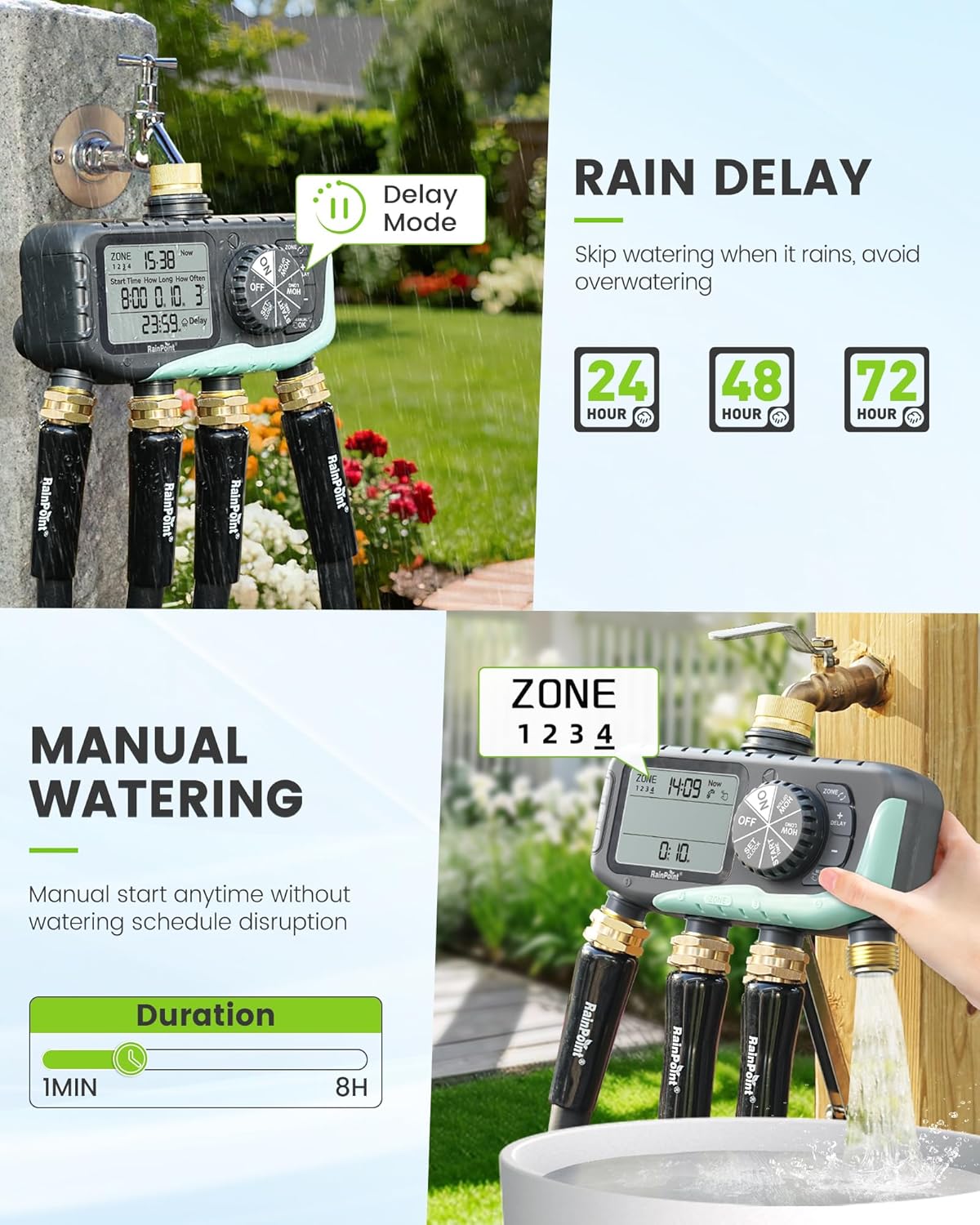
- פונקציית עיכוב גשם: Skip watering for 24, 48, or 72 hours to conserve water during rainy periods.
- מצב השקיה ידנית: Initiate watering instantly for 1 minute to 8 hours without affecting programmed schedules.
- תכנות קל: Features a large 3.4-inch LCD screen, a large dial, and clear buttons for intuitive setup.
- בנייה עמידה: Equipped with solid brass inlet and outlet, leak-proof sealing rings, and an IP65 waterproof rating for outdoor use.
- Upgraded Coil Valve: Provides stronger water pressure and wider coverage compared to standard valves.
- הגנת מתח נמוך: Valves automatically close when battery power is low to prevent water waste.


תוכן החבילה
- RAINPOINT 4-Zone Programmable Watering Timer
- מדריך למשתמש
- Standard 3/4-inch faucet adapter (if applicable)
התקנה והתקנה
- התקנת סוללה: Open the battery compartment on the back of the timer. Insert two (2) AA alkaline batteries (not included), ensuring correct polarity. Close the compartment securely.
- להתחבר לברז: Screw the timer onto a standard 3/4-inch outdoor faucet. Ensure the connection is tight to prevent leaks. It is recommended to use a short hose between the faucet and the timer to reduce stress on the faucet connection and allow for easier positioning.
- חבר צינורות: Attach your garden hoses to the four independent outlets (Zone 1, Zone 2, Zone 3, Zone 4) at the bottom of the timer. Ensure each connection is secure.
- הפעלה ראשונית: The LCD screen will light up, and the timer will be ready for programming.


הוראות הפעלה
1. הגדרת זמן נוכחי
Rotate the dial to the 'SET CLOCK' position. Use the '+' and '-' buttons to adjust the current time. Press 'OK' to confirm and move to the next setting (e.g., AM/PM or 24-hour format). Rotate the dial away from 'SET CLOCK' to save.
2. Programming Watering Schedules (for each zone)
The timer allows individual programming for each of its four zones.
- בחר אזור: Rotate the dial to 'PROGRAM'. Use the 'ZONE' button to select the desired zone (1, 2, 3, or 4) you wish to program.
- הגדר זמן התחלה: Use the '+' and '-' buttons to set the desired watering start time for the selected zone. Press 'OK' to confirm.
- הגדר משך השקיה: Use the '+' and '-' buttons to set how long the watering will last (from 1 minute to 3 hours 59 minutes). Press 'OK' to confirm.
- הגדר תדירות: Use the '+' and '-' buttons to set how often the watering will occur (e.g., every 8 hours, every 12 hours, or every 1 to 7 days). Press 'OK' to confirm.
- Repeat steps a-d for each zone you wish to program. Rotate the dial to 'ON' to activate the programmed schedules.

3. פונקציית עיכוב גשם
To temporarily pause watering due to rain:
- Rotate the dial to 'ON'.
- Press the 'DELAY' button.
- Use the '+' or '-' buttons to select the desired delay duration (24, 48, or 72 hours).
- Press 'OK' to confirm. The timer will resume its programmed schedule after the delay period.
4. השקיה ידנית
להשקות באופן מיידי מבלי להשפיע על לוח הזמנים המתוכנן שלך:
- Rotate the dial to 'ON'.
- Press the 'MANUAL/OK' button.
- Use the '+' or '-' buttons to set the desired manual watering duration (from 1 minute to 8 hours).
- Press 'OK' to start manual watering. The timer will automatically return to its programmed schedule after the manual watering duration ends.
5. הגנה מפני צריכת חשמל נמוכה
When the battery level is critically low, the timer's valves will automatically close to prevent continuous water flow and waste. Replace batteries promptly when the low battery indicator appears on the screen.

תַחזוּקָה
- ניקוי: Periodically wipe the timer's exterior with a soft, damp בַּד. אין להשתמש בחומרי ניקוי שוחקים או ממסים.
- החלפת סוללה: Replace batteries annually or when the low battery indicator appears. Always use fresh AA alkaline batteries.
- חורף: Before the first frost, disconnect the timer from the faucet and hoses. Drain any remaining water and store the unit indoors in a dry, protected area to prevent freezing damage.
- בדיקת דסקיות: Regularly inspect the rubber washers in the inlet and outlet connections for wear or damage. Replace if necessary to prevent leaks.
פתרון בעיות
- No Water Flow or Partial Flow:
- בדוק את רמת הסוללה והחלף אותה אם היא חלשה.
- ודא שהברז פתוח לחלוטין.
- Verify that the watering schedule is correctly programmed and activated ('ON' mode).
- Inspect hose connections for kinks or blockages.
- Check the timer's inlet filter for debris.
- דליפות מחיבורים:
- Ensure all connections (faucet, hoses) are tightened securely.
- Check rubber washers for proper seating and damage; replace if worn.
- Display Fading or Not Working:
- החלף סוללות בטריות.
- Avoid prolonged exposure to direct sunlight, which can degrade LCD screens over time. Consider shielding the display if installed in a very sunny area.
- Water Hammer (Pipes Clanging):
- This can occur when valves close rapidly. Consider installing a water hammer arrester between the faucet and the timer.
- טיימר לא מגיב:
- Remove batteries for a few minutes, then reinsert them to reset the device. Reprogram as needed.
מפרטים
| מספר דגם | iob447 |
| מותג | נקודת גשם |
| ASIN | B0G32Z1HMB |
| חוֹמֶר | פלסטיק, פליז |
| צֶבַע | כְּחוֹל |
| מידות המוצר (L x W x H) | 2.54 x 2.54 x 2.54 cm (approx. 1 x 1 x 1 inch); 317.51 grams |
| גודל מסך | 3.4 אינץ' |
| מספר הגדרות | 7 (מתייחס לאפשרויות תכנות) |
| דירוג עמיד למים | IP65 |
| מקור כוח | 2 סוללות אלקליין AA x (לא כלולות) |
אחריות ותמיכה
RAINPOINT products are designed for reliability and performance. For warranty information, technical support, or any questions regarding your 4-Zone Programmable Watering Timer, please contact RAINPOINT customer service through the official website or your retailer's support channels. Please have your model number (iob447) and purchase information ready when contacting support.