1. הקדמה
תודה על הרכישהasing the ELEPHAS BL128MINI Mini Projector. This manual provides essential information for setting up, operating, and maintaining your projector. Please read it thoroughly before use to ensure optimal performance and longevity of the device.
2. תכולת החבילה
ודא שכל הפריטים המפורטים להלן כלולים בחבילה שלך:
- 1 x ELEPHAS BL128MINI Projector
- 1 x שלט רחוק
- מדריך למשתמש אחד (מסמך זה)
- 1 x כבל HDMI
- 1 x Detachable Tripod
3. המוצר נגמרview
3.1 תכונות עיקריות
- 1080P רזולוציית Full HD: Supports 1920 x 1080 resolution for clear images.
- 24-bit True Color: Delivers vibrant and accurate colors.
- הקרנת מסך גדול: Capable of projecting up to a 200-inch screen.
- Detachable Tripod: Provides stable placement and flexible positioning.
- Built-in HIFI Speaker: Offers integrated audio output.
- אפשרויות קישוריות מרובות: Includes USB, HDMI, AV, and Audio ports.

Image 3.1: The ELEPHAS BL128MINI Projector offers 1080P Full HD resolution with 24-bit true color, an 8000:1 contrast ratio, and enhanced brightness for a vivid viewניסיון.
3.2 Projector Ports and Controls
Familiarize yourself with the various ports and controls on your projector for proper connection and operation.

Image 3.2: Rear panel of the ELEPHAS BL128MINI Projector, highlighting DC power input, USB ports, HDMI port, AV port, and audio output. Compatible devices include Xbox, TV Stick, PC, Smartphone, USB drives, speakers, and headphones.
4. התקנה
4.1 חיבור מתח
- חבר את ספק הכוח ליציאת DC IN במקרן.
- חבר את מתאם החשמל לשקע בקיר.
4.2 Tripod Installation
The included detachable tripod allows for stable placement on various surfaces.
- Locate the tripod mounting screw hole on the bottom of the projector.
- Screw the tripod securely into the mounting hole.
- Adjust the tripod legs to achieve the desired height and angle for projection.

Image 4.2: The detachable tripod provides stability for the projector, whether placed on a desktop or uneven outdoor surfaces.
4.3 מיקום ומרחק הקרנה
Position the projector on a flat, stable surface. The optimal projection distance ranges from 3.3 to 9.8 feet for screen sizes between 50 and 200 inches.

Image 4.3: Recommended projection distances for achieving various screen sizes, from 50 to 200 inches.
5. הוראות הפעלה
5.1 הפעלה/כיבוי
- הפעלה: לחץ על לחצן ההפעלה במקרן או בשלט הרחוק.
- כיבוי: לחץ שוב על לחצן ההפעלה. המקרן ייכנס למצב המתנה.
5.2 התאמת פוקוס
Rotate the focus ring on the projector lens until the projected image is clear and sharp.
5.3 בחירת מקור קלט
Use the 'Source' button on the remote control or the projector to select the desired input source (HDMI, USB, AV).
5.4 חיבור התקנים חיצוניים
המקרן תומך במגוון התקנים חיצוניים:
- HDMI: Connect laptops, PCs, TV boxes, TV sticks, gaming consoles (e.g., Xbox), or other HDMI-enabled devices using the provided HDMI cable.
- USB: הכנס כונן הבזק מסוג USB ליציאת ה-USB כדי להפעיל מדיה files ישירות.
- AV: Use the AV port for older devices with composite video output.
- סמארטפונים/טאבלטים: For iOS and Android devices, an additional HDMI adapter (not included) is required for connection.
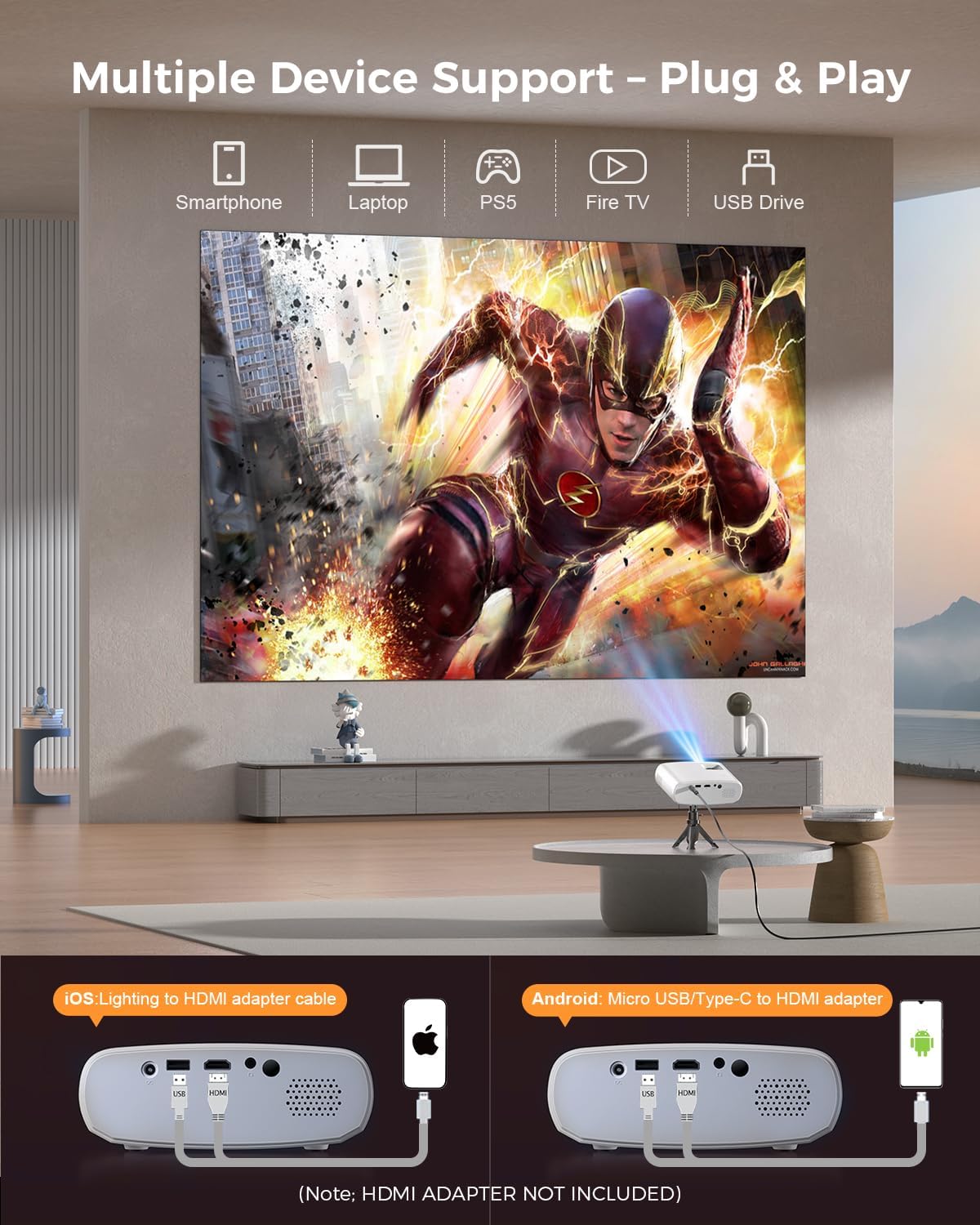
Image 5.4: The projector supports multiple devices via HDMI and USB. Note that an HDMI adapter is required for direct smartphone connection (not included).
5.5 פלט שמע
The projector has a built-in HIFI speaker. For external audio, connect headphones or external speakers to the Audio Out port.
6. תחזוקה
6.1 ניקוי
- עֲדָשָׁה: Use a soft, lint-free cloth or lens cleaning paper. Avoid abrasive materials.
- Casing: נגב את המקרן גasing with a soft, dry cloth. Do not use liquid cleaners or solvents.
- אוורור: ודאו שפתחי האוורור נקיים מאבק וחסימות כדי למנוע התחממות יתר.
6.2 אחסון
When not in use, store the projector in a cool, dry place, away from direct sunlight and extreme temperatures. Use the original packaging or a protective bag to prevent dust accumulation.
7. פתרון תקלות
| בְּעָיָה | סיבה אפשרית | פִּתָרוֹן |
|---|---|---|
| אין תמונה מוקרנת | כבל חשמל רופף; מקור קלט שגוי; המכשיר אינו מחובר כראוי. | Check power connection; Select correct input source; Reconnect HDMI/USB cable. |
| תמונה מטושטשת | המיקוד לא מותאם; המקרן קרוב/רחוק מדי מהמסך. | כוונן את טבעת המיקוד; כוונן את מרחק ההקרנה. |
| אין קול | עוצמת קול נמוכה מדי; מושתק; התקן שמע חיצוני לא מחובר. | הגברת עוצמת הקול; ביטול השתקה; בדיקת חיבורי שמע חיצוניים. |
| השלט רחוק לא עובד | סוללות חלשות/ריקות; חסימה בין השלט למקרן. | החלף סוללות; ודא קו ראייה ברור למקלט ה-IR. |
| Cannot play Netflix/Hulu/Prime Video | הגנת זכויות יוצרים של HDCP. | Use an external streaming device like Amazon Fire Stick or Roku Stick (not included). |
8. מפרטים
| תכונה | פְּרָט |
|---|---|
| דֶגֶם | BL128MINI |
| מותג | אלפאס |
| רזולוציית תצוגה | 1920 x 1080 (1080P Full HD) |
| טכנולוגיית קישוריות | HDMI, USB, AV, Audio Out |
| תכונות מיוחדות | HDMI Connectivity, Portable, Built-in Speakers, Detachable Tripod |
| שימוש מומלץ | פנים/חוץ |
| משקל פריט | 1.96 פאונד (כ-0.89 ק"ג) |
| מידות המוצר | 6 x 4.4 x 2.4 אינץ' (כ-15.2 x 11.2 x 6.1 ס"מ) |
9. אחריות ותמיכה
ELEPHAS projectors are certified with CE, FCC, and RoHS standards.
- Factory Support: We provide 3-years factory support for this product.
- תמיכה טכנית: תמיכה טכנית לכל החיים זמינה.
- שֵׁירוּת לָקוֹחוֹת: 24/7 professional service is provided.
- החזרות: A 30-day return or exchange policy is in place.
For further assistance, please refer to the contact information provided on the product packaging or the official ELEPHAS webאֲתַר.

Image 9.1: ELEPHAS offers comprehensive customer support, including 24/7 professional service, a 30-day return policy, and lifetime technical support.