1. הקדמה
The XDuoo MX-02 is a versatile HD Bluetooth 5.4 transmitter designed to convert various wired audio sources into high-quality wireless Bluetooth signals. It supports multiple input interfaces and advanced Bluetooth codecs, providing an enhanced audio experience for a wide range of devices.
This manual provides detailed instructions for setting up, operating, and maintaining your MX-02 device. Please read it thoroughly before use to ensure optimal performance and longevity.
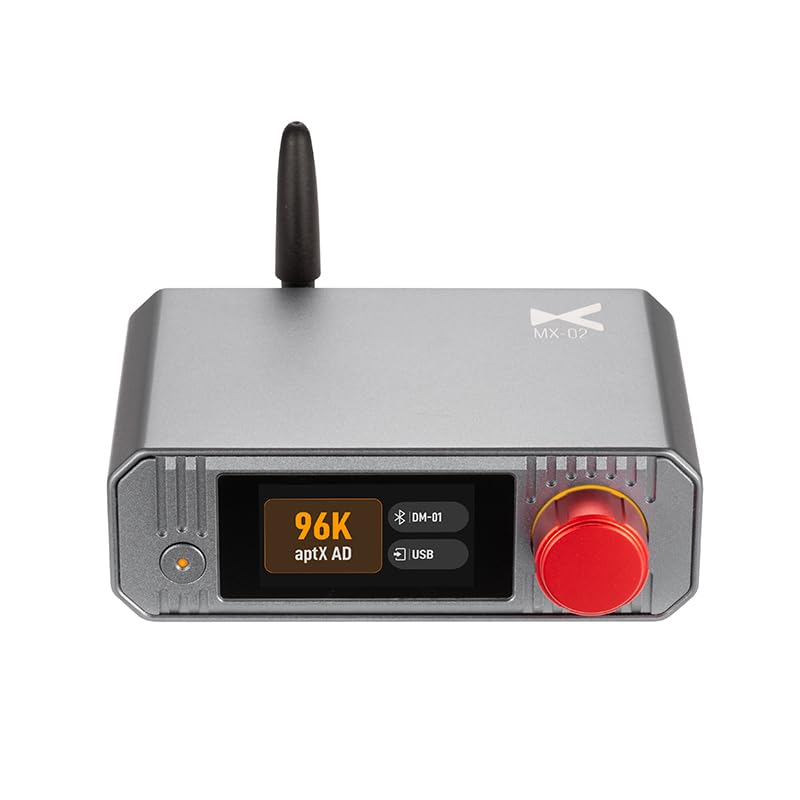
איור 1: חֲזִית view of the XDuoo MX-02 HD Bluetooth Transmitter, showing the display and control knob.
2. תכונות עיקריות
- Multiple Input Interfaces: USB, Optical, Coaxial, and Line input for broad compatibility with audio devices.
- תמיכה באודיו ברזולוציה גבוהה: Coaxial and Optical inputs support up to 24bit/192kHz. USB input supports up to 24bit/96kHz.
- Bluetooth 5.4 מתקדם: Ensures stable connection, extended transmission range (approx. 50m unobstructed), and low latency.
- Versatile Bluetooth Codec Support: Includes SBC, aptX, aptX HD, aptX Adaptive (with Low Latency, High Quality, Lossless options), LC3, and aptX Lite.
- Low Transmission Latency: Less than 20ms, with even lower latency in Game Mode.
- High-Definition TFT Color Display: Provides intuitive operation and settings management.
3. תכולת החבילה
אנא בדקו את החבילה עבור הפריטים הבאים:
- XDuoo MX-02 HD Bluetooth Transmitter Unit
- כבל חשמל USB-C
- אנטנת בלוטות'
- מדריך למשתמש (מסמך זה)
- (Additional cables or accessories may vary by region or retailer)
4. המכשיר נגמרview
4.1 לוח קדמי
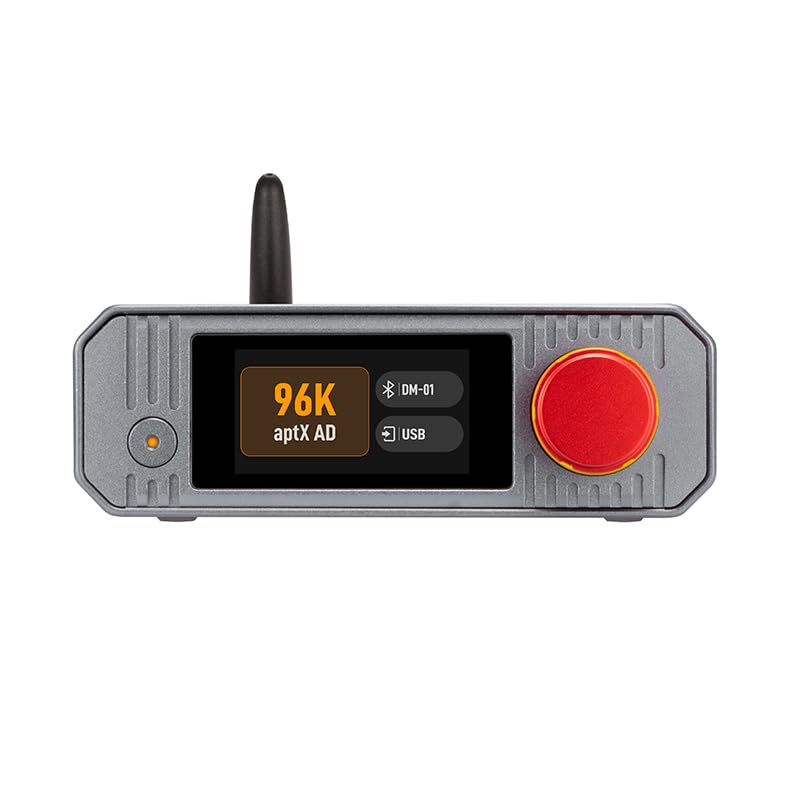
איור 2: Front panel of the MX-02, highlighting the display screen and multi-function knob.
- מסך תצוגה: Shows current status, input source, Bluetooth codec, connected devices, and menu options.
- כפתור רב תכליתי: Rotate to navigate menus or adjust settings; press to confirm selection or power on/off.
- נורית חיווי: Provides status feedback (e.g., power, Bluetooth pairing).
4.2 פאנל אחורי
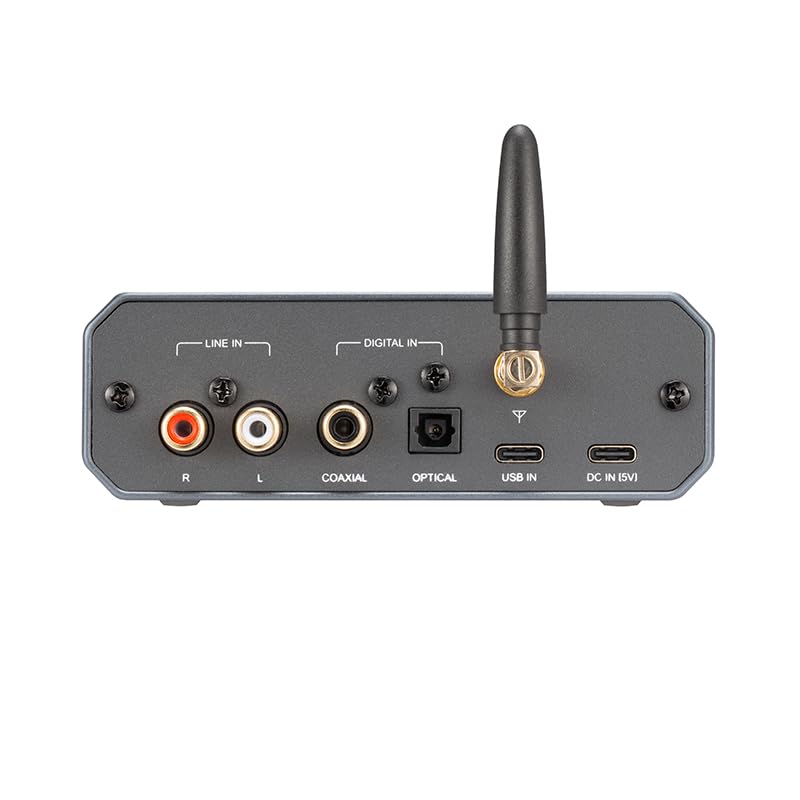
איור 3: Rear panel of the MX-02, showing all input and power ports.
- כניסת קו (RCA): Analog audio input (Left/Right).
- קלט קואקסיאלי: קלט אודיו דיגיטלי.
- קלט אופטי: כניסת שמע דיגיטלית (TOSLINK).
- USB In: USB audio input (Type-B).
- מחבר אנטנה: לחיבור אנטנת בלוטות'.
- כניסת זרם ישר (5 וולט): כניסת חשמל USB-C.
5. הוראות התקנה
5.1 חיבור ראשוני
- חבר אנטנה: Screw the provided Bluetooth antenna onto the antenna connector on the rear panel of the MX-02. Ensure it is securely fastened.
- חיבור חשמל: Connect the USB-C power cable to the "DC IN (5V)" port on the rear of the MX-02 and plug the other end into a 5V USB power adapter (not included) or a compatible USB port.
- הפעלה: Press and hold the multi-function knob on the front panel for a few seconds until the display screen illuminates.
5.2 חיבור מקורות שמע
The MX-02 supports various audio input methods. Choose the appropriate connection for your source device:
- כניסת USB: Connect a USB cable from your computer, PS5, or Nintendo Switch to the "USB IN" port on the MX-02. The MX-02 will be recognized as an audio output device.
- קלט קואקסיאלי: Use a coaxial cable to connect your CD player, TV, or other device with a coaxial output to the "COAXIAL" port on the MX-02.
- קלט אופטי: Use an optical (TOSLINK) cable to connect your TV, CD player, or other device with an optical output to the "OPTICAL" port on the MX-02.
- קלט קו (RCA): Use RCA cables to connect analog audio sources (e.g., turntable pre-amp, older CD players) to the "LINE IN (R/L)" ports on the MX-02.

איור 4: Example setup showing the MX-02 connecting a TV and turntable to wireless headphones/speakers.
This image illustrates how the MX-02 can convert wired audio from devices like a television or a turntable into a Bluetooth signal for wireless transmission.
6. הוראות הפעלה
6.1 בחירת מקור קלט
After powering on, the MX-02 display will show the current input source. To change the input:
- Rotate the multi-function knob to navigate through the available input options (USB, Coaxial, Optical, Line).
- Press the knob to select the desired input source.
6.2 זיווג בלוטות '
To transmit audio wirelessly, you need to pair the MX-02 with your Bluetooth receiving device (headphones, speakers, etc.):
- Ensure your Bluetooth receiving device is in pairing mode. Refer to your device's manual for instructions.
- On the MX-02, navigate to the Bluetooth pairing menu using the multi-function knob.
- בחר "חפש Devices" or a similar option. The MX-02 will scan for nearby Bluetooth devices.
- Once your device appears on the MX-02 display, select it and confirm pairing.
- A successful connection will be indicated on the MX-02 display.
6.3 Managing Bluetooth Codecs
The MX-02 allows you to select preferred Bluetooth audio codecs to optimize for sound quality or low latency:

איור 5: The MX-02's high-definition color display showing options for Bluetooth audio codec selection and other settings.
This image demonstrates the intuitive menu system for configuring Bluetooth codecs and other operational parameters.
- Access the "Bluetooth Audio Codec" menu via the multi-function knob.
- Rotate the knob to highlight the desired codec (e.g., aptX HD for high quality, aptX Adaptive for balanced performance, aptX Low Latency or LC3 for gaming).
- Press the knob to confirm your selection. The MX-02 will attempt to use this codec with the connected device.
Note: The actual codec used depends on the capabilities of both the MX-02 and your receiving Bluetooth device. The MX-02 will automatically negotiate the best available codec.
6.4 הגדרות מערכת
The MX-02 offers various system settings accessible through its menu:
- מסך כבוי: Adjust display timeout settings.
- הפעלה אוטומטית: Configure automatic power-on behavior.
- שָׂפָה: בחר את שפת התצוגה.
- איפוס למפעל: אפס את כל ההגדרות לברירת המחדל.
Navigate these options using the multi-function knob and press to confirm changes.
7. תחזוקה וטיפול
- ניקוי: השתמשו במטלית רכה ויבשה לניקוי החלק החיצוני של המכשיר. אין להשתמש בחומרי ניקוי נוזליים או ממסים.
- אִחסוּן: Store the MX-02 in a cool, dry place away from direct sunlight and extreme temperatures.
- טיפול: הימנע מנפילה או הכפיפה של המכשיר למכות חזקות.
- אוורור: יש לוודא אוורור נאות סביב המכשיר כדי למנוע התחממות יתר. אין לחסום פתחי אוורור.
- כּוֹחַ: Always use a 5V/0.25A compatible USB power source.
8. פתרון תקלות
| בְּעָיָה | סיבה אפשרית | פִּתָרוֹן |
|---|---|---|
| אין כוח | Power cable not connected or faulty; power adapter not working. | Check USB-C power cable connection. Try a different USB power adapter or port. |
| אין פלט שמע | Incorrect input source selected; Bluetooth device not paired or connected; volume too low; faulty cables. | Verify the correct input source is selected on the MX-02. Ensure your Bluetooth receiving device is paired and connected. Check volume levels on both the MX-02 (if applicable) and the receiving device. Inspect audio cables for damage and ensure they are securely connected. |
| צימוד Bluetooth נכשל | Receiving device not in pairing mode; too far from MX-02; interference. | Put your Bluetooth receiving device into pairing mode. Move the devices closer together. Ensure no other strong wireless signals are causing interference. Try restarting both devices. |
| Poor sound quality / dropouts | Weak Bluetooth signal; interference; incorrect codec selected. | Reduce distance between MX-02 and receiving device. Remove obstacles. Check for sources of interference (Wi-Fi routers, microwaves). Try a different Bluetooth codec if available. |
| USB audio not recognized | Incorrect USB cable; driver issue (for PC); source device not configured for USB audio output. | Ensure you are using a data-capable USB cable. For PC, check device manager for drivers (usually plug-and-play). Configure your source device (e.g., computer, console) to output audio via USB to the MX-02. |
9. מפרטים
| תכונה | פְּרָט |
|---|---|
| דֶגֶם | MX-02 |
| ממשק חשמל | USB-C (for 5V DC power) |
| צריכת חשמל | 5V/0.25A |
| תשומות | USB (Type-B), Coaxial, Optical (TOSLINK), Line (RCA L/R) |
| תמיכה ב-USB אודיו | עד 24bit/96kHz |
| Coaxial/Optical Audio Support | עד 24bit/192kHz |
| גרסת בלוטות' | 5.4 |
| Classic Bluetooth Formats | SBC, aptX, aptX HD, aptX Adaptive (aptX Low Latency, aptX High Quality, aptX Lossless) |
| LE Audio Formats | LC3, aptX Lite |
| חביון שידור | <20ms (lower in Game Mode) |
| טווח שידור | Approx. 50m (unobstructed environment) |
| מידות (L x W x H) | 12.0 x 10.2 x 4.2 ס"מ |
| מִשׁקָל | 0.36 ק"ג |
| יַצרָן | XDuoo |
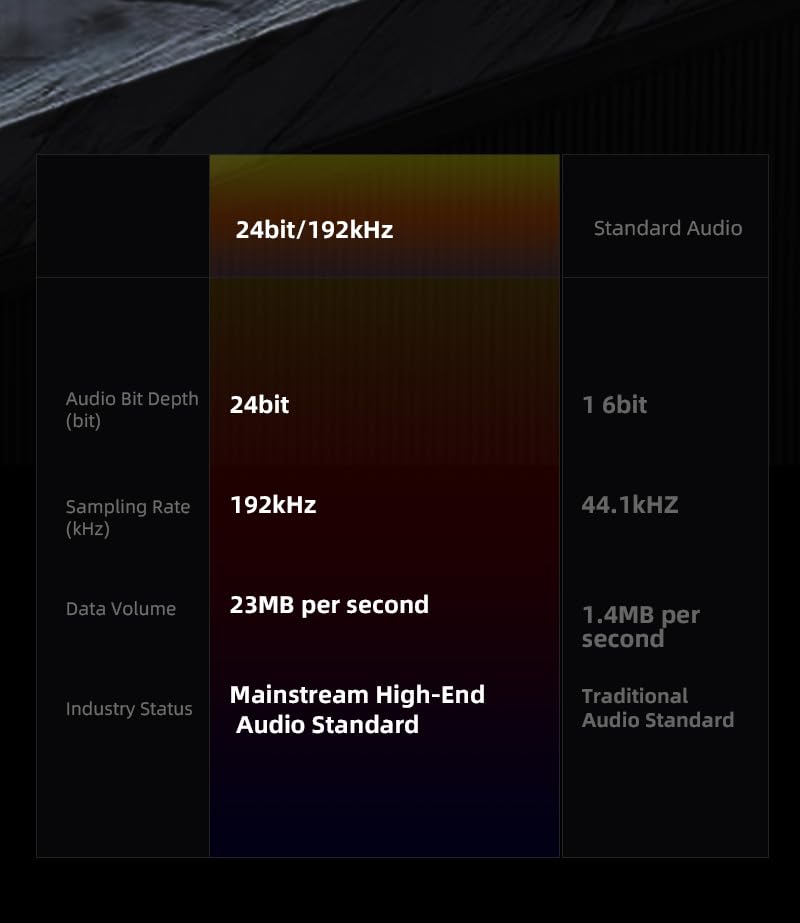
איור 6: Comparison illustrating the benefits of 24bit/192kHz high-resolution audio supported by the MX-02.
This table highlights the superior bit depth, sampling rate, and data volume of high-resolution audio compared to traditional audio standards.
10. אחריות ותמיכה
The XDuoo MX-02 comes with a standard manufacturer's warranty. Please refer to the warranty card included in your package or visit the official XDuoo webבאתר לקבלת תנאי האחריות המפורטים.
For technical support, troubleshooting assistance, or service inquiries, please contact your retailer or the official XDuoo customer support channels.
יַצרָן: XDuoo
דֶגֶם: MX-02