
מָבוֹא
Thank you for choosing the EuroFone S3 Plus Motorcycle Intercom with 2K HD Camera. This device is designed to enhance your riding experience by providing seamless communication, high-definition video recording, and entertainment features. Please read this manual thoroughly before use to ensure proper operation and to maximize the product's lifespan.
תכונות המוצר
- Bluetooth 5.1 מתקדם: Equipped with a low-power Bluetooth 5.1 chip for faster, more stable, and energy-efficient connections, improving connectivity, communication speed, and range.
- 6-Person Group Intercom: Supports simultaneous communication for up to 6 riders, with a maximum communication distance of 1800-2000 meters in open areas.
- הקלטת וידאו 2K HD: Features a 14mm Sony HD F2.0 lens, 2K Ultra HD video camera at 30FPS for smooth, clear details. Includes anti-shake and anti-vibration technology.
- עדשת זווית רחבה במיוחד של 135°: מספק תחום רחב של view, preventing blind spots in recordings.
- חיי סוללה ארוכים: Built-in 2000mAh battery offers up to 45 hours of continuous talk time, 8 hours of video recording, 80 hours of music playback, and 1000 hours of standby time. Fully charges in approximately 1.5 hours via Type-C port.
- IP67 עמיד למים ואבק: Designed with a silicone-tight structure for deep protection against rain and dust, suitable for various environments. (Note: Not suitable for prolonged use in heavy rain or submersion).
- CVC8.0 & DSP Dual Noise Cancellation: Windproof microphone eliminates call echoes and reduces engine noise and wind noise, ensuring clear communication.
- HIFI Audio Quality: Features 40mm high-output speakers for clear voice and music even at high speeds.
- מענה אוטומטי לשיחות: Automatically answers incoming calls after approximately 10 seconds, allowing for hands-free communication while riding.
- תמיכת עוזר קולי: Compatible with Siri and other voice assistants, with voice navigation available in Japanese, English, and Chinese.
- תאימות אוניברסלית: Connects to most commercially available transceivers, smartphones, and navigation devices via Bluetooth.
- FM Radio & Music Sharing: Built-in FM radio for local broadcasts and music sharing function to enjoy music with friends or family.
- Large Multi-Function Buttons: Easy to operate even with gloves on, allowing for simple control of music playback, volume, and calls.
תוכן החבילה
החבילה כוללת את הפריטים הבאים:
- 1 Bluetooth Host Unit
- כבל טעינה מסוג C אחד
- 2 Helmet Clips (Screw Clip + Velcro Clip)
- אוזניות סטריאו 1
- 1 מדריך למשתמש
- 2 Microphones (Hard Mic & Soft Mic)
התקנה והתקנה
Follow these steps to install the EuroFone S3 Plus on your helmet:
- הסר את ריפוד הקסדה: Carefully remove the inner lining of your helmet to access the ear pockets and chin bar area.
- Install Mounting Clip:

Image: The mounting clip being attached to the side of a helmet.
Choose between the screw clip or the adhesive velcro clip. For a secure fit, the screw clip is recommended. Unscrew the screws on the metal buckle, position the buckle on the edge of the helmet, and tighten the screws. Ensure it is firmly attached. - חיבור יחידה ראשית: Gently slide the main intercom unit along the bracket until it clicks into place.
- חיבור רמקולים:
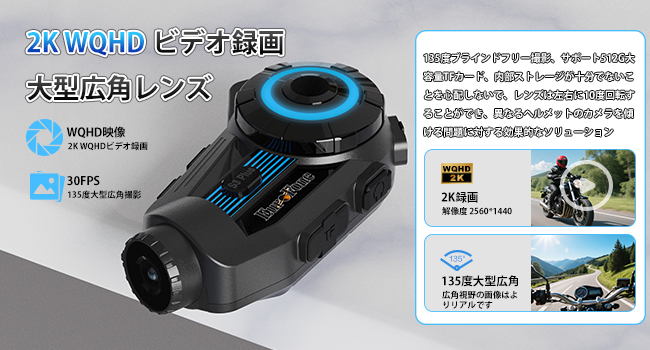
Image: Speakers being placed into the helmet's ear pockets.
Stick the headset with the longer wire to the ear pocket on the side away from the main unit. Stick the headset with the shorter wire to the ear pocket on the side close to the main unit. Use the provided 3M velcro pads to secure the speakers inside the helmet's ear pockets. Ensure they are positioned comfortably over your ears. - התקנת מיקרופון:

Image: A microphone being positioned near the mouth inside a helmet.
Connect the boom microphone to the speaker wire connector. Stick the microphone to the side of the helmet mouth area, ensuring it is close to your mouth for clear audio pickup. - מסלול כבלים: Carefully route all cables under the helmet lining to keep them tidy and prevent interference.
- התקן מחדש את הציפוי: Once all components are in place, reinstall the helmet's inner lining.
מדריך וידאו להתקנה
Video: A step-by-step guide on installing the EuroFone S3 Plus Motorcycle Intercom system onto a helmet, including speaker and microphone placement.
פעולות בסיסיות
Familiarize yourself with the main functions of your S3 Plus intercom:
- הפעלה/כיבוי: לחץ לחיצה ארוכה על לחצן ההפעלה כדי להפעיל או לכבות את המכשיר.
- זיווג Bluetooth:
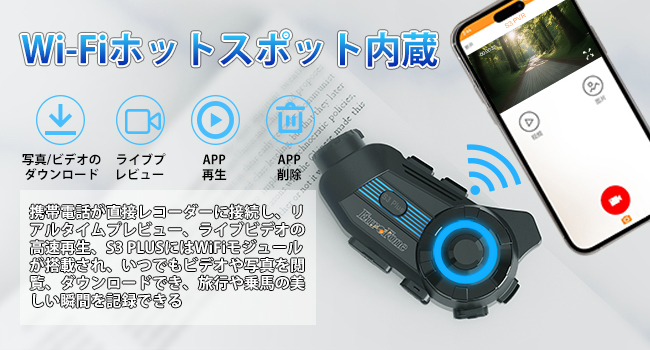
Image: Illustration of the Bluetooth 5.1 chip and its benefits for stable connection.
Long press the power button to turn on the S3 Plus. On your phone, go to Bluetooth settings and select "S3 Plus" from the list of available devices to connect. - פונקציית אינטרקום:

Image: Depiction of multiple riders connected via wireless intercom.
The S3 Plus supports up to 6 riders for group communication. Refer to the detailed manual for specific pairing instructions for multiple units. The system features automatic communication recovery if a connection is temporarily lost. - השמעת מוזיקה:

Image: Two riders sharing music wirelessly while riding.
Once paired with your phone, open your music player. Click the multi-purpose button to play/pause. Rotate the jog dial clockwise to increase volume, counter-clockwise to decrease. Short press and rotate clockwise for the previous song, counter-clockwise for the next song. - רדיו FM: Double-click the multi-purpose button to switch to FM Radio. Rotate the jog dial twice to the left or right to switch channels. Double-click again to switch off FM Radio.
- מענה אוטומטי לשיחות:

Image: A phone screen showing an incoming call, with the intercom automatically answering.
When an incoming call is detected, the device will automatically answer after 10 seconds. To reject a call, single-click the multi-purpose button. - עוזר קולי:

תמונה: דוגמהamples of voice commands for GPS, music, and weather.
Activate your phone's voice assistant (e.g., Siri) through the intercom for hands-free control.
Basic Operation Video Tutorial
Video: Demonstrates basic operations of the EuroFone S3 Plus, including power, Bluetooth pairing, music control, and call handling.
תפעול מצלמה
The S3 Plus features a 2K HD camera for recording your rides.
- הכנס כרטיס מיקרו SD:

Image: The S3 Plus unit highlighting the 2K WQHD video recording and wide-angle lens.
Open the cover and insert a micro SDXC card (Class 10 or higher recommended) into the designated slot. - התחל/הפסק הקלטה: Long press the record button to start recording. A single click will stop recording.
- WiFi Connection for App:

Image: A smartphone connected to the intercom via Wi-Fi, showing video playback and download options.
Download the dedicated app (Road Cam) to your smartphone. Long press the WiFi button on the intercom to enable WiFi. Connect your phone to the intercom's WiFi network (SSID: S3 Dash Cam). Once connected, you can view פו חיtage, playback recordings, and download files דרך האפליקציה. - Intelligent Gravity Sensor:

Image: A helmet with the intercom unit on the ground, indicating the gravity sensor locking video in case of impact.
In the event of an impact, the intelligent gravity sensor will automatically lock the current video file כדי למנוע את החלפתו. - EIS Anti-Shake & Night Vision:

Image: Comparison of video quality with and without EIS anti-shake and night vision features.
The camera features Electronic Image Stabilization (EIS) for smoother footage and night vision capabilities for clear recording in low-light conditions.
Camera Operation Video Tutorial
Video: A demonstration of how to operate the camera functions of the EuroFone S3 Plus, including recording and connecting to the mobile app via WiFi.
תַחזוּקָה
To ensure the longevity and optimal performance of your S3 Plus intercom, follow these maintenance guidelines:
- ניקוי: השתמש רך, דamp מטלית לניקוי החלק החיצוני של היחידה. אין להשתמש בכימיקלים חזקים או בחומרי ניקוי שוחקים.
- חשיפה למים: While IP67 waterproof, avoid prolonged exposure to heavy rain or submersion in water. If wet, wipe dry immediately with a towel.
- אִחסוּן: יש לאחסן את המכשיר במקום קריר ויבש, הרחק מאור שמש ישיר וטמפרטורות קיצוניות, כאשר אינו בשימוש.
- טיפול בסוללה: להשגת חיי סוללה אופטימליים, יש לטעון את המכשיר באופן קבוע ולהימנע מפריקה מלאה שלו למשך פרקי זמן ממושכים.
פתרון בעיות
If you encounter any issues with your S3 Plus, refer to the following common solutions:
| בְּעָיָה | סיבה אפשרית | פִּתָרוֹן |
|---|---|---|
| המכשיר לא נדלק | סוללה חלשה | טען את המכשיר במלואו. |
| לא ניתן להתאים לטלפון | Bluetooth not enabled or device not in pairing mode | Ensure Bluetooth is on on your phone. Long press the power button on the intercom until the indicator light flashes, then select "S3 Plus" on your phone. |
| Intercom connection drops frequently | מכשולים או מרחקים ארוכים | Reduce distance between intercoms or move to an area with fewer obstructions. The device supports automatic reconnection. |
| איכות שמע ירודה / רעש | Microphone position, wind noise, or interference | Adjust microphone position closer to your mouth. Ensure CVC8.0/DSP noise cancellation is active. Check for external interference. |
| Camera not recording / App not connecting | No SD card, full SD card, or WiFi not connected | Insert a compatible micro SD card. Format or replace the SD card if full. Ensure intercom WiFi is on and your phone is connected to "S3 Dash Cam" network. |
מפרטים
- שם הדגם: S3 פלוס
- מותג: EuroFone
- צֶבַע: כְּחוֹל
- טכנולוגיית קישוריות: Wireless (Bluetooth 5.1, WiFi)
- גורם צורת אוזניות: Full Wireless
- זמן שימוש מתמשך: 8 Hours (Video Recording), 45 Hours (Talk Time), 80 Hours (Music Playback)
- זמן המתנה: 1000 שעות
- קיבולת סוללה: 2000mAh
- יציאת טעינה: סוג-C
- רזולוציית לכידת וידאו: 1440p (2K WQHD)
- עֲדָשָׁה: 135° Wide Angle, Sony HD F2.0
- סוג זיכרון: Micro SDXC Card (not included)
- דירוג עמיד למים: IP67
- מאפיינים מיוחדים: Built-in GPS, Voice Assistant, FM Radio, Noise Cancellation (CVC8.0 & DSP), Automatic Call Answering, Music Sharing, Anti-shake, Night Vision, Intelligent Gravity Sensor
- מידות המוצר: 5.7 x 10.5 x 3.5 ס"מ
- משקל מוצר: 360 גרם
אחריות ותמיכה
The EuroFone S3 Plus Motorcycle Intercom comes with a אחריות לשנה. If you have any questions or require assistance, please feel free to contact our customer support team. We aim to respond within 24 hours.