
1. הקדמה
The Audizio Desio is a versatile digital radio that combines classic aesthetics with modern audio technology. It features DAB, DAB+, and FM tuning for clear radio reception, along with Bluetooth 5.0 for wireless streaming, a USB port for media playback, and a 3.5mm AUX input for wired connections. The radio is equipped with a 2.4-inch color LCD display and integrated stereo speakers, making it suitable for various environments such as living rooms, kitchens, or bedrooms.
This manual provides detailed instructions for setting up, operating, and maintaining your Audizio Desio radio. Please read it thoroughly before use to ensure proper functionality and to maximize your listening experience.
2. מידע בטיחות
- ודא שעוצמת מתאם החשמלtage matches your local power supply before connecting.
- אין לחשוף את היחידה לגשם, לחות או טמפרטורות קיצוניות.
- הימנע מהצבת היחידה ליד מקורות חום או באור שמש ישיר.
- אל תפתח את ה-casinז; הפנה את כל הטיפולים לצוות מוסמך.
- הרחק את היחידה משדות מגנטיים חזקים.
- נקה את היחידה רק עם מטלית רכה ויבשה.
3. תכולת החבילה
אנא ודאו שכל הפריטים נמצאים בעת הוצאת האריזה:
- Audizio Desio DAB/DAB+/FM Radio
- מתאם מתח (DC 5V)
- שְׁלַט רָחוֹק
- מדריך למשתמש
4. בקרות וחיבורים
פקדי לוח קדמי
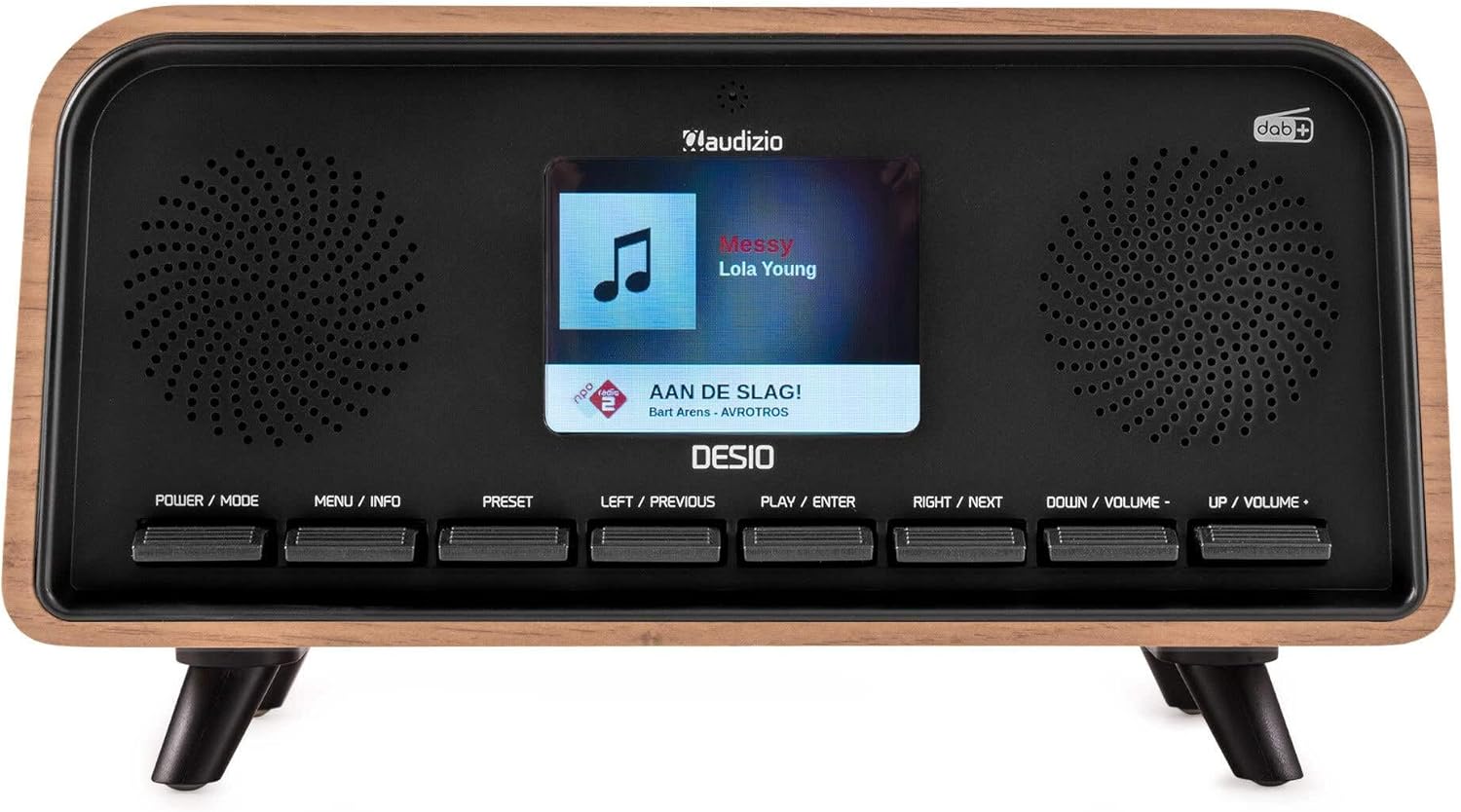
חֲזִית view of the Audizio Desio radio, showing the display playing music with artist and track information. The control buttons are visible below the screen.
- POWER / MODE: Press to turn on/off. Press and hold to switch between DAB, FM, Bluetooth, USB, and AUX modes.
- MENU / INFO: Press to access menu options. In playback mode, press to cycle through information display.
- קבוע מראש: Press to recall saved stations. Press and hold to save current station.
- LEFT / PREVIOUS: Navigate left in menus, or skip to previous track/station.
- PLAY / ENTER: Confirm selection in menus, or play/pause media.
- RIGHT / NEXT: Navigate right in menus, or skip to next track/station.
- DOWN / VOLUME -: Decrease volume, or navigate down in menus.
- UP / VOLUME +: Increase volume, or navigate up in menus.
חיבורי לוח אחורי
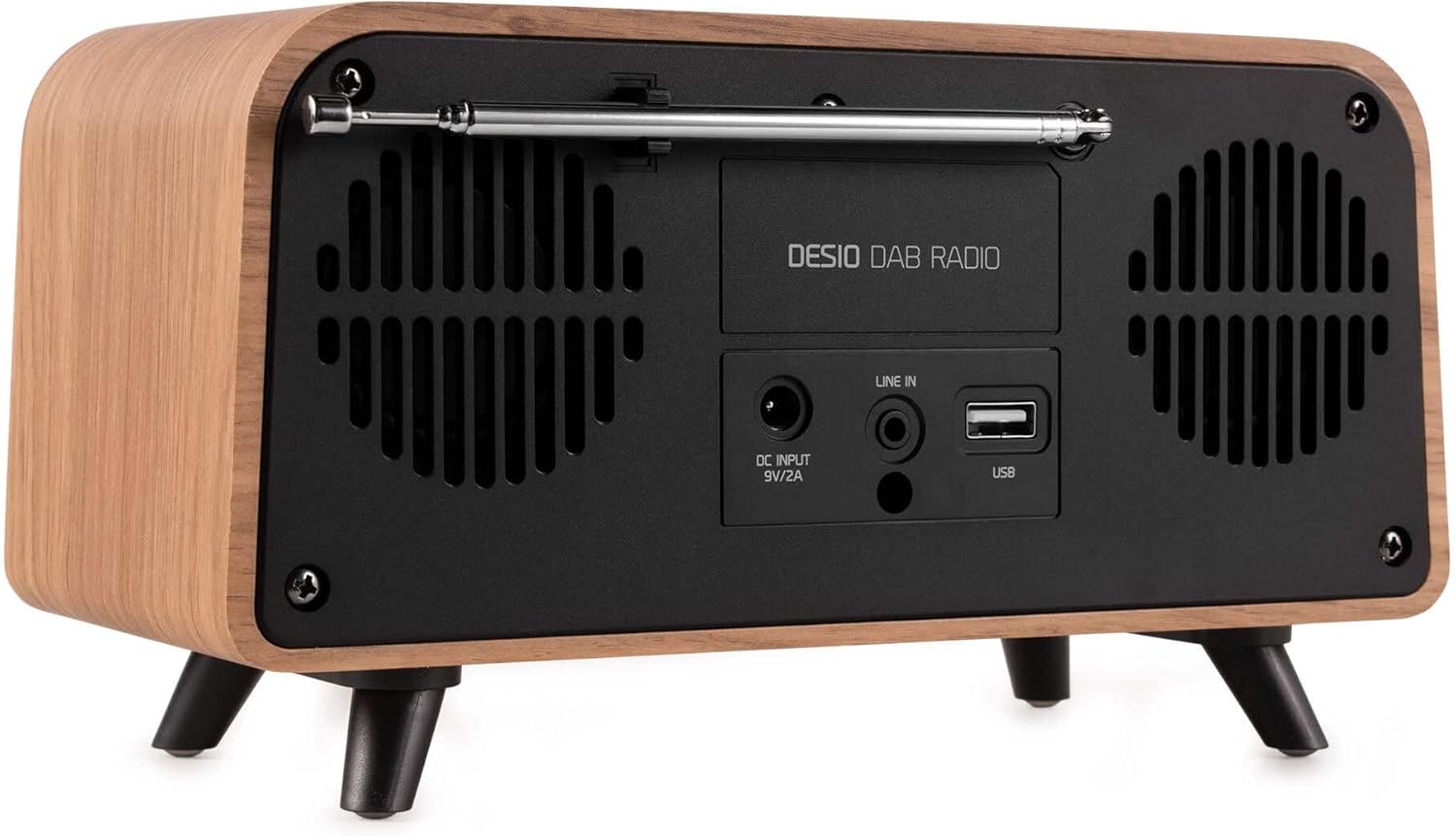
אֲחוֹרִי view of the Audizio Desio radio, highlighting the DC INPUT 9V/2A, LINE IN (3.5mm AUX), and USB ports. The telescopic antenna is extended.
- DC INPUT 9V/2A: חברו כאן את מתאם החשמל המצורף.
- LINE IN (3.5mm AUX): חברו התקני שמע חיצוניים באמצעות כבל שמע 3.5 מ"מ.
- USB: הכנס כונן הבזק מסוג USB להשמעת MP3.
- אנטנה טלסקופית: Extend fully for optimal DAB/DAB+ and FM reception.
5. הגדרה ראשונית
- חבר חשמל: Plug the provided DC 5V power adapter into the DC INPUT port on the rear of the radio, then plug the adapter into a wall outlet.
- הרחבת אנטנה: Fully extend the telescopic antenna located on the rear of the unit for best reception.
- הפעלה: הקש על POWER / MODE לחצן להפעלת הרדיו.
- First-time DAB Scan: Upon first power-on, the radio will automatically perform a full scan for DAB/DAB+ stations. This may take a few minutes. The display will show the scanning progress.
- הגדר זמן/תאריך: The time and date will usually be set automatically via DAB signal. If not, you can manually set them via the menu.
6. הוראות הפעלה
6.1 תפעול רדיו DAB/DAB+

חֲזִית view of the Audizio Desio radio, displaying a DAB radio station ('NPO Klassiek') and current time.
- Select DAB Mode: הקש על POWER / MODE button repeatedly until 'DAB' is displayed.
- סרוק אחר תחנות: If no stations are found or you wish to rescan, press תפריט / מידע, ואז השתמש LEFT / PREVIOUS or ממש ליד to select 'Full Scan' and press PLAY / ENTER.
- בחר תחנה: השתמש ב- LEFT / PREVIOUS or ממש ליד לחצו על כפתורים כדי לעיין בתחנות הזמינות. PLAY / ENTER כדי לבחור תחנה.
- שמור קבוע מראש: כדי לשמור תחנה, לחצו והחזיקו את הלחצן הגדרה מראש לַחְצָן. להשתמש LEFT / PREVIOUS or ממש ליד to choose a preset number (1-50), then press PLAY / ENTER כדי לאשר.
- אחזור הגדרה מראש: כדי לאחזר תחנה שמורה, לחצו על הלחצן הגדרה מראש button (do not hold). Use LEFT / PREVIOUS or ממש ליד to select the desired preset, then press PLAY / ENTER.

חֲזִית view of the Audizio Desio radio, showing the 'Preset Recall' menu on the display, indicating empty preset slots.
פעולת רדיו FM 6.2
- בחר מצב FM: הקש על POWER / MODE לחץ שוב ושוב על הלחצן עד שיוצג 'FM'.
- סריקה אוטומטית: לחץ והחזק PLAY / ENTER to automatically scan for and save available FM stations.
- כוונון ידני: לְהִשְׁתַמֵשׁ LEFT / PREVIOUS or ממש ליד כדי לכוונן את התדר בצורה עדינה.
- Save/Recall Presets: Follow the same procedure as for DAB radio (Section 6.1).
6.3 Bluetooth (BT) Operation

חֲזִית view of the Audizio Desio radio, with the display showing 'BT' (Bluetooth) mode and 'Connected' status.
- בחר מצב BT: הקש על POWER / MODE button repeatedly until 'BT' is displayed. The radio will enter pairing mode, indicated by a flashing Bluetooth icon.
- צמד מכשיר: On your smartphone, tablet, or laptop, enable Bluetooth and search for available devices. Select 'Audizio Desio' from the list.
- לְחַבֵּר: Once paired, the display will show 'Connected'. You can now stream audio from your device to the radio.
- בקרת השמעה: Use your connected device or the radio's PLAY / ENTER, LEFT / PREVIOUS, ו ממש ליד לחצנים לשליטה בהפעלה.
6.4 השמעת USB

חֲזִית view of the Audizio Desio radio, with the display showing 'USB' mode, current time, and details of an MP3 file שמשחקים.
- הכנס כונן USB: Insert a USB flash drive (formatted to FAT32) containing MP3 fileליציאת ה-USB בחלקו האחורי של הרדיו.
- בחר מצב USB: הקש על POWER / MODE button repeatedly until 'USB' is displayed. The radio will automatically start playing the first compatible audio file.
- נווט Files: לְהִשְׁתַמֵשׁ LEFT / PREVIOUS or ממש ליד to skip tracks. Press PLAY / ENTER כדי להשהות/לחדש את ההשמעה.
6.5 כניסת AUX
- חבר מכשיר: Connect an external audio device (e.g., MP3 player, smartphone) to the 'LINE IN' (3.5mm AUX) port on the rear of the radio using a 3.5mm audio cable (not included).
- בחר מצב AUX: הקש על POWER / MODE button repeatedly until 'AUX' is displayed.
- בקרת השמעה: Playback is controlled directly from your connected external device. Adjust volume using the radio's volume controls.
6.6 פונקציות אזעקה וטיימר
- הגדרת אזעקות: גישה להגדרות האזעקה דרך תפריט / מידע button. You can set multiple alarms with customizable sources (DAB, FM, Buzzer), volume, and recurrence (daily, weekdays, weekends).
- טיימר שינה: The sleep timer allows the radio to turn off automatically after a set period. Access this function via the תפריט / מידע button and select the desired duration.
- פונקצית נודניק: When an alarm sounds, press any button (except Power) to activate the snooze function for a short period.
7. תחזוקה
- ניקוי: Use a soft, dry, lint-free cloth to clean the radio's surface. Do not use abrasive cleaners, waxes, or solvents.
- טיפול באנטנה: טפלו באנטנה הטלסקופית בזהירות כדי למנוע כיפוף או שבירה.
- אִחסוּן: אם מאחסנים את הרדיו לתקופה ממושכת, נתקו אותו מאספקת החשמל ואחסנו אותו במקום קריר ויבש.
8. פתרון תקלות
| בְּעָיָה | סיבה אפשרית | פִּתָרוֹן |
|---|---|---|
| אין כוח | מתאם החשמל לא מחובר או ששקע פגום. | Check power adapter connection and try a different outlet. |
| קליטת DAB/FM גרועה | Antenna not fully extended or poor signal area. | Fully extend the antenna. Try repositioning the radio. Perform a full scan. |
| בלוטות' לא מתחבר | Radio not in BT mode, device not in pairing mode, or too far away. | Ensure radio is in BT mode. Put your device in pairing mode. Move device closer to the radio (within 10m). |
| השמעת USB לא עובדת | USB drive not inserted correctly, unsupported file format, or drive not FAT32. | הכנס מחדש את כונן ה-USB. ודא files are MP3. Check USB drive format (FAT32). |
| No sound from AUX | Radio not in AUX mode, cable faulty, or external device volume low. | Select AUX mode. Check 3.5mm cable. Increase volume on both radio and external device. |
9. מפרט טכני
- מותג: אודיזיו
- דֶגֶם: Desio
- טכנולוגיית טיונר: FM, DAB+
- בלוטות': Version 5.0 (Range: 10m)
- אפשרויות השמעה: Bluetooth, USB, 3.5mm AUX input
- תחנות מוגדרות מראש: 50
- לְהַצִיג: 2.4 אינץ 'צבעוני LCD
- פונקציות: Alarm, Sleep Timer, Snooze, Dimming, Week/Weekend Alarm
- Max Speaker Power: 30 וואט
- ספק כוח: DC 5V (Power Adapter)
- מידות המוצר (H x W x D): 32 x 16 x 18 ס"מ
- מִשׁקָל: 1.66 ק"ג
10. אחריות ותמיכה
This product comes with a standard manufacturer's warranty. For detailed warranty terms and conditions, please refer to the documentation provided at the time of purchase or contact your retailer.
For technical support, troubleshooting assistance, or service inquiries, please contact the Audizio customer support team or your local dealer. Please have your product model number (Desio) and purchase information ready when contacting support.