
מָבוֹא
Thank you for choosing the JUOVI 65W 20000mAh Portable Charger. This high-capacity power bank is designed to provide reliable and fast charging for a wide range of devices, including laptops, tablets, and smartphones. Please read this manual carefully to ensure proper use and optimal performance of your device.
תוכן החבילה
- 1 × JUOVI 65W 20000mAh Power Bank
- 1 × USB-C to USB-C Cable (1 ft)
- 1 × מדריך למשתמש
המוצר נגמרview
Familiarize yourself with the components of your JUOVI Power Bank:

Figure 1: JUOVI Power Bank with USB-C and USB-A ports, and digital display.
- USB-C Ports (C1 IN/OUT, C2 IN/OUT): Two ports supporting 65W PD 3.0 fast charging for both input and output.
- USB-A Ports (USB1 OUT, USB2 OUT): Two ports supporting 30W fast charging output.
- תצוגה דיגיטלית: מציג אחוז סוללה בזמן אמתtage ומצב טעינה.
- לחצן הפעלה: Activates the display and controls charging modes.
תכונות מפתח
65W High-Speed Laptop Charging & PD 3.0 Fast Charging
The power bank features dual USB-C ports capable of delivering 65W PD 3.0 fast charging. This allows for rapid recharging of compatible laptops, such as a 14-inch MacBook Pro to 50% in approximately 40 minutes, and an iPhone to 60% in just 30 minutes. It provides efficient power for laptops, tablets, and phones during travel or daily use.
Massive 20000mAh Capacity & Charge 4 Devices Simultaneously
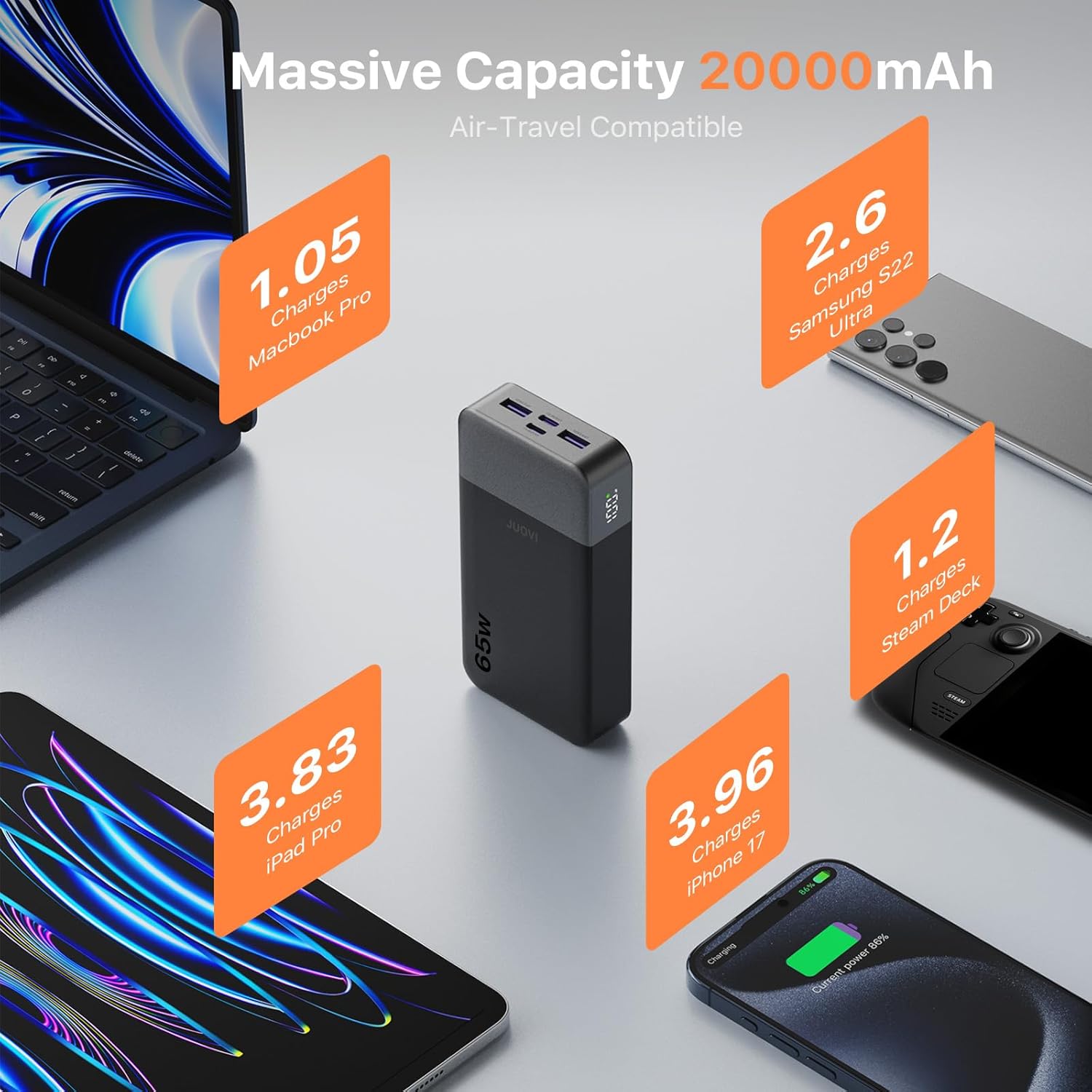
Figure 2: High capacity of JUOVI Power Bank for multiple devices.
With a 20000mAh battery, this power bank offers extended power. It includes 2 USB-C (65W) and 2 USB-A (30W) ports, enabling simultaneous charging of up to four devices, such as a laptop, tablet, phone, and earbuds. It is designed for travel, camping, flights, and daily commutes.

Figure 3: Charging multiple devices with the JUOVI Power Bank.
Dual-Mode Charging for All Devices & Trickle Mode
This charger supports a default high-power mode for laptops and tablets. For delicate devices like AirPods, Bluetooth headphones, and smartwatches, a simple double-press of the power button activates Low-Current Mode (Trickle Mode), providing safe and gentle charging to preserve battery health.
Smart Digital Display & Real-Time Power Monitoring
The integrated digital display provides real-time visibility of the remaining battery percentage and current charging status. This feature helps users accurately monitor power levels and plan usage without unexpected shutdowns.
הגנה בטיחותית

Figure 4: JUOVI Power Bank's 6-way safety protection features.
The power bank is engineered with a multi-protection system that guards against overcharging, overheating, short-circuit, and overcurrent. An intelligent chip monitors voltage and current in real-time, adjusting output for safe operation.
הגדרה
טעינת בנק הכוח
- Connect the provided USB-C to USB-C cable to one of the power bank's USB-C (IN/OUT) ports.
- חברו את הקצה השני של הכבל למטען קיר USB-C תואם (לא כלול) עם הספק מינימלי של 45W למהירות טעינה אופטימלית.
- התצוגה הדיגיטלית תציג את אחוז הסוללהtagהגדלהasing, indicating that the power bank is charging.
- ברגע שהתצוגה מציגה 100%, סוללת הסוללה טעונה במלואה.
הוראות הפעלה
טעינת המכשירים שלך
- בדוק את רמת הסוללה: לחץ על לחצן ההפעלה פעם אחת כדי view אחוז הסוללה הנוכחיtage בתצוגה הדיגיטלית.
- חבר מכשיר:
- For laptops and fast-charging devices, use a USB-C to USB-C cable and connect to either USB-C (IN/OUT) port.
- For other devices, use a compatible USB-A cable and connect to either USB-A (OUT) port.
- התחלת טעינה: The power bank will automatically begin charging your device. The digital display will show the charging status.
- טעינה אופטימלית: For maximum charging speed, it is recommended to charge one device at a time, especially high-power devices like laptops. Charging multiple devices simultaneously may reduce power per port.
Activating Trickle Mode (Low-Current Mode)
Trickle Mode is ideal for charging low-power devices such as wireless earbuds, smartwatches, or Bluetooth headphones, preventing overcharging and preserving their battery life.
- Connect your low-power device to any available output port on the power bank.
- Double-press the power button. The digital display will show a small icon (e.g., "L" or a specific symbol) indicating that Trickle Mode is active.
- To exit Trickle Mode and return to standard charging, double-press the power button again.
מפרטים
| מספר דגם | J2931 |
| קיבולת סוללה | 20000mAh |
| כוח פלט מרבי | 65W |
| יציאות USB-C | 2 (C1 IN/OUT, C2 IN/OUT) - up to 65W PD 3.0 |
| יציאות USB-A | 2 (USB1 OUT, USB2 OUT) - up to 30W |
| מידות המוצר | 5.39 x 2.76 x 1.04 אינץ' |
| משקל פריט | 14.1 אונקיות |
| תכונות מיוחדות | כיבוי אוטומטי, תצוגה דיגיטלית, טעינה מהירה, הגנת טעינת יתר, הגנה מפני קצר חשמלי |
פתרון בעיות
- מכשיר לא נטען:
- ודא שסוללת הסוללה טעונה מספיק.
- ודא שכבל הטעינה מחובר היטב הן לסוללת הכוח והן למכשיר שלך.
- נסה כבל טעינה או יציאה אחרת.
- ודא שהמכשיר שלך תואם למפרטי הפלט של סוללת הכוח.
- טעינה איטית:
- ודא שאתה משתמש בכבל תואם לטעינה מהירה ושהמכשיר שלך תומך בטעינה מהירה.
- If multiple devices are connected, disconnect some to allow higher power output to a single device.
- Check if Trickle Mode is accidentally activated (double-press power button to toggle).
- סוללת גיבוי לא נטענת:
- Ensure the USB-C cable is connected to an IN/OUT port and to a functional wall adapter.
- Try a different wall adapter or power outlet.
- Use the provided USB-C to USB-C cable for optimal input charging.
תַחזוּקָה
- הרחיקו את סוללת הסוללה מטמפרטורות קיצוניות, אור שמש ישיר ונוזלים.
- אחסן במקום קריר ויבש כאשר אינו בשימוש.
- הימנע מנפילה או הכפיפה של המכשיר למכות חזקות.
- נקו את המשטח בעזרת מטלית רכה ויבשה. אין להשתמש בכימיקלים חזקים או בחומרים שוחקים.
- טען את סוללת הסוללה לפחות פעם בשלושה חודשים כדי לשמור על תקינותה אם היא מאוחסנת למשך תקופות ארוכות.
אחריות ותמיכה
For warranty information or technical support, please refer to the contact details provided on the product packaging or visit the official JUOVI webאתר. שמור את קבלת הרכישה כהוכחת קנייה לתביעות אחריות.