
1. הקדמה
The Wattive ZHB600-4KW Variable Frequency Drive (VFD) is a high-performance motor speed controller designed for industrial applications. It converts single-phase 220V input power into three-phase 380V output, enabling precise speed regulation for asynchronous motors. This VFD is suitable for a wide range of equipment, including fans, pumps, conveyors, and textile machinery, offering stable performance and energy efficiency.

תמונה 1.1: חזית view of the WATTIVE ZHB600-4KW Variable Frequency Drive, highlighting its display and control panel. This device is designed for single-phase 220V input and three-phase 380V output, providing 4KW of power.

Image 1.2: Illustration showing the wide range of applications for the VFD, including textile, mechanical engineering, automation, food processing, chemical, woodworking, and metallurgical industries, as well as various types of fans and pumps.
2. מידע בטיחות
Please read all safety instructions carefully before installation, operation, or maintenance of the VFD. Failure to comply with these instructions may result in electric shock, fire, or serious injury.
- בטיחות חשמל: Ensure all power is disconnected before wiring or performing any maintenance. Only qualified personnel should perform electrical connections.
- הַאֲרָקָה: The VFD must be properly grounded to prevent electric shock.
- כרך ידtage תאימות: ודא שנפח הקלטtage matches the VFD's specifications (single-phase 220V). The output is three-phase 380V.
- תאימות מנוע: This VFD is compatible only with asynchronous motors. Do not use with other motor types.
- מגבלות זרם: Ensure the motor's current does not exceed the VFD's rated output current (6.5A). For heavier motor loads, select a VFD with higher power capacity.
- סְבִיבָה: Install the VFD in a clean, dry, and well-ventilated area, away from direct sunlight, corrosive gases, and excessive vibration.
- זמן פריקה: After disconnecting power, wait at least 10 minutes for the internal capacitors to discharge before touching any terminals. A warning label on the device indicates this.
3. תכולת החבילה
בעת פירוק האריזה, אנא ודא שכל הפריטים המפורטים להלן קיימים ולא ניזוקו:
- 1 x Wattive ZHB600-4KW Variable Frequency Drive
- 1 x 2-meter Extension Cable (for detachable control panel)
- 1 x מדריך הוראות (אנגלית)
אם פריטים כלשהם חסרים או ניזוקים, אנא צרו קשר עם הספק שלכם באופן מיידי.
4. תכונות מוצר
- ביצועים יציבים: Equipped with high-end internal modules, this VFD offers enhanced load capacity, high power, torque, and precision across a wide speed regulation range, ensuring overall stability and reduced voltagתנודות.
- Intuitive Display & Detachable Control Panel: The VFD features an intuitive display and control buttons for easy parameter adjustment and clear data display. The removable control panel includes a 2-meter extension cable for remote operation, providing convenience and flexibility.
- פיזור חום יעיל: An integrated high-performance DC heat sink and intelligent fan control ensure effective heat reduction and quiet operation, contributing to the equipment's long-term stable performance.
- הגנות מרובות: Designed for diverse operating conditions, the VFD incorporates multiple protective functions to safeguard circuit outputs, including short-circuit protection, motor short-circuit protection, overvoltage protection, overcurrent protection, earthing fault protection, phase loss protection, overheating protection, and overload protection.
- עיצוב עמיד וקומפקטי: Constructed from process-grade flame-retardant ABS plastic, the VFD offers high impact resistance, strong flame retardancy, and reliability. Its compact size and removable panel make it easy to install.
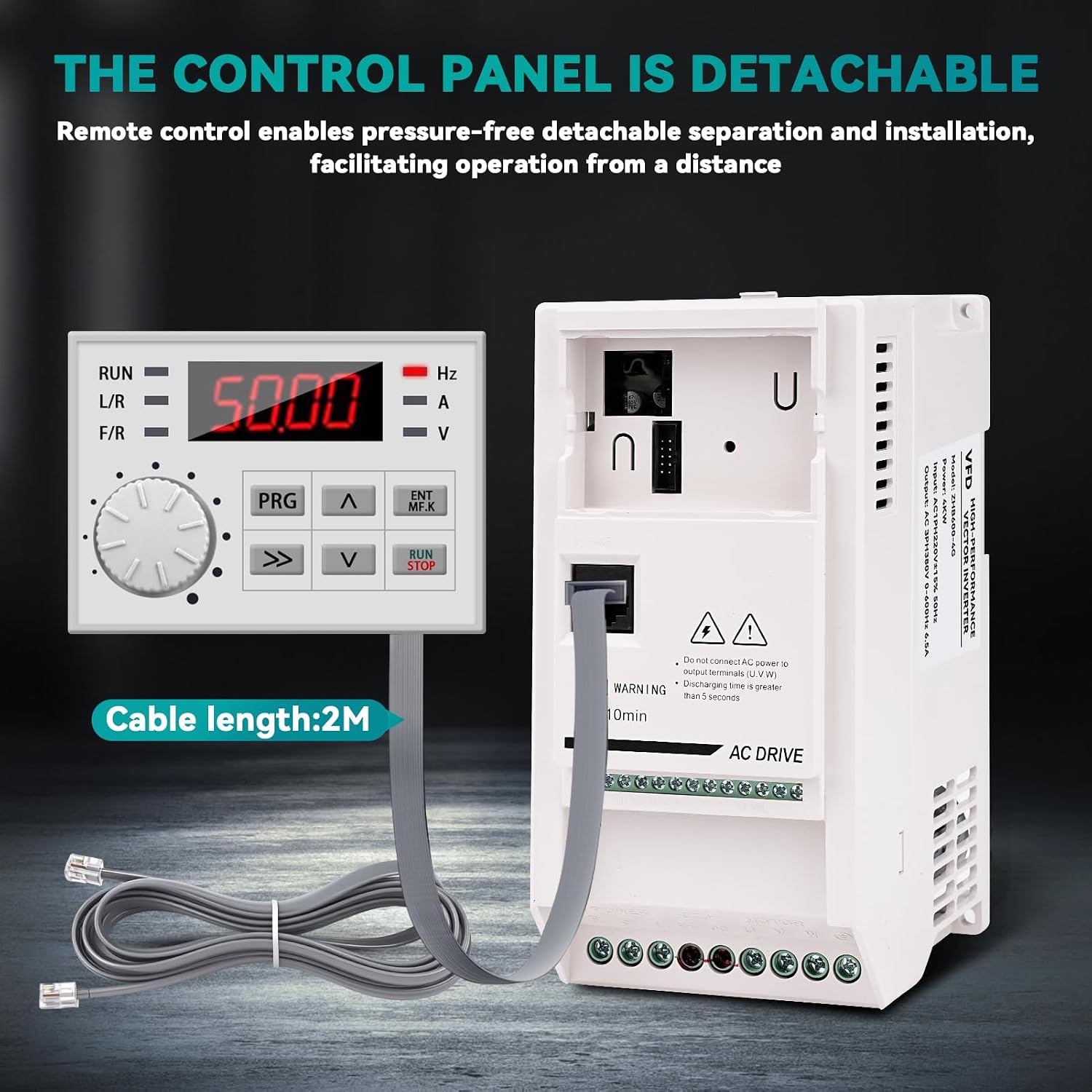
Image 4.1: The detachable control panel connected to the main unit via a 2-meter extension cable, allowing for remote operation and flexible installation.

תמונה 4.2: פנימי view highlighting the high-speed cooling fan for efficient heat dissipation and the use of ABS flame-retardant material for enhanced safety and durability. The compact size of the inverter is also shown.

Image 4.3: A visual representation of the multiple protection features integrated into the VFD, including short-circuit, motor short-circuit, overvoltage, overcurrent, earthing fault, phase loss, overheating, and overload protection.
5. התקנה והתקנה
5.1 הרכבה
The VFD can be installed using a wall-mounted method or within a cabinet. Ensure adequate space for ventilation, especially around the cooling fan. The recommended cooling method is air cooling with fan control.
5.2 תרשים חיווט
Refer to the wiring diagram below for proper connection of the VFD. Ensure all connections are secure and correctly polarized. Important: Do not connect AC power to the output terminals (U, V, W).

Image 5.1: Wiring diagram for the 380V VFD. It illustrates connecting a single-phase 220V power supply to the input terminals (L, N), a 380V three-phase motor to the output terminals (U, V, W), and the ground wire to the designated terminal.
- Input Power (L, N): Connect the single-phase 220V power supply to the 'POWER' input terminals.
- תפוקת מנוע (U, V, W): Connect the three-phase 380V asynchronous motor to the 'MOTOR' output terminals.
- חוט הארקה: Connect the ground wire to the designated ground terminal for safety.
- לוּחַ בַּקָרָה: The detachable control panel can be connected directly or via the provided 2-meter extension cable for remote access.
6. הוראות הפעלה
6.1 לוח הבקרה נגמרview
The VFD features an intuitive control panel for easy operation and parameter settings. Familiarize yourself with the keys and their functions:

תמונה 6.1: מפורט view of the VFD control panel and a table explaining the function of each key: PRG (Programming key), ENT/MFK (Confirm/Multifunction key), Increment key, Decrement key, RUN/STOP key, and Shift key.
| מַפְתֵחַ | שֵׁם | פוּנקצִיָה |
|---|---|---|
| PRG | מפתח תכנות | Level 1 Menu Entry or Exit |
| ENT/MFK | Confirm/Multifunction key | In menu mode, used to navigate sequentially through menu screens, set parameters, and confirm selections; in display mode, selects function switching based on P7-01 settings. |
| ^ | הגדל מפתח | Increment data or function codes |
| v | הקטנת מפתח | Decrement data or function codes |
| הפעלה / עצירה | מקש הפעלה/עצירה | In keyboard operation mode, used for running and stopping operations |
| >> | כפתור "שיפט | In both stop display and run display interfaces, cyclically select parameters for display; when modifying parameters, select the bit to be altered |
6.2 פעולה בסיסית
- הפעלה: After ensuring all wiring is correct and secure, apply single-phase 220V power to the VFD. The display will light up.
- הגדר תדירות: Use the Increment (^) and Decrement (v) keys to adjust the desired output frequency (0-600Hz). The display shows the current frequency.
- התנעת מנוע: הקש על הפעלה / עצירה key to start the motor. The VFD will ramp up to the set frequency.
- עצירת מנוע: הקש על הפעלה / עצירה key again to stop the motor. The VFD will ramp down and stop.
- התאמת פרמטר: For advanced settings, such as forward/reverse rotation (which may require an external universal rotation switch), enter the programming menu using the PRG key and adjust parameters as needed. Refer to the full instruction manual for detailed parameter settings.
7. תחזוקה
תחזוקה שוטפת מבטיחה את אורך החיים והביצועים האופטימליים של ה-VFD שלך.
- ניקוי: Keep the VFD clean and free from dust and debris. Use a soft, dry cloth for cleaning. Do not use liquid cleaners.
- בדיקת מאוורר: Periodically check the cooling fan for obstructions or excessive noise. Ensure proper airflow for efficient heat dissipation.
- בדיקת מסוף: Regularly inspect all wiring terminals for tightness and corrosion. Loose connections can lead to overheating or malfunction.
- תנאים סביבתיים: ודא שסביבת ההפעלה נשארת בטווחי הטמפרטורה והלחות שצוינו.
8. פתרון תקלות
If you encounter issues with your VFD, refer to the following general troubleshooting steps. For specific error codes and advanced diagnostics, consult the comprehensive instruction manual.
- אין כוח: Check the input power supply, circuit breaker, and all power connections.
- מנוע לא פועל: Verify that the RUN/STOP key has been pressed, the frequency is set, and the motor wiring is correct. Check for any error codes on the display.
- Overload/Overcurrent: If an overload or overcurrent error occurs, check the motor load, ensure the motor current does not exceed the VFD's rating, and inspect for any mechanical issues with the motor or driven equipment.
- התחממות יתר: Ensure the VFD's cooling fan is operating correctly and that there is adequate ventilation around the unit. Clean any dust from the heat sink.
- מהירות שגויה: Verify the frequency setting and any relevant speed control parameters.
אם הבעיה נמשכת לאחר ניסיון שלבים אלה, צור קשר עם תמיכת הלקוחות.
9. מפרטים
Detailed technical specifications for the Wattive ZHB600-4KW Variable Frequency Drive:

Image 9.1: Product information panel showing key specifications such as product name, material, rated input/output voltage, rated power, output current, and output frequency, along with the physical dimensions of the VFD.
| פָּרָמֶטֶר | עֵרֶך |
|---|---|
| מותג | Wattive |
| שם הדגם | ZHB600 |
| מספר דגם | ZHB600-4KW |
| קלט מדורג כרךtage | Single-phase 220V (AC) |
| תפוקה מדורגת כרךtage | Three-phase 380V (AC) |
| כוח מדורג | 4 קילוואט |
| זרם פלט | 6.5A |
| תדר קלט | 50 הרץ |
| טווח תדרי פלט | 0 - 600 הרץ |
| חוֹמֶר | Flame-retardant ABS Plastic |
| מידות המוצר (L x W x H) | 18.2 x 13 x 8.7 ס"מ |
| שיטת התקנה | Wall-mounted, Cabinet |
| שיטת קירור | Air cooling, with fan control |
| שימושים מומלצים במוצר | תַעֲשִׂיָתִי |
| Energy Specifications Met | CE |
| ארץ מוצא | סִין |
10. אחריות ותמיכה
For warranty information, technical support, or service inquiries, please refer to the contact details provided with your purchase documentation or visit the official Wattive webאתר. שמור את קבלת הרכישה כהוכחת קנייה.