
1. הקדמה
Welcome to your new xinwld A97 Pro Wireless Earbuds. These earbuds are designed to provide a high-fidelity audio experience with deep bass, advanced Bluetooth 5.4 connectivity, and effective environmental noise cancellation (ENC) for clear calls. This manual will guide you through the setup, operation, and maintenance of your earbuds.
תכונות עיקריות:
- Bluetooth 5.4: לחיבור אלחוטי יציב ויעיל.
- HiFi Stereo Sound with Deep Bass: Delivers rich audio quality.
- עד 40 שעות נגינה: Extended listening with the charging case.
- 4 ENC Noise Cancelling Microphones: Ensures clear calls by reducing ambient noise.
- עמידות למים IP7: Protects earbuds from water splashes and sweat (earbuds only).
- בקרות מגע אינטואיטיביות: ניהול קל של מוזיקה ושיחות.
- תצוגת LED דיגיטלית: Shows battery level of the charging case and earbuds.
2. תכולת החבילה
אנא בדקו את החבילה עבור הפריטים הבאים:
- xinwld A97 Pro Wireless Earbuds (Left and Right)
- נרתיק טעינה
- כבל טעינה USB-C
- מדריך למשתמש
- (Optional) Various Sizes of Eartips
3. המוצר נגמרview
Familiarize yourself with the components of your xinwld A97 Pro Wireless Earbuds.
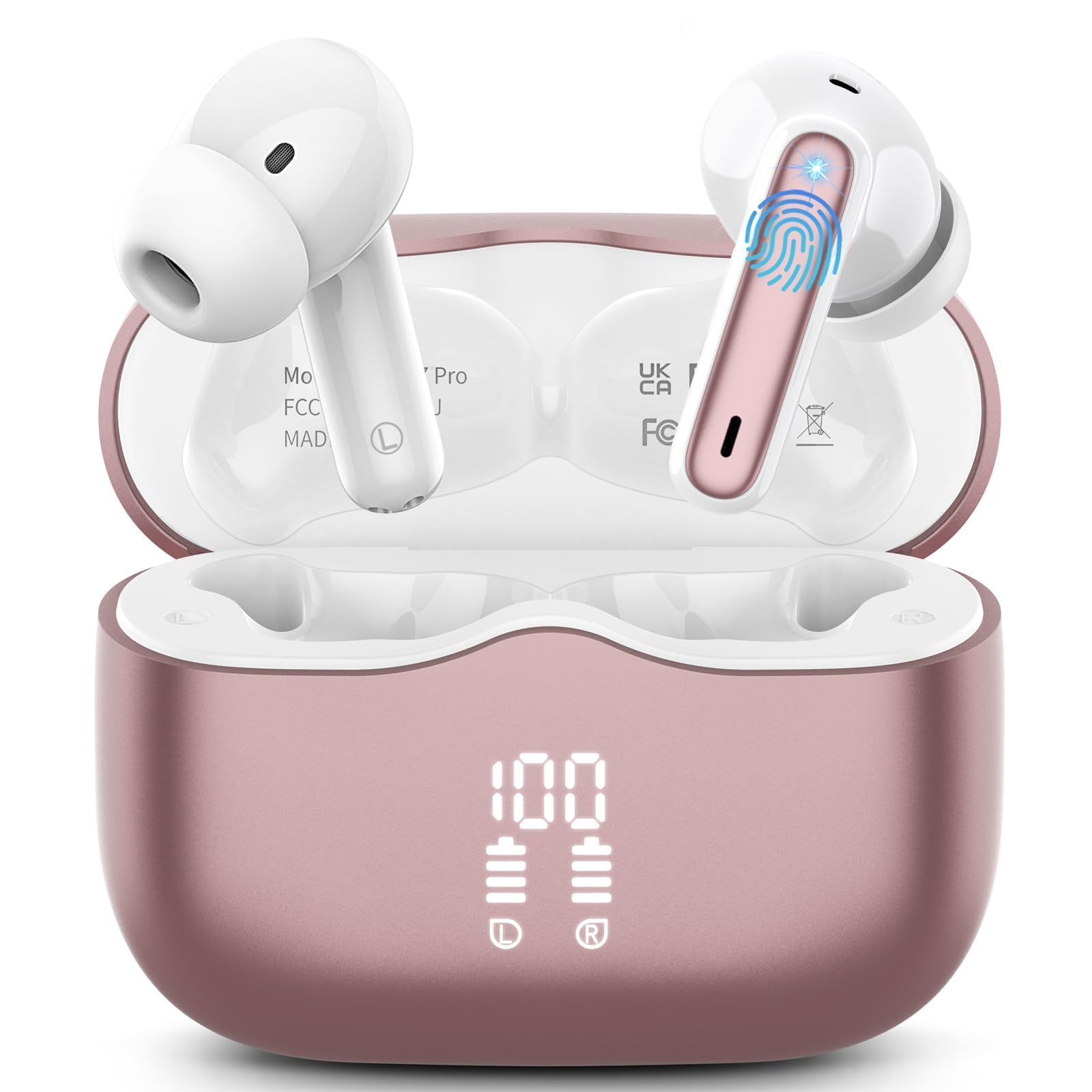
תמונה 1: xinwld A97 Pro Wireless Earbuds and Charging Case. The image shows the black earbuds placed inside their charging case, which features a digital LED display on the front indicating battery levels.
רכיבי האוזניות:
- אזור בקרת מגע: לניהול השמעה, שיחות ועוזר קולי.
- מִיקרוֹפוֹן: עבור שיחות ופונקציונליות ENC.
- טעינת אנשי קשר: מתחבר למארז הטעינה לקבלת חשמל.
- קצה האוזן: Provides comfort and sound isolation; replaceable.
רכיבי מארז הטעינה:
- תצוגת LED דיגיטלית: Shows the battery level of the case and charging status of the earbuds.
- יציאת טעינה USB-C: לטעינת המארז.
- חריצי טעינה לאוזניות: Holds and charges the earbuds when placed inside.
4. מדריך התקנה
4.1. טעינה ראשונית
לפני השימוש הראשון, טען את האוזניות ואת נרתיק הטעינה במלואן.
- הכנס את שני האוזניות לתוך מארז הטעינה.
- חברו את כבל הטעינה USB-C לשקע הטעינה במארז ואת הקצה השני למתאם חשמל USB (לא כלול).
- תצוגת ה-LED על מארז הטעינה תציג את אחוז הסוללהtage. The charging indicators for the earbuds will also be visible.
- לאחר טעינה מלאה, נתק את כבל הטעינה.
4.2. צימוד עם המכשיר שלך
- ודא שהאוזניות טעונות.
- Open the charging case. The earbuds will automatically power on and enter pairing mode, indicated by flashing lights.
- במכשיר שלך (סמארטפון, טאבלט וכו'), עבור אל הגדרות Bluetooth והפעל את Bluetooth.
- חפש available devices. Select "xinwld A97 Pro" from the list.
- Once connected, you will hear a confirmation sound, and the earbud indicator lights will turn off or flash slowly.
- אם הצימוד נכשל, החזירו את האוזניות למארז, סגרו את המכסה, המתינו מספר שניות ולאחר מכן חזרו על השלבים.
5. הוראות הפעלה
5.1. הפעלה/כיבוי
- הפעלה: פתחו את מארז הטעינה, והאוזניות יידלקו אוטומטית. לחלופין, לחצו והחזיקו את אזור בקרת המגע בשתי האוזניות למשך 3 שניות.
- כיבוי: Place the earbuds back into the charging case and close the lid. They will automatically power off and begin charging. Alternatively, disconnect them from Bluetooth, and they will power off after 5 minutes of inactivity.
5.2. ענידת האוזניות
Insert the earbuds into your ears and gently rotate them to find a comfortable and secure fit. Ensure the microphones are facing downwards for optimal call quality. Experiment with different eartip sizes (if included) for the best seal and sound.
5.3. גע בפקדים
The xinwld A97 Pro earbuds feature intuitive touch controls on each earbud. The functions are generally mirrored on both earbuds unless specified.
| פוּנקצִיָה | פְּעוּלָה |
|---|---|
| הפעל/השהה מוזיקה | הקשה אחת על אחת האוזניות |
| המסלול הבא | הקש פעמיים על אחת האוזניות |
| המסלול הקודם | לחיצה משולשת על כל אחת מהאוזניות |
| מענה/סיום שיחה | הקשה אחת על אחת האוזניות |
| דחה שיחה | לחץ והחזק את אחת האוזניות למשך 2 שניות |
| הפעל את עוזר הקולי | לחץ והחזק את אחת האוזניות למשך 3 שניות |
| בקרת עוצמת הקול | Control via your connected device (earbuds do not have direct volume control) |
5.4. ביטול רעשי סביבה (ENC)
The earbuds feature 4 ENC microphones to reduce ambient noise during calls, ensuring clearer conversations for both you and the person you are speaking with. This feature is automatically active during phone calls.
6. תחזוקה וטיפול
6.1. ניקיון
- נקו באופן קבוע את האוזניות ואת נרתיק הטעינה בעזרת מטלית רכה, יבשה ונטולת סיבים.
- Do not use harsh chemicals, cleaning solvents, or strong detergents, as these may damage the product.
- Gently clean the charging contacts on both the earbuds and inside the case to ensure proper charging and connectivity.
6.2. עמידות למים (IP7)
The earbuds are rated IP7 water-resistant, meaning they can withstand immersion in water up to 1 meter for 30 minutes. This rating applies to the earbuds only, not the charging case.
- אין לטבול את מארז הטעינה במים.
- Avoid using the earbuds in saunas, steam rooms, or during water sports.
- If the earbuds get wet, dry them thoroughly with a soft cloth before placing them back in the charging case to prevent damage to the charging contacts.
6.3. אחסון
When not in use, store the earbuds in their charging case to protect them from dust, scratches, and accidental damage.
6.4. טיפול בסוללה
To prolong battery life, avoid fully discharging the earbuds and charging case frequently. Charge them regularly, even if not in constant use, to maintain optimal battery health.
7. פתרון תקלות
אם נתקלת בבעיות כלשהן, אנא עיין בפתרונות הנפוצים הבאים:
7.1. Earbuds not pairing with device:
- ודא שה-Bluetooth מופעל במכשיר שלך.
- ודאו שהאוזניות טעונות ומחוץ למארז הטעינה.
- Try forgetting "xinwld A97 Pro" from your device's Bluetooth list and re-pairing.
- הפעל מחדש את המכשיר שלך.
- החזירו את האוזניות למארז, סגרו את המכסה, המתינו 10 שניות, ולאחר מכן פתחו כדי להיכנס שוב למצב צימוד.
7.2. Only one earbud working:
- ודא ששתי האוזניות טעונות.
- החזירו את שתי האוזניות למארז הטעינה, סגרו את המכסה ולאחר מכן פתחו אותו שוב.
- נקו את מגעי הטעינה בשתי האוזניות ובתוך המארז.
7.3. Earbuds not charging:
- ודא שכבל הטעינה מחובר היטב הן למארז והן למקור החשמל.
- בדקו אם מגעי הטעינה באוזניות ובתוך המארז נקיים וללא לכלוך.
- נסה כבל USB-C או מתאם מתח אחר.
7.4. Poor sound quality:
- ודאו שהאוזניות ממוקמות כראוי באוזניים.
- נסו קצוות אוזניים בגדלים שונים לאיטום טוב יותר.
- נקו כל שעוות אוזניים או פסולת מפיות האוזניות.
- Ensure your device's volume is not too low.
- התקרבו למכשיר המחובר כדי למנוע הפרעות.
8. מפרטים
| תכונה | פְּרָט |
|---|---|
| מותג | xinwld |
| שם הדגם | A97 Pro |
| מספר דגם | A97 |
| טכנולוגיית קישוריות | אלחוטי (Bluetooth) |
| גרסת בלוטות' | 5.4 |
| מיקום אוזניים | אין אוזן |
| סוג בקרה | בקרת מגע |
| דירוג עמידות במים | IP7 (אוזניות בלבד) |
| זמן משחק | עד 40 שעות (עם מארז טעינה) |
| מיקרופונים | 4 מיקרופונים עם ביטול רעשים של ENC |
| חוֹמֶר | פּלָסטִי |
9. אחריות ותמיכה
9.1. מידע על אחריות
Your xinwld A97 Pro Wireless Earbuds come with a limited warranty. Please refer to the warranty card included in your package or visit the official xinwld website for detailed warranty terms and conditions. The warranty period is typically 1 year from the date of purchase, covering manufacturing defects.
9.2. תמיכת לקוחות
For any questions, technical assistance, or warranty claims, please contact xinwld customer support through the following channels:
- אֶלֶקטרוֹנִי: Please check your product packaging or the official xinwld website for direct customer support email.
- Webאֲתַר: Visit the xinwld Store on Amazon (for general inquiries or to find official contact information).
When contacting support, please have your product model (A97 Pro) and purchase details ready to expedite assistance.